
Json与Ajax(注册实例)
需要在服务器上进行哈
jquery的ajax方法:
    // jquery请求

    $.ajax({

        url: "./server/slider.json",

        type: "post",

        dataType: "json",

        async: true,

        success: function(datas) {

            renderData(datas.slider);

        }

    })

    // jquery渲染数据

    function renderData(data) {

        var str = "";

        $.each(data, function(index, obj) {

            str += '<a href="' + obj.linkUrl + '"><img src="' + obj.picUrl + '"></a>'

        })

        $("#banner_jq").html(str);

}
跨域请求,封装jsonp函数
    function getJSONP(url, callback) {

        if (!url) {

            return;

        }

        var a = ['a', 'b', 'c', 'd', 'e', 'f', 'g', 'h', 'i', 'j'];

        //定义一个数组以便产生随机函数名

        var r1 = Math.floor(Math.random() * 10);

        var r2 = Math.floor(Math.random() * 10);

        var r3 = Math.floor(Math.random() * 10);

        var name = 'getJSONP' + a[r1] + a[r2] + a[r3];

        var cbname = 'getJSONP.' + name; //作为jsonp函数的属性

        if (url.indexOf('?') === -1) {

            url += '?jsonp=' + cbname;

        } else {

            url += '&jsonp=' + cbname;

        }

        var script = document.createElement('script');

        //定义被脚本执行的回调函数

        getJSONP[name] = function(e) {

            try {

                callback && callback(e);

            } catch (e) {

                //

            } finally {

                //最后删除该函数与script元素

                delete getJSONP[name];

                script.parentNode.removeChild(script);

            }

        }

        script.src = url;

        document.getElementsByTagName('head')[0].appendChild(script);

    }

    // 跨域调用

    getJSONP('http://class.imooc.com/api/jsonp', function(response) {

        console.log(response);

});
json和ajax登录功能
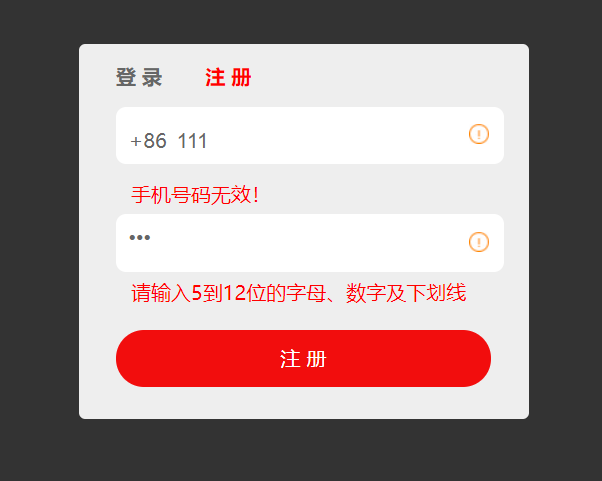
index.html
<!DOCTYPE html>

<html lang="en">

<head>

    <title>Register</title>

   <meta charset="utf-8">

   <link rel="stylesheet" type="text/css" href="css/style.css">

</head>

<body>

   <div class="register">

          <p class="title" id="title">

                  <span>登 录</span>

                  <span class="current">注 册</span>

          </p>

          <div class="form">

                  <div>

                      <span>+86</span>

                      <input type="text" name="user" id="user" placeholder="请输入注册手机号" autocomplete="off"/>

                      <i id="user_icon"></i>

                      <p class="info" id="user_info"></p>

                  </div>

                  <div>

                      <input type="password" name="pwd" id="pwd" placeholder="请设置密码">

                      <i id="pwd_icon"></i>

                      <p class="info" id="pwd_info"></p>

                  </div>

                  <p class="button">

                      <a href="javascript:void(0)" id="sigup-btn" class="btn show">注 册</a>

              <a href="javascript:void(0)" id="login-btn" class="btn">登 录</a>

                  </p>

          </div>

   </div>

   <script type="text/javascript" src="js/ajax.js"></script>

   <script type="text/javascript">

        var user = document.getElementById("user"),

            pwd = document.getElementById("pwd"),

            sigup = document.getElementById("sigup-btn"),

            login = document.getElementById("login-btn"),

            titles = document.getElementById("title").getElementsByTagName("span");

            userInfo = document.getElementById("user_info"),

            userIcon = document.getElementById("user_icon")

            pwdInfo = document.getElementById("pwd_info"),

            pwdIcon = document.getElementById("pwd_icon"),

            userReg = /^1[3578]\d{9}$/,

            pwdReg = /^\w{5,12}$/,

            isRepeat = false;       // 记录用户名是否被占用

         // 检测用户

         function checkUser(){

            var userVal = user.value;

            // 验证手机号是否有效

            if(!userReg.test(userVal)){

                userInfo.innerHTML = '手机号码无效!';

                userIcon.className = 'no';

            }else{

                userInfo.innerHTML = '';

                userIcon.className = '';

                // 发起请求

                $.ajax({

                    url:'http://localhost/register/server/isUserRepeat.php',

                    data:{username:userVal},

                    success:function(data){

                        if(data.code == 1){

                            userIcon.className = 'ok';

                            isRepeat = false;

                        }else if(data.code == 0){

                            userIcon.className = 'no';

                            isRepeat = true;

                            userInfo.innerHTML = data.msg;

                        }else{

                            userInfo.innerHTML = '检测失败,请重试...';

                        }

                    }

                })

            }

         }

         // 检测密码

         function checkPwd(){

             var pwdVal = pwd.value;

             if(!pwdReg.test(pwdVal)){

                 pwdInfo.innerHTML = '请输入5到12位的字母、数字及下划线';

                 pwdIcon.className = 'no';

             }else{

                 pwdInfo.innerHTML = '';

                 pwdIcon.className = 'ok';

             }

         }

         // 注册

         function register(){

             var user_val = user.value,

                 pwd_val = pwd.value;

             // 如果手机号有效且没有被占用,同时密码合法,方可注册

             if(userReg.test(user_val) && pwdReg.test(pwd_val) && !isRepeat){

                // 发起请求,实现注册

                $.ajax({

                    url:"http://localhost/register/server/register.php",

                    method:"post",

                    data:{username:user_val,userpwd:pwd_val},

                    success:function(data){

                        alert("注册成功,请登录!");

                        // 调用显示登录界面

                        showLogin();

                        // 清空文本框

                        user.value = "";

                        pwd.value = "";

                    },

                    error:function(){

                        pwdInfo.innerHTML = '注册失败,请重试!';

                    }

                })

             }

         }

         // 显示登录

         function showLogin(){

             // 载入登录界面,登录高亮显示

             titles[0].className = "current";

             titles[1].className = "";

             login.className = "show";

             sigup.className = "";

         }

         // 显示注册

         function showSigup(){

             // 载入注册界面,注册高亮显示

             titles[1].className = "current";

             titles[0].className = "";

             login.className = "";

             sigup.className = "show";

         }

        // 绑定事件,检测用户的有效性及是否注册过

        user.addEventListener("blur",checkUser,false);

        // 绑定事件,检测密码的有效性

        pwd.addEventListener("blur",checkPwd,false);

        // 注册

        sigup.addEventListener("click",register,false);

        // 登录高亮

        titles[0].addEventListener("click",showLogin,false);

        // 注册高亮

        titles[1].addEventListener("click",showSigup,false);

   </script>

</body>

</html>
style.css
*{

    margin:;

    padding:;

}

body{

    background:#333;

}

.register{

    width:300px;

    height:270px;

    margin:80px auto;

    padding:15px 30px;

    background:#eee;

    border-radius:5px;

}

.title{

    height:35px;

}

.title span{

    font-size:16px;

    font-weight:bold;

    color:#666;

    margin-right:30px;

    cursor:pointer;

}

.title span.current{

    color:#f00;

}

.form div{

    width:290px;

    height:30px;

    border-radius:8px;

    background:#fff;

    margin-bottom:40px;

    padding:8px 10px;

    position:relative;

}

.form div span{

    display:inline-block;

    padding-top:8px;

    padding-right:3px;

    color:#666;

}

.form div input{

    border:none;

    outline:none;

    font-size:17px;

    color:#666;

    background:none;

}

.form div i{

    position:absolute;

    width:16px;

    height:16px;

    right:12px;

    top:14px;

}

.form div i.ok{

    background:url(../img/icon.png) no-repeat 0 -67px;

}

.form div i.no{

    background:url(../img/icon.png) no-repeat -17px -67px;

}

.form .info{

    margin-top:22px;

    color:#f00;

    padding-left:2px;

}

.button{

    padding-top:7px;

}

.button a{

    display:none;

    width:100%;

    height:45px;

    line-height:45px;

    text-align:center;

    text-decoration:none;

    background:#f20d0d;

    color:#fff;

    border-radius:30px;

    font-size:16px;

}

.button a.show{

    display:block;

}
ajax.js
var $ = {

    ajax:function(options){

        var xhr = null,          // XMLHttpRequest对象

            url = options.url,   // url地址

            method = options.method || 'get', // 传输方式,默认为get

            async = typeof(options.async) === "undefined"?true:options.async,

            data = options.data || null,      // 参数

            params = '',

            callback = options.success,       // ajax请求成功的回调函数

            error = options.error;

            // 将data的对象字面量的形式转换为字符串形式

            if(data){

                for(var i in data){

                    params += i + '=' + data[i] + '&';

                }

                params = params.replace(/&$/,"");

            }

            // 根据method的值改变url

            if(method === "get"){

                url += '?'+params;

            }

        if(typeof XMLHttpRequest != "undefined"){

            xhr = new XMLHttpRequest();

        }else if(typeof ActiveXObject != "undefined"){

            // 将所有可能出现的ActiveXObject版本放在一个数组中

            var xhrArr = ['Microsoft.XMLHTTP','MSXML2.XMLHTTP.6.0','MSXML2.XMLHTTP.5.0','MSXML2.XMLHTTP.4.0','MSXML2.XMLHTTP.3.0','MSXML2.XMLHTTP.2.0'];

            // 遍历创建XMLHttpRequest对象

            var len = xhrArr.length;

            for(var i = 0;i<len;i++){

                try{

                    // 创建XMLHttpRequest对象

                    xhr = new ActiveXObject(xhrArr[i]);

                    break;

                }

                catch(ex){

                }

            }

        }else{

            throw new Error('No XHR object availabel.');

        }

        xhr.onreadystatechange = function(){

            if(xhr.readyState === 4){

                if((xhr.status >=200 && xhr.status <300) || xhr.status === 304){

                    callback && callback(JSON.parse(xhr.responseText))

                }else{

                    error && error();

                }

            }

        }

        // 创建发送请求

        xhr.open(method,url,async);

        xhr.setRequestHeader("Content-type","application/x-www-form-urlencoded");

        xhr.send(params);

    },

    jsonp:function(){

        // 跨域

    }

}
isUserRepeat.php
<?php

header('Content-Type:application/json');

$isUsername = array_key_exists('username',$_REQUEST);

$username = $isUsername ? $_REQUEST['username'] : '';

if(!$username){

    $msg = printMsg('参数有误',2);

    echo json_encode($msg);

    exit();

}

function printMsg($msg,$code){

    return array('msg'=>$msg,'code'=>$code);

}

// 记录存储用户的文件路径

$fileStr = __DIR__.'/user.json';

// 读取现存的用户名和密码

$fileStream = fopen($fileStr,'r');

$fileContent = fread($fileStream,filesize($fileStr));

$fileContent_array = $fileContent ? json_decode($fileContent,true) : array();

fclose($fileStream);

// 判断用户名是否有重复的

$isrepeat = false;

foreach($fileContent_array as $key=>$val){

    if($val['username'] === $username){

        $isrepeat = true;

        break;

    }

}

if($isrepeat){

    $msg = printMsg('用户名重复',0);

    echo json_encode($msg);

    exit();

}

$msg = printMsg('用户名可用',1);

echo json_encode($msg);

?>
register.php
<?php

header('Content-Type:application/json');

// 获取前端传递的注册信息 字段为   username   userpwd

$isUsername = array_key_exists('username',$_REQUEST);

$isUserpwd = array_key_exists('userpwd',$_REQUEST);

$username = $isUsername ? $_REQUEST['username'] : '';

$userpwd = $isUserpwd ? $_REQUEST['userpwd'] : '';

function printMsg($msg,$code){

    return array('msg'=>$msg,'code'=>$code);

}

if(!$username || !$userpwd){

    $msg = printMsg('参数有误',0);

    echo json_encode($msg);

    exit();

}

// 记录存储用户的文件路径

$fileStr = __DIR__.'/user.json';

// 读取现存的用户名和密码

$fileStream = fopen($fileStr,'r');

$fileContent = fread($fileStream,filesize($fileStr));

$fileContent_array = $fileContent ? json_decode($fileContent,true) : array();

fclose($fileStream);

// 判断用户名是否有重复的

$isrepeat = false;

foreach($fileContent_array as $key=>$val){

    if($val['username'] === $username){

        $isrepeat = true;

        break;

    }

}

if($isrepeat){

    $msg = printMsg('用户名重复',0);

    echo json_encode($msg);

    exit();

}

array_push($fileContent_array,array('username'=>$username,'userpwd'=>$userpwd));

// 将存储的用户名密码写入

$fileStream = fopen($fileStr,'w');

fwrite($fileStream,json_encode($fileContent_array));

fclose($fileStream);

echo json_encode(printMsg('注册成功',1));

?>
user.json
[{"username":"zhangsan","userpwd":"zhangsan"},{"username":"lisi","userpwd":"lisi"},{"username":"134","userpwd":"sdfsdf"},{"username":"135","userpwd":"dsff"},{"username":"136","userpwd":"dsff"},{"username":"13521554677","userpwd":"sdfsdf"},{"username":"13521557890","userpwd":"sdfsdf"},{"username":"13521557891","userpwd":"sdfsdf"},{"username":"13810701234","userpwd":"sdfsdf"},{"username":"13810709999","userpwd":"shitou051031"},{"username":"13810709998","userpwd":"sdfsdfdsf"},{"username":"13412345678","userpwd":"shitou"}]
杂七杂八的知识点:
jQuery 点击事件中触发的方式:
mousedown和mouseup事件鼠标左键点击和鼠标右键点击都是可以实现的;
click和dblclick事件只有鼠标左键点击才能实现
// jquery渲染数据
function renderData(data) {
var str = "";
$.each(data, function(index, obj) {
str += '<a href="' + obj.linkUrl + '"><img src="' + obj.picUrl + '"></a>'
})
$("#banner_jq").html(str);
}
Json与Ajax(注册实例)的更多相关文章
- day 74 json 和 ajax 的实例
一 json的定义: json(JavaScript object notation,js对象标记)是一种轻量级的数据交换格式,它基于ecmascript(w3c指定的js规范)的一个子集,采用完全独 ...
- Django JSON,AJAX
JSON 概念 JSON 指的是 JavaScript 对象表示法(JavaScript Object Notation) JSON 是轻量级的文本数据交换格式 JSON 独立于语言 * JSON 具 ...
- jQuery Ajax 实例 全解析
jQuery Ajax 实例 全解析 jQuery确实是一个挺好的轻量级的JS框架,能帮助我们快速的开发JS应用,并在一定程度上改变了我们写JavaScript代码的习惯. 废话少说,直接进入正题,我 ...
- Json.Net系列教程 1.Json.Net介绍及实例
原文 Json.Net系列教程 1.Json.Net介绍及实例 本系列教程假设读者已经对Json有一定的了解,关于Json在这里不多说.本系列教程希望能对读者开发涉及到Json的.Net项目有一定的帮 ...
- ajax常用实例代码总结新手向参考(一)
http的交互方法有四种:get.post.put(增加数据).delete(删除数据) put和delete实现用的是get和post get方式 页面不能被修改,只是获取查询信息.但是提交的数 ...
- Node.js_express_中间件 middleware_登录/注册实例源代码
静态资源: 都写死了的资源,如 css,html 解析规则: 所有路由和中间件都在一个数组中,js 引擎会按照代码先后顺序添加路由和中间件 当请求发送到服务器时,服务器获取当前的请求信息(请求方式.请 ...
- thinkphp中ajax使用实例(thinkphp内置支持ajax)
thinkphp中ajax使用实例(thinkphp内置支持ajax) 一.总结 1.thinkphp应该是内置支持ajax的,所以请求类型里面才会有是否是ajax // 是否为 Ajax 请求 if ...
- Django登录(含随机生成图片验证码)注册实例
登录,生成随机图片验证码 一.登录 - 随机生成图片验证码 1.随机生成验证码 Python随机生成图片验证码,需要使用PIL模块,安装方式如下: pip3 install pillow 1)创建图片 ...
- Ajax注册验证用户名是否存在 ——引自百度经验
Ajax注册验证用户名是否存在 http://jingyan.baidu.com/article/a948d6515fdf870a2dcd2e85.html
随机推荐
- python 迭代器和生成器详解
一.迭代器 说迭代器之前有两个相关的名词需要介绍:可迭代对象:只要定义了__iter__()方法,我们就说该对象是可迭代对象,并且可迭代对象能提供迭代器.迭代器:实现了__next__()或者next ...
- xgboost load model from demp text file
python package : https://github.com/mwburke/xgboost-python-deploy import xgboost as xgb import numpy ...
- 题解 【[MdOI2020] Decrease】
\[ \texttt{Preface} \] 感觉 C 比 B 还简单? \[ \texttt{Description} \] 给定一个 \(n×n\) 的矩阵,你可以进行若干次操作. 每次操作,你可 ...
- 使用Redis需要注意的几点
Redis作为缓存中间件,被广泛应用在各类系统,用来提升系统性能和吞吐,下面总结几点开发人员在使用Redis时需要考虑的几个关键点: 一. key的设计 1. key命名规范:为了避免不必要的麻烦,我 ...
- 转:RBAC如何设计一个权限系统
前言 权限管理是所有后台系统的都会涉及的一个重要组成部分,主要目的是对不同的人访问资源进行权限的控制,避免因权限控制缺失或操作不当引发的风险问题,如操作错误,隐私数据泄露等问题.目前在公司负责权限这块 ...
- 《Head first设计模式》之外观模式
外观模式提供了一个统一的接口,用来访问子系统中的一群接口.外观定义了一个高层接口,让子系统更容易使用. 我们已经知道适配器模式是如何将一个类的接口转换成另一个符合客户期望的接口的.现在我们要看一个改变 ...
- Windows服务器使用Telegraf采集服务器监控指标输出到influxdb
1.环境说明 操作系统:Windows Server 2008 R2 IP:192.168.10.135 官方文档地址 :https://docs.influxdata.com/telegraf/v1 ...
- 献给即将35岁的初学者,焦虑 or 出路?
导言:“对抗职场“35 岁焦虑”,也许唯一的方法是比这个瞬息万变的商业社会跑得更快!” 一直以来,都有许多人说“程序员或测试员是个吃青春饭的职业”,甚至还有说“35 岁混不到管理就等于失业”的言论. ...
- 一篇文章带你搞定 ElasticSearch 术语
这篇文章主要介绍 ElasticSearch 的基本概念,学习文档.索引.集群.节点.分片等概念,同时会将 ElasticSearch 和关系型数据库做简单的类比,还会简单介绍 REST API 的使 ...
- VSTO开发指南(VB2013版) 第四章 Excel编程
实例1:处理NewWorkbook和WorkSheet事件的控制台程序 书本第70页 程序清单 4.1 处理NewWorkbook和WorkSheet事件的控制台程序 Imports Excel = ...