
Allow Pin Swapping Using these Methods options
Frm:http://techdocs.altium.com/display/ADOH/Pin,+Pair+and+Part+Swapping#Pin,PairandPartSwapping-SwapManagerDialog
Controlling How the Swaps are Performed on the Schematic
In the PCB editor pin, pair and part swaps are performed by exchanging nets on component pads and corresponding copper. When the changes are merged into the schematics there are two ways that a pin swap can be handled, either by swapping the pins on the component symbol, or by swapping net labels on the wires attached to the pins. Each approach has its advantages and disadvantages.
Swapping the pins will always work on the schematic, but it may mean that this instance of the component symbol is no longer the same as it was defined in the library. In this situation it means the symbol cannot be updated from the library, and it also means that other instances of the same component in this design will have a different pin arrangement, a possible source of confusion to someone reading the schematic. This approach is ideal for simple components, such as a resistor arrays.
Performing the swap on the schematic by swapping net labels can only be done if the connectivity is established through the net labels, that is, if the pins are not hard-wired together. The advantage of this approach is that the component symbol does not change, and can be updated from the library at a later date. This approach is the best choice for a complex component, such as an FPGA, where physically moving two pins on the symbol could result in an I/O bank-based symbol presenting incorrectly.
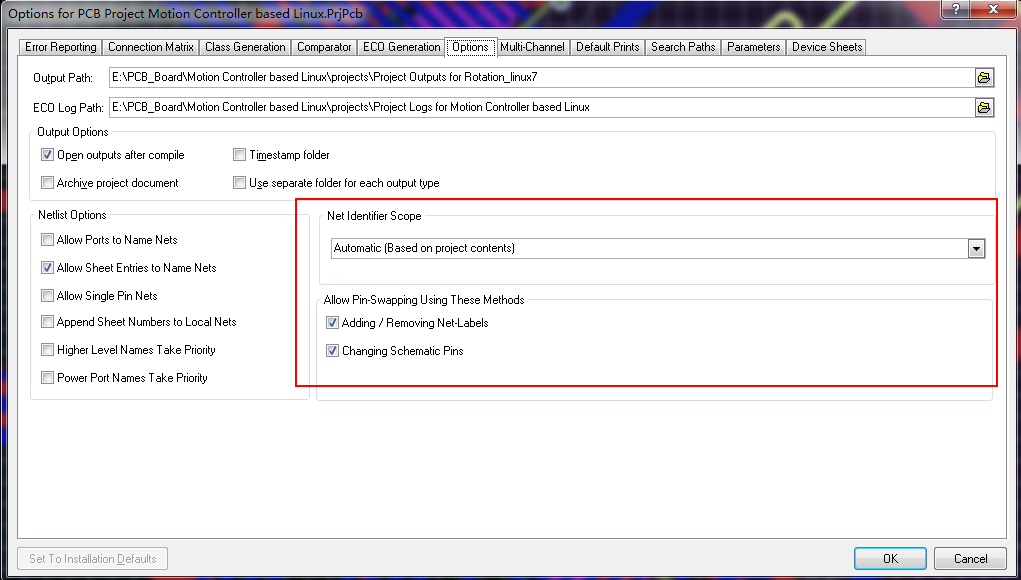
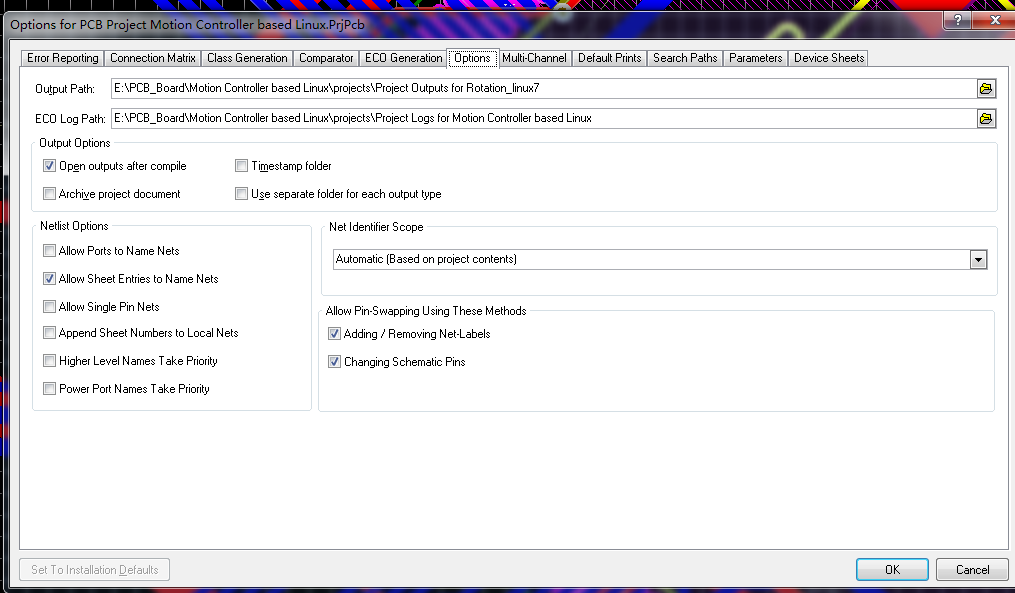
Selecting which of these two approaches is used is determined by the Allow Pin Swapping Using these Methods options in the Options for Project dialog, as shown in Figure 6.
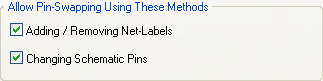
Figure 6. Project options governing how pin swaps are updated in the schematic documents. Found in the menu item Project->Project Options under the Options tab.
----
step

Allow Pin Swapping Using these Methods options的更多相关文章
- http请求方法之options请求方法
需预检的请求”要求必须首先使用 OPTIONS 方法发起一个预检请求到服务器,以获知服务器是否允许该实际请求. https://developer.mozilla.org/zh-CN/docs/W ...
- Access-Control-Allow-Methods: OPTIONS & CORS
Access-Control-Allow-Methods: OPTIONS CORS https://stackoverflow.com/questions/20478312/default-valu ...
- 用尽洪荒之力学习Flask源码
WSGIapp.run()werkzeug@app.route('/')ContextLocalLocalStackLocalProxyContext CreateStack pushStack po ...
- Altium Designer 10 快捷键笔记
一.放置.走线类: 1.交互式走线(Track):P T 2.铺铜(Fill):P F 3.大面积铺铜(Polygon):P G 4.自动扇出:元件封装上右键,C F 二.编辑类 1.调整铺铜(Pol ...
- C#进阶系列——一步一步封装自己的HtmlHelper组件:BootstrapHelper(三:附源码)
前言:之前的两篇封装了一些基础的表单组件,这篇继续来封装几个基于bootstrap的其他组件.和上篇不同的是,这篇的有几个组件需要某些js文件的支持. 本文原创地址:http://www.cnblog ...
- 关于JqueryEasyUI集合Kindeditor
写在前面 上一篇<初试JqueryEasyUI(附Demo)>: 在上一篇说过,下面要试下easyui集合编辑器,关于编辑器网上有很多,ckeditor.ueditor.kindedito ...
- JS组件系列——封装自己的JS组件,你也可以
前言:之前分享了那么多bootstrap组件的使用经验,这篇博主打算研究下JS组件的扩展和封装,我们来感受下JQuery为我们提供$.Extend的神奇,看看我们怎么自定义自己的组件,比如我们想扩展一 ...
- JS组件系列——使用HTML标签的data属性初始化JS组件
前言:最近使用bootstrap组件的时候发现一个易用性问题,很多简单的组件初始化都需要在JS里面写很多的初始化代码,比如一个简单的select标签,因为仅仅只是需要从后台获取数据填充到option里 ...
- eclipse 4.5.2 源码修改 格式化Java代码
注:本文代码基于eclipse4.5.2 1. 需求:在换电脑之后,如何不用配置eclipse就可以很快进入开发呢,并保持原来的编码规范. 2. 方法:修改eclipse源码 分别修改了两个jar包2 ...
随机推荐
- Android中的Service的使用详解
按运行地点分类: 类别 区别 优点 缺点 应用 本地服务(Local) 该服务依附在主进程上, 服务依附在主进程上而不是独立的进程,这样在一定程度上节约了资源,另外Local服务因为是在同一进程因此不 ...
- Service4
DNS解析的作用• 为什么需要DNS系统– www.baidu.com 与 119.75.217.56,哪个更好记?– 互联网中的114查号台/导航员 • DNS服务器的功能– 正向解析:根据注册的域 ...
- centos7下命令行配置nginx
本教程中的步骤要求用户拥有root权限 第一步 - 添加Nginx存储库要添加CentOS 7 EPEL仓库,请打开终端并使用以下命令: sudo yum install epel-release第二 ...
- Spring 学习笔记 IoC 基础
Spring IoC Ioc 是什么 IoC -- Inversion of Control(控制反转)什么是控制?什么是反转? 控制反转了什么? 在很早之前写项目不用 Spring 的时候,都是在 ...
- 关于VS的第一次使用
参考链接:https://blog.csdn.net/qq_36556893/article/details/88605617
- violet
操作系统的发展史 1.穿孔卡片 一个计算机机房一次只能被一个卡片使用 缺点:cpu的利用率低 2.联机批处理系统 支持多用户去使用一个计算机机房 3.脱机批处理系统 告诉磁盘 提高文件的读取速度 优点 ...
- 2019ICPC南京网络赛B super_log
题意:求a的a的a次方..一直求b次,也就是在纸上写个a,然后一直a次方a次方,对m取模,记为F(a,b,m)=pow(a,F(a,b-1,phi(m)) 解题思路:联系欧拉降幂,这个迭代的过程,我们 ...
- react组件中的方法?
SetState 设置状态 ReplaceState 替换状态 setProps设置属性 replacerProps替换属性 forceUpdate 强制更新 findDOMNode获取DOM节点 i ...
- Kettle使用kettle.properties
kettle.properties 是一个变量文件,这个文件我使用的最多的地方是保存 “数据库连接” 用户名和密码. 如果不用这个文件,那么使用“数据库连接”时,需要硬编码写到文件里. 有一天dba告 ...
- 用sql语句合并工作表
Sub 工作表合并() f = Application.GetOpenFilename(filefilter:="excel文件,*xlsx", Title:="请选择文 ...