
【seata源码学习】001 - seata-server的配置读取和服务注册
(PS. 随缘看心情写,坚持不了几天。文章还是写的超级的烂,排版也奇差无比~~~~ 脑壳疼~~~)
1. 相关知识
netty
netty多线程模型:Reactor模型
protobuf(Google Protocol Buffers)
“在以不同语言编写并在不同平台上运行的应用程序之间交换数据时,Protobuf 编码可提高效率。”
个人也没有去大致了解过,只是因为启动seata-server时报错才看到的。
参考:
github, protobuf
深入 ProtoBuf - 简介"com.typesafe.config"
"configuration library for JVM languages using HOCON files"
例如seata中主要的2个配置文件register.conf和file.conf,底层都是依赖"com.typesafe.config"读取并解析其配置。
参考:
github, com.typesafe.config
2. protobuf(Google Protocol Buffers)
启动seata-server时遇到的问题:
E:\Workspace Git\seata-fork\codec\seata-codec-protobuf\src\main\java\io\seata\codec\protobuf\convertor\BranchCommitRequestConvertor.java

Error:(19, 41) java: 程序包io.seata.codec.protobuf.generated不存在
通过查找protobuf的资料...BALABALABALA...
2.1 protobuf 本地安装
特别:通过maven-plugin来编译proto文件,可能不需要这么安装protobuf。(ps. 搞懵逼了,i'm five~~)
注意windows下载的是protoc-3.11.3-win64.zip,而不是protobuf-java-3.11.3.zip(这个需要自己编译)。
下载并解压后,将bin目录添加到环境变量 - 系统变量 - path。通过cmd验证是否安装成功:
PS C:\Users\Administrator> protoc --version

libprotoc 3.11.3
2.2 protobuf-maven-plugin
- idea安装插件
Protobuf Support(proto语法高亮,mvn编译命令)
- maven-plugin 配置,例如seata源码中的相应 pom.xml
<plugin>

    <groupId>org.xolstice.maven.plugins</groupId>

    <artifactId>protobuf-maven-plugin</artifactId>

    <version>${protobuf-maven-plugin.version}</version>

    <configuration>

        <protoSourceRoot>${project.basedir}/src/main/resources/protobuf/io/seata/protocol/transcation/</protoSourceRoot>

        <protocArtifact>

            com.google.protobuf:protoc:3.3.0:exe:${os.detected.classifier}

        </protocArtifact>

    </configuration>

    <executions>

        <execution>

            <goals>

                <goal>compile</goal>

            </goals>

        </execution>

    </executions>

</plugin>
- 手动编译,idea中
Maven - {seata-codec-protobuf 1.0.0} - plugins - protobuf - [protobuf:compile | protobuf:compile-javanano]。
关于protobuf:compile或者protobuf:compile-javanano并不清楚其具体的含义。
大致的表面现象是,最终生成的代码在target/generated-sources下目录不一样。
到此,IDEA中查看例如"io.seata.codec.protobuf.convertor.BranchCommitRequestConvertor"不在报错。
2.3 扩展,protobuf生成代码缺少"com.google.protobuf.nano.*"
为了解决这个问题,我在codec/seata-codec-protobuf/pom.xml中增加了其MAVEN依赖:
<!-- vergilyn-comment, 2020-02-13 >>>> 添加 -->

<dependency>

    <groupId>com.google.protobuf.nano</groupId>

    <artifactId>protobuf-javanano</artifactId>

    <version>3.1.0</version>

</dependency>
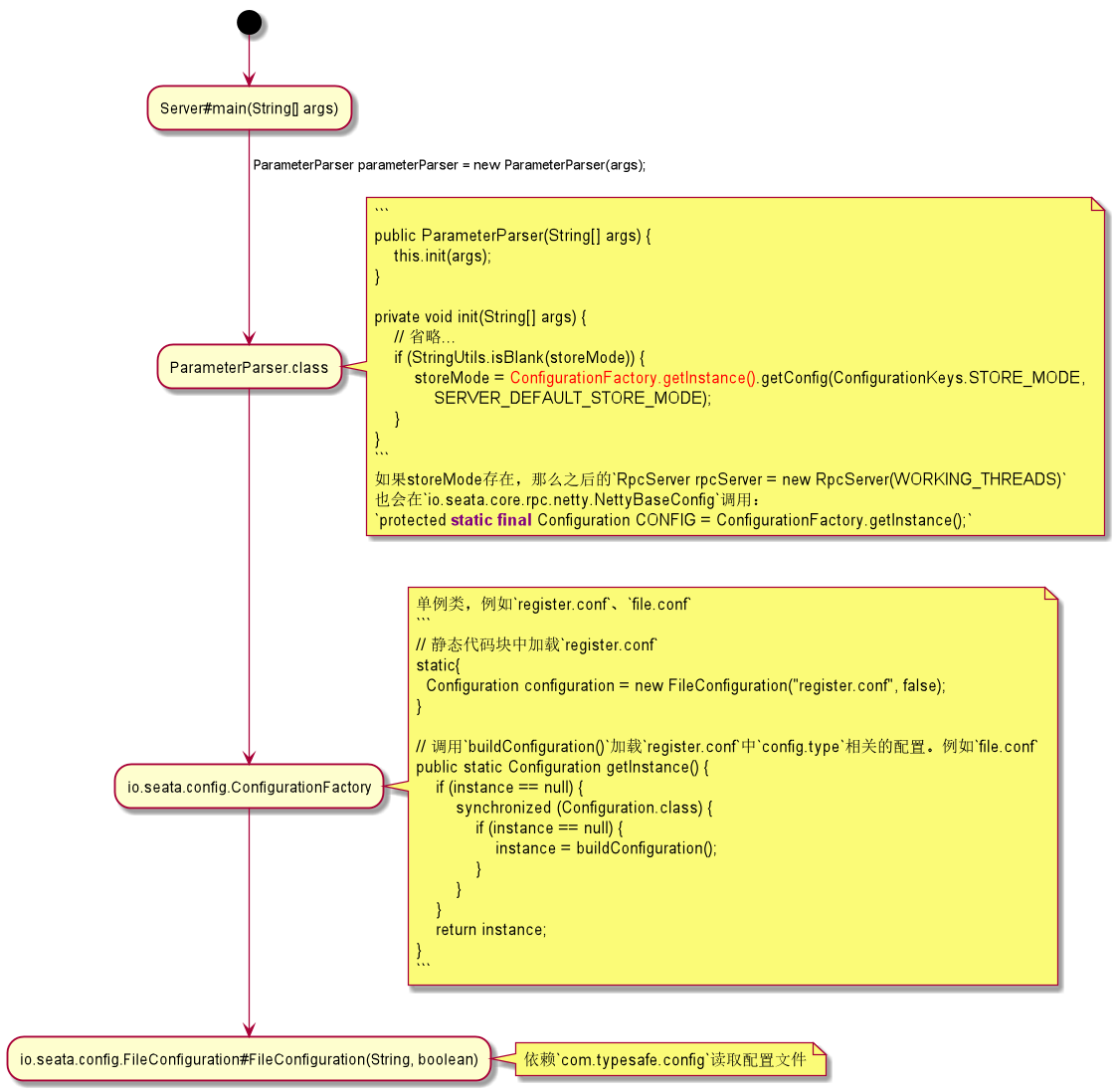
3. 配置文件的读取(register.conf、file.conf)
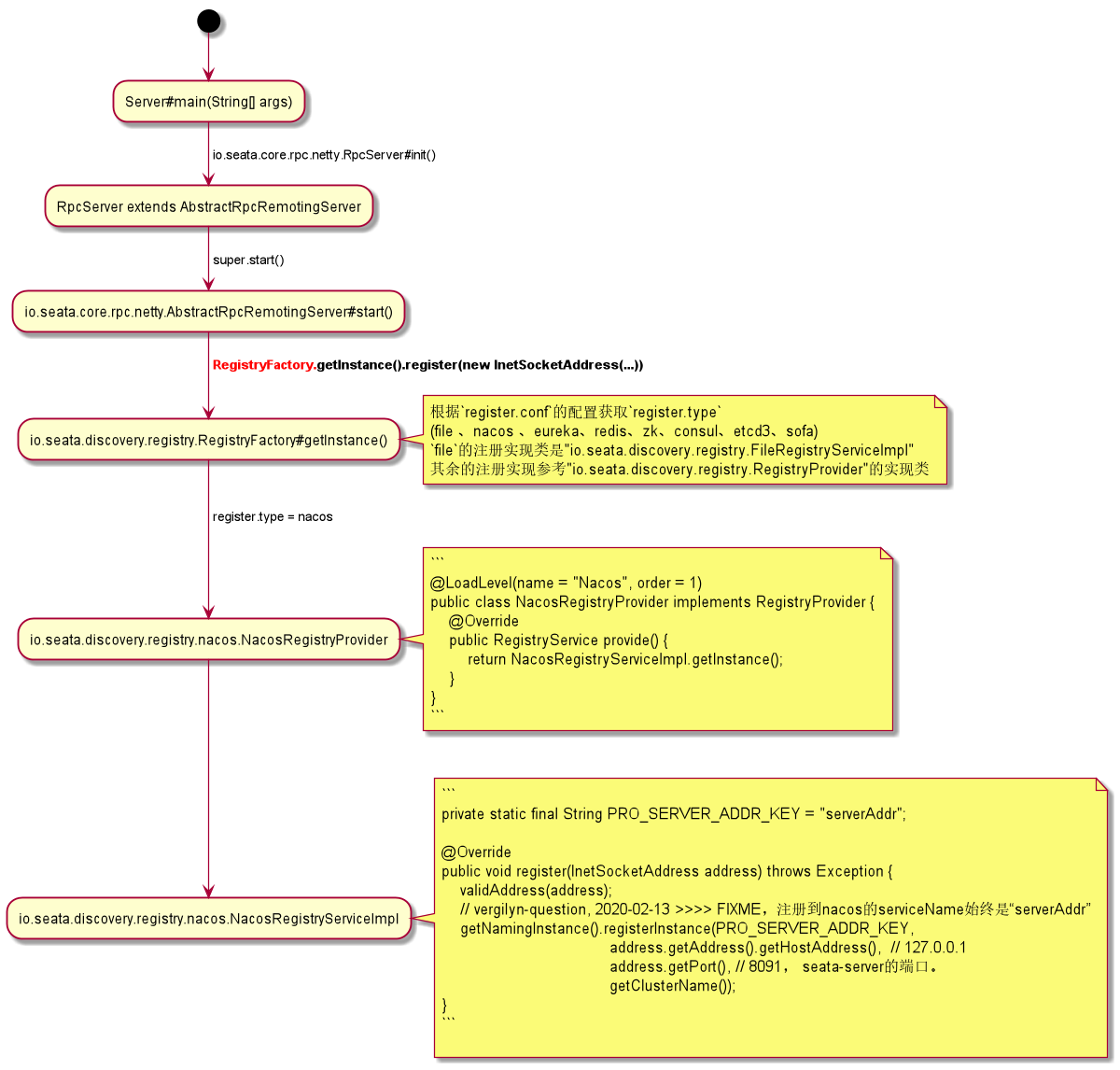
4. 将seata-server注册到服务注册中心(例如eureka、nacos)
4.1 备注
- seata v1.0.0中,通过nacos获取conf并不支持指定GROUP,默认从
SEATA_GROUP获取(在下一个版本开始支持配置GROUP)。
package io.seata.config.nacos;

public class NacosConfiguration extends AbstractConfiguration {

    private static final String SEATA_GROUP = "SEATA_GROUP";

    @Override

    public String getConfig(String dataId, String defaultValue, long timeoutMills) {

        String value;

        if ((value = getConfigFromSysPro(dataId)) != null) {

            return value;

        }

        try {

            value = configService.getConfig(dataId, SEATA_GROUP, timeoutMills);

        } catch (NacosException exx) {

            LOGGER.error(exx.getErrMsg());

        }

        return value == null ? defaultValue : value;

    }

}
- question: 现在seata支持的nacos的配置是一项一项的(nacos的dataId过多)
store {

  ## store mode: file、db

  mode = "db"

  ## database store property

  db {

    datasource = "druid"

    db-type = "mysql"

    driver-class-name = "com.mysql.jdbc.Driver"

    url = "jdbc:mysql://127.0.0.1:3306/test_microservice"

    user = "root"

    password = "123456"

  }

}

对应的是7个data-id,而不是一个data-id中的key-value:

1. store.mode

2. store.db.datasource

3. store.db.db-type

4. ...
- seata注册到nacos的服务名默认叫“serverAddr”
相关代码参考:io.seata.discovery.registry.nacos.NacosRegistryServiceImpl#register(...)
package io.seata.discovery.registry.nacos;

public class NacosRegistryServiceImpl implements RegistryService<EventListener> {

    private static final String PRO_SERVER_ADDR_KEY = "serverAddr";

    @Override

    public void register(InetSocketAddress address) throws Exception {

        validAddress(address);

        // vergilyn-question, 2020-02-13 >>>> FIXME,注册到nacos的serviceName始终是“serverAddr”

        getNamingInstance().registerInstance(PRO_SERVER_ADDR_KEY, address.getAddress().getHostAddress(), address.getPort(), getClusterName());

    }

}
5. 总结
seata配置的加载
seata配置加载类(factory模式):io.seata.config.ConfigurationFactory
不同config.type对应的加载扩展:io.seata.config.ConfigurationProvideregister.conf
其中只有2个配置:
a)register.type,将seata-server注册到什么地方。
b)confi.type,seata-server的一些核心配置。例如"store.mode",seata-server如何记录transaction log。seata-server注册到什么地方
io.seata.discovery.registry.RegistryFactory注册类(factory模式)
根据从register.conf中配置的不同register.type,调用相应io.seata.discovery.registry.RegistryProvider的实现类。
【seata源码学习】001 - seata-server的配置读取和服务注册的更多相关文章
- 源码学习系列之SpringBoot自动配置(篇二)
源码学习系列之SpringBoot自动配置(篇二)之HttpEncodingAutoConfiguration 源码分析 继上一篇博客源码学习系列之SpringBoot自动配置(篇一)之后,本博客继续 ...
- SpringBoot源码学习系列之异常处理自动配置
SpringBoot源码学习系列之异常处理自动配置 1.源码学习 先给个SpringBoot中的异常例子,假如访问一个错误链接,让其返回404页面 在浏览器访问: 而在其它的客户端软件,比如postm ...
- 源码学习系列之SpringBoot自动配置(篇一)
源码学习系列之SpringBoot自动配置源码学习(篇一) ok,本博客尝试跟一下Springboot的自动配置源码,做一下笔记记录,自动配置是Springboot的一个很关键的特性,也容易被忽略的属 ...
- SpringBoot源码学习系列之SpringMVC自动配置
目录 1.ContentNegotiatingViewResolver 2.静态资源 3.自动注册 Converter, GenericConverter, and Formatter beans. ...
- 『TensorFlow』SSD源码学习_其五:TFR数据读取&数据预处理
Fork版本项目地址:SSD 一.TFR数据读取 创建slim.dataset.Dataset对象 在train_ssd_network.py获取数据操作如下,首先需要slim.dataset.Dat ...
- SpringBoot源码学习系列之Locale自动配置
目录 1.spring.messages.cache-duration 2.LocaleResolver 的方法名必须为localeResolver 3.默认LocaleResolver 4.指定默认 ...
- Spring源码阅读笔记03:xml配置读取
前面的文章介绍了IOC的概念,Spring提供的bean容器即是对这一思想的具体实现,在接下来的几篇文章会侧重于探究这一bean容器是如何实现的.在此之前,先用一段话概括一下bean容器的基本工作原理 ...
- 【spring源码学习】spring的task配置
=================spring线程池的配置策略含义========================== id:当配置多个executor时,被@Async("id" ...
- 03.ElementUI源码学习:代码风格检查和格式化配置(ESlint & Prettier)
书接上文.在团队协作中,为避免低级Bug.以及团队协作时不同代码风格对彼此造成的困扰与影响,会预先制定编码规范.使用 Lint工具和代码风格检测工具,则可以辅助编码规范执行,格式化代码,使样式与规则保 ...
随机推荐
- 初入计科,首次接触C的感受
1 你对计算机科学与技术专业了解是怎样? 答:一开始我对这个专业并无了解,觉得无非是把电脑给学透.经过一周的学习后,我深刻地感觉自己对这个专业深深的误解. 通过翻阅书籍,上网浏览相关信息,我认为该专业 ...
- 3分钟接入socket.io使用
WebSocket 简介 传统的客户端和服务器通信协议是HTTP:客户端发起请求,服务端进行响应,服务端从不主动勾搭客户端. 这种模式有个明显软肋,就是同步状态.而实际应用中有大量需要客户端和服务器实 ...
- node--->PHPStorm 停留在 Scanning files to index..
使用webpack时,敲了npm 一些命令后,PHPStorm 开始 Scanning files to index...,去建立文件索引,但是如果一直停留在这个状态,说明是npm install 后 ...
- 浅谈DFS,BFS,IDFS,A*等算法
搜索是编程的基础,是必须掌握的技能.--王主任 搜索分为盲目搜索和启发搜索 下面列举OI常用的盲目搜索: 1.dijkstra 2.SPFA 3.bfs 4.dfs 5.双向bfs 6.迭代加深搜索( ...
- Message: 'chromedriver' executable needs to be available in the path.
环境:windows10 python:3.7.3 已经把 executable.exe 添加到了环境变量中,但还是会提示以上错误. 解决办法: from selenium import webdri ...
- 快速理解DevOps概念和意义-兼谈SRE
最近几年,由于负责的范围的变化.工作逐渐从某个IT领域或者部门,开始关注到整个IT体系的运转和管理.中间也遇到不少困难,同时也有机会去从更高的层面去学习和实践IT治理.文章主要是总结一下我对DevOp ...
- Arduino系列之智能家居蓝牙语音遥控灯(四)
用到的材料 Arduino uno hc-05 蓝牙模块 安卓手机 安卓APP AMR—voice 通过安卓手机连接Arduino的蓝牙模块Hc-05,通过语音识别软件AMR-voice识别语音, ...
- 暑假第五周总结(学习HBASE相关知识)
本周主要对HBASE的相关知识进行了学习,主要是通过视频的讲解了解到了HBASE的存储机制,HBASE的机制与普通的关系型数据库完全不同,HBASE以列进行存储,其主要执行的就是增删查操作,其更改主要 ...
- SubList到底怎么转化为ArrayList?
SubList 大家好,今天 Tony 给大家讲个SubList转化的坑. 这个错误真的会被忽略,大家好好的看看,这个错误我们生产环境还真的遇到过. 集合类型相信大家都很熟悉,在 Java 中 Arr ...
- 表达式属性(C#6.0和C#7.0
从C#6开始,只读属性可简写为表达式属性.它使用双箭头替换了花括号,get访问器和return关键字. 例如: decimal CurrentPrice,sharedOwned; public dec ...