
UITableView简单使用
在iOS开发中UITableView可以说是使用最广泛的控件,我们平时使用的软件中到处都可以看到它的影子,类似于微信、QQ、新浪微博等软件基本上随处都是UITableView。当然它的广泛使用自然离不开它强大的功能;
1首先我们在类别里添加UITableView这个控件和数据源
@interface ViewController ()<UITableViewDataSource,UITableViewDelegate>
@property (nonatomic,strong)UITableView * tableView;
@property (nonatomic,strong)NSMutableArray * dataSouce;
@end
2UITableView控件有两个代理我们要遵守这两个代理
@interface ViewController ()<UITableViewDataSource,UITableViewDelegate>
3我们在viewDidLoad中创建tableView和请求数据
- (void)viewDidLoad {
[super viewDidLoad];
// Do any additional setup after loading the view, typically from a nib.
[self creatTableView];
[self requestData];
}
- (void)creatTableView
{
self.tableView = [[UITableView alloc] initWithFrame:CGRectMake(0, 0, kScreenWidth, kScreenHeight) style:UITableViewStylePlain];
self.tableView.dataSource = self;
self.tableView.delegate = self;
[self.view addSubview:self.tableView];
}
- (void)requestData
{
self.dataSouce = [[NSMutableArray alloc] init];
for (int i=0; i<15; i++) {
NSString * strData = [NSString stringWithFormat:@"我是逗比%d",i];
[self.dataSouce addObject:strData];
}
[self.tableView reloadData];
}
4最后是实现UITableView的代理方法
#pragma mark - UITableView代理方法
- (NSInteger)numberOfSectionsInTableView:(UITableView *)tableView
{
//返回组数
return 1;
}
- (NSInteger)tableView:(UITableView *)tableView numberOfRowsInSection:(NSInteger)section
{
//返回组里的cell个数
return self.dataSouce.count;
}
- (UITableViewCell*)tableView:(UITableView *)tableView cellForRowAtIndexPath:(NSIndexPath *)indexPath
{
static NSString * identifier = @"cell";
UITableViewCell *cell = [tableView dequeueReusableCellWithIdentifier:identifier];
if (!cell) {
cell = [[UITableViewCell alloc] initWithStyle:UITableViewCellStyleDefault reuseIdentifier:identifier];
}
cell.textLabel.text = [self.dataSouce objectAtIndex:indexPath.row];
cell.textLabel.textColor = [UIColor redColor];
return cell;
}
运行效果如图:

二:接下来我们在上面程序的基础上继续深化学习,对cell的定制
1 在.h文件加两个属性,一个放图片 一个放文字,代码如下:
@interface MyTableViewCell : UITableViewCell
@property (nonatomic,strong)UIImageView * iconView;
@property (nonatomic,strong)UILabel * nameLabel;
@end
2实现iconView和nameLable的懒加载方法
重写- (instancetype)initWithStyle:(UITableViewCellStyle)style reuseIdentifier:(NSString *)reuseIdentifier这个方法
把iconView和nameLabel加到自身的contentView上
- (instancetype)initWithStyle:(UITableViewCellStyle)style reuseIdentifier:(NSString *)reuseIdentifier
{
if (self = [super initWithStyle:style reuseIdentifier:reuseIdentifier]) {
self.iconView.frame = CGRectMake(10, 10, 50, 50) ;
[self.iconView.layer setCornerRadius:25];
[self.iconView.layer setMasksToBounds:YES];
[self.contentView addSubview:self.iconView];
self.nameLabel.frame = CGRectMake(70, 15, 120, 40);
[self.contentView addSubview:self.nameLabel];
}
return self;
}
- (UILabel *)nameLabel
{
if (_nameLabel == nil) {
_nameLabel = [[UILabel alloc] init];
_nameLabel.textAlignment = NSTextAlignmentLeft;
_nameLabel.font = [UIFont systemFontOfSize:14];
}
return _nameLabel;
}
- (UIImageView *)iconView
{
if (_iconView == nil) {
_iconView = [[UIImageView alloc] init];
[_iconView.layer setBorderColor:[UIColor lightGrayColor].CGColor];
[_iconView.layer setBorderWidth:1.2];
}
return _iconView;
}
3 在ViewController.m里导入MyTableView.h 然后添加一个代理代码如下
- (CGFloat)tableView:(UITableView *)tableView heightForRowAtIndexPath:(NSIndexPath *)indexPath
{
return 75; //返回行高
}
//修改过的代码如下
- (UITableViewCell*)tableView:(UITableView *)tableView cellForRowAtIndexPath:(NSIndexPath *)indexPath
{
MyTableViewCell * cell = [tableView dequeueReusableCellWithIdentifier:@"cell"];
if (!cell) {
cell = [[MyTableViewCell alloc] initWithStyle:UITableViewCellStyleDefault reuseIdentifier:@"cell"];
}
cell.iconView.image = [UIImage imageNamed:@"jianbo"];
cell.nameLabel.text = [self.dataSouce objectAtIndex:indexPath.row];
return cell;
}
运行效果如下
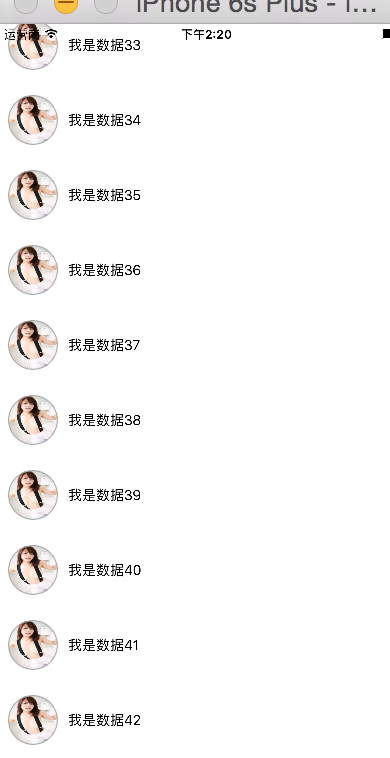
这一次就写这么多吧
UITableView简单使用的更多相关文章
- iOS开发——UI篇OC篇&UITableView简单封装
UITableView简单封装 UITableView时iOS开发中使用最多也是最重的一个UI空间,其实在App Store里面的%80以上的应用都用到了这个控件,所以就给大家介绍一下,前面的文章中也 ...
- iOS UI基础-9.2 UITableView 简单微博列表
概述 我们要实现的效果: 这个界面布局也是UITableView实现的,其中的内容就是UITableViewCell,只是这个UITableViewCell是用户自定义实现的.虽然系统自带的UITab ...
- iOS开发——高级UI&带你玩转UITableView
带你玩装UITableView 在实际iOS开发中UITableView是使用最多,也是最重要的一个控件,如果你不会用它,那别说什么大神了,菜鸟都不如. 其实关于UItableView事非常简单的,实 ...
- iOS 新浪微博-5.0 首页微博列表
首页显示微博列表,是微博的核心部分,这一章节,我们主要是显示出微博的列表. 导入第三方类库 pod 'SDWebImage', '~> 3.7.3' pod 'MJRefresh', '~> ...
- swfit-学习笔记(表UITableView的简单使用)
/*使用与Object-C基本类似,只做简单地使用,创建表及其设置数据源和代理*/ import UIKit class ViewController: UIViewController,UITabl ...
- iOS开发UI篇—UITableview控件简单介绍
iOS开发UI篇—UITableview控件简单介绍 一.基本介绍 在众多移动应⽤用中,能看到各式各样的表格数据 . 在iOS中,要实现表格数据展示,最常用的做法就是使用UITableView,UIT ...
- iOS开发UI篇—使用UItableview完成一个简单的QQ好友列表(一)
iOS开发UI篇—使用UItableview完成一个简单的QQ好友列表(一) 一.项目结构和plist文件 二.实现代码 1.说明: 主控制器直接继承UITableViewController // ...
- UITableView的简单总结与回顾
今天突发奇想的想对UItableView做一下汇总,感觉在编程中这个控件可以千变万化也是用的最多的一个了,下面就为大家简单总结下这个控件,也许还有不足,不过还是请各位不吝赐教了哈,那么我就开始了,我会 ...
- iOS开发基础-UITableView控件简单介绍
UITableView 继承自 UIScrollView ,用于实现表格数据展示,支持垂直滚动. UITableView 需要一个数据源来显示数据,并向数据源查询一共有多少行数据以及每一行显示什么 ...
随机推荐
- openstack私有云布署实践【7.1 keystone + memcache (科兴环境)】
其实登录数据库集群中任意1台都可以创建库,它们会实时自动同步数据库和对应的数据库权限. 首先登录kxcontroller1创建kx_keystone数据库,并赋于远程和本地访问的权限. mys ...
- 纯CSS实现tab选项卡切换
<!DOCTYPE html> <html> <head> <meta charset="utf-8"> <meta cont ...
- 2017年IT互联网圈跑会指南~
啦啦啦~要放假啦,还有十多天就要过年啦,要走亲访友啦!相信大家也是各种胡吃海喝后,啊咧~腰上好像多了好几圈o(>﹏<)o为了让小伙伴们及时制定年后行程(减膘)计划,活动家特此奉上2017年 ...
- [SOJ]寻找第k大数字(numberk)
Description 经过长时间的筹备工作,在Jourk,Ronny,Plipala,阿长,阿沈等人的努力下,DM实验室建立起自己的系列网站,其中包括三个大板块:DMOJ首页.DMOJ论坛.DMOJ ...
- lua中string常用api
local a="abcdefgbbb" string.sub(a,1,3) 字符串截取 返回截取的字符串 print(string.sub(a,1,3)) ...
- Cracking the Coding Interview 第二章
2.2 链表中倒数第k个结点 输入一个链表,输出该链表中倒数第k个结点. 思路:快慢指针(error: 判断是否有可行解,否则返回null, while, if 后加空格) /* public cla ...
- 关于WIN7 家庭版 iis 部署问题
预装Win7家庭普通版系统的iis部署 必先升级为win7 预计10分钟因个人电脑而异 Win7家庭普通版系统的机器可免费升级为旗舰版.(WIN7任何低版本的系统 都可以升级到旗舰版) 开始的步骤: ...
- GL应用方面
1.图和表 2.计算机辅助设计CAD 3.虚拟现实环境 4.数据可视化 5.教学与培训(基于VR) 6.计算机艺术 7.娱乐 8.图像处理 9.用户界面
- SQLite模糊查找(like)
select UserId,UserName,Name,Sex,Birthday,Height,Weight,Role from xqhit_Users where UserName like &qu ...
- Git 的版本库创建和修改
什么是版本库呢?版本库又名仓库,英文名repository,你可以简单理解成一个目录,这个目录里面的所有文件都可以被Git管理起来,每个文件的修改.删除,Git都能跟踪,以便任何时刻都可以追踪历史,或 ...