
iOS7 Sprite Kit 学习
iOS7 Sprite Kit 学习
iOS 7有一个新功能 Sprite Kit 这个有点类似cocos2d 感觉用法都差不多。下面简单来介绍下Sprite Kit
About Sprite Kit
Sprite Kit provides a graphics rendering and animation infrastructure that you can use to animate arbitrary textured images, or sprites. Sprite Kit uses a traditional rendering loop that allows processing on the contents of each frame before it is rendered. Your game determines the contents of the scene and how those contents change in each frame. Sprite Kit does the work to render frames of animation efficiently using the graphics hardware. Sprite Kit is optimized to allow essentially arbitrary changes to each frame of animation.
Sprite Kit also provides other functionality that is useful for games, including basic sound playback support and physics simulation. In addition, Xcode provides built-in support for Sprite Kit, allowing complex special effects and texture atlases to be easily created and then used in your app. This combination of framework and tools makes Sprite Kit a good choice for games and other apps that require similar kinds of animation. For other kinds of user-interface animation, use Core Animation instead.

Jumping into Sprite Kit
The best way to learn Sprite Kit is to see it in action. This example creates a pair of scenes and animates content in each. By working through this example, you will learn some of the fundamental techniques for working with Sprite Kit content, including:
Using scenes in a Sprite Kit–based game.
Organizing node trees to draw content.
Using actions to animate scene content.
Adding interactivity to a scene.
Transitioning between scenes.
Simulating physics inside a scene.
Getting Started
Xcode5.0以上。。
首先新建一个项目 SpriteWalkthrough 。
项目建好后在 ViewController.m 里添加如下代码
打开storyboard 然后找到右边 Sustom Slass 把Class 改成SKView!!!这个一定要改,不然会报错 -[UIView setShowsFPS:]: unrecognized selector sent to instance 0x9742e30
#import <SpriteKit/SpriteKit.h>

- (void)viewDidLoad

{

    [super viewDidLoad];

    SKView *spriteView = (SKView*)self.view;

    spriteView.showsFPS = YES;

    spriteView.showsDrawCount = YES;

    spriteView.showsNodeCount = YES;

    // Do any additional setup after loading the view, typically from a nib.

}
新建一个class 命名为HelloScene.h文件不需要做修改
#import <SpriteKit/SpriteKit.h>

@interface HelloScene : SKScene

@end
然后再回到ViewController.m .修改如下
#import "HelloScene.h"
-(void)viewWillAppear:(BOOL)animated

{

    HelloScene* hello = [[HelloScene alloc] initWithSize:CGSizeMake(self.view.frame.size.width,self.view.frame.size.height)];

    SKView *spriteView = (SKView*)self.view;

    [spriteView presentScene:hello];

}
OK 。。run it ..
2.然后在HelloScene.m里添加如下
@interface HelloScene()

@property BOOL contentCreated;

@end
-(void)didMoveToView:(SKView *)view

{

    if(!self.contentCreated)

    {

        [self  createSceneContents];

        self.contentCreated = YES;

    }

}

-(void)createSceneContents

{

    NSLog(@"createSceneContents");

    self.backgroundColor = [SKColor blackColor];

    self.scaleMode = SKSceneScaleModeAspectFit;

    [self addChild:[self newHelloNode]];

}
-(SKLabelNode*)newHelloNode

{

    SKLabelNode *helloNode = [SKLabelNode labelNodeWithFontNamed:@"Chalkduster"];

    helloNode.name = @"helloNode";//@ 这个和下面的一样

    helloNode.text = @"hello game ";

    helloNode.fontSize = 24;

    helloNode.position = CGPointMake(CGRectGetMidX(self.frame), CGRectGetMidY(self.frame));

    return helloNode;

}
这个时候可以运行一次。
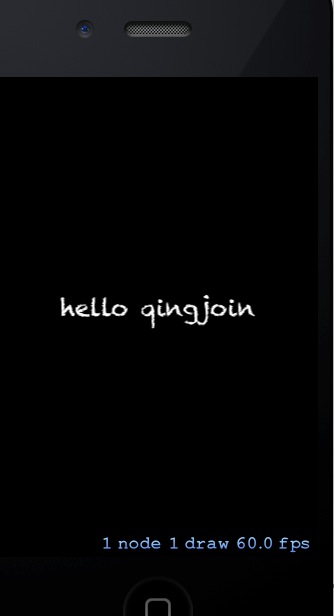
:
接下来继续,在HelloScene.m 里添加
-(void)touchesBegan:(NSSet *)touches withEvent:(UIEvent *)event

{

    SKNode *helloNode = [self childNodeWithName:@"helloNode"]; //@与上面的相同

    if(helloNode !=nil)

    {

        helloNode.name = nil;

        SKAction *moveUp = [SKAction moveByX:0 y:100.0 duration:0.5]; //向上移动

        SKAction *zoom = [SKAction scaleTo:2.0 duration:0.25];    //扩大两倍

        SKAction *pause = [SKAction waitForDuration:0.5];    //暂停

        SKAction *fadeAway = [SKAction fadeOutWithDuration:0.25];  //消失

        SKAction *remove = [SKAction removeFromParent];

        SKAction *moveSequence = [SKAction sequence:@[moveUp, zoom, pause, fadeAway, remove]];

        [helloNode runAction:moveSequence];

    }

}
再编译运行
新建一个class 命名为 SpaceshipScene 然后在SpaceshipScene.m里添加如下
@import "SpaceshipScene.h"

@interface SpaceshipScene ()

@property BOOL contentCreated;

@end

@implementation SpaceshipScene

- (void)didMoveToView:(SKView *)view

{

    if (!self.contentCreated)

    {

        [self createSceneContents];

        self.contentCreated = YES;

    }

}

- (void)createSceneContents

{

    self.backgroundColor = [SKColor blackColor];

    self.scaleMode = SKSceneScaleModeAspectFit;

}

@end
.h
#import <SpriteKit/SpriteKit.h>

@interface SpaceshipScene : SKScene

@end
然后回到
SpaceshipScene.m 修改如下代码。
-(void)touchesBegan:(NSSet *)touches withEvent:(UIEvent *)event

{

    SKNode *helloNode = [self childNodeWithName:@"helloNode"]; //@与上面的相同

    if(helloNode !=nil)

    {

        helloNode.name = nil;

        SKAction *moveUp = [SKAction moveByX:0 y:100.0 duration:0.5]; //向上移动

        SKAction *zoom = [SKAction scaleTo:2.0 duration:0.25];    //扩大两倍

        SKAction *pause = [SKAction waitForDuration:0.5];    //暂停

        SKAction *fadeAway = [SKAction fadeOutWithDuration:0.25];  //消失

        SKAction *remove = [SKAction removeFromParent];

        SKAction *moveSequence = [SKAction sequence:@[moveUp, zoom, pause, fadeAway, remove]];

        //[helloNode runAction:moveSequence];

        [helloNode runAction: moveSequence completion:^{

            SKScene *spaceshipScene  = [[SpaceshipScene alloc] initWithSize:self.size];

            SKTransition *doors = [SKTransition doorsOpenVerticalWithDuration:0.5];

            [self.view presentScene:spaceshipScene transition:doors];

        }];

    }

}
运行。。
最后把SpaceshipScene.m 文件修改如下
//

//  SpaceshipScene.m

//  SpriteWalkthrough

//

//  Created by qingyun on 8/13/13.

//  Copyright (c) 2013 qingyun. All rights reserved.

//

#import "SpaceshipScene.h"

@interface SpaceshipScene ()

@property BOOL contentCreated;

@end

@implementation SpaceshipScene

- (void)didMoveToView:(SKView *)view

{

    if (!self.contentCreated)

    {

        [self createSceneContents];

        self.contentCreated = YES;

    }

}

- (void)createSceneContents

{

    self.backgroundColor = [SKColor blackColor];

    self.scaleMode = SKSceneScaleModeAspectFit;

    SKSpriteNode *spaceship = [self newSpaceship];

    spaceship.position = CGPointMake(CGRectGetMidX(self.frame),CGRectGetMidY(self.frame)-150);

    [self addChild:spaceship];

    //@3

    SKAction *makeRocks = [SKAction sequence: @[

                                                [SKAction performSelector:@selector(addRock) onTarget:self],

                                                [SKAction waitForDuration:0.10 withRange:0.15]

                                                ]];

    [self runAction: [SKAction repeatActionForever:makeRocks]];

}

- (SKSpriteNode *)newSpaceship

{

    SKSpriteNode *hull = [[SKSpriteNode alloc] initWithColor:[SKColor grayColor] size:CGSizeMake(64,32)];

    SKAction *hover = [SKAction sequence:@[

                                           [SKAction waitForDuration:1.0],

                                           [SKAction moveByX:100 y:50.0 duration:1.0],

                                           [SKAction waitForDuration:1.0],

                                           [SKAction moveByX:-100.0 y:-50 duration:1.0]]];

    [hull runAction: [SKAction repeatActionForever:hover]]; //重复移动hover 里的action

    //@2

    SKSpriteNode *light1 = [self newLight];

    light1.position = CGPointMake(-28.0, 6.0);

    [hull addChild:light1];

    SKSpriteNode *light2 = [self newLight];

    light2.position = CGPointMake(28.0, 6.0);

    [hull addChild:light2];

    //@3

    hull.physicsBody = [SKPhysicsBody bodyWithRectangleOfSize:hull.size];

    hull.physicsBody.dynamic = NO;

    return hull;

}

//@2

- (SKSpriteNode *)newLight

{

    SKSpriteNode *light = [[SKSpriteNode alloc] initWithColor:[SKColor yellowColor] size:CGSizeMake(8,8)];

    SKAction *blink = [SKAction sequence:@[

                                           [SKAction fadeOutWithDuration:0.25],

                                           [SKAction fadeInWithDuration:0.25]]];

    SKAction *blinkForever = [SKAction repeatActionForever:blink];  //重复闪闪发光。

    [light runAction: blinkForever];

    return light;

}

//@3

static inline CGFloat skRandf() {

    return rand() / (CGFloat) RAND_MAX;

}

static inline CGFloat skRand(CGFloat low, CGFloat high) {

    return skRandf() * (high - low) + low;

}

- (void)addRock

{

    SKSpriteNode *rock = [[SKSpriteNode alloc] initWithColor:[SKColor brownColor] size:CGSizeMake(8,8)];

    rock.position = CGPointMake(skRand(0, self.size.width), self.size.height-50);

    rock.name = @"rock";

    rock.physicsBody = [SKPhysicsBody bodyWithRectangleOfSize:rock.size];

    rock.physicsBody.usesPreciseCollisionDetection = YES;

    [self addChild:rock];

}

-(void)didSimulatePhysics

{

    [self enumerateChildNodesWithName:@"rock" usingBlock:^(SKNode *node, BOOL *stop) {

        if (node.position.y < 0)

            [node removeFromParent];

    }];

}

@end
好了。一个简单的sprite 小游戏做成了。

demo 下载地址: https://github.com/qingjoin/SpriteKit
iOS7 Sprite Kit 学习的更多相关文章
- Sprite Kit编程指南(1)-深入Sprite Kit
深入Sprite Kit 学习Sprite Kit最好的方法是在实践中观察它.此示例创建一对场景和各自的动画内容.通过这个例子,你将学习使用Sprite Kit内容的一些基础技术,包括: · ...
- ios学习之路四(新建Sprite Kit 项目的时候出现apple LLVM 5.0 error)
在新建sprite kit 项目的时候出现"apple LLVM 5.0 error" 解决方法 在网上搜索,stackoverflow 上是这么说的点击打开链接.按照他的我也没解 ...
- Sprite Kit 入门教程
Sprite Kit 入门教程 Ray Wenderlich on September 30, 2013 Tweet 这篇文章还可以在这里找到 英语, 日语 If you're new here, ...
- ios游戏开发 Sprite Kit教程:初学者 1
注:本文译自Sprite Kit Tutorial for Beginners 目录 Sprite Kit的优点和缺点 Sprite Kit vs Cocos2D-iPhone vs Cocos2D- ...
- Sprite Kit教程:初学者
作者:Ray Wenderlich 原文出处:点击打开链接 http://www.raywenderlich.com/42699/spritekit-tutorial-for-beginners 转自 ...
- Sprite Kit编程指南中文版下载
下载地址:http://download.csdn.net/detail/xin814/6032573 关于Sprite Kit 重要提示: 这是API或开发技术的一个初版文档.虽然本文档的技术准确 ...
- Sprite Kit教程:制作一个通用程序 2
注1:本文译自Sprite Kit Tutorial: Making a Universal App: Part 2 目录 动画的定义:可行性 属性列表 添加游戏逻辑 添加音效 何去何从 上一篇文章中 ...
- swift语言注册非免费苹果账号iOS游戏框架Sprite Kit基础教程
swift语言注册非免费苹果账号iOS游戏框架Sprite Kit基础教程 1.2.3 注册非免费苹果账号swift语言注册非免费苹果账号iOS游戏框架Sprite Kit基础教程 免费的苹果账号在 ...
- Swift版iOS游戏框架Sprite Kit基础教程下册
Swift版iOS游戏框架Sprite Kit基础教程下册 试读下载地址:http://pan.baidu.com/s/1qWBdV0C 介绍:本教程是国内唯一的Swift版的Spritekit教程. ...
随机推荐
- Swift # 柯里化函数
前言 此次文章,讲述的是Swift的一个新特性(柯里化函数),可能很多iOS开发人员是第一次听这个词汇,包括我自己也是,自己也用了几天时间才总结出来,希望能帮助到各位咯,个人感觉偏向有开发经验的码友, ...
- POJ 2492 并查集应用的扩展
A Bug's Life Time Limit: 10000MS Memory Limit: 65536K Total Submissions: 28651 Accepted: 9331 Descri ...
- Oracle 11g for Windows 简体中文版的安装过程
原文:Oracle 11g for Windows 简体中文版的安装过程 我的配置 操作系统:Windows Server 2003 sp2 内存:1024M以上 1.下载Oracle 11g 地址 ...
- Android 使用Gson解析json案例具体解释
一.眼下解析json有三种工具:org.json(Java经常使用的解析),fastjson(阿里巴巴project师开发的),Gson(Google官网出的),解析速度最快的是Gson,下载地址:h ...
- leetcode[73] Set Matrix Zeroes 将矩阵置零
给定一个矩阵,把零值所在的行和列都置为零.例如: 1 2 3 1 3 1 1 1 操作之后变为 1 3 0 0 0 1 1 方法1: 赋值另存一个m*n的矩阵,在原矩阵为零的值相应置新的矩阵行和列为零 ...
- SSIS Package to Call Web Service
原文 SSIS Package to Call Web Service SSIS Package to Call Web Service. You can Call WebService from S ...
- Byte[]、Image、Bitmap 之间的相互转换
原文:Byte[].Image.Bitmap 之间的相互转换 /// <summary> /// 将图片Image转换成Byte[] /// </summ ...
- ASP.NET中Partial Class部分类
原文:ASP.NET中Partial Class部分类 如果您在开发项目的公用函数库,用于公用函数库的内容越丰富越好,但这不可能一下子就写好,需要一点一点的积累,这时就可以使用Partial Clas ...
- 【转】Android官方下拉刷新控件 SwipeRefreshLayout
今天在Google+上看到了SwipeRefreshLayout这个名词,遂搜索了下,发现竟然是刚刚google更新sdk新增加的一个widget,于是赶紧抢先体验学习下. SwipeRefreshL ...
- Android项目----dispathTouchEvent
说到dispathTouchEvent,就不得不说一个最贱的屏幕触摸动作触发的一些列Touch事件: ACTION_DOWN->ACTION_MOVE->ACTION_MOVE->A ...