
iOS 旋屏问题
今天突然想起来,以前的一个问题没有解决,就上网百度了一些方法,看到一篇文章,写的很详细,我就操作试试,结果还真的实现了功能,接下来我将重复他的结合我自己的测试,说一下iOS中的旋屏问题。
1、首先配置工程 使其支持屏幕旋转
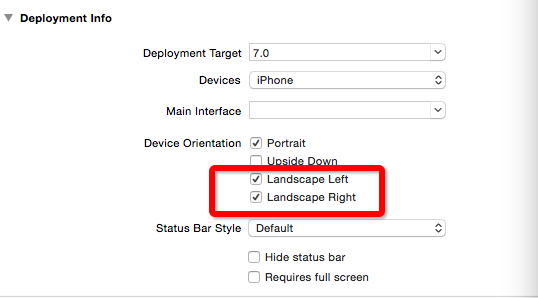
2、如果你的rootViewController为UITabBarController的情况下 建议创建一个UITabBarController的公共父类 在里面实现如下代理方法
preferredInterfaceOrientationForPresentation 我理解为打开时当前界面的朝向
shouldAutorotate 是否支持旋转
supportedInterfaceOrientations 所支持的旋转方向
return返回的为当前选中 tabar 的item的情况
具体的代码如下:
- (UIInterfaceOrientation)preferredInterfaceOrientationForPresentation {
return [self.selectedViewController preferredInterfaceOrientationForPresentation];
}
- (BOOL)shouldAutorotate {
return YES;
}
- (UIInterfaceOrientationMask)supportedInterfaceOrientations {
return [self.selectedViewController supportedInterfaceOrientations];
}
3、在 UITabBarController 中放UINavigationController后 还需要在 UINavigationController中实现还是那三个方法 因为我的界面只有VideoDetail1ViewController需要横竖屏的处理 所以我只是单独的做了判断
- (UIInterfaceOrientation)preferredInterfaceOrientationForPresentation {
if ([self.topViewController isKindOfClass:[VideoDetail1ViewController class]]) {
return UIInterfaceOrientationPortraitUpsideDown;
}
return UIInterfaceOrientationPortrait;
}
- (BOOL)shouldAutorotate {
if ([self.topViewController isKindOfClass:[VideoDetail1ViewController class]]) {
return YES;
}
return NO;
}
- (UIInterfaceOrientationMask)supportedInterfaceOrientations {
if ([self.topViewController isKindOfClass:[VideoDetail1ViewController class]]) {
return UIInterfaceOrientationMaskAllButUpsideDown;
}
return UIInterfaceOrientationMaskPortrait;
}
如果不需要特定的对某个界面做旋屏的还,可以直接进行如下操作:
- (UIInterfaceOrientation)preferredInterfaceOrientationForPresentation {
return [self.topViewController preferredInterfaceOrientationForPresentation];
}
- (BOOL)shouldAutorotate {
return [self.topViewController shouldAutorotate];
}
- (UIInterfaceOrientationMask)supportedInterfaceOrientations {
return [self.topViewController supportedInterfaceOrientations];
}
4、然后如果某个界面想支持屏幕旋转 只需要在里面重写写方法即可
- (UIInterfaceOrientation)preferredInterfaceOrientationForPresentation {
return UIInterfaceOrientationPortrait;
}
- (BOOL)shouldAutorotate {
return YES;
}
- (UIInterfaceOrientationMask)supportedInterfaceOrientations {
return UIInterfaceOrientationMaskAllButUpsideDown;
}
5、 运行就可以达到想要的结果
(总结下来为 APP 中 UITabBarController中的支持旋转由 UITabBarController 下的 UINavigationController 控制 而UINavigationController的旋转由你自己在当前Controller中设置的值来控制),如果rootViewController不是UITabBarController的话 同理...
附: 在手机为横屏模式下打开APP APP会按照横屏来布局 需要在 如下方法中新加
- (BOOL)application:(UIApplication *)application didFinishLaunchingWithOptions:(NSDictionary *)launchOptions{
[[UIApplication sharedApplication] setStatusBarOrientation:UIInterfaceOrientationPortrait];//此方法 ....
}
这样就会解决横屏模式下打开 APP 产生的一些问题
(容易出现的一些问题为:当你在didFinishLaunchingWithOptions中 加载了另一个 window 的时候需要在自己建的 window 中也遵守屏幕旋转的几个代理方法 不然横屏模式下打开APP布局依然会乱)
iOS 旋屏问题的更多相关文章
- iOS旋屏
横竖屏切换,视图乱了怎么办? 首先,我们必须了解一下下列4种状态,它们被用来描述设备旋转方向: UIInterfaceOrientationLandscapeLeft 向左,即HOME键在右 UIIn ...
- ios 导航栏和旋屏
1,状态栏(UIStatusBar) http://my.oschina.net/shede333/blog/304560 2,visibleViewController和topViewControl ...
- iOS特殊界面旋屏设置的方法之一
1.AppDelegate.h @property (assign, nonatomic) BOOL allowRotation; 2.AppDelegate.m #pragma mark - 自动旋 ...
- iOS6的旋屏控制技巧
在iOS5.1 和 之前的版本中, 我们通常利用 shouldAutorotateToInterfaceOrientation: 来单独控制某个UIViewController的旋屏方向支持,比如: ...
- UIImagePickerController在UIPopoverController中 旋屏问题
1弧度=180/π度1度=π/180弧度今天遇到了 一个问题.UIImagePickerController在UIPopoverController中 旋屏问题. 在查找了许多资料后方知,此乃iOS系 ...
- iOS离屏渲染之优化分析
在进行iOS的应用开发过程中,有时候会出现卡顿的问题,虽然iOS设备的性能越来越高,但是卡顿的问题还是有可能会出现,而离屏渲染是造成卡顿的原因之一.因此,本文主要分析一下离屏渲染产生的原因及避免的方法 ...
- Yosemite 给 iOS 录屏
[Yosemite 给 iOS 录屏] Mac 升级到Yosemite后,支持iOS屏幕录制.把Mac和iPhone用数据线相连.打开QuickTime Player,新建一个影片. 从摄像头源中选择 ...
- 同时支持Android 和 ios 投屏到电脑的软件,Support Android and ios screen shrare to PC - 希沃授课助手
最近学校由粉笔黑板更换了智慧电子黑板,然后发现了一个好玩的软件. 感谢希沃公司的开发: 希沃授课助手,这是一款同时支持Android 和 ios 投屏和远程控制的. 效果很流畅,非常赞
- iOS 离屏渲染的研究
GPU渲染机制: CPU 计算好显示内容提交到 GPU,GPU 渲染完成后将渲染结果放入帧缓冲区,随后视频控制器会按照 VSync 信号逐行读取帧缓冲区的数据,经过可能的数模转换传递给显示器显示. G ...
随机推荐
- SQL Server 存储过程进行分页查询
CREATE PROCEDURE prcPageResult -- 获得某一页的数据 -- @currPage INT = 1 , --当前页页码 (即Top currPage) @showColum ...
- CentOS7 PostgreSQL 主从配置( 一)
主库配置 pg_hba.conf host replication all 10.2.0.0/0 trust postgresql.conf listen_addresses = '*' max_wa ...
- centos6.5中gitlab的搭建
使用gitlab官网给的源码进行安装,步骤如下: Install a GitLab CE Omnibus package on CentOS 6 (and RedHat/Oracle/Scientif ...
- maven 国内镜像地址
由于连接国外网站时网速特慢,为解决这个问题,os china 建立了一个maven 的私服.为了记忆,特将此记录. settings.xml 设置镜像方法步骤如下: 1. mirrors 设置 < ...
- weblogic11g 配置数据源
配置连接数据源步骤详解: 服务器:Weblogic11g,使用JNDI配置 步骤一: 输入http://localhost:7001/console/,登录控制台: 步骤二:按下图要求配置后,进入“下 ...
- NoRouteToHostException
http://stackoverflow.com/questions/1572215/how-to-avoid-a-noroutetohostexception 端口不够用,注意一定要关闭所有不用的连 ...
- 使用VS软件打开网站在浏览器浏览的方法
1.用VS软件打开网站之后,先检查网站是否使用IIS Express开发 2.若不是,则切换成使用IIS Express开发 3.检查项目使用的托管管道模式设置为经典模式了没有 4.最后选择“在浏览器 ...
- 四种xml的解析方式
这篇文章是我上网找资料,加上自己总结了一些而得 资料来源: http://www.cnblogs.com/allenzheng/archive/2012/12/01/2797196.html http ...
- EditText的一点深入的了解
最近在开发android下的记事本程序时,频繁的使用EditText控件,折腾来折腾去,算是对其的了解更深入了一些.特将这些收获记录如下: 一.几个属性的介绍 android:gravity=&quo ...
- input内文字点击消失 弹出层,可以写表单
<!DOCTYPE HTML> <html> <head> <meta http-equiv="Content-Type" content ...