
iOS 旋屏问题
今天突然想起来,以前的一个问题没有解决,就上网百度了一些方法,看到一篇文章,写的很详细,我就操作试试,结果还真的实现了功能,接下来我将重复他的结合我自己的测试,说一下iOS中的旋屏问题。
1、首先配置工程 使其支持屏幕旋转
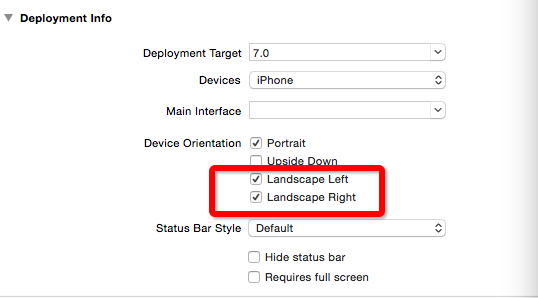
2、如果你的rootViewController为UITabBarController的情况下 建议创建一个UITabBarController的公共父类 在里面实现如下代理方法
preferredInterfaceOrientationForPresentation 我理解为打开时当前界面的朝向
shouldAutorotate 是否支持旋转
supportedInterfaceOrientations 所支持的旋转方向
return返回的为当前选中 tabar 的item的情况
具体的代码如下:
- (UIInterfaceOrientation)preferredInterfaceOrientationForPresentation {
return [self.selectedViewController preferredInterfaceOrientationForPresentation];
}
- (BOOL)shouldAutorotate {
return YES;
}
- (UIInterfaceOrientationMask)supportedInterfaceOrientations {
return [self.selectedViewController supportedInterfaceOrientations];
}
3、在 UITabBarController 中放UINavigationController后 还需要在 UINavigationController中实现还是那三个方法 因为我的界面只有VideoDetail1ViewController需要横竖屏的处理 所以我只是单独的做了判断
- (UIInterfaceOrientation)preferredInterfaceOrientationForPresentation {
if ([self.topViewController isKindOfClass:[VideoDetail1ViewController class]]) {
return UIInterfaceOrientationPortraitUpsideDown;
}
return UIInterfaceOrientationPortrait;
}
- (BOOL)shouldAutorotate {
if ([self.topViewController isKindOfClass:[VideoDetail1ViewController class]]) {
return YES;
}
return NO;
}
- (UIInterfaceOrientationMask)supportedInterfaceOrientations {
if ([self.topViewController isKindOfClass:[VideoDetail1ViewController class]]) {
return UIInterfaceOrientationMaskAllButUpsideDown;
}
return UIInterfaceOrientationMaskPortrait;
}
如果不需要特定的对某个界面做旋屏的还,可以直接进行如下操作:
- (UIInterfaceOrientation)preferredInterfaceOrientationForPresentation {
return [self.topViewController preferredInterfaceOrientationForPresentation];
}
- (BOOL)shouldAutorotate {
return [self.topViewController shouldAutorotate];
}
- (UIInterfaceOrientationMask)supportedInterfaceOrientations {
return [self.topViewController supportedInterfaceOrientations];
}
4、然后如果某个界面想支持屏幕旋转 只需要在里面重写写方法即可
- (UIInterfaceOrientation)preferredInterfaceOrientationForPresentation {
return UIInterfaceOrientationPortrait;
}
- (BOOL)shouldAutorotate {
return YES;
}
- (UIInterfaceOrientationMask)supportedInterfaceOrientations {
return UIInterfaceOrientationMaskAllButUpsideDown;
}
5、 运行就可以达到想要的结果
(总结下来为 APP 中 UITabBarController中的支持旋转由 UITabBarController 下的 UINavigationController 控制 而UINavigationController的旋转由你自己在当前Controller中设置的值来控制),如果rootViewController不是UITabBarController的话 同理...
附: 在手机为横屏模式下打开APP APP会按照横屏来布局 需要在 如下方法中新加
- (BOOL)application:(UIApplication *)application didFinishLaunchingWithOptions:(NSDictionary *)launchOptions{
[[UIApplication sharedApplication] setStatusBarOrientation:UIInterfaceOrientationPortrait];//此方法 ....
}
这样就会解决横屏模式下打开 APP 产生的一些问题
(容易出现的一些问题为:当你在didFinishLaunchingWithOptions中 加载了另一个 window 的时候需要在自己建的 window 中也遵守屏幕旋转的几个代理方法 不然横屏模式下打开APP布局依然会乱)
iOS 旋屏问题的更多相关文章
- iOS旋屏
横竖屏切换,视图乱了怎么办? 首先,我们必须了解一下下列4种状态,它们被用来描述设备旋转方向: UIInterfaceOrientationLandscapeLeft 向左,即HOME键在右 UIIn ...
- ios 导航栏和旋屏
1,状态栏(UIStatusBar) http://my.oschina.net/shede333/blog/304560 2,visibleViewController和topViewControl ...
- iOS特殊界面旋屏设置的方法之一
1.AppDelegate.h @property (assign, nonatomic) BOOL allowRotation; 2.AppDelegate.m #pragma mark - 自动旋 ...
- iOS6的旋屏控制技巧
在iOS5.1 和 之前的版本中, 我们通常利用 shouldAutorotateToInterfaceOrientation: 来单独控制某个UIViewController的旋屏方向支持,比如: ...
- UIImagePickerController在UIPopoverController中 旋屏问题
1弧度=180/π度1度=π/180弧度今天遇到了 一个问题.UIImagePickerController在UIPopoverController中 旋屏问题. 在查找了许多资料后方知,此乃iOS系 ...
- iOS离屏渲染之优化分析
在进行iOS的应用开发过程中,有时候会出现卡顿的问题,虽然iOS设备的性能越来越高,但是卡顿的问题还是有可能会出现,而离屏渲染是造成卡顿的原因之一.因此,本文主要分析一下离屏渲染产生的原因及避免的方法 ...
- Yosemite 给 iOS 录屏
[Yosemite 给 iOS 录屏] Mac 升级到Yosemite后,支持iOS屏幕录制.把Mac和iPhone用数据线相连.打开QuickTime Player,新建一个影片. 从摄像头源中选择 ...
- 同时支持Android 和 ios 投屏到电脑的软件,Support Android and ios screen shrare to PC - 希沃授课助手
最近学校由粉笔黑板更换了智慧电子黑板,然后发现了一个好玩的软件. 感谢希沃公司的开发: 希沃授课助手,这是一款同时支持Android 和 ios 投屏和远程控制的. 效果很流畅,非常赞
- iOS 离屏渲染的研究
GPU渲染机制: CPU 计算好显示内容提交到 GPU,GPU 渲染完成后将渲染结果放入帧缓冲区,随后视频控制器会按照 VSync 信号逐行读取帧缓冲区的数据,经过可能的数模转换传递给显示器显示. G ...
随机推荐
- Varnish && Varnish Cache
1 1 1 Varnish https://www.varnish-cache.org/intro/index.html#intro Introduction to Varnish The basic ...
- lldpcli 常用命令
1.查看周围的邻居列表 root@hbg:/# lldpcli show neighbors------------------------------------------------------ ...
- find the greatest common divisor
function gcd(a, b) return a else return gcd(b, a mod b)
- NSNotificationCenter消息通信机制
作用:NSNotificationCenter是专门供程序中不同类间的消息通信而设置的. 注册通知:即要在什么地方接受消息 [[NSNotificationCenter defaultCenter] ...
- sysbench使用教程【转载】
水晶命匣 2016-08-16 20:02 一.环境描述 此次使用的虚拟机环境如下所示: CPU:双核 2.4GHz 内存:4 GB 硬盘:120 GB IP:192.168.21.129 操作系统: ...
- SLF4JLoggerContext cannot be cast to LoggerContext
Getting Exception org.apache.logging.slf4j.SLF4JLoggerContext cannot be cast to org.apache.logging.l ...
- 巧妙使用Contains()方法查找一个数是否在某堆数中
问题:要判断用户输入的一个数,或者是程序里方法的一个参数的值,或者是一个变量的值是否在某堆数中. 简洁写法:把这堆数放在list中,使用list的Contains()方法检查list是否包含这个数,取 ...
- Lucene 简单手记http://www.cnblogs.com/hoojo/archive/2012/09/05/2671678.html
什么是全文检索与全文检索系统? 全文检索是指计算机索引程序通过扫描文章中的每一个词,对每一个词建立一个索引,指明该词在文章中出现的次数和位置,当用户查询时,检索程序就根据事先建立的索引进行查找,并将查 ...
- java 文件字符输入、输出流
Example10_6.java import java.io.*; public class Example10_6 { public static void main(String args[]) ...
- 转:jmeter实践
本文主要介绍性能测试中的常用工具jmeter的使用方式,以方便开发人员在自测过程中就能自己动手对系统进行自动压测和模拟用户操作访问请求.最后还用linux下的压测工具ab做了简单对比. 1. ...