
GMap学习笔记
GMap学习笔记
1、GMap体系详解
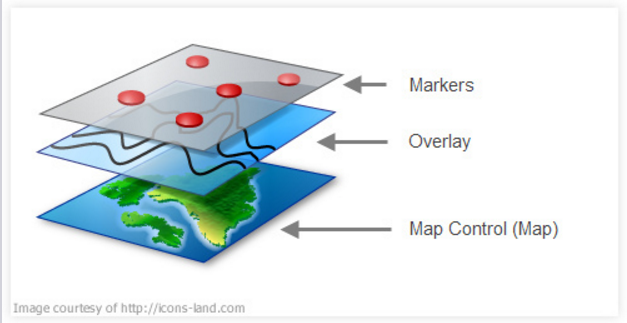
- What is the map control (GMapControl)? This is the control which renders the map.
- What is an Overlay (GMapOverlay)? This is a layer on top of the map control. You can have several layers on top of a map, each layer representing, say, a route with stops, a list of stores etc.
- What are Markers (GMapMarker)? These are the points on a layer, each representing a specific geo location (Lat,Lon) e.g. each drop point on a route.
- What is a route (GMapRoute)? This is the path or direction between two or more poin
2、c# 使用GMap 实现具体的功能(加载地图、放大、缩小、鹰眼、添加点线面、自定义marker、截图、下载缓存)
注:添加GMap.NET.Core.dll 和 GMap.NET.WindowsForms.dll文件,引用后使用GMap的控件。
2.1 加载地图
这里直接调用了SuperMap iServer REST服务。调用第三方地图服务参考 http://www.cnblogs.com/luxiaoxun/p/3364107.html
2.2 放大、缩小地图
private void tsbZoomIn_Click(object sender, EventArgs e)

{

this.mapControl1.Zoom += ;

}

private void tsbZoomOut_Click(object sender, EventArgs e)

{

this.mapControl1.Zoom -= ;

}

//定义的地图控件缩放变化后对应的事件

private void mapControl1_OnMapZoomChanged()

{

double zoom = this.mapControl1.Zoom - Convert.ToDouble();

this.mapControl2.Zoom = zoom; //设置地图缩放大小

}
2.3 鹰眼
需要2个地图控件,同时缩放、移动,实现联动的效果。

gMapControl1 事件设置代码:
private bool Mapleft1 = false;

private void gMapControl1_MouseDown(object sender, MouseEventArgs e)

{

    if (e.Button == MouseButtons.Left)

    {

        Mapleft1 = true;

    }

}

private void gMapControl1_MouseUp(object sender, MouseEventArgs e)

{

    if (e.Button == MouseButtons.Left)

    {

        Mapleft1 = false;

    }

}

private void gMapControl1_OnPositionChanged(PointLatLng point)

{

    if (Mapleft1)

    {

        this.gMapControl2.Position = point; //设置小地图中心点

    }

}

private void gMapControl1_OnMapZoomChanged()

{

    double zoom = this.gMapControl1.Zoom - Convert.ToDouble();

    this.gMapControl2.Zoom = zoom; //设置地图缩放大小

}
gMapControl2 事件设置代码:
private bool Mapleft2 = false;

private void gMapControl2_MouseMove(object sender, MouseEventArgs e)

{

    lastPosition1 = this.gMapControl1.FromLocalToLatLng(e.X, e.Y);

}

private void gMapControl2_MouseUp(object sender, MouseEventArgs e)

{

    if (e.Button==MouseButtons.Left)

    {

        Mapleft2 = false;

    }

}

private void gMapControl2_MouseDown(object sender, MouseEventArgs e)

{

    if (e.Button == MouseButtons.Left)

    {

        this.gMapControl1.Position = lastPosition1; //鼠标单击设置gMapControl1.中心点

        Mapleft2 = true;

    }

}

private void gMapControl2_OnPositionChanged(PointLatLng point)

{

    if (Mapleft2)

    {

        this.gMapControl1.Position = point; //设置gMapControl1中心点

    }

}
2.4 添加点线面
以添加点对象为例:
IAction _editAddAlarmAction = null;

        //添加告警源

        private void tsbAddAlarm_Click_1(object sender, EventArgs e)

        {

            if (_editAddAlarmAction == null)

            {

                _editAddAlarmAction = new AddAlarmAction();

            }

            this.mapControl1.CurrentAction = _editAddAlarmAction;

            ToolCheckChanged((sender as ToolStripItem).Name);

        }
  public class AddAlarmAction : Action

    {

        List<Feature> targetFeatures = null;

        private GMapControl _gMapControl = null;

        private GMapOverlay markerOverlay = new GMapOverlay("addalarm");

        private bool _start = false;

        List<PointLatLng> _points = null;

        List<Point2D> _point2Ds = new List<Point2D>();

        private string _mapUrl = string.Empty;

        private string _mapName = string.Empty;

        Map _map = null;

        public override void OnLoad(GMapControl gMapControl)

        {

            _gMapControl = gMapControl;

            _gMapControl.Overlays.Add(markerOverlay);

            _points = new List<PointLatLng>();

            _start = false;

            this._mapUrl = ((SuperMapProvider)gMapControl.MapProvider).ServiceUrl;

            this._mapName = ((SuperMapProvider)gMapControl.MapProvider).MapName;

            this._map = new Map(this._mapUrl);

        }

        public override void OnMapMouseDown(object sender, MouseEventArgs e)

        {

            PointLatLng currentPoint = this._gMapControl.FromLocalToLatLng(e.X, e.Y);

            double mercatorX, mercatorY;

            Helper.LonLat2Mercator(currentPoint.Lng, currentPoint.Lat, out mercatorX, out mercatorY);

            Point2D point2D = new Point2D(mercatorX, mercatorY);

            _point2Ds.Add(point2D);

            _points.Add(currentPoint);

            if (_start)

            {

                GMapMarker marker = new GMapMarkerImage(currentPoint, new Bitmap("C:\\Users\\yaohui\\Desktop\\iClient-for-DotNet-master\\iClient-for-DotNet-master\\Demo\\demo.winform\\Resources\\sign-warning-icon.png"));

                markerOverlay.Markers.Add(marker);

                marker.ToolTipText = "告警源编号:";

                marker.ToolTip.Fill = Brushes.Blue;

                marker.ToolTip.Foreground = Brushes.White;

                marker.ToolTip.Stroke = Pens.Black;

                marker.ToolTip.TextPadding = new Size(, );

                marker.ToolTipMode = MarkerTooltipMode.OnMouseOver;

            }

            _start = true;

        }

        public override void OnMapMouseDoubleClick(object sender, MouseEventArgs e)

        {

            if (!_start) return;

            PointLatLng currentPoint = this._gMapControl.FromLocalToLatLng(e.X, e.Y);

            double mercatorX, mercatorY;

            Helper.LonLat2Mercator(currentPoint.Lng, currentPoint.Lat, out mercatorX, out mercatorY);

            Point2D point2D = new Point2D(mercatorX, mercatorY);

            markerOverlay.Markers.Clear();

            _points.Clear();

            _point2Ds.Clear();

            _start = false;

        }

    }
2.5 自定义marker
通过继承gmap的marker类,进行扩展:(这里添加了符号高亮的画笔)
using GMap.NET.WindowsForms;

using System;

using System.Collections.Generic;

using System.Drawing;

using System.Linq;

using System.Text;

using System.Windows.Forms;

namespace gmap.demo.winform

{

    class GMapMarkerImage : GMapMarker

    {

        private Image image;

        public Image Image

        {

            get

            {

                return image;

            }

            set

            {

                image = value;

                if (image != null)

                {

                    this.Size = new Size(image.Width, image.Height);

                }

            }

        }

        public bool IsHighlight = true;

        public Pen HighlightPen

        {

            set;

            get;

        }

        public Pen FlashPen

        {

            set;

            get;

        }

        public Pen OutPen

        {

            get;

            set;

        }

        private Timer flashTimer = new Timer();

        private int radius;

        private int flashRadius;

        public GMapMarkerImage(GMap.NET.PointLatLng p, Image image)

            : base(p)

        {

            Size = new System.Drawing.Size(image.Width, image.Height);

            Offset = new System.Drawing.Point(-Size.Width / , -Size.Height / );

            Image = image;

            HighlightPen = new System.Drawing.Pen(Brushes.Red, );

            radius = Size.Width >= Size.Height ? Size.Width : Size.Height;

            flashTimer.Interval = ;

            flashTimer.Tick += new EventHandler(flashTimer_Tick);

        }

        void flashTimer_Tick(object sender, EventArgs e)

        {

            if (FlashPen == null)

            {

                FlashPen = new Pen(Brushes.Red, );

                flashRadius = radius;

            }

            else

            {

                flashRadius += radius / ;

                if (flashRadius >=  * radius)

                {

                    flashRadius = radius;

                    FlashPen.Color = Color.FromArgb(, Color.Red);

                }

                else

                {

                    Random rand = new Random();

                    int alpha = rand.Next();

                    FlashPen.Color = Color.FromArgb(alpha, Color.Red);

                }

            }

        }

        //this.Overlay.Control.Refresh();

        //this.mapControl1.Refresh();

        public void StartFlash()

        {

            flashTimer.Start();

        }

        public void StopFlash()

        {

            flashTimer.Stop();

            if (FlashPen != null)

            {

                FlashPen.Dispose();

                FlashPen = null;

            }

        }

        //this.mapControl1.Refresh();

        public override void OnRender(Graphics g)

        {

            if (image == null)

                return;

            Rectangle rect = new Rectangle(LocalPosition.X, LocalPosition.Y, Size.Width, Size.Height);

            g.DrawImage(image, rect);

            if (IsMouseOver && IsHighlight)

            {

                g.DrawRectangle(HighlightPen, rect);

            }

            if (FlashPen != null)

            {

                g.DrawEllipse(FlashPen,

                    new Rectangle(LocalPosition.X - flashRadius /  + Size.Width / , LocalPosition.Y - flashRadius /  + Size.Height / , flashRadius, flashRadius));

            }

        }

        //public override void Dispose()

        //{

        //    if (HighlightPen != null)

        //    {

        //        HighlightPen.Dispose();

        //        HighlightPen = null;

        //    }

        //    if (FlashPen != null)

        //    {

        //        FlashPen.Dispose();

        //        FlashPen = null;

        //    }

        //}

    }

}
2.6 截图
//地图保存为图片

        private void toolStripButton6_Click(object sender, EventArgs e)

        {

            try

            {

                using (SaveFileDialog dialog = new SaveFileDialog())

                {

                    dialog.Filter = "PNG (*.png)|*.png";

                    dialog.FileName = "GMap.NET image";

                    Image image = this.mapControl1.ToImage();

                    if (image != null)

                    {

                        using (image)

                        {

                            if (dialog.ShowDialog() == DialogResult.OK)

                            {

                                string fileName = dialog.FileName;

                                if (!fileName.EndsWith(".png", StringComparison.OrdinalIgnoreCase))

                                {

                                    fileName += ".png";

                                }

                                image.Save(fileName);

                                MessageBox.Show("图片已保存: " + dialog.FileName, "GMap.NET", MessageBoxButtons.OK, MessageBoxIcon.Asterisk);

                            }

                        }

                    }

                }

            }

            catch (Exception exception)

            {

                MessageBox.Show("图片保存失败: " + exception.Message, "GMap.NET", MessageBoxButtons.OK, MessageBoxIcon.Hand);

            }

        }
2.7 保存缓存
        //保存缓存

        private void toolStripButton7_Click(object sender, EventArgs e)

        {

            if (this.mapControl1.ShowExportDialog() == true)

            {

                //this.gMapControl1.ShowTileGridLines = true;//显示瓦片,也就是显示方格

                this.mapControl1.ReloadMap();

            }

        }
3、iclient for .net 模拟B/S实现报警闪烁demo展示

4、参考
http://www.cnblogs.com/luxiaoxun/p/3494756.html
http://blog.csdn.net/sunsun1203/article/details/53816464
http://www.cnblogs.com/luxiaoxun/p/3475355.html
http://blog.sina.com.cn/s/blog_819100560101dgng.html
GMap学习笔记的更多相关文章
- js学习笔记:webpack基础入门(一)
之前听说过webpack,今天想正式的接触一下,先跟着webpack的官方用户指南走: 在这里有: 如何安装webpack 如何使用webpack 如何使用loader 如何使用webpack的开发者 ...
- PHP-自定义模板-学习笔记
1. 开始 这几天,看了李炎恢老师的<PHP第二季度视频>中的“章节7:创建TPL自定义模板”,做一个学习笔记,通过绘制架构图.UML类图和思维导图,来对加深理解. 2. 整体架构图 ...
- PHP-会员登录与注册例子解析-学习笔记
1.开始 最近开始学习李炎恢老师的<PHP第二季度视频>中的“章节5:使用OOP注册会员”,做一个学习笔记,通过绘制基本页面流程和UML类图,来对加深理解. 2.基本页面流程 3.通过UM ...
- 2014年暑假c#学习笔记目录
2014年暑假c#学习笔记 一.C#编程基础 1. c#编程基础之枚举 2. c#编程基础之函数可变参数 3. c#编程基础之字符串基础 4. c#编程基础之字符串函数 5.c#编程基础之ref.ou ...
- JAVA GUI编程学习笔记目录
2014年暑假JAVA GUI编程学习笔记目录 1.JAVA之GUI编程概述 2.JAVA之GUI编程布局 3.JAVA之GUI编程Frame窗口 4.JAVA之GUI编程事件监听机制 5.JAVA之 ...
- seaJs学习笔记2 – seaJs组建库的使用
原文地址:seaJs学习笔记2 – seaJs组建库的使用 我觉得学习新东西并不是会使用它就够了的,会使用仅仅代表你看懂了,理解了,二不代表你深入了,彻悟了它的精髓. 所以不断的学习将是源源不断. 最 ...
- CSS学习笔记
CSS学习笔记 2016年12月15日整理 CSS基础 Chapter1 在console输入escape("宋体") ENTER 就会出现unicode编码 显示"%u ...
- HTML学习笔记
HTML学习笔记 2016年12月15日整理 Chapter1 URL(scheme://host.domain:port/path/filename) scheme: 定义因特网服务的类型,常见的为 ...
- DirectX Graphics Infrastructure(DXGI):最佳范例 学习笔记
今天要学习的这篇文章写的算是比较早的了,大概在DX11时代就写好了,当时龙书11版看得很潦草,并没有注意这篇文章,现在看12,觉得是跳不过去的一篇文章,地址如下: https://msdn.micro ...
随机推荐
- 鼠标hover事件
JS: // ========== // = 鼠标hover事件 = // ========== function showHide (btn,box) { $(btn).hover(function ...
- 【SSRS】入门篇(一) -- 创建SSRS项目
原文:[SSRS]入门篇(一) -- 创建SSRS项目 在本篇中,您将学习如何在 SQL Server Data Tools (SSDT) 中创建报表服务器项目. 报表服务器项目用于创建在报表服务器中 ...
- 2014由于在myeclipse5.5.1许可证
点击假设Myeclipse负载项目server该图标不响应.这是MyEclipse过期,这也是一年许可: subscriber: axin Serial:nLR8ZC-855575-69517252 ...
- Scala开发环境搭建与资源推荐
Scala开发环境搭建与资源推荐 本文介绍了Scala的开发环境,包括SDK.IDE的设置.常用资源列表等.Scala是一门静态语言,很有可能就是Java的继承者. AD: 2014WOT全球软件技术 ...
- ODBC操作数据库
/*ODBC使用步骤:(ODBC数据源由微软平台提供) * 1.配置ODBC数据源(控制面板->管理工具->ODBC数据源) * 2.加载并注册驱动程序,导入java.sql.*包 * 3 ...
- Jqury笔记
1. --------------- -var aa = new Array(); aa.push(1); alert(aa[0]); var aa=[];也表示一个数组: ------------ ...
- Javascript多线程引擎(一)
Javascript多线程引擎(一) Javascript 天生是单线程的语言, 不支持synchronized等线程操作, 但是这便不妨碍Javascript作为web语言中最具有魅力语言之一. 虽 ...
- C# 6.0 功能预览
C# 6.0 功能预览 (一) 一.索引的成员和元素初始化 1.1 原始初始化集合 Dictionary 1.2 键值初始化集合 Dictionary 1.3 运算符 $ 初始化集合 Dictiona ...
- 一个简单的Garbage Collector的实现
一个简单的Garbage Collector的实现 前言: 最近看了google的工程师写的一个非常简单的垃圾收集器,大概200多行C代码,感叹大牛总能够把复杂的东西通过很简单的语言和代码表达出来.为 ...
- html页面显示服务器时间
全局变量 var lblTimer; var d; ready事件里面写 lblTimer = $("#lbltimer"); d = new Date('<%=DateTi ...