
Jenkins+Ansible+Gitlab自动化部署三剑客
一、gitlab安装
环境:centos 7 x64
1、关闭防火墙
systemctl stop firewalld

systemctl disable firewalld
2、禁用selinux
vim /etc/selinux/config

# This file controls the state of SELinux on the system.

# SELINUX= can take one of these three values:

#     enforcing - SELinux security policy is enforced.

#     permissive - SELinux prints warnings instead of enforcing.

#     disabled - No SELinux policy is loaded.

SELINUX=enforcing

# SELINUXTYPE= can take one of three values:

#     targeted - Targeted processes are protected,

#     minimum - Modification of targeted policy. Only selected processes are protected.

#     mls - Multi Level Security protection.

SELINUXTYPE=targeted

改为SELINUX=disabled,然后重启服务器,使用getenforce进行验证
3、安装环境依赖
yum install curl policycoreutils openssh-server openssh-clients postfix
4、下载仓库文件
curl -sS https://packages.gitlab.com/install/repositories/gitlab/gitlab-ce/script.rpm.sh | sudo bash
5、启动邮件服务
systemctl start postfix

systemctl enable postfix
6、安装gitlab-ce
yum install -y gitlab-ce
7、配置ssl
mkdir /etc/gitlab/ssl

cd /etc/gitlab/ssl

openssl genrsa -out /etc/gitlab/ssl/gitlab.example.com.key

openssl req -new -key "gitlab.example.com.key" -out "gitlab.example.com.csr"

openssl x509 -req -days  -in "gitlab.example.com.csr" -signkey "gitlab.example.com.key" -out "gitlab.example.com.crt"

openssl dhparam -out dhparams.pem

chmod  *
8、配置gitlab.rb
vim /etc/gitlab/gitlab.rb

external_url 'https://gitlab.example.com'
//external_url 'https://192.168.71.128'
nginx['redirect_http_to_https'] = true nginx['ssl_certificate'] = "/etc/gitlab/ssl/gitlab.example.com.crt" nginx['ssl_certificate_key'] = "/etc/gitlab/ssl/gitlab.example.com.key" nginx['ssl_dhparam'] = "/etc/gitlab/ssl/dhparams.pem" # Path to dhparams.pem, eg. /etc/gitlab/ssl/dhparams.pem

gitlab-ctl reconfigure
9、配置nginx
server {

  listen *:;

  server_name gitlab.example.com;

  //server_name 192.168.71.128;

  rewrite ^(.*)$ https://$host$1 permanent;

  server_tokens off; ## Don't show the nginx version number, a security best practice
10、运维工程师使用
a、新建项目

b、用户维护,创建regular用户
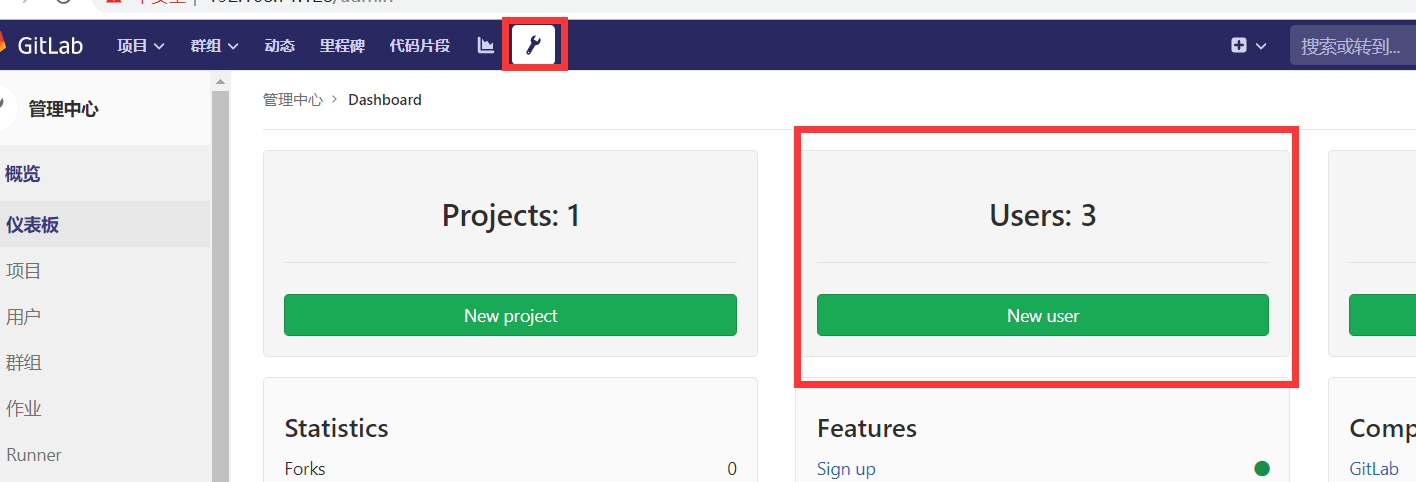
c、给项目分配用户及权限,分配dev用户和maintainer用户

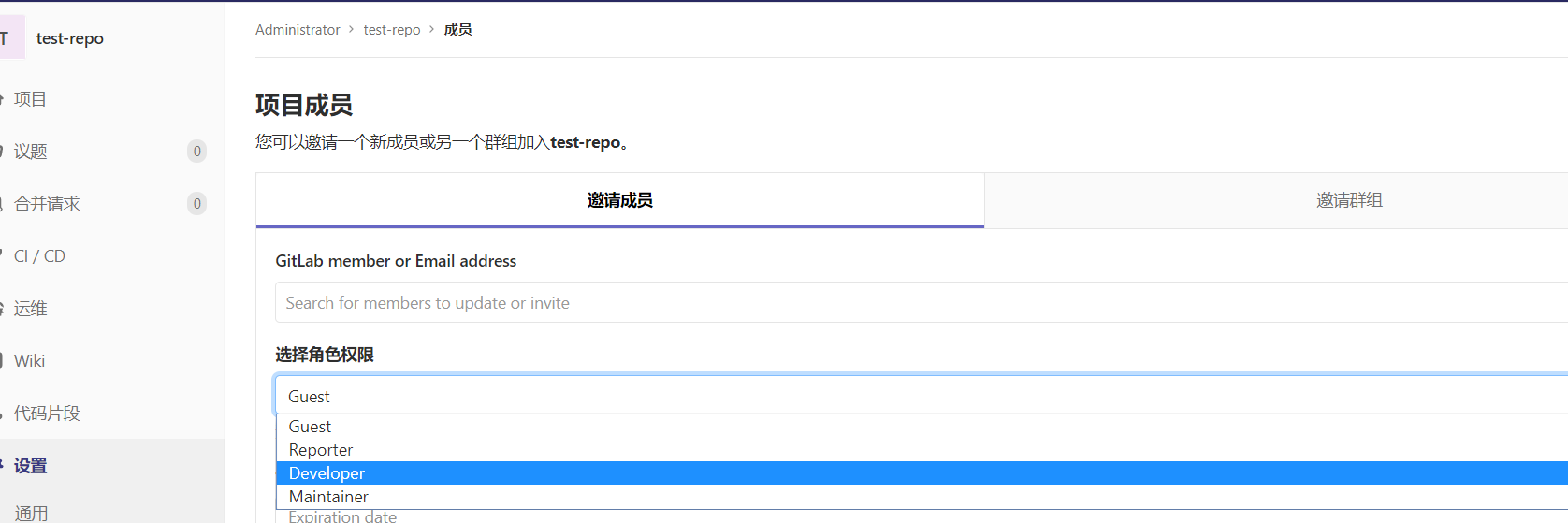
11、开发组长使用
//克隆仓库
git -c http.sslverify=false clone https://192.168.71.128/root/test-repo.git
处理合并申请
12、开发人员使用
git -c http.sslverify=false clone https://192.168.71.128/root/test-repo.git
创建分支合并申请

二、ansible安装
1、环境准备(python3.6.5安装及virtualenvwrapper管理虚拟环境)
详见:https://www.cnblogs.com/hougang/p/11423083.html
2、pip安装
mkvirtualenv -p python3 env36

pip install ansible
3、git安装
root用户安装git

yum -y install git nss curl

切换到普通用户

su deploy

cd ~

git clone ansible(可以将github源导入码云,然后再clone码云上的ansible,不然下载会很慢或失败)

git clone https://github.com/ansible/ansible.git

进入env36环境

workon env36

安装ansible依赖包

pip install paramiko PyYAML jinja2

将ansible移动到虚环境目录下

mv ansible ~/.virtualenvs/env36.ansible/

cd ~/.virtualenvs/env36.ansible/ansible

切换分支

git checkout stable-2.5

安装

source ~/.virtualenvs/env36.ansible/ansible/hacking/env-setup -q

验证

ansible --version
3、ansible使用
ansible主机:192.168.71.132
ssh-keygen -t rsa
ssh-copy-id -i id_rsa.pub root@192.168.71.133
测试机:192.168.71.133
Jenkins+Ansible+Gitlab自动化部署三剑客的更多相关文章
- Jenkins+Ansible+Gitlab自动化部署三剑客-Ansible本地搭建
可以通过git bash连接linux 关闭防火墙,禁用防火墙开机启动,并更爱selinux文件,重启 重新登录并检查禁用 getenforce 安装git yum -y install git ns ...
- Jenkins+Ansible+Gitlab自动化部署三剑客-gitlab本地搭建
实际操作 准备linux初始环境 关闭防火墙 systemctl stop firewalld 开机自己关闭 systemctl disable firewalld 设置安全配置 为关闭 vim /e ...
- Jenkins+Ansible+Gitlab自动化部署三剑客-Jenkins本地搭建
后面需要shell基础,目前没有,等有了,再更
- Jenkins Ansible GitLab 自动化部署
Jenkins Ansible GitLab 自动化部署 DevOps https://www.cnblogs.com/yangjianbo/articles/10393765.html https: ...
- Jenkins+maven+gitlab自动化部署之基础环境部署(一)
从一个二线城市,来到上海,刚入职,老大就给任务,为了减少开发打包部署时间,需要搭建一套自动化部署环境.接到任务后,赶紧上网查找资料,以及了解jenkins作用等等,用了一周时间,了解了个大概,由于都是 ...
- Jenkins+maven+gitlab自动化部署之docker发布sprint boot项目(七)
Jenkins发布docker应用与发布java应用配置基本一致,需要配置Dockerfile及构建的步骤,步骤如下: 1.jenkins主机构建应用为jar包 2.jenkins主机把生产的jar包 ...
- Jenkins+maven+gitlab自动化部署之前端构建发布(六)
前端项目构建,需要在jenkins主机部署node服务,网上有说介绍说安装对应的nodejs插件进行前端项目构建,我这里是直接调用系统npm命令,进行前端打包.具体node部署参考:Centos7部署 ...
- Jenkins+maven+gitlab自动化部署之构建Java应用(五)
前面几篇文章介绍jenkins部署以及配置,接下来我们,就介绍下如何使用jenkins发布应用. 1)新建项目 jenkins首页,点击左上新建任务,出现下图,填写对应信息,然后点击确定: 2)项目参 ...
- Jenkins+maven+gitlab自动化部署之Jenkins部署(三)
本章开始正式搭建Jenkins: 公司现在使用的jenkins版本是2.150.3,但是本次实验安装的版本我们选择最新的 2.164.3(当然,当你阅读这篇文章时,此版本已经不是最新),jenkins ...
随机推荐
- 深度排序模型概述(二)PNN/NFM/AFM
在CTR预估中,为了解决稀疏特征的问题,学者们提出了FM模型来建模特征之间的交互关系.但是FM模型只能表达特征之间两两组合之间的关系,无法建模两个特征之间深层次的关系或者说多个特征之间的交互关系,因此 ...
- 如何让Python2与Python3共存
一.摘要 最近做服务测试的时候,实在被第三方模块折磨的够呛,从安装就存在兼容Py2和Py3的问题,产品提供的服务越来越多,做服务验证也不得不跟进支持测试,这眼前的Hadoop/Hive/Hbase/H ...
- C#信号量(Semaphore,SemaphoreSlim)
Object->MarshalByRefObject->WaitHandle->Semaphore 1.作用: 多线程环境下,可以控制线程的并发数量来限制对资源的访问 2.举例: S ...
- 《深入理解Java虚拟机》之(一、内存区域)
一.java的体系构成: Java的技术体系主要由支撑java程序运行的虚拟机.提供各种开发领域接口支持的java api.java编程语言及许多第三方java框架(如Spring .Struts等) ...
- Codeforces Round #588 (Div. 2) C. Anadi and Domino(思维)
链接: https://codeforces.com/contest/1230/problem/C 题意: Anadi has a set of dominoes. Every domino has ...
- BZOJ 2100: [Usaco2010 Dec]Apple Delivery spfa
由于是无向图,所以可以枚举两个终点,跑两次最短路来更新答案. #include <queue> #include <cstdio> #include <cstring&g ...
- HDOJ 4858 项目管理 ( 只是有点 莫队的分块思想在里面而已啦 )
题目: 链接:http://acm.hdu.edu.cn/showproblem.php?pid=4858 题意: 我们建造了一个大项目!这个项目有n个节点,用很多边连接起来,并且这个项目是连通的! ...
- 查看API工具 https://editor.swagger.io/
The base URL for the API is: https://api.cloud.nalantis.com/api/ The OpenAPI documentation is ava ...
- TCP报头格式
1.端口号:用来标识同一台计算机的不同的应用进程. 1)源端口:源端口和IP地址的作用是标识报文的返回地址. 2)目的端口:端口指明接收方计算机上的应用程序接口. TCP报头中的源端口 ...
- springboot发送邮件,以及携带邮件附件简单使用
可以通过springboot官方文档中Sending Email,找到类似如下java mail的使用文档 https://docs.spring.io/spring/docs/5.1.9.RELEA ...