
vue+element-ui 实现table单元格点击编辑,并且按上下左右键单元格之间切换
通过我的测试我发现两个两种方法来编辑单元格的内容
第一种点击编辑:
我是给td里添加一个input,将值赋值给input,当失去焦点的时候将input的值付给td原来的内容,然后将input删除,
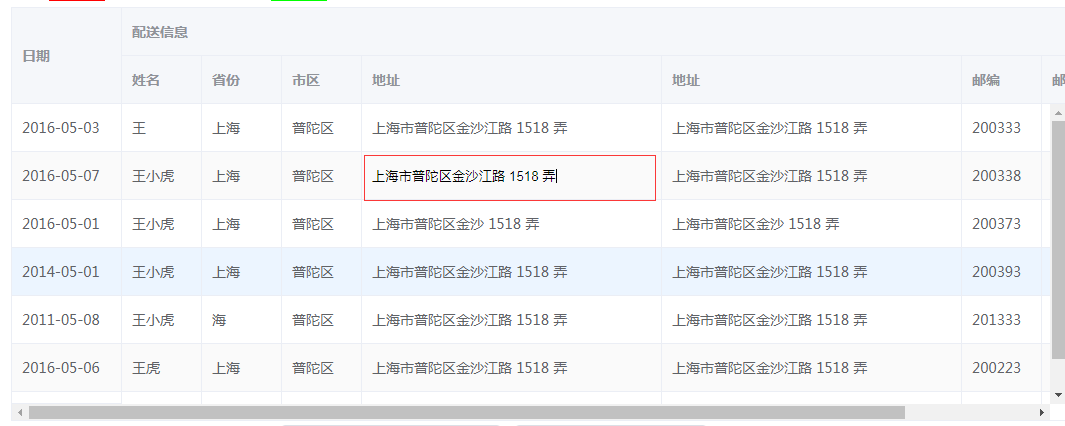
代码如下:
if (column.label != "日期") {

          if(cell.children.length>1){return} ////防止点击cell再次创建input输入框

          var cellInput = document.createElement("input");

          cellInput.setAttribute("type", "text");

          cellInput.setAttribute("class", "edit");

          cellInput.value =cell.children[0].innerText;
          cellInput.style.width = "100%";

          cellInput.style.border = "none";

          cellInput.style.backgroundColor = "transparent";

          cellInput.style.paddingLeft = "10px";

          cellInput.style.outline = "none";

          oldel.style.display = " none";

          cell.appendChild(cellInput);

          cellInput.focus();    //主动聚焦

          cellInput.onblur = function() {

            oldel.innerHTML = cellInput.value;

            oldel.style.display = "block";

            cell.removeChild(cellInput);

            //event.target.innerHTML = cellInput.value;

          };

      }
第二种方法:
通过contentEditable来控制元素可以输入编辑
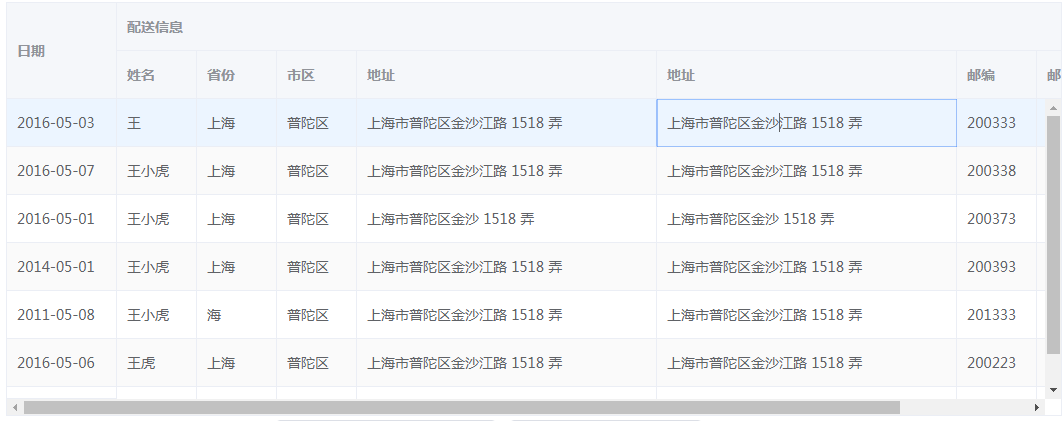
代码如下:
celledit(row, column, cell, event) {

      cell.contentEditable = true;

      cell.focus()

}
不需要太多,只要两行就行;
上面实现了点击编辑单个单元格的功能,现在还要实现通过键盘按上下左右在不同单元格进行切换;这样更利于用户体验
因为我使用的是Element+vue,如果你也使用的这个复制粘贴可以拿过去直接用;所以如果其他使用这个可能要进行一些改变;
let self = this;

      if (boolen == true) {

        document.onkeydown = function(e) {

          console.log(e);

          var curel = document.activeElement; //当前元素

          var curcellIndex = curel.cellIndex; // 当前元素行单元格索引

          var curRowIndex = curel.parentElement.sectionRowIndex; //当前元素行的索引;

          var curtbody = curel.parentElement.parentElement.children; //当前tbody内容的整个表单

          curel.onblur = function() {

            console.log(curel.innerText);

            self.check(curel.innerText);

          };

          if (e.keyCode == 38) {

            //按上键

            if (curRowIndex - 1 < 0) {

              curel.contentEditable = false;

              curtbody[curtbody.length - 1].children[

                curcellIndex

              ].contentEditable = true;

              curtbody[curtbody.length - 1].children[curcellIndex].focus();

            } else {

              curel.contentEditable = false;

              curtbody[curRowIndex - 1].children[

                curcellIndex

              ].contentEditable = true;

              curtbody[curRowIndex - 1].children[curcellIndex].focus();

            }

          } else if (e.keyCode == 37) {

            let preCellindex =

              curtbody[curtbody.length - 1].children.length - 1;

            console.log("preRow", curel.parentElement.children.length);

            //键盘按钮左键

            if (curcellIndex - 1 == 0) {

              if (curRowIndex - 1 < 0) {

                curel.contentEditable = false;

                curtbody[curtbody.length - 1].children[

                  preCellindex

                ].contentEditable = true;

                curtbody[curtbody.length - 1].children[preCellindex].focus();

              } else {

                curel.contentEditable = false;

                curtbody[curRowIndex - 1].children[

                  preCellindex

                ].contentEditable = true;

                curtbody[curRowIndex - 1].children[preCellindex].focus();

              }

            } else {

              curel.contentEditable = false;

              curel.parentElement.children[

                curcellIndex - 1

              ].contentEditable = true;

              curel.parentElement.children[curcellIndex - 1].focus();

            }

          } else if (e.keyCode == 39 || e.keyCode == 9) {

            //键盘按钮右键

            e.preventDefault();

            if (curcellIndex + 1 == curel.parentElement.children.length) {

              if (curRowIndex + 1 == curtbody.length) {

                curel.contentEditable = false;

                curtbody[0].children[1].contentEditable = true;

                curtbody[0].children[1].focus();

              } else {

                curel.contentEditable = false;

                curtbody[curRowIndex + 1].children[1].contentEditable = true;

                curtbody[curRowIndex + 1].children[1].focus();

              }

            } else {

              curel.contentEditable = false;

              curel.parentElement.children[

                curcellIndex + 1

              ].contentEditable = true;

              curel.parentElement.children[curcellIndex + 1].focus();

            }

          } else if (e.keyCode == 40 || e.keyCode == 13) {

            //向下按钮按键

            e.preventDefault();

            if (curRowIndex + 1 == curtbody.length) {

              curel.contentEditable = false;

              curtbody[0].children[curcellIndex].contentEditable = true;

              curtbody[0].children[curcellIndex].focus();

            } else {

              curel.contentEditable = false;

              curtbody[curRowIndex + 1].children[

                curcellIndex

              ].contentEditable = true;

              curtbody[curRowIndex + 1].children[curcellIndex].focus();

            }

          }

        };

      }
vue+element-ui 实现table单元格点击编辑,并且按上下左右键单元格之间切换的更多相关文章
- VUE+Element UI实现简单的表格行内编辑效果
原理是通过Css控制绑定的输入控件与显示值,在选中行样式下对控件进行隐藏或显示 <!DOCTYPE html> <html> <head> <meta cha ...
- (Element UI 组件 Table)去除单元格底部的横线
Element UI 组件 Table 有一个属性 border,添加它可以增加纵向边框,但是无法控制横线边框,因此即使是最简单的 el-table,也会包含一个底部横线. 这个底部横线其实是一个 b ...
- Vue+element ui table 导出到excel
需求: Vue+element UI table下的根据搜索条件导出当前所有数据 参考: https://blog.csdn.net/u010427666/article/details/792081 ...
- 分享一个自搭的框架,使用Spring boot+Vue+Element UI
废弃,新的:https://www.cnblogs.com/hackyo/p/10453243.html 特点:前后端分离,可遵循restful 框架:后端使用Spring boot,整合了aop.a ...
- Vue + Element UI 实现权限管理系统
Vue + Element UI 实现权限管理系统 前端篇(一):搭建开发环境 https://www.cnblogs.com/xifengxiaoma/p/9533018.html
- vue + element ui 实现实现动态渲染表格
前言:之前需要做一个页面,能够通过表名动态渲染出不同的表格,这里记录一下.转载请注明出处:https://www.cnblogs.com/yuxiaole/p/9786326.html 网站地址:我的 ...
- vue + element ui 表格自定义表头,提供线上demo
前言:工作中用到 vue+element ui 的前端框架,需要使用自定义表头,需要使用 re.转载请注明出处:https://www.cnblogs.com/yuxiaole/p/9710826.h ...
- vue+element ui 的上传文件使用组件
前言:工作中用到 vue+element ui 的前端框架,使用到上传文件,则想着封装为组件,达到复用,可扩展.转载请注明出处:https://www.cnblogs.com/yuxiaole/p/9 ...
- vue+element ui 的表格列使用组件
前言:工作中用到 vue+element ui 的前端框架,有这个场景:很多表格的列有许多一样的,所以考虑将列封装为组件.转载请注明出处:https://www.cnblogs.com/yuxiaol ...
- vue+element ui 的tab 动态增减,切换时提示用户是否切换
前言:工作中用到 vue+element ui 的前端框架,动态添加 Tab,删除 Tab,切换 Tab 时提示用户是否切换等,发现 element ui 有一个 bug,这里记录一下如何实现.转载 ...
随机推荐
- [Bob]Collectors Problem
https://vjudge.net/problem/UVA-10779#author=0 网络流 1.Bob向他有的贴纸连边,流量为他有的贴纸数量 2.每一种贴纸向汇点连流量为1的边 3.其余人,如 ...
- properties的编码问题
1.在eclipse中,如果不专门设置,properties文件的编码是ISO-8859-1,最好将其改为UTF-8 2.当properties文件的编码改为UTF-8还不够,Spring的conte ...
- js 返回两数(包含这两数)之间的随机数函数
function selectFrom( lowerValue, upperValue ){ var choices = upperValue - lowerValue + 1; return Mat ...
- spring bean 的作用域之间有什么区别
spring bean 的作用域之间有什么区别? spring容器中的bean可以分为五个范围.所有范围的名称都是说明的, 1.singleton:这种bean范围是默认的,这种范围确保不管接受到多个 ...
- git前期准备
git小结 设置用户名 git config –global user.name 'itcast' 设置用户名邮箱 git config –global user.email 'itcast' 查看设 ...
- JavaScript DOM的一些扩展
对DOM的扩展主要是:Selectors API和HTML5. Selectors API Selectors API是由W3C发起指定的一个标准,致力于让浏览器原生支持CSS查询.Selectors ...
- Mininet系列实验(六):Mininet动态改变转发规则实验
一. 实验目的 熟悉Mininet自定义拓扑脚本的编写:熟悉编写POX脚本动态改变转发规则 二.实验原理 在SDN环境中,控制器可以通过对交换机下发流表操作来控制交换机的转发行为.在本实验中,基于Mi ...
- python操作excel实用脚本
import xlrd data = xlrd.open_workbook('/home/ppe/workspace/pythonwp/tianranqi_org.xls') table = data ...
- JSP页面中如何注入Spring容器中的bean
第一步在JSP页面中导入下面的包: <%@page import="org.springframework.web.context.support.WebApplicationCont ...
- 阶段5 3.微服务项目【学成在线】_day17 用户认证 Zuul_11-前端显示当前用户-前端请求jwt
前端代码 sessionStorage也是key/value的格式 页头显示当前用户 查询jwt nginx里面的配置 测试 开启认证服务 进行登陆 跳转到首页就应该立即请求查询. 跳转到首页 coo ...