
《精通并发与Netty》学习笔记(14 - 解决TCP粘包拆包(二)Netty自定义协议解决粘包拆包)
一、Netty粘包和拆包解决方案
Netty提供了多个解码器,可以进行分包的操作,分别是:
* LineBasedFrameDecoder (换行)
LineBasedFrameDecoder是回车换行解码器,如果用户发送的消息以回车换行符作为消息结束的标识,则可以直接使用Netty的LineBasedFrameDecoder对消息进行解码,只需要在初始化Netty服务端或者客户端时将LineBasedFrameDecoder正确的添加到ChannelPipeline中即可,不需要自己重新实现一套换行解码器。
LineBasedFrameDecoder的工作原理是它依次遍历ByteBuf中的可读字节,判断看是否有“\n”或者“\r\n”,如果有,就以此位置为结束位置,从可读索引到结束位置区间的字节就组成了一行。它是以换行符为结束标志的解码器,支持携带结束符或者不携带结束符两种解码方式,同时支持配置单行的最大长度。如果连续读取到最大长度后仍然没有发现换行符,就会抛出异常,同时忽略掉之前读到的异常码流。防止由于数据报没有携带换行符导致接收到ByteBuf无限制积压,引起系统内存溢出。
* DelimiterBasedFrameDecoder(添加特殊分隔符报文来分包)
DelimiterBasedFrameDecoder是分隔符解码器,用户可以指定消息结束的分隔符,它可以自动完成以分隔符作为码流结束标识的消息的解码。
回车换行解码器实际上是一种特殊的DelimiterBasedFrameDecoder解码器。
* FixedLengthFrameDecoder(使用定长的报文来分包)
FixedLengthFrameDecoder是固定长度解码器,它能够按照指定的长度对消息进行自动解码,开发者不需要考虑TCP的粘包/拆包等问题,非常实用。
对于定长消息,如果消息实际长度小于定长,则往往会进行补位操作,它在一定程度上导致了空间和资源的浪费。但是它的优点也是非常明显的,编解码比较简单,因此在实际项目中仍然有一定的应用场景。
* LengthFieldBasedFrameDecoder (自定义解码器跟编码器)
本文介绍的重点LengthFieldBasedFrameDecoder,一般包含了消息头(head)、消息体(body):消息头是固定的长度,一般有有以下信息 -> 是否压缩(zip)、消息类型(type or cmdid)、消息体长度(body length);消息体长度不是固定的,其大小由消息头记载,一般记载业务交互信息。
netty对应来说就是编码器(Encoder)跟解码器(Decoder),一般其中会有一个基本消息类对外输出
二、实例演示
首先编写自定义协议类:
package com.spring.netty.handler2;

/**

 * 自定义Person协议

 */

public class PersonProtocol {

    private int length;

    private byte[] content;

    public int getLength() {

        return length;

    }

    public void setLength(int length) {

        this.length = length;

    }

    public byte[] getContent() {

        return content;

    }

    public void setContent(byte[] content) {

        this.content = content;

    }

}
新建服务端代码:
package com.spring.netty.handler2;

import io.netty.bootstrap.ServerBootstrap;

import io.netty.channel.ChannelFuture;

import io.netty.channel.EventLoopGroup;

import io.netty.channel.nio.NioEventLoopGroup;

import io.netty.channel.socket.nio.NioServerSocketChannel;

public class MyServer {

    public static void main(String[] args) throws Exception {

        EventLoopGroup bossGroup = new NioEventLoopGroup(1);

        EventLoopGroup workerGroup = new NioEventLoopGroup();

        try {

            ServerBootstrap serverBootstrap = new ServerBootstrap();

            serverBootstrap.group(bossGroup,workerGroup).channel(NioServerSocketChannel.class).

                    childHandler(new MyServerInitializer());

            ChannelFuture channelFuture = serverBootstrap.bind(8899).sync();

            channelFuture.channel().closeFuture().sync();

        }finally {

            bossGroup.shutdownGracefully();

            workerGroup.shutdownGracefully();

        }

    }

}
package com.spring.netty.handler2;

import io.netty.channel.ChannelInitializer;

import io.netty.channel.ChannelPipeline;

import io.netty.channel.socket.SocketChannel;

public class MyServerInitializer extends ChannelInitializer<SocketChannel> {

    @Override

    protected void initChannel(SocketChannel ch) throws Exception {

        ChannelPipeline pipeline = ch.pipeline();

        pipeline.addLast(new MyPersonDecoder());

        pipeline.addLast(new MyPersonEncoder());

        pipeline.addLast(new MyServerHandler());

    }

}
package com.spring.netty.handler2;

import io.netty.buffer.ByteBuf;

import io.netty.channel.ChannelHandlerContext;

import io.netty.handler.codec.ReplayingDecoder;

import java.util.List;

/**

 * Person解码器

 */

public class MyPersonDecoder extends ReplayingDecoder<Void> {

    @Override

    protected void decode(ChannelHandlerContext ctx, ByteBuf in, List<Object> out) throws Exception {

        System.out.println("MyPersonDecoder decode invoked!");

        int length = in.readInt();

        byte[] content = new byte[length];

        in.readBytes(content);

        PersonProtocol personProtocol = new PersonProtocol();

        personProtocol.setLength(length);

        personProtocol.setContent(content);

        out.add(personProtocol);

    }

}
package com.spring.netty.handler2;

import io.netty.buffer.ByteBuf;

import io.netty.channel.ChannelHandlerContext;

import io.netty.handler.codec.MessageToByteEncoder;

/**

 * 编码器

 */

public class MyPersonEncoder extends MessageToByteEncoder<PersonProtocol> {

    @Override

    protected void encode(ChannelHandlerContext ctx, PersonProtocol msg, ByteBuf out) throws Exception {

        System.out.println("MyPersonEncoder encode invoked!");

        out.writeInt(msg.getLength());

        out.writeBytes(msg.getContent());

    }

}
package com.spring.netty.handler2;

import io.netty.channel.ChannelHandlerContext;

import io.netty.channel.SimpleChannelInboundHandler;

import java.nio.charset.Charset;

import java.util.UUID;

public class MyServerHandler extends SimpleChannelInboundHandler<PersonProtocol> {

    private int count;

    @Override

    protected void channelRead0(ChannelHandlerContext ctx, PersonProtocol msg) throws Exception {

        int length = msg.getLength();

        byte[] content = msg.getContent();

        System.out.println("服务端接收到的数据:");

        System.out.println("长度:"+length);

        System.out.println("内容:"+new String(content, Charset.forName("utf-8")));

        System.out.println("服务端接收到的消息数量:"+(++this.count));

        //服务端向客户端返回uuid

        String responseMessage = UUID.randomUUID().toString();

        int responseLength = responseMessage.getBytes("utf-8").length;

        byte[] responseContent = responseMessage.getBytes("utf-8");

        PersonProtocol personProtocol = new PersonProtocol();

        personProtocol.setLength(length);

        personProtocol.setContent(content);

        ctx.writeAndFlush(responseContent);

    }

    @Override

    public void exceptionCaught(ChannelHandlerContext ctx, Throwable cause) throws Exception {

        cause.printStackTrace();

        ctx.close();

    }

}
编写客户端程序:
package com.spring.netty.handler2;

import io.netty.bootstrap.Bootstrap;

import io.netty.channel.ChannelFuture;

import io.netty.channel.ChannelInitializer;

import io.netty.channel.ChannelPipeline;

import io.netty.channel.EventLoopGroup;

import io.netty.channel.nio.NioEventLoopGroup;

import io.netty.channel.socket.SocketChannel;

import io.netty.channel.socket.nio.NioSocketChannel;

public class MyClient {

    public static void main(String[] args) throws Exception {

        EventLoopGroup eventLoopGroup = new NioEventLoopGroup();

        try {

            Bootstrap bootstrap = new Bootstrap();

            bootstrap.group(eventLoopGroup).channel(NioSocketChannel.class)

                    .handler(new ChannelInitializer<SocketChannel>() {

                        @Override

                        protected void initChannel(SocketChannel ch) throws Exception {

                            ChannelPipeline pipeline = ch.pipeline();

                            pipeline.addLast(new MyPersonDecoder());

                            pipeline.addLast(new MyPersonEncoder());

                            pipeline.addLast(new MyClientHandler());

                        }

                    });

            ChannelFuture channelFuture = bootstrap.connect("localhost",8899).sync();

            channelFuture.channel().closeFuture().sync();

        }finally {

            eventLoopGroup.shutdownGracefully();

        }

    }

}
package com.spring.netty.handler2;

import io.netty.channel.ChannelHandlerContext;

import io.netty.channel.SimpleChannelInboundHandler;

import java.nio.charset.Charset;

public class MyClientHandler extends SimpleChannelInboundHandler<PersonProtocol> {

    private int count;

    @Override

    public void channelActive(ChannelHandlerContext ctx) throws Exception {

        for(int i=0;i<10;++i){

            String messageToBeSent = "sent from client";

            byte[] content = messageToBeSent.getBytes(Charset.forName("utf-8"));

            int length = messageToBeSent.getBytes(Charset.forName("utf-8")).length;

            PersonProtocol personProtocol = new PersonProtocol();

            personProtocol.setLength(length);

            personProtocol.setContent(content);

            ctx.writeAndFlush(personProtocol);

        }

    }

    //从服务器端接收数据

    @Override

    protected void channelRead0(ChannelHandlerContext ctx, PersonProtocol msg) throws Exception {

        int length = msg.getLength();

        byte[] content = msg.getContent();

        System.out.println("客户端接收到的数据:");

        System.out.println("长度:"+length);

        System.out.println("内容:"+new String(content, Charset.forName("utf-8")));

        System.out.println("客户端接收到的消息数量:"+(++this.count));

    }

    @Override

    public void exceptionCaught(ChannelHandlerContext ctx, Throwable cause) throws Exception {

        cause.printStackTrace();

        ctx.close();

    }

}
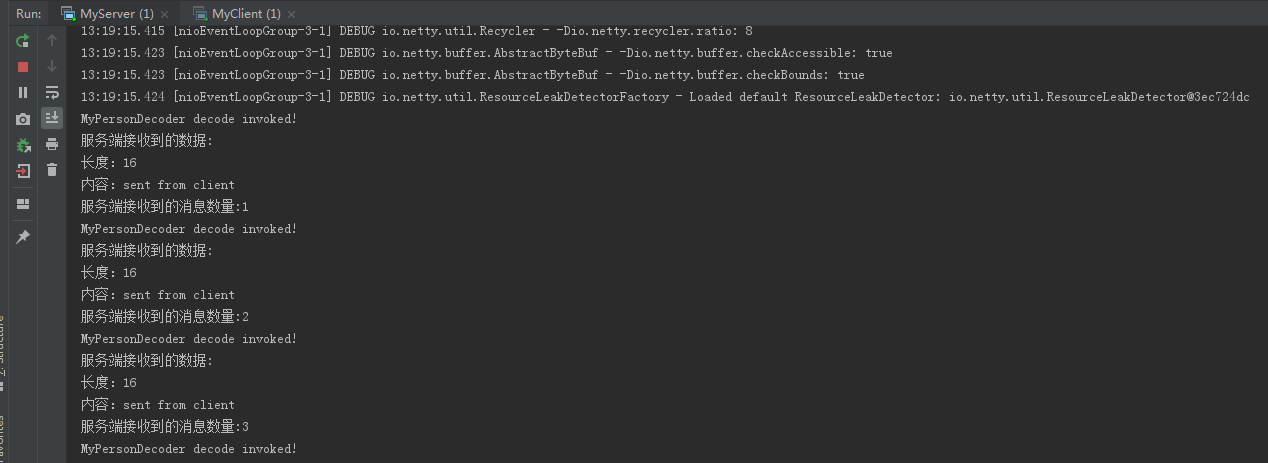
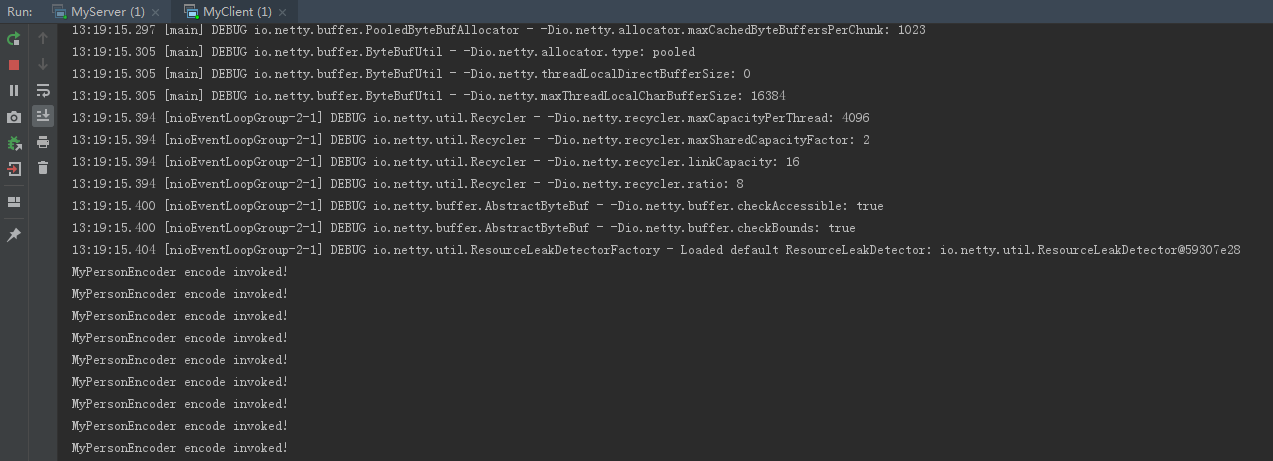
分别启动服务端和客户端查看效果:
服务端效果如图:
客户端效果如图:
《精通并发与Netty》学习笔记(14 - 解决TCP粘包拆包(二)Netty自定义协议解决粘包拆包)的更多相关文章
- SAS学习笔记14 利用SAS绘制地图(二)
笔记9讲过利用SAS绘制地图,这次接着讲 用中国各地(不含港澳台)的平均湿度数据来绘制地图 在地图上标出地名 宏%maplabel有9个参数,依次为:地图文件名.包含区域名称的数据集文件.输出的注释数 ...
- 并发编程学习笔记(14)----ThreadPoolExecutor(线程池)的使用及原理
1. 概述 1.1 什么是线程池 与jdbc连接池类似,在创建线程池或销毁线程时,会消耗大量的系统资源,因此在java中提出了线程池的概念,预先创建好固定数量的线程,当有任务需要线程去执行时,不用再去 ...
- Netty学习笔记-入门版
目录 Netty学习笔记 前言 什么是Netty IO基础 概念说明 IO简单介绍 用户空间与内核空间 进程(Process) 线程(thread) 程序和进程 进程切换 进程阻塞 文件描述符 文件句 ...
- SQL反模式学习笔记14 关于Null值的使用
目标:辨别并使用Null值 反模式:将Null值作为普通的值,反之亦然 1.在表达式中使用Null: Null值与空字符串是不一样的,Null值参与任何的加.减.乘.除等其他运算,结果都是Null: ...
- Ext.Net学习笔记14:Ext.Net GridPanel Grouping用法
Ext.Net学习笔记14:Ext.Net GridPanel Grouping用法 Ext.Net GridPanel可以进行Group操作,例如: 如何启用Grouping功能呢?只需要在Grid ...
- Netty学习笔记(二) 实现服务端和客户端
在Netty学习笔记(一) 实现DISCARD服务中,我们使用Netty和Python实现了简单的丢弃DISCARD服务,这篇,我们使用Netty实现服务端和客户端交互的需求. 前置工作 开发环境 J ...
- Netty 学习笔记(1)通信原理
前言 本文主要从 select 和 epoll 系统调用入手,来打开 Netty 的大门,从认识 Netty 的基础原理 —— I/O 多路复用模型开始. Netty 的通信原理 Netty 底层 ...
- golang学习笔记14 golang substring 截取字符串
golang学习笔记14 golang substring 截取字符串golang 没有java那样的substring函数,但支持直接根据 index 截取字符串mystr := "hel ...
- mybatis学习笔记(14)-查询缓存之中的一个级缓存
mybatis学习笔记(14)-查询缓存之中的一个级缓存 标签: mybatis mybatis学习笔记14-查询缓存之中的一个级缓存 查询缓存 一级缓存 一级缓存工作原理 一级缓存測试 一级缓存应用 ...
- Python3+Selenium3+webdriver学习笔记14(等待判断 鼠标事件 )
!/usr/bin/env python -*- coding:utf-8 -*-'''Selenium3+webdriver学习笔记14(等待判断 鼠标事件 )'''from selenium im ...
随机推荐
- duilib学习领悟(3)
世上本无窗口,窗口只是人的眼睛和电脑屏幕及鼠标键盘相互操作后的视觉效果! 下面我们来看看我们之前讲过的代码: class CDuiFrameWnd : public CWindowWnd, publi ...
- rm -rf修改为mv命令的脚本
使用mv命令代替 rm命令,将文件移动到一个垃圾箱文件夹中,并记录删除日志. PARA_CNT=$# TRASH_DIR="/main/.rm_trash/files" for i ...
- mysql 5.5 编码设置为utf8 转载自:http://outofcontrol.ca/thoughts/comments/change-mysql-5.5-default-character-set-to-utf8
Change MySQL 5.5 default character-set to UTF8 连接里是linux下的 在window下my.ini Add under [client] the fo ...
- 自己编写jQuery插件之Tab切换
自己编写jQuery插件之 Tabs切换 jquery ui 带有Tabs切换插件,但其css样式太难维护,引用的东西太多,因此就自己写了个. 起初我Html代码架子是这样的: <div cla ...
- 定时器TIM,pwm
一.定时器 1. 定义 设置等待时间,到达后则执行指定操作的硬件. 2. STM32F407的定时器有以下特征 具有基本的定时功能,也有PWM输出(灯光控制.电机的转速).脉冲捕获功能( ...
- webpack+vue+Eslint+husky+lint-staged 统一项目编码规范
一. Eslint: 为什么我们要在项目中使用ESLint ESLint可以校验我们写的代码,给代码定义一个规范,项目里的代码必须按照这个规范写. 加入ESLint有非常多的好处,比如说可以帮助我们避 ...
- 国庆集训Day1
T1 divide 题意: 有\(n\)个数 \(a_1, a_2,..., a_n\) 有m个数\(b_1, b_2,..., b_n\) 令\(a = a_1\times a_2\,\times ...
- CSS定位中“父相子绝”
一.定位的介绍 定位有三种:相对定位(position:relative).绝对定位(position:absolute).固定定位(position:fixed) 二.三种定位的用法,特点和实例 2 ...
- CPU中断的机制概论
cpu的数学模型是图灵机,图灵机是一个线性运行指令的机器,它的执行序列是完全确定的,中断机制是使得cpu具有异步处理能力的机制,就是先暂停他的序列 来执行一些其他指令.具体来说就是,从硬件实现上,其 ...
- Elasticsearch的java客户端JEST的操作
准备 把Elasticsearch安装好 安装百度上有很多资料. 导入必要的包 <parent> <groupId>org.springframework.boot</g ...