
android studio 1.0 开发 ndk 调用 c++ so库
一个没用过java和安卓的人使用android studio开发带c++ so库的安卓程序用例(以ndk的hello-jni为例),对于不熟悉java和安卓的人来说这个很花时间,希望通过这篇文章帮助跟我一样的人,欢迎随便转载:
1.下载安装android sdk和ndk,ndk r10(目前最新)是单独可以编译c++的,无需cygwin。
apply plugin: 'com.android.application'

android {

    compileSdkVersion 21

    buildToolsVersion "21.1.2"

    defaultConfig {

        applicationId "com.sample.hello"

        minSdkVersion 15

        targetSdkVersion 21

        versionCode 1

        versionName "1.0"

    }

    buildTypes {

        release {

            minifyEnabled false

            proguardFiles getDefaultProguardFile('proguard-android.txt'), 'proguard-rules.pro'

        }

    }

    sourceSets {

        main {

            jniLibs.srcDirs = ['libs']

        }

    }

}

dependencies {

    compile fileTree(dir: 'libs', include: ['*.jar'])

    compile 'com.android.support:appcompat-v7:21.0.3'

}
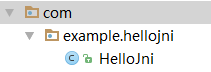
/*

 * Copyright (C) 2009 The Android Open Source Project

 *

 * Licensed under the Apache License, Version 2.0 (the "License");

 * you may not use this file except in compliance with the License.

 * You may obtain a copy of the License at

 *

 *      http://www.apache.org/licenses/LICENSE-2.0

 *

 * Unless required by applicable law or agreed to in writing, software

 * distributed under the License is distributed on an "AS IS" BASIS,

 * WITHOUT WARRANTIES OR CONDITIONS OF ANY KIND, either express or implied.

 * See the License for the specific language governing permissions and

 * limitations under the License.

 */

package com.example.hellojni;

public class HelloJni

{

    /* A native method that is implemented by the

     * 'hello-jni' native library, which is packaged

     * with this application.

     */

    public native String  stringFromJNI(String msg);

    /* This is another native method declaration that is *not*

     * implemented by 'hello-jni'. This is simply to show that

     * you can declare as many native methods in your Java code

     * as you want, their implementation is searched in the

     * currently loaded native libraries only the first time

     * you call them.

     *

     * Trying to call this function will result in a

     * java.lang.UnsatisfiedLinkError exception !

     */

    public native String  unimplementedStringFromJNI();

    /* this is used to load the 'hello-jni' library on application

     * startup. The library has already been unpacked into

     * /data/data/com.example.hellojni/lib/libhello-jni.so at

     * installation time by the package manager.

     */

    static {

        System.loadLibrary("hello-jni");

    }

}
import com.example.hellojni.HelloJni;finalEditText editText =(EditText) findViewById(R.id.editText);
HelloJni hj =newHelloJni();
editText.setText(hj.stringFromJNI("this is java!"));
LOCAL_CFLAGS := -std=c99
android studio 1.0 开发 ndk 调用 c++ so库的更多相关文章
- Android Studio 3.0 下载 使用新功能介绍
谷歌2017发布会更新了挺多内容的,而且也发布了AndroidStudio3.0预览版,一些功能先睹为快.(英语一般,有些翻译不太好) 下载地址 https://developer.android.g ...
- Android Studio 3.0 新特性
最新Android Studio版本是Android Studio 3.0,本文提供了所有新功能和更改的摘要. 所有这些功能都可以在最新的金丝雀版本中发布,但beta测试版本可能尚未提供. 核心IDE ...
- Android Studio 1.0.1 + Genymotion安卓模拟器打造高效安卓开发环境
我们开发安卓大多是使用Eclipse和安卓SDK中自带的安卓模拟器.当然,Google早就推出了自己的安卓开发环境——Android studio,在不久前,Google发布了Android Stud ...
- [Android] 环境配置之正式版Android Studio 1.0
昨天看见 Android Studio 1.0 正式版本发布了:心里挺高兴的. 算是忠实用户了吧,从去年开发者大会一开始出现 AS 后就开始使用了:也是从那时开始就基本没有用过 Eclipse 了:一 ...
- [Android] android studio 2.0即时运行功能探秘
即时运行instant Run是android studio 2中,开发人员最关心的特性之一 在google发布studio 2.0之后,马上更新体验了一把,然而发现,并没快多少,说好的即时运行呢? ...
- 用Android studio进行 OpenCV 开发的第一个项目
我的天! 折腾了好久终于搭建成功了第一个项目. 项目环境: Windows 7 家庭普通版 64位 Android studio 1.5.1 OpenCV-2.4.9-android-sdk 基于 ...
- Android studio 百度地图开发(2)地图定位
Android studio 百度地图开发(2)地图定位 email:chentravelling@163.com 开发环境:win7 64位,Android Studio,请注意是Android S ...
- Android Studio 1.0.2项目实战——从一个APP的开发过程认识Android Studio
Android Studio 1.0.1刚刚发布不久,谷歌紧接着发布了Android Studio 1.0.2版本,和1.0.0一样,是一个Bug修复版本.在上一篇Android Studio 1.0 ...
- 告别编译运行 ---- Android Studio 2.0 Preview发布Instant Run功能
以往的Android开发有一个头疼的且拖慢速度的问题,就是你每改一行代码要想看到结果必须要编译运行到手机或者模拟器上,而且需要从头(可能是登录界面)一直点击到你修改的界面为止.开发一个完整的Andro ...
随机推荐
- windows下Meteor+AngularJS开发的坑
有复杂的地方我再开贴记录,这里只记录容易解决的坑. 1. windows下手工增加smart package.直接将下载下来的包扔到meteor package中.记得将文件夹名字改得和smart.j ...
- 表格搞定 Asp.net Web 状态管理
最近在网上搜罗了 ASP.NET WEB 状态管理方面的一些内容,终于把这些内容整合总结了一下. 1. 希望自己通过整理,能够掌握一些,为自己投资. 2. 以便自己忘记,又要浪费时间搜罗. 3. 希望 ...
- 说说SQL Server 网络配置
打开Sql Server Configuration Manager,里面显示了SQL Server的网络配置,这些到底表示什么含义呢? 图一:MSSQLSERVER的协议 这些配置选项,其实就是为了 ...
- 提供程序不支持 DatabaseExists
如果Oracle CodeFirst模式下要用EFProviderWrapperToolkit,那么会报告以下错误: 提供程序不支持 DatabaseExists. 这个错误是因为Oracle Cod ...
- org.artofsolving.jodconverter.office.OfficeException: failed to start and connect
org.artofsolving.jodconverter.office.OfficeException: failed to start and connect docviewer 调用 openo ...
- myeclipse转到函数定义的方法去
转到函数的定义CTRl+鼠标左击 myeclipse自动补全的快捷键 alt+/
- jQuery通过parent()和parents()方法访问父级元素
<div class="inputGroup"> <p>2.您的最高学历是?</p> <label><input type=& ...
- EF-DbUpdateException--实体类和数据库列不对应的解决方案
错误信息 1.VS实体类里面的字段 2数据库里面的字段 猜测是因为字段数不匹配导致的 3删除多余字段 5.结果 错误信息贴上: -------------------------Log_Header- ...
- ArcGIS API for JavaScript(2)-ArcGIS Server发布要素图层服务
1.前言 上一篇该系列的文章我们主要讲了一下基础Web地图搭建,这篇我们主要讲一下ArcGIS Server发布服务,并且如何调用服务.将自己的数据加载到Web地图当中来,实现Web端浏览数据. 2. ...
- 移动混合应用HTML5数据查询优化
项目介绍 pheongap混合应用,跨平台,做应用加工厂提供应用模板编辑器~ 本地应用,完全是模拟IOS,安卓原生应用的实现,所以支持14种手势,所有PPT动画,视觉差效果,等等功能组合... 这是I ...