
二十四种设计模式:迭代器模式(Iterator Pattern)
迭代器模式(Iterator Pattern)
介绍
提供一种方法顺序访问一个聚合对象中各个元素,而又不需暴露该对象的内部表示。
示例
有一个Message实体类,某聚合对象内的各个元素均为该实体对象,现在要提供一种方法顺序地访问这个聚合对象中的各个元素。
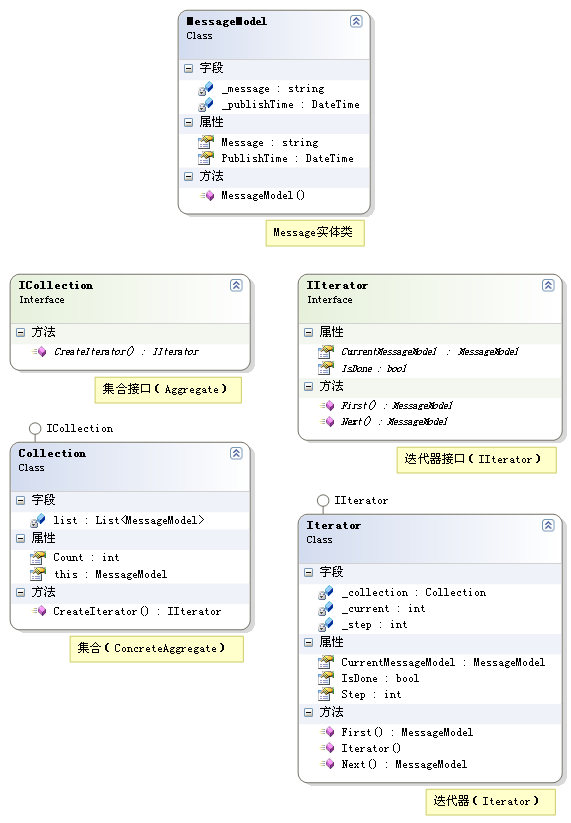
MessageModel
using System;

using System.Collections.Generic;

using System.Text;

namespace Pattern.Iterator

{

    /// <summary>

    /// Message实体类

    /// </summary>

    public class MessageModel

    {

        /// <summary>

        /// 构造函数

        /// </summary>

        /// <param name="msg">Message内容</param>

        /// <param name="pt">Message发布时间</param>

        public MessageModel(string msg, DateTime pt)

        {

            this._message = msg;

            this._publishTime = pt;

        }

        private string _message;

        /// <summary>

        /// Message内容

        /// </summary>

        public string Message

        {

            get { return _message; }

            set { _message = value; }

        }

        private DateTime _publishTime;

        /// <summary>

        /// Message发布时间

        /// </summary>

        public DateTime PublishTime

        {

            get { return _publishTime; }

            set { _publishTime = value; }

        }

    }

}
ICollection
using System;

using System.Collections.Generic;

using System.Text;

namespace Pattern.Iterator

{

    /// <summary>

    /// 集合接口(Aggregate)

    /// </summary>

    public interface ICollection

    {

        /// <summary>

        /// 创建迭代器对象

        /// </summary>

        /// <returns></returns>

        IIterator CreateIterator();

    }

}
Collection
using System;

using System.Collections.Generic;

using System.Text;

namespace Pattern.Iterator

{

    /// <summary>

    /// 集合(ConcreteAggregate)

    /// </summary>

    public class Collection : ICollection

    {

        private List<MessageModel> list = new List<MessageModel>();

        /// <summary>

        /// 创建迭代器对象

        /// </summary>

        /// <returns></returns>

        public IIterator CreateIterator()

        {

            return new Iterator(this);

        }

        /// <summary>

        /// 集合内的对象总数

        /// </summary>

        public int Count

        {

            get { return list.Count; }

        }

        /// <summary>

        /// 索引器

        /// </summary>

        /// <param name="index">index</param>

        /// <returns></returns>

        public MessageModel this[int index]

        {

            get { return list[index]; }

            set { list.Add(value); }

        }

    }

}
IIterator
using System;

using System.Collections.Generic;

using System.Text;

namespace Pattern.Iterator

{

    /// <summary>

    /// 迭代器接口(IIterator)

    /// </summary>

    public interface IIterator

    {

        /// <summary>

        /// 第一个对象

        /// </summary>

        /// <returns></returns>

        MessageModel First();

        /// <summary>

        /// 下一个对象

        /// </summary>

        /// <returns></returns>

        MessageModel Next();

        /// <summary>

        /// 当前对象

        /// </summary>

        MessageModel CurrentMessageModel { get; }

        /// <summary>

        /// 是否迭代完毕

        /// </summary>

        bool IsDone { get; }

    }

}
Iterator
using System;

using System.Collections.Generic;

using System.Text;

namespace Pattern.Iterator

{

    /// <summary>

    /// 迭代器(Iterator)

    /// </summary>

    public class Iterator : IIterator

    {

        private Collection _collection;

        private int _current = 0;

        private int _step = 1;

        /// <summary>

        /// 构造函数

        /// </summary>

        /// <param name="collection"></param>

        public Iterator(Collection collection)

        {

            this._collection = collection;

        }

        /// <summary>

        /// 第一个对象

        /// </summary>

        /// <returns></returns>

        public MessageModel First()

        {

            _current = 0;

            return _collection[_current];

        }

        /// <summary>

        /// 下一个对象

        /// </summary>

        /// <returns></returns>

        public MessageModel Next()

        {

            _current += _step;

            if (!IsDone)

            {

                return _collection[_current];

            }

            else

            {

                return null;

            }

        }

        /// <summary>

        /// 当前对象

        /// </summary>

        public MessageModel CurrentMessageModel

        {

            get { return _collection[_current]; }

        }

        /// <summary>

        /// 是否迭代完毕

        /// </summary>

        public bool IsDone

        {

            get { return _current >= _collection.Count ? true : false; }

        }

        /// <summary>

        /// 步长

        /// </summary>

        public int Step

        {

            get { return _step; }

            set { _step = value; }

        }

    }

}
Test
using System;

using System.Data;

using System.Configuration;

using System.Collections;

using System.Web;

using System.Web.Security;

using System.Web.UI;

using System.Web.UI.WebControls;

using System.Web.UI.WebControls.WebParts;

using System.Web.UI.HtmlControls;

using I = Pattern.Iterator;

public partial class Iterator : System.Web.UI.Page

{

    protected void Page_Load(object sender, EventArgs e)

    {

        I::Collection collection = new I::Collection();

        collection[0] = new I::MessageModel("第1条信息", DateTime.Now);

        collection[1] = new I::MessageModel("第2条信息", DateTime.Now);

        collection[2] = new I::MessageModel("第3条信息", DateTime.Now);

        collection[3] = new I::MessageModel("第4条信息", DateTime.Now);

        collection[4] = new I::MessageModel("第5条信息", DateTime.Now);

        collection[5] = new I::MessageModel("第6条信息", DateTime.Now);

        collection[6] = new I::MessageModel("第7条信息", DateTime.Now);

        collection[7] = new I::MessageModel("第8条信息", DateTime.Now);

        collection[8] = new I::MessageModel("第9条信息", DateTime.Now);

        I::Iterator iterator = new I::Iterator(collection);

        iterator.Step = 2;

        for (I::MessageModel mm = iterator.First(); !iterator.IsDone; mm = iterator.Next())

        {

            Response.Write(mm.Message);

            Response.Write("<br />");

        }

    }

}
运行结果
第1条信息
第3条信息
第5条信息
第7条信息
第9条信息
二十四种设计模式:迭代器模式(Iterator Pattern)的更多相关文章
- 二十四种设计模式:适配器模式(Adapter Pattern)
适配器模式(Adapter Pattern) 介绍将一个类的接口转换成客户希望的另外一个接口.Adapter模式使得原本由于接口不兼容而不能一起工作的那些类可以一起工作.示例有一个Message实体类 ...
- 二十四种设计模式:观察者模式(Observer Pattern)
观察者模式(Observer Pattern) 介绍定义对象间的一种一对多的依赖关系,以便当一个对象的状态发生改变时,所有依赖于它的对象都得到通知并自动刷新. 示例有一个Message实体类,某些对象 ...
- 二十四种设计模式:装饰模式(Decorator Pattern)
装饰模式(Decorator Pattern) 介绍动态地给一个对象添加一些额外的职责.就扩展功能而言,它比生成子类方式更为灵活.示例有一个Message实体类,某个对象对它的操作有Insert()和 ...
- 二十四种设计模式:单例模式(Singleton Pattern)
单例模式(Singleton Pattern) 介绍保证一个类仅有一个实例,并提供一个访问它的全局访问点. 示例保证一个类仅有一个实例. Singleton using System; using S ...
- 设计模式 - 迭代器模式(iterator pattern) 具体解释
迭代器模式(iterator pattern) 详细解释 本文地址: http://blog.csdn.net/caroline_wendy 迭代器模式(iterator pattern) : 提供一 ...
- 二十四种设计模式:命令模式(Command Pattern)
命令模式(Command Pattern) 介绍将一个请求封装为一个对象,从而使你可用不同的请求对客户进行参数化:对请求排队或记录请求日志,以及支持可取消的操作. 示例有一个Message实体类,某个 ...
- 二十四种设计模式:解释器模式(Interpreter Pattern)
解释器模式(Interpreter Pattern) 介绍给定一个语言, 定义它的文法的一种表示,并定义一个解释器,该解释器使用该表示来解释语言中的句子. 示例有一个Message实体类,某个类对它的 ...
- 二十四种设计模式:策略模式(Strategy Pattern)
策略模式(Strategy Pattern) 介绍定义一系列的算法,把它们一个个封装起来,并且使它们可相互替换.本模式使得算法的变化可独立于使用它的客户. 示例有一个Message实体类,对它的操作有 ...
- 二十四种设计模式:组合模式(Composite Pattern)
组合模式(Composite Pattern) 介绍将对象组合成树形结构以表示"部分-整体"的层次结构.它使得客户对单个对象和复合对象的使用具有一致性.示例有一个Message实体 ...
随机推荐
- JS实现判断滚动条滚到页面底部并执行事件的方法
需要了解三个dom元素,分别是:clientHeight.offsetHeight.scrollTop. clientHeight:这个元素的高度,占用整个空间的高度,所以,如果一个div有滚动条,那 ...
- leetcode 之Remove Nth Node From End of List(19)
这题比较简单,方法有很多.其中一种比较有意思的做法是设置两个指针,一个先走n步,然后再一起走.一个到了末尾,另一个也就确定了要删除元素的位置. ListNode *removeNthFromEnd(L ...
- python 结束练习
1.文件操作有哪些模式?请简述各模式的作用 r 只读模式 r+ 读写 rb w 只写模式 w+ 写读 wb x 只写模式 x+ 写读 xb a 追加模式 a+ 写读 ab 2.s = '**hello ...
- mysql5.7 ERROR 1819 (HY000): Your password does not satisfy the current policy requirements
mysql5.7初次登录使用提示 ERROR 1820 (HY000): You must reset your password using ALTER USER statement before ...
- 数据库之各种键(Key)
超键(super key):在关系中能唯一标识元组的属性集称为关系模式的超键候选键(candidate key):不含有多余属性的超键称为候选键主键(primary key):用户选作元组标识的一个候 ...
- 走进 Akka.NET
官方文档:https://getakka.net/index.html 官网:https://petabridge.com/ 一.Akka.NET 是什么? Akka 是一个构建高并发.分布式和弹性消 ...
- git 命令小结
一.git 版本管理 1.git log: 获取当前版本之前的所有操作 2.git log --pretty=oneline:获取当前版本的前三和后三个操作 3.git reflog :获取当前项目下 ...
- python模块安装路径
Unix(Linux): prefix/lib/pythonX.Y/site-packages 默认路径:/usr/local/lib/pythonX.Y/site-packages 另外,在Unix ...
- 三:Ionic Framework开发Android应用
第一步:添加Android平台 ionic cordova platform add android 第二步:编译Android应用 中间等待的过程有点长,需要耐心等待,生成的apk此时可以复制至平板 ...
- IO复用之epoll系列
epoll是什么? epoll是Linux内核为处理大批量文件描述符而作了改进的poll,是Linux下多路复用IO接口select/poll的增强版本,它能显著提高程序在大量并发连接中只有少量活跃的 ...