
【ExtJS】FormPanel 布局(二)
周末2天好好学习了下布局,现在都给实现了吧。
5、border布局:

Border布局将容器分为五个区域:north、south、east、west和center。除了center区域外,其他区域都需要设置宽高,center区域宽高与其他区域有关。容器内部除去west、north、east、south的宽高,由center区域自动填满。
 1   Ext.create('Ext.panel.Panel',{

         width: 700,

         height: 500,

         title: 'Border Layout',

         layout: 'border',

         renderTo: 'border',

         margin: '50 150 50 50',

         border : true,

         defaults:{

             xtype: 'panel'

         },

         items: [{

             title: 'North Region is resizable',

             region: 'north',

             height: 100,

             html: 'north',

             split: true

         },{

             title: 'South Region is resizable',

             region: 'south',

             height: 100,

             html: 'south',

             split: true

         },{

             title: 'West Region is collapsible',

             region:'west',

             width: 200,

             collapsible: true,

             html: 'west',

             margin: '0 5 0 0',

             layout: 'fit'

         },{

             title: 'East Region is collapsible',

             region:'east',

             width: 200,

             collapsible: true,

             html: 'east',

             margin: '0 0 0 5',

             layout: 'fit'

         },{

             title: 'Center Region',

             region: 'center',

             html: 'center',

             layout: 'fit'

         }]

     })
效果:
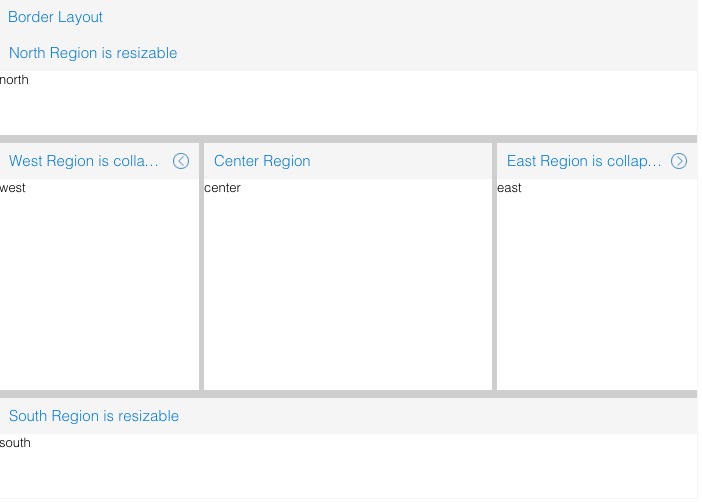
配置项:
1、region:Border布局下各区域的默认权重. 当某区域项不含weight属性时使用. 此对象必须包含所有区域 ("north", "south", "east" 和 "west").
2、margin:为组件设置margin. margin 可以是一个数值适用于所有边 或者它可以是每个样式的CSS样式规范, 例如: '10 5 3 10'.
6、card布局:
     var navigate = function(panel, direction){

         var layout = panel.getLayout();

         layout[direction]();

         Ext.getCmp('move-prev').setDisabled(!layout.getPrev());

         Ext.getCmp('move-next').setDisabled(!layout.getNext());

     };

     var card = Ext.create('Ext.panel.Panel', {

         title: 'Card Layout',

         width: 400,

         height: 200,

         layout: 'card',

         activeItem: 0,

         renderTo: 'card',

         margin: '50 150 50 50',

         border: true,

         defaults: {

             xtype: 'panel',

             border: true

         },

         bbar: [{

             id: 'move-prev',

             text: 'Back',

             handler: function(btn) {

                 navigate(btn.up("panel"), "prev");

             },

             disabled: true

         },

         '->',

         {

             id: 'move-next',

             text: 'Next',

             handler: function(btn) {

                 navigate(btn.up("panel"), "next");

             }

         }],

         items: [{

             id: 'card-0',

             html: 'Step1'

         },{

             id: 'card-1',

             html: 'Step2'

         },{

             id: 'card-2',

             html: 'Step3'

         }]

     });
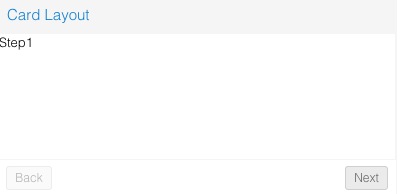
效果:


7、Column布局:
Column布局为Auto布局的子类,用于设置子元素的宽度。
     var column = Ext.create('Ext.panel.Panel',{

         title: 'Column Layout',

         width: 400,

         layout: 'column',

         margin: '50 150 50 50',

         border: true,

         renderTo: 'column',

         defaults: {

             xtype: 'panel',

             border: true,

             margin: '2 2 2 2',

             height: 100

         },

         items: [{

             html: 'column1',

             columnWidth: 1/2

         },{

             html: 'column2',

             columnWidth: .25

         },{

             html: 'column3',

             columnWidth: 1/4

         }]

     });
效果:

8、Container布局:
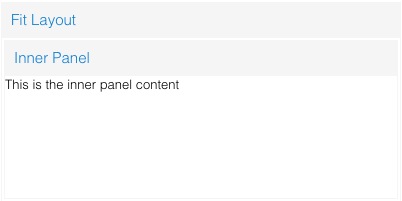
这个是一个布局的基类, 能使当容器只包含一个子元素时, 子元素自动填满容器. 此类应该通过layout :'fit' 属性进行扩展或创建, 通常应该不需要通过 类名关键字进行直接创建.
Fit并没有任何直接的配置参数(继承的除外), 要通过Fit布局使一个面板填充一个容器, 只需简单的设置容器layout: 'fit'属性, 然后给容器 添加一个唯一面板即可.
     var fit = Ext.create('Ext.panel.Panel',{

         title: 'Fit Layout',

         width: 400,

         height: 200,

         layout: 'fit',

         margin: '50 150 50 50',

         border: true,

         renderTo: 'fit',

         items: {

             title: 'Inner Panel',

             html: 'This is the inner panel content!',

                margin: '2 2 2 2',

             border: true

         }

     });
效果:
9、VBox与HBox布局:
     var hbox = Ext.create('Ext.panel.Panel',{

         width: 400,

         height: 300,

         title: "HBoxLayout Panel",

         border: true,

         margin: '50 150 50 50',

         renderTo: 'hbox',

         layout: {

             type: 'hbox',

             align: 'stretch'

         },

         items: [{

             xtype: 'panel',

             title: 'Inner Panel One',

             html: 'One',

             border: true,

             margin: '2 2 2 2',

             flex: 2

         },{

             xtype: 'panel',

             title: 'Inner Panel Two',

             html: 'One',

             border: true,

             margin: '2 2 2 2',

             flex: 1

         },{

             xtype: 'panel',

             title: 'Inner Panel Three',

             html: 'One',

             border: true,

             margin: '2 2 2 2',

             flex: 1

         }]

     });
VBox:
     var vbox = Ext.create('Ext.panel.Panel',{

         width: 400,

         height: 300,

         title: "VBoxLayout Panel",

         border: true,

         margin: '50 150 50 50',

         renderTo: 'vbox',

         layout: {

             type: 'vbox',

             align: 'center'

         },

         renderTo: 'vbox',

         items: [{

             xtype: 'panel',

             title: 'Inner Panel One',

             html: 'One',

             border: true,

             margin: '2 2 2 2',

             width: 250,

             flex: 2

         },

         {

             xtype: 'panel',

             title: 'Inner Panel Two',

             html: 'Two',

             border: true,

             margin: '2 2 2 2',

             width: 250,

             flex: 4

         },

         {

             xtype: 'panel',

             title: 'Inner Panel Three',

             html: 'Three',

             border: true,

             margin: '2 2 2 2',

             width: '50%',

             flex: 4

         }]

     });
效果:


10、Table布局:
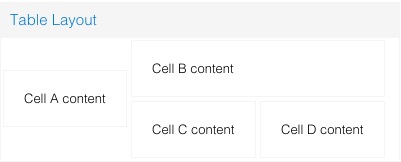
1. columns:设置表格布局的列数;
     var table = Ext.create('Ext.panel.Panel',{

         title: 'Table Layout',

         width: 400,

         height: 160,

         renderTo: 'table',

         border: true,

         margin: '50 150 50 50',

         layout: {

             type: 'table',

             columns: 3

         },

         defaults: {             border: true,

             margin: '2 2 2 2',

         },

         items: [{

             html: 'Cell A content',

             rowspan: 2

         },{

             html: 'Cell B content',

             colspan: 2

         },{

             html: 'Cell C content',

             cellCls: 'highlight'

         },{

             html: 'Cell D content'

         }]

     });
效果:
这些都是一些基本布局,更多复杂应用也只不过是布局的嵌套,具体实现成什么样,还得看实际上的需求。
【ExtJS】FormPanel 布局(二)的更多相关文章
- ExtJs FormPanel布局
FormPanel有两种布局:form和column,form是纵向布局,column为横向布局.默认为后者.使用layout属性定义布局类型.对于一个复杂的布局表单,最重要的是正确分割,分割结果直接 ...
- Extjs关于FormPanel布局
Extjs关于FormPanel布局 FormPanel有两种布局:form和column,form是纵向布局,column为横向布局.默认为后者.使用layout属性定义布局类型.对于一个复杂的布局 ...
- ExtJs常用布局--layout详解(含实例)
序言: 笔者用的ExtJs版本:ext-3.2.0 ExtJs常见的布局方式有:border.form.absolute.column.accordion.table.fit.card.anchor ...
- 无废话ExtJs 入门教程二十一[继承:Extend]
无废话ExtJs 入门教程二十一[继承:Extend] extjs技术交流,欢迎加群(201926085) 在开发中,我们在使用视图组件时,经常要设置宽度,高度,标题等属性.而这些属性可以通过“继承” ...
- 无废话ExtJs 入门教程二十[数据交互:AJAX]
无废话ExtJs 入门教程二十[数据交互:AJAX] extjs技术交流,欢迎加群(521711109) 1.代码如下: 1 <!DOCTYPE html PUBLIC "-//W3C ...
- 无废话ExtJs 入门教程二[Hello World]
无废话ExtJs 入门教程二[Hello World] extjs技术交流,欢迎加群(201926085) 我们在学校里学习任何一门语言都是从"Hello World"开始,这里我 ...
- 基本CSS布局二
基本CSS布局二------基本页面布局二 /*主面板样式*/ #container { width:100%; margin:0px auto;/*主面板DIV居中*/ } /*顶部面板样式*/ # ...
- 【ExtJS】FormPanel 布局(一)
准备工作,布置一个最简单的Form,共5个组件,都为textfield. Ext.onReady(function(){ Ext.create('Ext.form.Panel', { width: 5 ...
- Extjs Column布局常见问题及解决方法
原文地址:http://blog.csdn.net/weoln/article/details/4339533 第一次用Extjs的column布局时遇见了很多问题,记录下来,供大家参考.column ...
随机推荐
- 修改mysql时区的三种方法
方法一:通过mysql命令行模式下动态修改 1.1 查看mysql当前时间,当前时区 > select curtime(); #或select now()也可以 +-----------+ | ...
- fiddler-实现https抓包
1. fiddler设置-fiddler options-https项进行设置,如下: 2. ie代理设置:连接-局域网设置 3. 下载fiddler根证书,ie浏览器上打开地址:http://1 ...
- .net 可选参数和命名参数
可选参数,可以为方法的参数设置默认值,在调用方法的时候,如果不传递参数,就是执行默认参数. class Program { , string s = "A", DateTime d ...
- scrapy爬虫框架入门实战
博客 https://www.jianshu.com/p/61911e00abd0 项目源码 https://github.com/ppy2790/jianshu/blob/master/jiansh ...
- C#设计模式--工厂模式之简单模式
简单工厂模式定义:简单工厂模式是属于创建型模式,又叫做静态工厂方法(Static Factory Method)模式,但不属于23种GOF设计模式之一.简单工厂模式是由一个工厂对象决定创建出哪一种产品 ...
- 一步一步教你如何制件 ZKEACMS 的扩展组件/插件
前言 如果你还不知道ZKEACMS,不妨先了解一下. ASP.NET MVC 开源建站系统 ZKEACMS 推荐,从此网站“拼”起来 官方地址:http://www.zkea.net/zkeacms ...
- Ocelot Consul ACL
Ocelot允许您指定服务发现提供程序,并使用它来查找Ocelot正在将请求转发给下游服务的主机和端口.目前,这仅在GlobalConfiguration部分中受支持,这意味着所有ReRoute将使用 ...
- Asp.Net Core下的两种路由配置方式
与Asp.Net Mvc创建区域的时候会自动为你创建区域路由方式不同的是,Asp.Net Core下需要自己手动做一些配置,但更灵活了. 我们先创建一个区域,如下图 然后我们启动访问/Manage/H ...
- Bitnami WordPress如何让默认URL指向WordPress目录?
Bitnami WordPress下载地址:https://bitnami.com/stack/wordpress/installer ,根据自己操作系统选择对应版本,我是windows server ...
- Kettle 解决数据锁的问题(事务(进程 ID 51)与另一个进程被死锁在 锁 资源上)
1.Kettle做了一个作业, 执行的时候问题发生在步骤2和步骤3之间,也就是步骤2还未完全执行完的时候,步骤3就要更新步骤2插入的数据,造成死锁.(我的理解是既然都分开作业了,那么每个作业都是一个单 ...