
EF Core中Key属性相同的实体只能被跟踪(track)一次
在EF Core的DbContext中,我们可以通过DbContext或DbSet的Attach方法,来让DbContext上下文来跟踪(track)一个实体对象,假设现在我们有User实体对象,其UserCode为Key属性:
using System;

using System.Collections.Generic;

using System.ComponentModel.DataAnnotations;

namespace EFCoreDB.Entities

{

    public partial class User

    {

        public User()

        {

            UserRole = new HashSet<UserRole>();

        }

        public int Id { get; set; }

        [Key]

        public string UserCode { get; set; }

        public string Username { get; set; }

        public string Password { get; set; }

        public string MailAddress { get; set; }

        public string FirstName { get; set; }

        public string MiddleName { get; set; }

        public string LastName { get; set; }

        public string CompanyCode { get; set; }

        public DateTime? CreateTime { get; set; }

        public int? DataStatus { get; set; }

        public ICollection<UserRole> UserRole { get; set; }

    }

}
现在我们使用DbSet的Attach方法将两个UserCode都为"User001"的User实体Attach到一个DbContext:
using EFCoreDB.Entities;

using System;

namespace EFCoreDB

{

    class Program

    {

        static void Main(string[] args)

        {

            using (FinanceDigitalToolContext dbContext = new FinanceDigitalToolContext())

            {

                User user = new User() { UserCode = "User001", Username = "Tom" };

                dbContext.User.Attach(user);

                user = new User() { UserCode = "User001", Username = "Jim" };

                dbContext.User.Attach(user);

                dbContext.SaveChanges();

            }

            Console.WriteLine("Press key to quit....");

            Console.ReadLine();

        }

    }

}
运行结果如下:

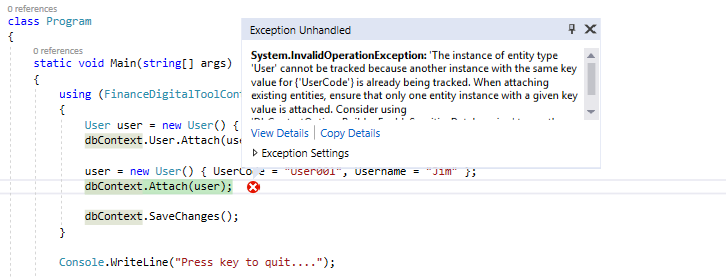
结果在Attach第二个User实体的时候代码抛出了异常,异常信息如下:
The instance of entity type 'User' cannot be tracked because another instance with the same key value for {'UserCode'} is already being tracked. When attaching existing entities, ensure that only one entity instance with a given key value is attached. Consider using 'DbContextOptionsBuilder.EnableSensitiveDataLogging' to see the conflicting key values.
异常信息显示,当前DbContext中已经有一个相同UserCode值的实体被跟踪了,所以Attach第二个User实体的时候失败了。
同样如果我们改为用DbContext的Attach方法来添加第二个User实体也会失败:
using EFCoreDB.Entities;

using System;

namespace EFCoreDB

{

    class Program

    {

        static void Main(string[] args)

        {

            using (FinanceDigitalToolContext dbContext = new FinanceDigitalToolContext())

            {

                User user = new User() { UserCode = "User001", Username = "Tom" };

                dbContext.User.Attach(user);

                user = new User() { UserCode = "User001", Username = "Jim" };

                dbContext.Attach(user);

                dbContext.SaveChanges();

            }

            Console.WriteLine("Press key to quit....");

            Console.ReadLine();

        }

    }

}
但是如果现在我们Attach一个User实体的两个引用是不会报错的,如下所示:
using EFCoreDB.Entities;

using System;

namespace EFCoreDB

{

    class Program

    {

        static void Main(string[] args)

        {

            using (FinanceDigitalToolContext dbContext = new FinanceDigitalToolContext())

            {

                User user1 = new User() { UserCode = "User001", Username = "Tom" };//实体User的第一个引用user1

                dbContext.User.Attach(user1);//Attach user1

                User user2 = user1;//实体User的第二个引用user2,user1和user2实际上指向相同的User实体对象

                dbContext.User.Attach(user2);//Attach user2,不会报错

                dbContext.SaveChanges();

            }

            Console.WriteLine("Press key to quit....");

            Console.ReadLine();

        }

    }

}
结果如下,没有报错:
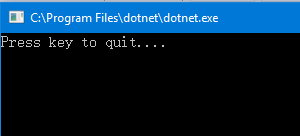
这说明当我们用Attach方法将一个User实体添加到EF Core的DbContext中进行跟踪时,DbContext会判断当前添加的实体是否和DbContext.ChangeTracker.Entries中被跟踪的所有实体是同一个对象,如果是同一个对象,那么其实只是把DbContext.ChangeTracker.Entries中所跟踪实体的EntityState更改为Unchanged,我们可以用下面代码来看看User实体两次Attach后的EntityState值:
using EFCoreDB.Entities;

using Microsoft.EntityFrameworkCore;

using System;

namespace EFCoreDB

{

    class Program

    {

        static void Main(string[] args)

        {

            using (FinanceDigitalToolContext dbContext = new FinanceDigitalToolContext())

            {

                User user1 = new User() { UserCode = "User001", Username = "Tom" };//实体User的第一个引用user1

                dbContext.User.Attach(user1);//Attach user1

                dbContext.Entry(user1).State = EntityState.Added;//修改user1实体的EntityState为Added

                Console.WriteLine($"user1的EntityState为:{dbContext.Entry(user1).State.ToString()}");//显示user1实体的EntityState

                User user2 = user1;//实体User的第二个引用user2,user1和user2实际上指向相同的User实体对象

                dbContext.User.Attach(user2);//Attach user2,不会报错

                Console.WriteLine($"user1的EntityState为:{dbContext.Entry(user1).State.ToString()}");//显示user1实体的EntityState,Attach user2后,user1实体的EntityState变为Unchanged

                dbContext.SaveChanges();

            }

            Console.WriteLine("Press key to quit....");

            Console.ReadLine();

        }

    }

}
结果如下:

EF Core中Key属性相同的实体只能被跟踪(track)一次的更多相关文章
- EF Core中怎么实现自动更新实体的属性值到数据库
我们在开发系统的时候,经常会遇到这种需求数据库表中的行被更新时需要自动更新某些列. 数据库 比如下面的Person表有一列UpdateTime,这列数据要求在行被更新后自动更新为系统的当前时间. Pe ...
- EF Core中如何通过实体集合属性删除从表的数据
假设在数据库中有两个表:Person表和Book表,Person和Book是一对多关系 Person表数据: Book表数据: 可以看到数据库Book表中所有的数据都属于Person表中"F ...
- [小技巧]EF Core中如何获取上下文中操作过的实体
原文地址:https://www.cnblogs.com/lwqlun/p/10576443.html 作者:Lamond Lu 源代码:https://github.com/lamondlu/EFC ...
- EF Core 中多次从数据库查询实体数据,DbContext跟踪实体的情况
使用EF Core时,如果多次从数据库中查询一个表的同一行数据,DbContext中跟踪(track)的实体到底有几个呢?我们下面就分情况讨论下. 数据库 首先我们的数据库中有一个Person表,其建 ...
- 9.翻译系列:EF 6以及EF Core中的数据注解特性(EF 6 Code-First系列)
原文地址:http://www.entityframeworktutorial.net/code-first/dataannotation-in-code-first.aspx EF 6 Code-F ...
- 9.4 翻译系列:EF 6以及 EF Core中的NotMapped特性(EF 6 Code-First系列)
原文链接:http://www.entityframeworktutorial.net/code-first/notmapped-dataannotations-attribute-in-code-f ...
- EF Core 中DbContext不会跟踪聚合方法和Join方法返回的结果,及FromSql方法使用讲解
EF Core中: 如果调用Queryable.Count等聚合方法,不会导致DbContext跟踪(track)任何实体. 此外调用Queryable.Join方法返回的匿名类型也不会被DbCont ...
- EF Core中如何正确地设置两张表之间的关联关系
数据库 假设现在我们在SQL Server数据库中有下面两张表: Person表,代表的是一个人: CREATE TABLE [dbo].[Person]( ,) NOT NULL, ) NULL, ...
- 项目开发中的一些注意事项以及技巧总结 基于Repository模式设计项目架构—你可以参考的项目架构设计 Asp.Net Core中使用RSA加密 EF Core中的多对多映射如何实现? asp.net core下的如何给网站做安全设置 获取服务端https证书 Js异常捕获
项目开发中的一些注意事项以及技巧总结 1.jquery采用ajax向后端请求时,MVC框架并不能返回View的数据,也就是一般我们使用View().PartialView()等,只能返回json以 ...
随机推荐
- inline-block和float的区别,什么时候使用
文章转载于新浪博客http://blog.sina.com.cn/s/blog_5f39af320101qckt.html 只用于学习交流 什么时候使用inline-block,什么时候使用float ...
- 理解Canvas原理
Canvas原理 Canvas我们把它翻译成画布,从字面意思我们就可以知道,不就是可以在上面画东西的布吗.好像很简单,没什么好说的.先看图: 从这几幅图我们可以看到以下几点: 1.每个小方格我们可以看 ...
- Linux基础之命令练习Day3-文件管理:cat,tar,gzip,vim,ln
一. 文件合并 cat命令的用途是连接文件或标准输入并打印.这个命令常用来显示文件内容,或者将几个文件连接起来显示,或者从标准输入读取内容并显示,它常与重定向符号配合使用. 1.命令格式: cat [ ...
- Sql-exec
--显示sql server现有的所有数据库 exec sp_helpdb --查看数据表设置的约束 exec sp_helpconstraint SubjectType --update selec ...
- Linux下C语言操作MySQL数据库
MySQL是Linux系统下广泛使用的开源免费数据库,是Linux应用程序数据存储的首选. Ubuntu下安装 […]
- Windows API编程----枚举系统进程
1.该函数可以检索系统中的每个进程的标识符(进程ID) BOOL WINAPI EnumProcesses( _Out_ DWORD *pProcessIds, _In_ DWORD cb, _Ou ...
- Data Flow ->> OLE DB Destination ->> Fast Load
OLE DB Destination组件提供了fast load选项,用bulk模式load数据而不是row-to-row的模式.这样性能上好.但是需要注意一点就是,一旦用了fast load,err ...
- 24点-code1
#include <iostream> #include <string> #include <cstdlib> #include <cmath> us ...
- ansible之基本原理及命令
什么是ansible ansible是新出现的自动化运维工具,基于Python开发,集合了众多运维工具(\(puppet.chef.func.fabric\))的优点,实现了批量系统配置.批量程序部署 ...
- 【Leetcode】【Medium】Binary Tree Right Side View
Given a binary tree, imagine yourself standing on the right side of it, return the values of the nod ...