
数据添加到solr索引库后前台如何搜索
主要结构:
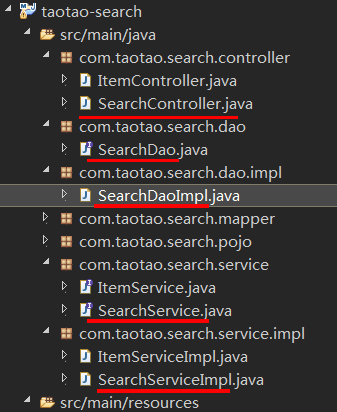
查询 Dao:
package com.taotao.search.dao.impl;

import java.util.ArrayList;

import java.util.List;

import java.util.Map;

import org.apache.solr.client.solrj.SolrQuery;

import org.apache.solr.client.solrj.SolrServer;

import org.apache.solr.client.solrj.response.QueryResponse;

import org.apache.solr.common.SolrDocument;

import org.apache.solr.common.SolrDocumentList;

import org.springframework.beans.factory.annotation.Autowired;

import org.springframework.stereotype.Repository;

import com.taotao.search.dao.SearchDao;

import com.taotao.search.pojo.Item;

import com.taotao.search.pojo.SearchResult;

@Repository

public class SearchDaoImpl implements SearchDao{

    @Autowired

    SolrServer solrServer;

    @Override

    public SearchResult search(SolrQuery query) throws Exception {

        //返回值对象

        SearchResult result = new SearchResult();

        //根据查询条件查询索引库

        QueryResponse response = solrServer.query(query);

        //取查询结果

        SolrDocumentList documentList = response.getResults();

        //取查询结果总数量

        result.setRecordCount(documentList.getNumFound());

        //商品列表

        List<Item> itemList = new ArrayList<Item>();

        //取高亮显示

        Map<String, Map<String, List<String>>> highlighting = response.getHighlighting();

        //取商品列表

        for (SolrDocument document : documentList) {

            Item item = new Item();

            item.setId((String) document.get("id"));

            //取高亮显示结果

            List<String> list = highlighting.get(document.get("id")).get("item_title");

            String title = "";

            if (list!=null && list.size()>0) {

                title = list.get(0);

            }else{

                title = (String) document.get("item_title");

            }

            item.setTitle(title);

            item.setImage((String) document.get("item_image"));

            item.setPrice((long) document.get("item_price"));

            item.setCategory_name((String)document.get("item_category_name"));

            //添加到商品列表

            itemList.add(item);

        }

        result.setItemList(itemList);

        return result;

    }

}
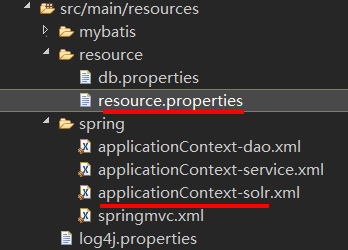
其中的 注入的solrServer是在 配置文件中配的:
增加 applicationContext-solr.xml
<?xml version="1.0" encoding="UTF-8"?>

<beans xmlns="http://www.springframework.org/schema/beans"

    xmlns:context="http://www.springframework.org/schema/context" xmlns:p="http://www.springframework.org/schema/p"

    xmlns:aop="http://www.springframework.org/schema/aop" xmlns:tx="http://www.springframework.org/schema/tx"

    xmlns:xsi="http://www.w3.org/2001/XMLSchema-instance"

    xsi:schemaLocation="http://www.springframework.org/schema/beans http://www.springframework.org/schema/beans/spring-beans-4.0.xsd

    http://www.springframework.org/schema/context http://www.springframework.org/schema/context/spring-context-4.0.xsd

    http://www.springframework.org/schema/aop http://www.springframework.org/schema/aop/spring-aop-4.0.xsd http://www.springframework.org/schema/tx http://www.springframework.org/schema/tx/spring-tx-4.0.xsd

    http://www.springframework.org/schema/util http://www.springframework.org/schema/util/spring-util-4.0.xsd">

    <bean id="httpSolrServer" class="org.apache.solr.client.solrj.impl.HttpSolrServer">

        <constructor-arg name="baseURL" value="${SOLR_SERVER_URL}"></constructor-arg>

    </bean>

</beans>
resource.properties
#solrServer的url
SOLR_SERVER_URL=http://192.168.29.102:8080/solr
service层:
package com.taotao.search.service.impl;

import org.apache.solr.client.solrj.SolrQuery;

import org.springframework.beans.factory.annotation.Autowired;

import org.springframework.stereotype.Service;

import com.taotao.search.dao.SearchDao;

import com.taotao.search.pojo.SearchResult;

import com.taotao.search.service.SearchService;

@Service

public class SearchServiceImpl implements SearchService {

    @Autowired

    private SearchDao searchDao;

    @Override

    public SearchResult search(String queryString, int page, int rows) throws Exception {

        //创建查询对象

        SolrQuery query = new SolrQuery();

        //设置查询条件

        query.setQuery(queryString);

        //设置分页

        query.setStart((page-1)*rows);

        query.setRows(rows);

        //设置默认搜索域

        query.set("df", "item_keywords");

        //设置高亮显示

        query.setHighlight(true);

        query.addHighlightField("item_title");

        query.setHighlightSimplePre("<em style=\"color:red\">");

        query.setHighlightSimplePost("</em>");

        //执行查询

        SearchResult searchResult = searchDao.search(query);

        //计算总页数

        long recordCount = searchResult.getRecordCount();

        long pageCount = recordCount/rows;

        if (recordCount % rows > 0) {

            pageCount++;

        }

        searchResult.setPageCount(pageCount);

        searchResult.setCurPage(page);

        return searchResult;

    }

}
Controller层:
package com.taotao.search.controller;

import org.apache.commons.lang3.StringUtils;

import org.springframework.beans.factory.annotation.Autowired;

import org.springframework.stereotype.Controller;

import org.springframework.web.bind.annotation.RequestMapping;

import org.springframework.web.bind.annotation.RequestParam;

import org.springframework.web.bind.annotation.ResponseBody;

import com.taotao.common.pojo.TaotaoResult;

import com.taotao.common.utils.ExceptionUtil;

import com.taotao.search.pojo.SearchResult;

import com.taotao.search.service.SearchService;

@Controller

public class SearchController {

    @Autowired

    private SearchService searchService;

    @RequestMapping("/query")

    @ResponseBody

    public TaotaoResult search(@RequestParam("q")String queryString,

            @RequestParam(defaultValue="1")Integer page,

            @RequestParam(defaultValue="60")Integer rows){

        if (StringUtils.isEmpty(queryString)) {

            return TaotaoResult.build(400, "查询条件不能为空");

        }

        SearchResult result = null;

        try {

            //解决参数乱码

            queryString = new String(queryString.getBytes("ISO8859-1"), "utf-8");

            result = searchService.search(queryString, page, rows);

        } catch (Exception e) {

            return TaotaoResult.build(500, ExceptionUtil.getStackTrace(e));

        }

        return  TaotaoResult.ok(result);

    }

}
结果:

数据添加到solr索引库后前台如何搜索的更多相关文章
- 将数据库的数据导入solr索引库中
在solr与tomcat整合文章中,我用的索引库是mycore,现在就以这个为例. 首先要准备jar包:solr-dataimporthandler-4.8.1.jar.solr-dataimport ...
- 使用solrj操作solr索引库
(solrj)初次使用solr的开发人员总是很郁闷,不知道如何去操作solr索引库,以为只能用<五分钟solr4.5教程(搭建.运行)>中讲到的用xml文件的形式提交数据到索引库,其实没有 ...
- 使用solrj操作solr索引库,solr是lucene服务器
客户端开发 Solrj 客户端开发 Solrj Solr是搭建好的lucene服务器 当然不可能完全满足一般的业务需求 可能 要针对各种的架构和业务调整 这里就需要用到Solrj了 Solrj是Sol ...
- 如何在分布式环境中同步solr索引库和缓存信息
天气依旧很好,主要是凉快.老习惯,我在北京向各位问好. 搜索无处不在,相信各位每天都免不了与它的亲密接触,那么我想你确实有必要来了解一下它们,就上周在公司实现的一个小需求来给各位分享一下:如何在分布式 ...
- 商城06——solr索引库搭建&solr搜索功能实现&图片显示问题解决
1. 课程计划 1.搜索工程的搭建 2.linux下solr服务的搭建 3.Solrj使用测试 4.把数据库中的数据导入索引库 5.搜索功能的实现 2. 搜索工程搭建 要实现搜索功能,需要搭建 ...
- solr索引库的创建
solr索引库的创建 一.找到你安装的[solrhome]目录(我的是这个) 二.进入该目录 三.选择其中任意一个索引库复制一份到该目录下并更名为要创建的索引库名称 四.进入[myindex]目录下, ...
- JAVAEE——宜立方商城09:Activemq整合spring的应用场景、添加商品同步索引库、商品详情页面动态展示与使用缓存
1. 学习计划 1.Activemq整合spring的应用场景 2.添加商品同步索引库 3.商品详情页面动态展示 4.展示详情页面使用缓存 2. Activemq整合spring 2.1. 使用方法 ...
- solr 索引库的维护
一.配置中文分析器:IK-analyzer,在FieldType中指定中文分析器:1 复制IK-analyzer到你的服务器指定目录中.2 在该目录中,我们需要的东西有:IKAnalyzer的jar包 ...
- 维护solr索引库
一 2)solrcore 一个solr下可以有多个solrcore,每个solrcore就是一个独立的索引库3)solrconfig.xml lib:配置solr的扩展包的位置,不指定路径 ...
随机推荐
- Codeforces Round #495 (Div. 2) Sonya and Matrix
正常没有正方形的限制下,值为i的点个数4i 那么从0开始遍历,第一个不为4i的值就是min(x, y) 由于对称性我们姑且令x为这个值 我们先列举n*m=t的各种情况 对于一对n, m.我们已经知道n ...
- 【label】标签组件说明
label标签组件 用来改进表单组件的可用性,使用for属性找到对应的id,或者将控件放在该标签下,当点击时,就会触发对应的控件.目前可以绑定的控件有:<button/>, <che ...
- python—IDLE的shell上下翻看历史
Alt+p和Alt+n,分别向上(history previous)和向下(history next)调出使用过的历史命令.
- Eclipse 安装SVN、Maven插件
1先安装subeclipse插件就是svn svn - http://subclipse.tigris.org/update_1.6.x 我这里是灰色的说明我安装过了这里只是截图说明下,我就不继续安装 ...
- C语言实训——扑克牌洗牌程序
说明此程序本来是21点扑克程序的一个被调函数,在这里我单独将它拿出来作为一个小程序. #include<stdio.h> #include<time.h> #include&l ...
- Comparison of Android versions(strcmp的应用)
Description As an Android developer, itˇs really not easy to figure out a newer version of two kerne ...
- Python—列表(一个“打了激素”的数组)
我们在C语言中会使用数组来将一大堆数据类型一样的数据挨个摆在一起,但是数组有一个基本的要求,就是数据类型必须是一致的,我们知道Python的变量由于没有数据类型,也就是说Python没有数组这一概念, ...
- android AndroidManifest.xml uses-feature 详解
如果你是一个Android用户,而且你有一个老旧的安装有android 1.5 的android设备,你可 能会注意到一些高版本的应用没有在手机上的Android Market 中显示.这必定是应用使 ...
- mysql入门 — (1)
使用cd进入到mysql/bin文件夹下面,或者配置完环境之后,直接在cmd中使用mysql,然后回车开启mysql. 登录 为了安全考虑,在这里只设置了本地root用户可以连接上数据库.使用的指令是 ...
- LintCode-53.翻转字符串
翻转字符串 给定一个字符串,逐个翻转字符串中的每个单词. 说明 单词的构成:无空格字母构成一个单词 输入字符串是否包括前导或者尾随空格?可以包括,但是反转后的字符不能包括 如何处理两个单词间的多个空格 ...