
Netty(一):的入门使用。
Netty的入门基本使用流程代码,不做具体分析。使用版本为Netty 4.x版本。
服务端调用示例:
绑定端口号为8080端口
 package com.cllover;

 import com.sun.webkit.EventLoop;

 import io.netty.bootstrap.ServerBootstrap;

 import io.netty.channel.ChannelFuture;

 import io.netty.channel.EventLoopGroup;

 import io.netty.channel.nio.NioEventLoopGroup;

 import io.netty.channel.socket.nio.NioServerSocketChannel;

 public class Server {

     public static void main(String[] args) {

         //接受连接

         EventLoopGroup parentEventLoopGroup = new NioEventLoopGroup();

         EventLoopGroup childEventLoopGroup = new NioEventLoopGroup();

         try {

             //入口

             ServerBootstrap serverBootstrap = new ServerBootstrap();

             serverBootstrap.group(parentEventLoopGroup,childEventLoopGroup).

                 channel(NioServerSocketChannel.class).childHandler(new Init());

         //绑定运行端口

             ChannelFuture channelFuture = serverBootstrap.bind(8080).sync();

             channelFuture.channel().closeFuture().sync();

         } catch (InterruptedException e) {

             e.printStackTrace();

         }finally {

             //连接关闭

             parentEventLoopGroup.shutdownGracefully();

             childEventLoopGroup.shutdownGracefully();

         }

     }

 }
Init:初始化类
 package com.cllover;

 import io.netty.channel.ChannelInitializer;

 import io.netty.channel.ChannelPipeline;

 import io.netty.channel.socket.SocketChannel;

 import io.netty.handler.codec.http.HttpServerCodec;

 public class Init extends ChannelInitializer<SocketChannel> {

     @Override

     protected void initChannel(SocketChannel ch) throws Exception {

         ChannelPipeline pipeline = ch.pipeline();

         pipeline.addLast("httpServerCode",new HttpServerCodec());

         pipeline.addLast("httpServerHandler",new HttpServerHandler());

     }

 }
HttpServerHandler:自定义服务端处理器
 package com.cllover;

 import io.netty.buffer.ByteBuf;

 import io.netty.buffer.Unpooled;

 import io.netty.channel.ChannelHandlerContext;

 import io.netty.channel.SimpleChannelInboundHandler;

 import io.netty.handler.codec.http.*;

 import io.netty.util.CharsetUtil;

 public class HttpServerHandler extends SimpleChannelInboundHandler<HttpObject> {

     /*

     * 数据处理方法

     * */

     @Override

     protected void channelRead0(ChannelHandlerContext ctx, HttpObject msg) throws Exception {

         if (msg instanceof HttpRequest) {

             ByteBuf byteBuf = Unpooled.copiedBuffer("Hello World!", CharsetUtil.UTF_8);

             FullHttpResponse fullHttpResponse = new DefaultFullHttpResponse(HttpVersion.HTTP_1_1,

                     HttpResponseStatus.OK, byteBuf);


        //加入头信息

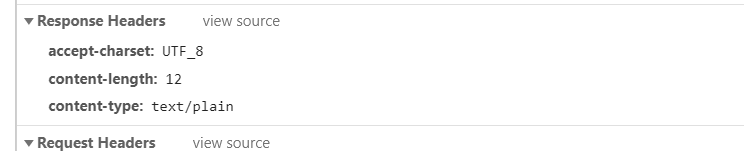
             fullHttpResponse.headers().set(HttpHeaderNames.ACCEPT_CHARSET, "UTF_8");

             fullHttpResponse.headers().set(HttpHeaderNames.CONTENT_TYPE, "text/plain");

             fullHttpResponse.headers().set(HttpHeaderNames.CONTENT_LENGTH, byteBuf.readableBytes());

             ctx.writeAndFlush(fullHttpResponse);

         }

     }

 }
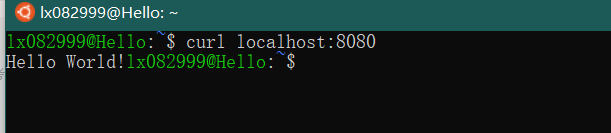
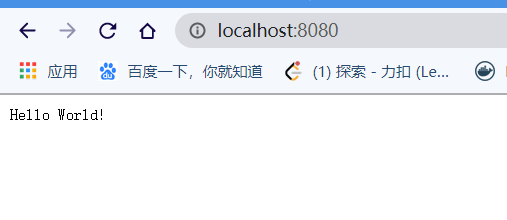
运行方式:
- 在本机windows/子系统linux上输入:curl locaclhost:8080
2.在浏览器输入localhost:8080
头信息:
Netty(一):的入门使用。的更多相关文章
- Netty学习笔记-入门版
目录 Netty学习笔记 前言 什么是Netty IO基础 概念说明 IO简单介绍 用户空间与内核空间 进程(Process) 线程(thread) 程序和进程 进程切换 进程阻塞 文件描述符 文件句 ...
- netty零基础入门
直接上代码,从最基本的接收消息规则开始 package cn.qdl; import io.netty.buffer.ByteBuf; import io.netty.channel.ChannelH ...
- Netty学习记录-入门篇
你如果,缓缓把手举起来,举到顶,再突然张开五指,那恭喜你,你刚刚给自己放了个烟花. 模块介绍 netty-bio: 阻塞型网络通信demo. netty-nio: 引入channel(通道).buff ...
- 关于Netty的入门使用
Netty介绍: Netty是一个提供异步事件驱动的网络应用框架,用以快速开发高性能.高可靠性的网络服务器和客户端程序. 换句话说,Netty是一个NIO框架,使用它可以简单快速地开发网络应用程序,比 ...
- Netty入门二:开发第一个Netty应用程序
Netty入门二:开发第一个Netty应用程序 时间 2014-05-07 18:25:43 CSDN博客 原文 http://blog.csdn.net/suifeng3051/article/ ...
- springboot整合netty(二)
目录 前言 正文 代码 1. 新建一个springboot项目,在pom文件中添加netty依赖: 2.新建netty服务 3.netty调用所需的服务类 4 springboot启动类 5.测试 我 ...
- 漫谈NIO(3)之Netty实现
1.前言 上一章结合Java的NIO例子,讲解了多路IO复用的一个基本使用方法,通过实际编码加深对其理解.本章开始进入Netty的环节,前面两章都是为了Netty进行铺垫说明.此节将对比Java的NI ...
- 1. 彤哥说netty系列之开篇(有个问卷调查)
你好,我是彤哥,本篇是netty系列的第一篇. 欢迎来我的公从号彤哥读源码系统地学习源码&架构的知识. 简介 本文主要讲述netty系列的整体规划,并调查一下大家喜欢的学习方式. 知识点 ne ...
- netty9---使用编码解码器
客户端: package com.client; import java.net.InetSocketAddress; import java.util.Scanner; import java.ut ...
- netty5----心跳
netty3心跳: package com.heart; import java.net.InetSocketAddress; import java.util.concurrent.Executor ...
随机推荐
- window10下启动vue项目具体步骤
1. 安装nodejs 直接去nodejs官方网站下载安装包(https://nodejs.org/zh-cn/) 然后在cmd窗口里面输入 node -v 可以检测出来nodejs是否在全局环境下安 ...
- redis cluster info显示cluster_state:fail解决方案
1.查看错误信息: 1.1 错误信息(1) 127.0.0.1:7000> get name (error) CLUSTERDOWN The cluster is down 127.0.0.1: ...
- DOM 和 BOM 区别
DOM, DOCUMENT, BOM, WINDOW 区别DOM 是为了操作文档出现的 API,document 是其的一个对象:BOM 是为了操作浏览器出现的 API,window 是其的一个对象. ...
- Python之爬虫(十六) Scrapy框架中选择器的用法
Scrapy提取数据有自己的一套机制,被称作选择器(selectors),通过特定的Xpath或者CSS表达式来选择HTML文件的某个部分Xpath是专门在XML文件中选择节点的语言,也可以用在HTM ...
- L1和L2正则化。L1为什么能产生稀疏值,L2更平滑
参考博客:https://zhuanlan.zhihu.com/p/35356992 https://zhuanlan.zhihu.com/p/25707761 https://www.zhihu.c ...
- vue + echart 实现中国地图 和 省市地图(可切换省份)
一.中国地图 1.先导入echarts,然后再main.js里引入echarts // 引入echartsimport echarts from 'echarts'Vue.prototype.$ech ...
- (数据科学学习手札90)Python+Kepler.gl轻松制作时间轮播图
本文示例代码及数据已上传至我的Github仓库https://github.com/CNFeffery/DataScienceStudyNotes 1 简介 Kepler.gl作为一款强大的开源地理信 ...
- P2058 海港 (洛谷)
这个题复制过来真的有点恶心,懒得手打,以后再搬题面吧. 今天我双更了,AC这个题我就完成某谷春令营第一课的作业了(假的) 这个题是个双指针.非常友善.一直往里读入就可以了,遇见不是一条船的乘客输出这一 ...
- 深入理解JVM(一)Java内存区域
运行时数据区 程序计数器 当前线程执行的字节码的行号指示器 每条线程都有独立的程序计数器,各线程之间计数器互不影响,独立存储. 如果执行的是java方法,计数器记录正在执行的虚拟机字节码指令的位置: ...
- webpack的使用 一、webpack 和webpack的安装
本质上,webpack 是一个现代 JavaScript 应用程序的静态模块打包器(module bundler).当 webpack 处理应用程序时, 它会递归地构建一个依赖关系图(dependen ...