
SpringBoot集成基于tobato的fastdfs-client实现文件上传下载和删除
1. 简介
基于tobato的fastdfs-client是一个功能完善的FastDFS客户端工具,它是在FastDFS作者YuQing发布的客户端基础上进行了大量的重构,提供了上传、下载、删除、生成缩略图等API。
2. 安装FastDFS
3. 示例代码
- 创建工程
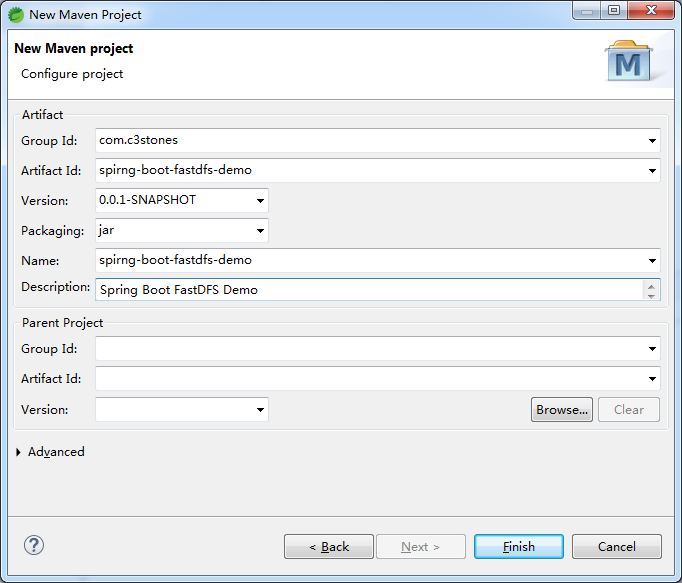
- 修改pom.xml
<project xmlns="http://maven.apache.org/POM/4.0.0"

	xmlns:xsi="http://www.w3.org/2001/XMLSchema-instance"

	xsi:schemaLocation="http://maven.apache.org/POM/4.0.0 https://maven.apache.org/xsd/maven-4.0.0.xsd">

	<modelVersion>4.0.0</modelVersion>

	<groupId>com.c3stones</groupId>

	<artifactId>spirng-boot-fastdfs-demo</artifactId>

	<version>0.0.1-SNAPSHOT</version>

	<name>spirng-boot-fastdfs-demo</name>

	<description>Spring Boot FastDFS Demo</description>

	<parent>

		<groupId>org.springframework.boot</groupId>

		<artifactId>spring-boot-starter-parent</artifactId>

		<version>2.2.8.RELEASE</version>

		<relativePath />

	</parent>

	<dependencies>

		<dependency>

			<groupId>com.github.tobato</groupId>

			<artifactId>fastdfs-client</artifactId>

			<version>1.26.6</version>

		</dependency>

		<dependency>

			<groupId>org.springframework.boot</groupId>

			<artifactId>spring-boot-starter-thymeleaf</artifactId>

		</dependency>

		<dependency>

			<groupId>org.springframework.boot</groupId>

			<artifactId>spring-boot-starter-web</artifactId>

		</dependency>

		<dependency>

			<groupId>org.springframework.boot</groupId>

			<artifactId>spring-boot-starter-test</artifactId>

		</dependency>

	</dependencies>

	<build>

		<plugins>

			<plugin>

				<groupId>org.springframework.boot</groupId>

				<artifactId>spring-boot-maven-plugin</artifactId>

			</plugin>

		</plugins>

	</build>

</project>
- 创建配置文件application.yml
#fastdfs 配置

fdfs:

  # 读取时间

  so-timeout: 1500

  # 连接超时时间

  connect-timeout: 600

  # 缩略图

  thumb-image:

    width: 150

    height: 150

  # Tracker服务

  tracker-list:

    - 192.168.0.100:22122
- 创建配置类
import org.springframework.context.annotation.Configuration;

import org.springframework.context.annotation.EnableMBeanExport;

import org.springframework.context.annotation.Import;

import org.springframework.jmx.support.RegistrationPolicy;

import com.github.tobato.fastdfs.FdfsClientConfig;

/**

 * FastDFS Client配置

 *

 * @author CL

 *

 */

@Configuration

@Import(FdfsClientConfig.class)

@EnableMBeanExport(registration = RegistrationPolicy.IGNORE_EXISTING)

public class FdfsConfig {

}
- 创建包装类
import java.io.ByteArrayInputStream;

import java.io.IOException;

import java.time.LocalDateTime;

import java.util.HashSet;

import java.util.Set;

import org.apache.commons.lang3.StringUtils;

import org.springframework.beans.factory.annotation.Autowired;

import org.springframework.stereotype.Component;

import org.springframework.web.multipart.MultipartFile;

import com.github.tobato.fastdfs.domain.fdfs.MetaData;

import com.github.tobato.fastdfs.domain.fdfs.StorePath;

import com.github.tobato.fastdfs.domain.proto.storage.DownloadByteArray;

import com.github.tobato.fastdfs.service.FastFileStorageClient;

/**

 * FastDFS客户端包装类

 *

 * @author CL

 *

 */

@Component

public class FdfsClientWrapper {

	@Autowired

	private FastFileStorageClient fastFileStorageClient;

	public String uploadFile(MultipartFile file) throws IOException {

		if (file != null) {

			byte[] bytes = file.getBytes();

			long fileSize = file.getSize();

			String originalFilename = file.getOriginalFilename();

			String extension = originalFilename.substring(originalFilename.lastIndexOf(".") + 1);

			return this.uploadFile(bytes, fileSize, extension);

		}

		return null;

	}

	/**

	 * 文件上传

	 *

	 * @param bytes     文件字节

	 * @param fileSize  文件大小

	 * @param extension 文件扩展名

	 * @return 返回文件路径(卷名和文件名)

	 */

	public String uploadFile(byte[] bytes, long fileSize, String extension) {

		ByteArrayInputStream bais = new ByteArrayInputStream(bytes);

		// 元数据

		Set<MetaData> metaDataSet = new HashSet<MetaData>();

		metaDataSet.add(new MetaData("dateTime", LocalDateTime.now().toString()));

		StorePath storePath = fastFileStorageClient.uploadFile(bais, fileSize, extension, metaDataSet);

		return storePath.getFullPath();

	}

	/**

	 * 下载文件

	 *

	 * @param filePath 文件路径

	 * @return 文件字节

	 * @throws IOException

	 */

	public byte[] downloadFile(String filePath) throws IOException {

		byte[] bytes = null;

		if (StringUtils.isNotBlank(filePath)) {

			String group = filePath.substring(0, filePath.indexOf("/"));

			String path = filePath.substring(filePath.indexOf("/") + 1);

			DownloadByteArray byteArray = new DownloadByteArray();

			bytes = fastFileStorageClient.downloadFile(group, path, byteArray);

		}

		return bytes;

	}

	/**

	 * 删除文件

	 *

	 * @param filePath 文件路径

	 */

	public void deleteFile(String filePath) {

		if (StringUtils.isNotBlank(filePath)) {

			fastFileStorageClient.deleteFile(filePath);

		}

	}

}
- 创建文件上传Controller
import java.io.IOException;

import java.net.URLEncoder;

import javax.servlet.ServletOutputStream;

import javax.servlet.http.HttpServletResponse;

import org.slf4j.Logger;

import org.slf4j.LoggerFactory;

import org.springframework.beans.factory.annotation.Autowired;

import org.springframework.stereotype.Controller;

import org.springframework.web.bind.annotation.RequestMapping;

import org.springframework.web.bind.annotation.ResponseBody;

import org.springframework.web.multipart.MultipartFile;

import com.c3stones.wapper.FdfsClientWrapper;

/**

 * 文件上传Controller

 *

 * @author CL

 *

 */

@Controller

public class FileUploadController {

	private static Logger log = LoggerFactory.getLogger(FileUploadController.class);

	@Autowired

	private FdfsClientWrapper fdfsClientWrapper;

	/**

	 * 进入上传页面

	 *

	 * @return 路径

	 */

	@RequestMapping(value = "/")

	public String form() {

		return "form";

	}

	/**

	 * 上传文件

	 *

	 * @param file 文件

	 * @return 文件路径

	 */

	@RequestMapping(value = "upload")

	@ResponseBody

	public String uploadFile(MultipartFile file) {

		String filePath = null;

		try {

			filePath = fdfsClientWrapper.uploadFile(file);

		} catch (IOException e) {

			log.error("上传文件异常:{}", e);

			return "上传文件失败";

		}

		return filePath;

	}

	/**

	 * 下载文件

	 *

	 * @param filePath 文件路径

	 * @return

	 */

	@RequestMapping(value = "download")

	public void downloadFile(String filePath, HttpServletResponse response) {

		ServletOutputStream outputStream = null;

		try {

			byte[] bytes = fdfsClientWrapper.downloadFile(filePath);

			String fileName = "fdfs.jpg";

			response.setHeader("Content-disposition", "attachment;filename=" + URLEncoder.encode(fileName, "UTF-8"));

			response.setCharacterEncoding("UTF-8");

			if (bytes != null) {

				outputStream = response.getOutputStream();

				outputStream.write(bytes);

				outputStream.flush();

			}

		} catch (IOException e) {

			log.debug("下载文件输出流异常:{}", e);

		} finally {

			try {

				if (outputStream != null) {

					outputStream.close();

				}

			} catch (IOException e) {

				log.debug("下载文件关闭流异常:{}", e);

			}

		}

	}

	/**

	 * 删除文件

	 *

	 * @param filePath 文件路径

	 * @return 删除结果

	 */

	@RequestMapping(value = "delete")

	@ResponseBody

	public String deleteFile(String filePath) {

		fdfsClientWrapper.deleteFile(filePath);

		return "删除成功";

	}

}
- 创建启动类
import org.springframework.boot.SpringApplication;

import org.springframework.boot.autoconfigure.SpringBootApplication;

/**

 * 启动类

 *

 * @author CL

 *

 */

@SpringBootApplication

public class Application {

	public static void main(String[] args) {

		SpringApplication.run(Application.class, args);

	}

}
- 在resource下创建templates/form.html
<!DOCTYPE html>

<html>

<head>

<meta charset="UTF-8">

<title>上传文件</title>

</head>

<body>

	<form action="/upload" method="post" enctype="multipart/form-data">

		选择文件:<input type="file" name="file"><br />

		<input type="submit" value="提交">

	</form>

</body>

</html>
- 启动项目
4. 测试
- 文件上传
浏览器访问:http://localhost:8080/,选择一种图片,点击提交,记录返回的文件路径(卷名+文件名)。 - 文件浏览
浏览器访问:http://192.168.0.100:8888/[filePath] - 文件下载(下载的文件名为:fdfs.jpg)
浏览器访问:http://localhost:8080/download?filePath=[filePath] - 文件删除
浏览器访问:http://localhost:8080/delete?filePath=[filePath]
5. 项目地址
SpringBoot集成基于tobato的fastdfs-client实现文件上传下载和删除的更多相关文章
- Java 客户端操作 FastDFS 实现文件上传下载替换删除
FastDFS 的作者余庆先生已经为我们开发好了 Java 对应的 SDK.这里需要解释一下:作者余庆并没有及时更新最新的 Java SDK 至 Maven 中央仓库,目前中央仓库最新版仍旧是 1.2 ...
- RPC基于http协议通过netty支持文件上传下载
本人在中间件研发组(主要开发RPC),近期遇到一个需求:RPC基于http协议通过netty支持文件上传下载 经过一系列的资料查找学习,终于实现了该功能 通过netty实现文件上传下载,主要在编解码时 ...
- 基于Spring Mvc实现的Excel文件上传下载
最近工作遇到一个需求,需要下载excel模板,编辑后上传解析存储到数据库.因此为了更好的理解公司框架,我就自己先用spring mvc实现了一个样例. 基础框架 之前曾经介绍过一个最简单的spring ...
- SpringBoot入门一:基础知识(环境搭建、注解说明、创建对象方法、注入方式、集成jsp/Thymeleaf、logback日志、全局热部署、文件上传/下载、拦截器、自动配置原理等)
SpringBoot设计目的是用来简化Spring应用的初始搭建以及开发过程.该框架使用了特定的方式来进行配置,从而使开发人员不再需要定义样板化的配置.通过这种方式,SpringBoot致力于在蓬勃发 ...
- 一、手把手教你docker搭建fastDFS文件上传下载服务器
在搭建fastDFS文件上传下载服务器之前,你需要准备的有一个可连接的linux服务器,并且该linux服务器上已经安装了docker,若还有没安装docker的,先百度自行安装docker. 1.执 ...
- vue+Ueditor集成 [前后端分离项目][图片、文件上传][富文本编辑]
后端DEMO:https://github.com/coderliguoqing/UeditorSpringboot 前端DEMO:https://github.com/coderliguoqing/ ...
- 艺萌文件上传下载及自动更新系统(基于networkComms开源TCP通信框架)
1.艺萌文件上传下载及自动更新系统,基于Winform技术,采用CS架构,开发工具为vs2010,.net2.0版本(可以很容易升级为3.5和4.0版本)开发语言c#. 本系统主要帮助客户学习基于TC ...
- FastDFS实现文件上传下载实战
正好,淘淘商城讲这一块的时候,我又想起来当时老徐让我写过一个关于实现FastDFS实现文件上传下载的使用文档,当时结合我们的ITOO的视频系统和毕业论文系统,整理了一下,有根据网上查到的知识,总结了一 ...
- 转:【专题十一】实现一个基于FTP协议的程序——文件上传下载器
引言: 在这个专题将为大家揭开下FTP这个协议的面纱,其实学习知识和生活中的例子都是很相通的,就拿这个专题来说,要了解FTP协议然后根据FTP协议实现一个文件下载器,就和和追MM是差不多的过程的,相信 ...
随机推荐
- BurpSuite多重代理的情形
有时候为了隐藏自己的真实IP,访问目标网站需要走代理.比如说,通过代理IP访问目标网站并且代理IP可以随时切换,这样可以避免IP被封堵后无法访问目标网站的尴尬. 一. 首先把代理切换为全局模式 操作步 ...
- HDU100题简要题解(2080~2089)
//2089之前忘做了,周二C语言课上做,至于2086,写题解的时候突然发现之前的做法是错的,新的解法交上去CE,等周二再弄吧,其余题目暂时可以放心 HDU2080 夹角有多大II 题目链接 Prob ...
- 解决docker镜像无vim
docker拉取的镜像一般都是ubantu系统 安装vim apt-get update apt-get vim
- 原生javascript包装一个ajax方法
调用AJAX 1 <script type="text/javascript" src="ajax.js"></script> 2 &l ...
- 运维自动化之11 - 自动化部署之jenkins及简介
https://www.cnblogs.com/jimmy-xuli/p/9020825.html
- 建议收藏!超详细的JVM反射原理技术点总结
反射定义 1,JAVA反射机制是在运行状态中 对于任意一个类,都能够知道这个类的所有属性和方法: 对于任意一个对象,都能够调用它的任意一个方法和属性: 这种动态获取的信息以及动态调用对象的方法的功能称 ...
- MathType总结编辑括号的类型(下)
在数学中,所涉及到的公式总是会有各种各样的情况,对于括号这些都是最常见的了.在最开始的四则基本运算中我们学会了使用括号,而随着学习的不断深入,所涉及到的符号与公式都越来越多,对于括号的类型也是使用得非 ...
- ABBYY FineReader 15 PDF文档查看功能
PDF文档查看功能是ABBYY FineReader 15(Windows系统)OCR文字识别软件中PDF编辑器的一项基础功能,可供用户查看,搜索PDF文档,无需进入编辑模式,也可复制其中的文本,图片 ...
- C语言讲义——errno
#define EPERM 1 /* Operation not permitted */ #define ENOENT 2 /* No such file or directory */ #defi ...
- 【mq读书笔记】消息拉取长轮训机制(Broker端)
RocketMQ并没有真正实现推模式,而是消费者主动想消息服务器拉取消息,推模式是循环向消息服务端发送消息拉取请求. 如果消息消费者向RocketMQ发送消息拉取时,消息未到达消费队列: 如果不启用长 ...