
SpringBoot集成基于tobato的fastdfs-client实现文件上传下载和删除
1. 简介
基于tobato的fastdfs-client是一个功能完善的FastDFS客户端工具,它是在FastDFS作者YuQing发布的客户端基础上进行了大量的重构,提供了上传、下载、删除、生成缩略图等API。
2. 安装FastDFS
3. 示例代码
- 创建工程
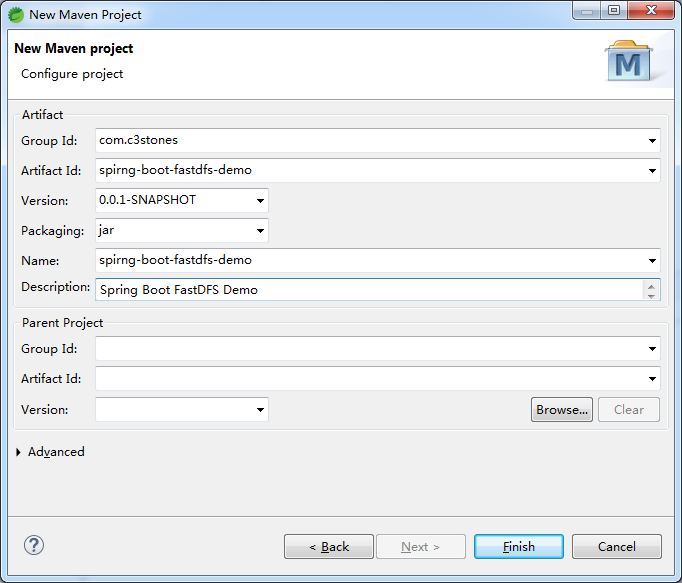
- 修改pom.xml
<project xmlns="http://maven.apache.org/POM/4.0.0"

	xmlns:xsi="http://www.w3.org/2001/XMLSchema-instance"

	xsi:schemaLocation="http://maven.apache.org/POM/4.0.0 https://maven.apache.org/xsd/maven-4.0.0.xsd">

	<modelVersion>4.0.0</modelVersion>

	<groupId>com.c3stones</groupId>

	<artifactId>spirng-boot-fastdfs-demo</artifactId>

	<version>0.0.1-SNAPSHOT</version>

	<name>spirng-boot-fastdfs-demo</name>

	<description>Spring Boot FastDFS Demo</description>

	<parent>

		<groupId>org.springframework.boot</groupId>

		<artifactId>spring-boot-starter-parent</artifactId>

		<version>2.2.8.RELEASE</version>

		<relativePath />

	</parent>

	<dependencies>

		<dependency>

			<groupId>com.github.tobato</groupId>

			<artifactId>fastdfs-client</artifactId>

			<version>1.26.6</version>

		</dependency>

		<dependency>

			<groupId>org.springframework.boot</groupId>

			<artifactId>spring-boot-starter-thymeleaf</artifactId>

		</dependency>

		<dependency>

			<groupId>org.springframework.boot</groupId>

			<artifactId>spring-boot-starter-web</artifactId>

		</dependency>

		<dependency>

			<groupId>org.springframework.boot</groupId>

			<artifactId>spring-boot-starter-test</artifactId>

		</dependency>

	</dependencies>

	<build>

		<plugins>

			<plugin>

				<groupId>org.springframework.boot</groupId>

				<artifactId>spring-boot-maven-plugin</artifactId>

			</plugin>

		</plugins>

	</build>

</project>
- 创建配置文件application.yml
#fastdfs 配置

fdfs:

  # 读取时间

  so-timeout: 1500

  # 连接超时时间

  connect-timeout: 600

  # 缩略图

  thumb-image:

    width: 150

    height: 150

  # Tracker服务

  tracker-list:

    - 192.168.0.100:22122
- 创建配置类
import org.springframework.context.annotation.Configuration;

import org.springframework.context.annotation.EnableMBeanExport;

import org.springframework.context.annotation.Import;

import org.springframework.jmx.support.RegistrationPolicy;

import com.github.tobato.fastdfs.FdfsClientConfig;

/**

 * FastDFS Client配置

 *

 * @author CL

 *

 */

@Configuration

@Import(FdfsClientConfig.class)

@EnableMBeanExport(registration = RegistrationPolicy.IGNORE_EXISTING)

public class FdfsConfig {

}
- 创建包装类
import java.io.ByteArrayInputStream;

import java.io.IOException;

import java.time.LocalDateTime;

import java.util.HashSet;

import java.util.Set;

import org.apache.commons.lang3.StringUtils;

import org.springframework.beans.factory.annotation.Autowired;

import org.springframework.stereotype.Component;

import org.springframework.web.multipart.MultipartFile;

import com.github.tobato.fastdfs.domain.fdfs.MetaData;

import com.github.tobato.fastdfs.domain.fdfs.StorePath;

import com.github.tobato.fastdfs.domain.proto.storage.DownloadByteArray;

import com.github.tobato.fastdfs.service.FastFileStorageClient;

/**

 * FastDFS客户端包装类

 *

 * @author CL

 *

 */

@Component

public class FdfsClientWrapper {

	@Autowired

	private FastFileStorageClient fastFileStorageClient;

	public String uploadFile(MultipartFile file) throws IOException {

		if (file != null) {

			byte[] bytes = file.getBytes();

			long fileSize = file.getSize();

			String originalFilename = file.getOriginalFilename();

			String extension = originalFilename.substring(originalFilename.lastIndexOf(".") + 1);

			return this.uploadFile(bytes, fileSize, extension);

		}

		return null;

	}

	/**

	 * 文件上传

	 *

	 * @param bytes     文件字节

	 * @param fileSize  文件大小

	 * @param extension 文件扩展名

	 * @return 返回文件路径(卷名和文件名)

	 */

	public String uploadFile(byte[] bytes, long fileSize, String extension) {

		ByteArrayInputStream bais = new ByteArrayInputStream(bytes);

		// 元数据

		Set<MetaData> metaDataSet = new HashSet<MetaData>();

		metaDataSet.add(new MetaData("dateTime", LocalDateTime.now().toString()));

		StorePath storePath = fastFileStorageClient.uploadFile(bais, fileSize, extension, metaDataSet);

		return storePath.getFullPath();

	}

	/**

	 * 下载文件

	 *

	 * @param filePath 文件路径

	 * @return 文件字节

	 * @throws IOException

	 */

	public byte[] downloadFile(String filePath) throws IOException {

		byte[] bytes = null;

		if (StringUtils.isNotBlank(filePath)) {

			String group = filePath.substring(0, filePath.indexOf("/"));

			String path = filePath.substring(filePath.indexOf("/") + 1);

			DownloadByteArray byteArray = new DownloadByteArray();

			bytes = fastFileStorageClient.downloadFile(group, path, byteArray);

		}

		return bytes;

	}

	/**

	 * 删除文件

	 *

	 * @param filePath 文件路径

	 */

	public void deleteFile(String filePath) {

		if (StringUtils.isNotBlank(filePath)) {

			fastFileStorageClient.deleteFile(filePath);

		}

	}

}
- 创建文件上传Controller
import java.io.IOException;

import java.net.URLEncoder;

import javax.servlet.ServletOutputStream;

import javax.servlet.http.HttpServletResponse;

import org.slf4j.Logger;

import org.slf4j.LoggerFactory;

import org.springframework.beans.factory.annotation.Autowired;

import org.springframework.stereotype.Controller;

import org.springframework.web.bind.annotation.RequestMapping;

import org.springframework.web.bind.annotation.ResponseBody;

import org.springframework.web.multipart.MultipartFile;

import com.c3stones.wapper.FdfsClientWrapper;

/**

 * 文件上传Controller

 *

 * @author CL

 *

 */

@Controller

public class FileUploadController {

	private static Logger log = LoggerFactory.getLogger(FileUploadController.class);

	@Autowired

	private FdfsClientWrapper fdfsClientWrapper;

	/**

	 * 进入上传页面

	 *

	 * @return 路径

	 */

	@RequestMapping(value = "/")

	public String form() {

		return "form";

	}

	/**

	 * 上传文件

	 *

	 * @param file 文件

	 * @return 文件路径

	 */

	@RequestMapping(value = "upload")

	@ResponseBody

	public String uploadFile(MultipartFile file) {

		String filePath = null;

		try {

			filePath = fdfsClientWrapper.uploadFile(file);

		} catch (IOException e) {

			log.error("上传文件异常:{}", e);

			return "上传文件失败";

		}

		return filePath;

	}

	/**

	 * 下载文件

	 *

	 * @param filePath 文件路径

	 * @return

	 */

	@RequestMapping(value = "download")

	public void downloadFile(String filePath, HttpServletResponse response) {

		ServletOutputStream outputStream = null;

		try {

			byte[] bytes = fdfsClientWrapper.downloadFile(filePath);

			String fileName = "fdfs.jpg";

			response.setHeader("Content-disposition", "attachment;filename=" + URLEncoder.encode(fileName, "UTF-8"));

			response.setCharacterEncoding("UTF-8");

			if (bytes != null) {

				outputStream = response.getOutputStream();

				outputStream.write(bytes);

				outputStream.flush();

			}

		} catch (IOException e) {

			log.debug("下载文件输出流异常:{}", e);

		} finally {

			try {

				if (outputStream != null) {

					outputStream.close();

				}

			} catch (IOException e) {

				log.debug("下载文件关闭流异常:{}", e);

			}

		}

	}

	/**

	 * 删除文件

	 *

	 * @param filePath 文件路径

	 * @return 删除结果

	 */

	@RequestMapping(value = "delete")

	@ResponseBody

	public String deleteFile(String filePath) {

		fdfsClientWrapper.deleteFile(filePath);

		return "删除成功";

	}

}
- 创建启动类
import org.springframework.boot.SpringApplication;

import org.springframework.boot.autoconfigure.SpringBootApplication;

/**

 * 启动类

 *

 * @author CL

 *

 */

@SpringBootApplication

public class Application {

	public static void main(String[] args) {

		SpringApplication.run(Application.class, args);

	}

}
- 在resource下创建templates/form.html
<!DOCTYPE html>

<html>

<head>

<meta charset="UTF-8">

<title>上传文件</title>

</head>

<body>

	<form action="/upload" method="post" enctype="multipart/form-data">

		选择文件:<input type="file" name="file"><br />

		<input type="submit" value="提交">

	</form>

</body>

</html>
- 启动项目
4. 测试
- 文件上传
浏览器访问:http://localhost:8080/,选择一种图片,点击提交,记录返回的文件路径(卷名+文件名)。 - 文件浏览
浏览器访问:http://192.168.0.100:8888/[filePath] - 文件下载(下载的文件名为:fdfs.jpg)
浏览器访问:http://localhost:8080/download?filePath=[filePath] - 文件删除
浏览器访问:http://localhost:8080/delete?filePath=[filePath]
5. 项目地址
SpringBoot集成基于tobato的fastdfs-client实现文件上传下载和删除的更多相关文章
- Java 客户端操作 FastDFS 实现文件上传下载替换删除
FastDFS 的作者余庆先生已经为我们开发好了 Java 对应的 SDK.这里需要解释一下:作者余庆并没有及时更新最新的 Java SDK 至 Maven 中央仓库,目前中央仓库最新版仍旧是 1.2 ...
- RPC基于http协议通过netty支持文件上传下载
本人在中间件研发组(主要开发RPC),近期遇到一个需求:RPC基于http协议通过netty支持文件上传下载 经过一系列的资料查找学习,终于实现了该功能 通过netty实现文件上传下载,主要在编解码时 ...
- 基于Spring Mvc实现的Excel文件上传下载
最近工作遇到一个需求,需要下载excel模板,编辑后上传解析存储到数据库.因此为了更好的理解公司框架,我就自己先用spring mvc实现了一个样例. 基础框架 之前曾经介绍过一个最简单的spring ...
- SpringBoot入门一:基础知识(环境搭建、注解说明、创建对象方法、注入方式、集成jsp/Thymeleaf、logback日志、全局热部署、文件上传/下载、拦截器、自动配置原理等)
SpringBoot设计目的是用来简化Spring应用的初始搭建以及开发过程.该框架使用了特定的方式来进行配置,从而使开发人员不再需要定义样板化的配置.通过这种方式,SpringBoot致力于在蓬勃发 ...
- 一、手把手教你docker搭建fastDFS文件上传下载服务器
在搭建fastDFS文件上传下载服务器之前,你需要准备的有一个可连接的linux服务器,并且该linux服务器上已经安装了docker,若还有没安装docker的,先百度自行安装docker. 1.执 ...
- vue+Ueditor集成 [前后端分离项目][图片、文件上传][富文本编辑]
后端DEMO:https://github.com/coderliguoqing/UeditorSpringboot 前端DEMO:https://github.com/coderliguoqing/ ...
- 艺萌文件上传下载及自动更新系统(基于networkComms开源TCP通信框架)
1.艺萌文件上传下载及自动更新系统,基于Winform技术,采用CS架构,开发工具为vs2010,.net2.0版本(可以很容易升级为3.5和4.0版本)开发语言c#. 本系统主要帮助客户学习基于TC ...
- FastDFS实现文件上传下载实战
正好,淘淘商城讲这一块的时候,我又想起来当时老徐让我写过一个关于实现FastDFS实现文件上传下载的使用文档,当时结合我们的ITOO的视频系统和毕业论文系统,整理了一下,有根据网上查到的知识,总结了一 ...
- 转:【专题十一】实现一个基于FTP协议的程序——文件上传下载器
引言: 在这个专题将为大家揭开下FTP这个协议的面纱,其实学习知识和生活中的例子都是很相通的,就拿这个专题来说,要了解FTP协议然后根据FTP协议实现一个文件下载器,就和和追MM是差不多的过程的,相信 ...
随机推荐
- Spring扩展之二:ApplicationListener
1.介绍 用于监听应用程序事件的接口. 子接口:GenericApplicationListener,SmartApplicationListener. 通过ApplicationEvent类和App ...
- rocketmq详解-[个人版]-第一章
一.消息队列概述 1.1.消息队列由来 在运维场景中,我们经常会存在如下场景:一旦出现S1异常,C1将因为S1的影响而异常(C为客户端,s为服务端) 当然可以通过添加多个S的方式,实现高可用.但这样会 ...
- Spring中@Translational注解失效场景
今天面试被问到@Translational注解什么场景下失效,我一脸懵逼,说的恍恍惚惚的,下来我就总结一下@Translational注解失效的场景! @Transactional 注解相信大家并不陌 ...
- ClickHouse 研讨会学习笔记(clickhouse tips and tricks)
一.显示执行日志 clickhouse-client --send_logs_level=trace 或者进入client session 后输入 set send_logs_level = 'tra ...
- FL studio系列教程(十):FL Studio中如何新建样本
FL Studio中强调以样本为核心的编曲模式.样本其实就是一个小的音序片段,可以是单独的乐器或单独的打击乐,还可以是他们组合的一个小音序片段,它是我们学习编曲的最基础知识.所以本文主要为大家讲解的是 ...
- 关于Vegas制作黑白负片爆闪效果的教程分享
作为一款视频剪辑软件,Vegas界面简洁,操作难度低,比较容易上手,今天小编就带大家了解Vegas制作超级炫酷的黑白负片爆闪效果的操作过程. 1.导入视频 首先,双击打开视频剪辑软件Vegas Pro ...
- python中字符串的编码和解码
1. 常用的编码 ASCII:只能表示一些字母,数字和特殊的字符,占一个字节 GBK:国家简体中文字符集和繁体字符集,兼容ASCII,占两个字节 Unicode:能够表示全世界上所有的字符,Unico ...
- [题解] 洛谷 P3393 逃离僵尸岛
题目TP门 很明显是一个最短路,但是如何建图才是关键. 对于每一个不可遍历到的点,可以向外扩散,找到危险城市. 若是对于每一个这样的城市进行搜索,时间复杂度就为\(O(n^2)\),显然过不了.不妨把 ...
- 写给程序员的机器学习入门 (十) - 对象识别 Faster-RCNN - 识别人脸位置与是否戴口罩
每次看到大数据人脸识别抓逃犯的新闻我都会感叹技术发展的太快了,国家治安水平也越来越好了
- CenOS下载离线依赖包神器--yumdownloader
Blog:博客园 个人 本文只总结一些常用的用法,更详细的说明见man yumdownloader和 info yumdownloader. 概述 有时候所在服务器环境不能访问外网,yum安装会感到非 ...