
Invalid bound statement (not found): com.xxx.xxx.dao.ShopMapper.insertShop
mybatis在编写完SQL,进行测试的时候出现了错误,显示
org.apache.ibatis.binding.BindingException: Invalid bound statement
(not found): cn.edu.nyist.dao.ShopMapper.updateShop
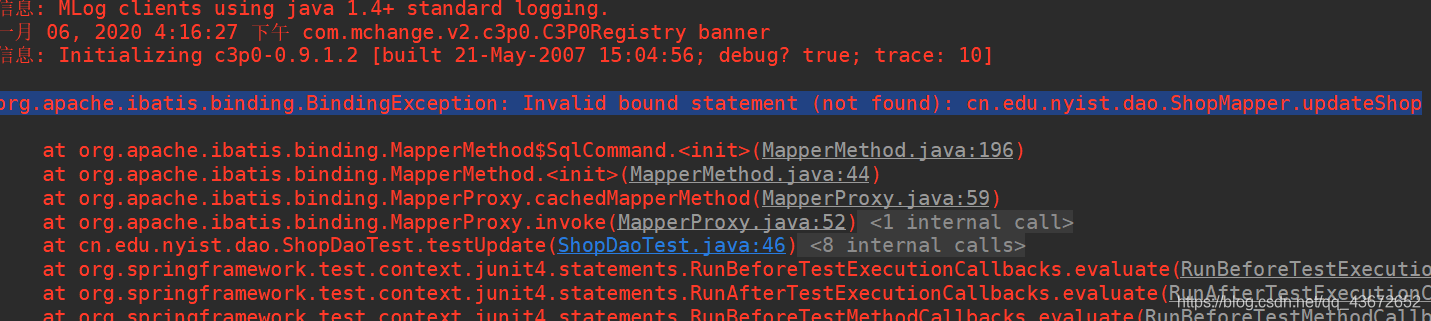
当时在确认shopMapper.xml中的insert语句没有错误后,开始在网上找到了解决方法,首先确认Mapper.xml文件的位置,在maven搭建的项目中,如果Mapper.xml在resources目录下记得你所编写的xml文件名要和dao接口名一致,并在pom.xml后面添加以下标签
<build>

        <resources>

            <resource>

                <directory>src/main/java</directory>

                <!-- 此配置不可缺,否则mybatis的Mapper.xml将会丢失 -->

                <includes>

                    <include>**/*.xml</include>

                </includes>

            </resource>

            <!--指定资源的位置-->

            <resource>

                <directory>../mybatis02/src/main/resources/resources</directory>

            </resource>

        </resources>

    </build>
还有一种不需要在pom.xml中添加,但是你所创建的mapper.xml和dao接口需要在一个包下,并且必须同名。
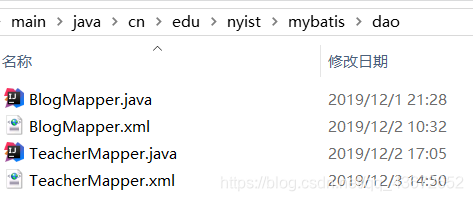
第三、也是我这次没有注意到的一点,Mapper.xml文件的namespace必须和你想实现的接口对应。也就是说namespace的值一定要正确。

本来这里实现的是ShopMapper。唉,当时Crtl+A,crtl+c,crtl+v…竟然忘记修改了,真是大意了!
改正确后,就能正常测试了!为防止以后再犯,特此记录一下!
Invalid bound statement (not found): com.xxx.xxx.dao.ShopMapper.insertShop的更多相关文章
- "Invalid bound statement (not found): com.sitech.admin.dao.TbOpenAbilityInfoDao.findAbilityReadyUp"mybatis配置文件bug
问题描述: 通常在正常启动某项工程后操作某个功能时抛出的bug: org.apache.ibatis.binding.BindingException: Invalid bound statement ...
- 解决Invalid bound statement (not found): com.cqupt.ssm.dao.UserDao.queryMenu问题
今天写项目时多加了个查询菜品的方法报错: Invalid bound statement (not found): com.cqupt.ssm.dao.UserDao.queryMenu 大概意思是找 ...
- 【spring boot Mybatis】报错:org.apache.ibatis.binding.BindingException: Invalid bound statement (not found): com.newhope.interview.dao.UserMapper.add
报错如下: org.apache.ibatis.binding.BindingException: Invalid bound statement (not found): com.newhope.i ...
- 关于org.apache.ibatis.binding.BindingException: Invalid bound statement (not found): com.atguigu.crud.dao.DepartmentMapper.insertSelective的错误
今天我在使用mybatis逆向工程的时候,由于一个疏忽字打错了..结果花了一早上才把错误找全..广大小伙伴们一定要小心啊(能复制粘贴就别手打) 关于org.apache.ibatis.binding. ...
- Java报错:org.apache.ibatis.binding.BindingException: Invalid bound statement (not found): com.sirifeng.babytun.dao.GoodsDAO.findById
前言 最近学vue学得差不多了,想来搭个项目实战一下,结果刚开始搭建SSM框架的时候就来到了我们最喜欢的debug环节 org.apache.ibatis.binding.BindingExcepti ...
- Mybatis 异常记录(1): Invalid bound statement (not found)
错误信息: org.apache.ibatis.binding.BindingException: Invalid bound statement (not found): com.pingan.cr ...
- mybatis一个怪异的问题: Invalid bound statement not found
ssm中报一下错误: invalid bound statement (not found): me.tspace.pm.dao.userdao.getuser at org.apache.ib ...
- springmvc-mybatis整合出错: Invalid bound statement (not found)
Invalid bound statement (not found):(自己dao里面的某个方法) 错误原因:在使用mybatis generator插件自动生成代码后将UserMapper.jav ...
- 异常 org.apache.ibatis.binding.BindingException: Invalid bound statement (not found) 解决方案
原来是因为 AssetsMapper.xml 不知道为什么不见了,导致这个异常,在启动项目时的启动任务里调用到了它,然后因为没有这个xml,所以抛出异常 启动信息: C:\extend\Develop ...
随机推荐
- FreeSql.Repository (一)什么是仓储
欢迎来到<FreeSql.Repository 仓储模式>系列文档,完整文档请前往 wiki 中心:https://github.com/dotnetcore/FreeSql/wiki F ...
- 从隔壁兄弟那爬点网页数据,整理成word文档
package com.parse_report; import com.report.utils.ParseUrl; /** * Create by JIUN 2018/7/14 */ public ...
- Python的基本介绍
我认为Python打破了传统语言的各种细节,让我对编程语音有了全新认识 Python的优势: 可移植性高,解释性更加简单,这两点在编程语言发展到现在已经成为不可或缺的一部分,而很多种编程语言能做到这几 ...
- day112:MoFang:种植园使用websocket代替http&服务端基于flask-socketio提供服务&服务端响应信息&种植园页面显示初始化
目录 1.种植园使用websocket代替http 2.服务端基于socket提供服务 3.服务端响应信息 4.种植园页面展示 1.种植园使用websocket代替http 我们需要完成的种植园,是一 ...
- Git - 简单的使用与Github
Github: Following the instructions to create repo. Git on Linux(centos): download the latest GIT and ...
- Python:值得学习的二十个技巧
本文为大家介绍20个值得记住的 Python 技巧,可以提升您编程技巧, 并为您节省大量时间. 在平常编程过程中,以下技巧大多非常有用. 1 字符串反转 使用切片反转字符串. str1="q ...
- 想成为Git大神?从学会reset开始吧
大家好,今天我们来着重介绍一个非常关键的功能就是reset.在上一篇文章介绍修改历史记录的时候曾经提到过,当我们需要拆分一个历史提交记录的时候需要使用reset.估计很多小伙伴不明白,reset究竟做 ...
- 从数据库将数据导出到excel表格
public class JxlExcel { public static void main(String[] args) { //创建Excel文件 String[] title= {" ...
- sql将两个查询结果拼接到一块,去掉重复,动态sql
<?xml version="1.0" encoding="UTF-8"?> <!DOCTYPE mapper PUBLIC "-/ ...
- Error running 'DemoApplication': No jdk for module 'demo' 没有jdk
方案1----- 按理说jdk都是在File->Project Structure里面设置就可以了,而且现在检查了也是没有问题 后来几经折腾,通过直接搜索Settings里面的jdk,发现还有这 ...