
Signature Request Warnings & eth_sign学习
https://consensys.zendesk.com/hc/en-us/articles/360004427792-Signature-Request-Warnings-eth-sign
MetaMask helps you manage your Ethereum private keys. As you probably know, you can use these keys to sign transactions that send Ether or ERC20 tokens from one account to another. But you can also use these keys to sign data presented to you by an application. This is powerful: signing data can prove ownership of your account and act as a form of authentication, user consent, or messaging.
metamask帮助我们管理以太坊私钥,我们可以使用这些key去对从一个账户到另一个账户之间的ether和ERC20 tokens交易进行签名。除此之外你还可以使用它来在应用中签署数据来代表你的身份。这是十分有用的,签署数据能够帮助我们证明我们对账户的拥有权或充当身份验证、用户同意或消息传递的形式
As Ethereum has evolved, the mechanics of asking users to sign data have evolved as well. For usability's sake, the community is trying to make data as clear and readable as possible when presented for signing. If an application asks a user to sign a Terms of Service with their private key, the user should be able to understand the content of what they're signing and trust its accuracy.
随着Ethereum的发展,要求用户签署数据的机制也在不断发展。出于可用性的考虑,社区正在努力使数据在提供签名时尽可能清晰和可读。如果应用程序要求用户用私钥签署服务条款,用户应该能够理解他们所签署的内容并相信其准确性。
For some older signing methods, this is not technically possible. When MetaMask encounters an application that asks for a signature on data in a format that's not human readable, we warn our users to sign only if they fully trust the application they are interacting with. In these cases, the balance of your wallet is at stake: it's possible for a malicious actor to encode a real transaction involving Eth or tokens inside the data, ask for your signature, and submit the transaction to the blockchain as if you had signed the transaction yourself.
对于一些较老的签名方法,这在技术上是不可能的。当MetaMask遇到要求对数据进行签名的应用程序时,该应用程序的格式不是人类可读的,我们警告用户只有在完全信任与之交互的应用程序时才签名。在这种情况下,你钱包的余额就岌岌可危了:恶意的参与者可能会对数据中涉及Eth或token的真实交易进行编码,请求您的签名,并将交易提交给区块链,就好像您自己签署了交易一样。

上图这种就是一种很老旧的签名方法,用户并不知道它签署的信息到底是什么
Some applications still rely on these older methods to interact with users, so we continue to support this type of signing functionality in our extension with a significant warning. In the long term we hope the Ethereum community will stop using these dangerous signing methods in favor of newer & safer alternatives.
有些应用程序仍然依赖这些较老的方法与用户交互,因此我们在扩展中继续支持这种签名功能,并发出了重要警告。从长远来看,我们希望Ethereum社区将停止使用这些危险的签约方式,支持更新和更安全的替代方案。

上图就是一种比较新的方法,在这里可以看见用户签署的信息
If you'd like to see how different signing methods interact with the MetaMask extension, check out these signing examples.
如果您想了解不同的签名方法如何与MetaMask扩展交互,请查看写在下面的这个实例中的这些方法:
有一个实现的例子:signing examples.
页面实现为:

这里面实现的代码都写在了bundle.js,从6506行可见对web3签署的API的调用,好好看看,了解人家是怎么实现的
后面学习之后发现实现代码是index.js,bundle.js是使用browserify将index.js转换成了浏览器能调用的格式的代码
var ethUtil = require('ethereumjs-util')

var sigUtil = require('eth-sig-util')

var Eth = require('ethjs')

window.Eth = Eth

var fs = require('fs')

var terms = fs.readFileSync(__dirname + '/terms.txt').toString()

ethSignButton.addEventListener('click', function(event) {

  event.preventDefault() //阻止元素发生默认的行为(例如,当点击提交按钮时阻止对表单的提交)

  var msg = '0x879a053d4800c6354e76c7985a865d2922c82fb5b3f4577b2fe08b998954f2e0'

  var from = web3.eth.accounts[]

  web3.eth.sign(from, msg, function (err, result) {

    if (err) return console.error(err)

    console.log('SIGNED:' + result)

  })

})

personalSignButton.addEventListener('click', function(event) {

  event.preventDefault()

  var text = terms

  var msg = ethUtil.bufferToHex(new Buffer(text, 'utf8'))

  // var msg = '0x1' // hexEncode(text)

  console.log(msg)

  var from = web3.eth.accounts[]

  /*  web3.personal.sign not yet implemented!!!

   *  We're going to have to assemble the tx manually!

   *  This is what it would probably look like, though:

    web3.personal.sign(msg, from) function (err, result) {

      if (err) return console.error(err)

      console.log('PERSONAL SIGNED:' + result)

    })

  */

   console.log('CLICKED, SENDING PERSONAL SIGN REQ')

  var params = [msg, from]

  var method = 'personal_sign'

  web3.currentProvider.sendAsync({

    method,

    params,

    from,

  }, function (err, result) {

    if (err) return console.error(err)

    if (result.error) return console.error(result.error)

    console.log('PERSONAL SIGNED:' + JSON.stringify(result.result))

    console.log('recovering...')

    const msgParams = { data: msg }

    msgParams.sig = result.result

    console.dir({ msgParams })

    const recovered = sigUtil.recoverPersonalSignature(msgParams)

    console.dir({ recovered })

    if (recovered === from ) {

      console.log('SigUtil Successfully verified signer as ' + from)

    } else {

      console.dir(recovered)

      console.log('SigUtil Failed to verify signer when comparing ' + recovered.result + ' to ' + from)

      console.log('Failed, comparing %s to %s', recovered, from)

    }

    /*

    method = 'personal_ecRecover'

    var params = [msg, result.result]

    web3.currentProvider.sendAsync({

      method,

      params,

      from,

    }, function (err, recovered) {

      console.dir({ err, recovered })

      if (err) return console.error(err)

      if (result.error) return console.error(result.error)

      if (result.result === from ) {

        console.log('Successfully verified signer as ' + from)

      } else {

        console.log('Failed to verify signer when comparing ' + result.result + ' to ' + from)

      }

    })

    */

  })

})

personalRecoverTest.addEventListener('click', function(event) {

  event.preventDefault()

  var text = 'hello!'

  var msg = ethUtil.bufferToHex(new Buffer(text, 'utf8'))

  // var msg = '0x1' // hexEncode(text)

  console.log(msg)

  var from = web3.eth.accounts[]

  /*  web3.personal.sign not yet implemented!!!

   *  We're going to have to assemble the tx manually!

   *  This is what it would probably look like, though:

    web3.personal.sign(msg, from) function (err, result) {

      if (err) return console.error(err)

      console.log('PERSONAL SIGNED:' + result)

    })

  */

   console.log('CLICKED, SENDING PERSONAL SIGN REQ')

  var params = [msg, from]

  var method = 'personal_sign'

  web3.currentProvider.sendAsync({

    method,

    params,

    from,

  }, function (err, result) {

    if (err) return console.error(err)

    if (result.error) return console.error(result.error)

    console.log('PERSONAL SIGNED:' + JSON.stringify(result.result))

    console.log('recovering...')

    const msgParams = { data: msg }

    msgParams.sig = result.result

    method = 'personal_ecRecover'

    var params = [msg, result.result]

    web3.currentProvider.sendAsync({

      method,

      params,

      from,

    }, function (err, result) {

      var recovered = result.result

      console.log('ec recover called back:')

      console.dir({ err, recovered })

      if (err) return console.error(err)

      if (result.error) return console.error(result.error)

      if (recovered === from ) {

        console.log('Successfully ecRecovered signer as ' + from)

      } else {

        console.log('Failed to verify signer when comparing ' + result + ' to ' + from)

      }

    })

  })

})

ethjsPersonalSignButton.addEventListener('click', function(event) {

  event.preventDefault()

  var text = terms

  var msg = ethUtil.bufferToHex(new Buffer(text, 'utf8'))

  var from = web3.eth.accounts[]

  console.log('CLICKED, SENDING PERSONAL SIGN REQ')

  var params = [from, msg]

  // Now with Eth.js

  var eth = new Eth(web3.currentProvider)

  eth.personal_sign(msg, from)

  .then((signed) => {

    console.log('Signed!  Result is: ', signed)

    console.log('Recovering...')

    return eth.personal_ecRecover(msg, signed)

  })

  .then((recovered) => {

    if (recovered === from) {

      console.log('Ethjs recovered the message signer!')

    } else {

      console.log('Ethjs failed to recover the message signer!')

      console.dir({ recovered })

    }

  })

})

signTypedDataButton.addEventListener('click', function(event) {

  event.preventDefault()

  const msgParams = [

    {

      type: 'string',

      name: 'Message',

      value: 'Hi, Alice!'

    },

    {

      type: 'uint32',

      name: 'A number',

      value: ''

    }

  ]

  var from = web3.eth.accounts[]

  /*  web3.eth.signTypedData not yet implemented!!!

   *  We're going to have to assemble the tx manually!

   *  This is what it would probably look like, though:

    web3.eth.signTypedData(msg, from) function (err, result) {

      if (err) return console.error(err)

      console.log('PERSONAL SIGNED:' + result)

    })

  */

   console.log('CLICKED, SENDING PERSONAL SIGN REQ')

  var params = [msgParams, from]

  console.dir(params)

  var method = 'eth_signTypedData'

  web3.currentProvider.sendAsync({

    method,

    params,

    from,

  }, function (err, result) {

    if (err) return console.dir(err)

    if (result.error) {

      alert(result.error.message)

    }

    if (result.error) return console.error(result)

    console.log('PERSONAL SIGNED:' + JSON.stringify(result.result))

    const recovered = sigUtil.recoverTypedSignature({ data: msgParams, sig: result.result })

    if (recovered === from ) {

      alert('Successfully ecRecovered signer as ' + from)

    } else {

      alert('Failed to verify signer when comparing ' + result + ' to ' + from)

    }

  })

})

ethjsSignTypedDataButton.addEventListener('click', function(event) {

  event.preventDefault()

  const msgParams = [

    {

      type: 'string',

      name: 'Message',

      value: 'Hi, Alice!'

    },

    {

      type: 'uint32',

      name: 'A number',

      value: ''

    }

  ]

  var from = web3.eth.accounts[]

  console.log('CLICKED, SENDING PERSONAL SIGN REQ')

  var params = [msgParams, from]

  var eth = new Eth(web3.currentProvider)

  eth.signTypedData(msgParams, from)

  .then((signed) => {

    console.log('Signed!  Result is: ', signed)

    console.log('Recovering...')

    const recovered = sigUtil.recoverTypedSignature({ data: msgParams, sig: signed })

    if (recovered === from ) {

      alert('Successfully ecRecovered signer as ' + from)

    } else {

      alert('Failed to verify signer when comparing ' + signed + ' to ' + from)

    }

  })

})
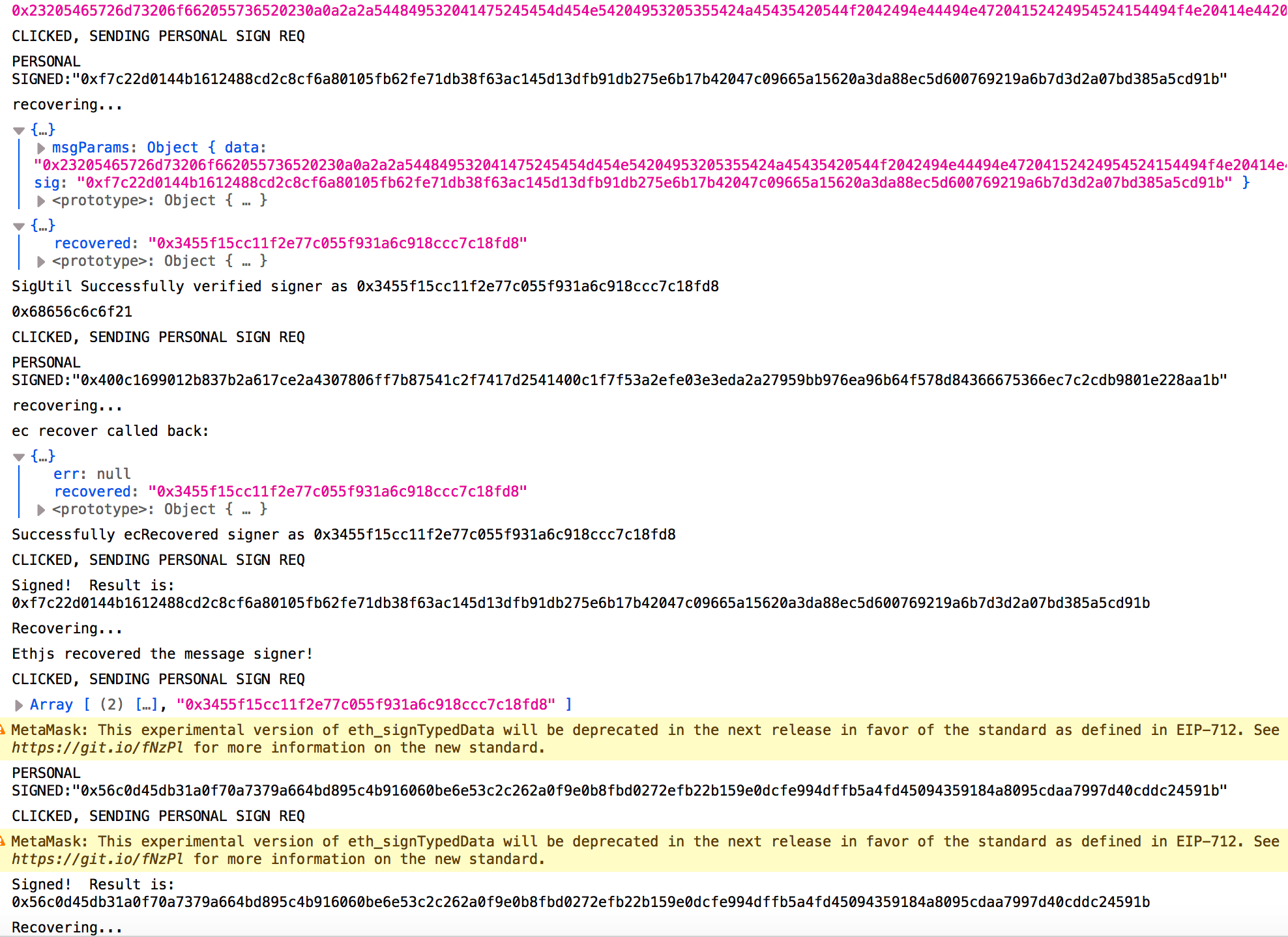
在运行的过程中我们能够看见我们进行签名的信息到底是什么
在页面控制器中的返回信息如下图所示:
点击eth_sign,metamask如图:
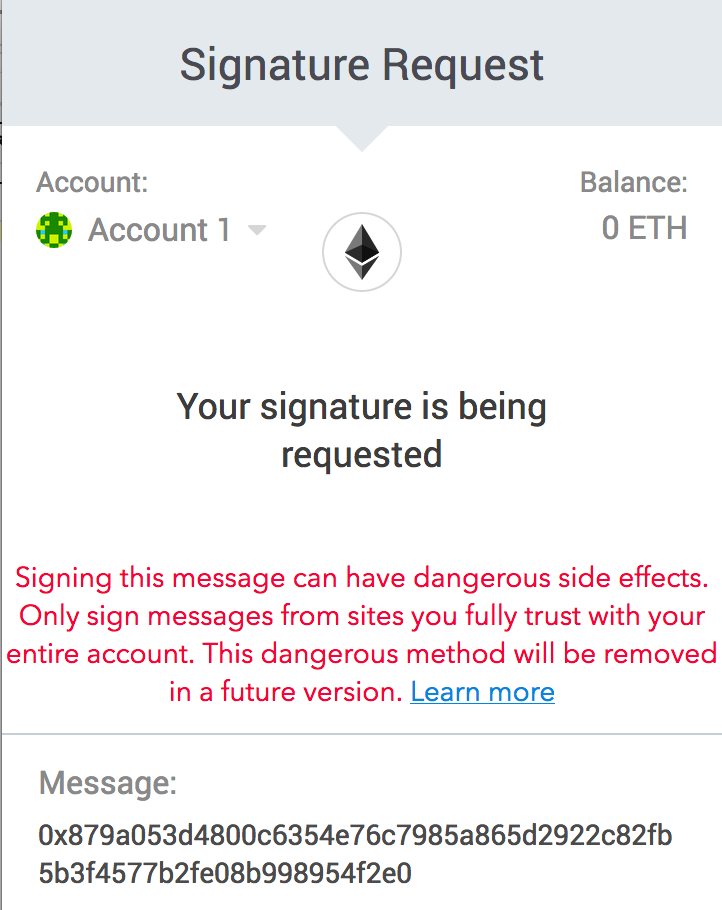
不能看见签署的信息到底是什么
而另外的几种新的签名方法都能够很详细地看见用户对什么信息进行了签名
Signature Request Warnings & eth_sign学习的更多相关文章
- Request模块入门学习
使用指令npm install --save request来安装模块,然后使用var request = require('request')完成引用. 对于GET请求,主要是获取目的url中数据. ...
- JSP内置对象之request对象【学习笔记】
request对象是JSP中重要的对象,每个request对象封装着一次用户的请求,并且所有的请求参数都被封装在request对象中,因此request对象是获取请求参数的重要途径. 一.获取请求头与 ...
- <c:set var="ctx" value="${pageContext.request.contextPath}" />的学习
${pageContext.request.contextPath},是获取当前根目录 set var="ctx",是给这个路径定义了一个变量,用的时候可以通过EL表达式获取:${ ...
- python+request 常用基础学习笔记
1.pycharm,避免控制台输出的json内容中文出现乱码. #注:乱码为Unicode格式:\u6d4b\u8bd5.加入如下代码后正确返回中文:测试 get_result = r.json() ...
- browerify初步了解
之前在写Signature Request Warnings & eth_sign学习的时候在里的signing examples时了解到browserify工具,可以通过这个例子学习如何使用 ...
- C#开发微信公众号-学习笔记
由于最近要做微信服务号的开发,所以开始找相关说明和接口文档开始学,故把学习过程及注意事项记录一下,帮助想学习的快速上手.废话不多少了,直接上干货! 1.申请微信公众号 这个就不需要多说了吧,大家直接照 ...
- java微信学习 接入
现在实习的公司要做微信开发,然而一直没安排任务,所以一直在看微信接口,记录下学习的内容 微信开发肯定要看的就是微信公众平台开发者文档,上面有每种接口的调用格式,刚开始学习的时候自己申请了一个订阅号,个 ...
- Core Data 学习简单整理01
Core Data是苹果针对Mac和iOS平台开发的一个框架, 通过CoreData可以在本地生成数据库sqlite,提供了ORM的功能,将对象和数据模型相互转换 . 通过Core Data管理和操作 ...
- webx学习
webx框架学习指南 http://openwebx.org/docs/Webx3_Guide_Book.html webx学习(一)——初识webx webx学习(二)——Webx Framewor ...
随机推荐
- MVC架构介绍-Model的开发
需要在派生类实现lEntity,IEntity的两个属性EntityId和IsDeleteInDataBase,以显式方式实现 Model的所有属性存入数据库以前都要确保有相应的默认值,不要依赖数据库 ...
- Java基础——Servlet(八)文件上传下载
一.简单的文件上传常见的组件Smartupload , Apache 的 commons FileUploadSmartupload上传的步骤: 1.初始化上传上下文 2.准备上传 3.保存文件 &l ...
- Clock Pictures(kmp + Contest2075 - 湖南多校对抗赛(2015.04.26))
Problem H: Clock Pictures Time Limit: 3 Sec Memory Limit: 128 MBSubmit: 73 Solved: 18[Submit][Stat ...
- canvas-star0.html
<!DOCTYPE html> <html lang="en"> <head> <meta charset="UTF-8&quo ...
- 使用普通用户执行 docker
CentOS 版本 7.4,Docker 版本 docker-1.13 及以下 ll /var/run/docker.sock srw-rw----. 1 root root 0 May 25 14: ...
- csharp: Configuring ASP.NET with Spring.NET and FluentNHibernate
Domain: FluentNhibernateLocalSessionFactoryObject.cs using System; using System.Collections.Generic; ...
- debounce(防抖动函数)
短时间内不重复触发一个事件 设置一个门槛值,表示两次 Ajax 通信的最小间隔时间.如果在间隔时间内,发生新的keydown事件,则不触发 Ajax 通信,并且重新开始计时.如果过了指定时间,没有发生 ...
- instanceof和typeof的细节
我骑着小毛驴,喝着大红牛哇,哩个啷格里格朗,别问我为什么这木开心,如果活着不是为了浪荡那将毫无意义 今天来捋一捋我们平日经常用的instanceof和typeof的一些小问题 typeof: type ...
- Docker第二章:docker基础1--镜像,容器&仓库
镜像介绍及操作:http://www.haveneed.cn/article-detials/115 容器介绍及操作:http://www.haveneed.cn/article-detials/11 ...
- python自动化开发-6-面向对象编程
面向对象编程 面向对象的特性 封装:把客观事物封装成抽象的类,并且类可以把自己的数据和方法只让可信的类或者对象操作,对不可信的进行信息隐藏. 继承:面向对象编程 (OOP) 语言的一个主要功能就是“ ...