
webpack4打包报错:WARNING in configuration The 'mode' option has not been set, webpack will fallback to 'production' for this value. Set 'mode' option to 'development' or 'production' to enable defaults fo
运行命令webpack ./src/main.js ./dist/murenziwei.js后,目录上神马动静都没有,你以为在dist文件夹上会有murenziwei.js吗?毛都没有

警告和错误倒是有,警告说我没有设置mode?错误说我配置打包出入口有问题?
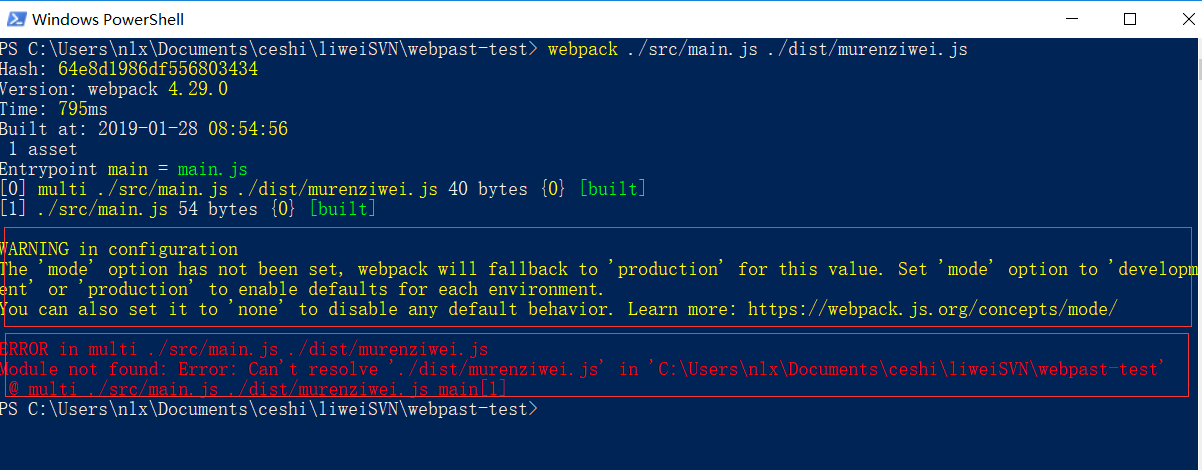
为了快点打包成功,我老老实实的服从,将上面webpack命令改为webpack ./src/main.js --output-filename ./dist/murenziwei.js --output-path . --mode development,然后按下Enter,我的解决了,你的呢?
- --output-filename:设置要打包的文件目录
- --output-path:打包文件放置的文件目录
- --mode:告诉程序,在当前目录,我是属于开发状态development


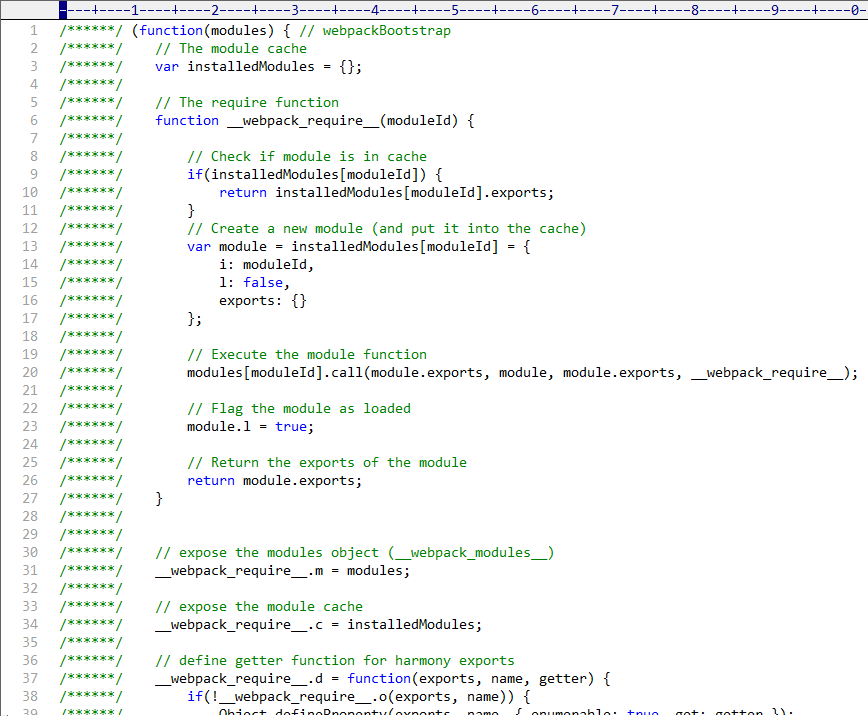
再来最后一眼,瞧瞧murenziwei.js都有啥?
webpack4打包报错:WARNING in configuration The 'mode' option has not been set, webpack will fallback to 'production' for this value. Set 'mode' option to 'development' or 'production' to enable defaults fo的更多相关文章
- webpack4 打包报错 :regeneratorRuntime is not defined
使用async函数,在webpack打包时报错 babel-polyfill is required. You must also install it in order to get async/a ...
- android -------- 混淆打包报错(warning - InnerClass annotations are missing corresponding EnclosingMember annotations)
最近做Android混淆打包遇到一些问题,Android Sdutio 3.1 版本打包的 错误如下: Android studio warning - InnerClass annotations ...
- webpack4打包报错ERROR in multi ./src/main.js dist/bundle.js
webpack打包测试: 上边将mode01.js模块及main.js主文件编写完成,下边使用webpack对这些js文件进行打包 1.进入程序目录,执行webpack main.js build.j ...
- No compiler is provided in this environment. Perhaps you are running on a JRE rather than a JDK? idea maven 打包报错问题解决
mvn clean install -X -Dmaven.test.skip=true -P dev 打包报错:No compiler is provided in this environment. ...
- maven打包报错 Fatal error compiling: tools.jar not found: C:\Program Files\Java\jre1.8.0_151\..\lib\tool
maven 打包报错 [ERROR] Failed to execute goal org.apache.maven.plugins:maven-compiler-plugin:2.5.1:comp ...
- (TODO:)下载图片,报错:warning: could not load any Objective-C class information from the dyld shared cache. This will significantly reduce the quality of type information available.
想使用NSInvocationOperation下载图片,然而并没有下载下来, NSData为nil, 还有报错:(打断点就报错) warning: could not load any Object ...
- ecstore在MySQL5.7下维护报错WARNING:512 @ ALTER IGNORE TABLE
ecstore在MySQL5.7下维护报错WARNING:512 @ ALTER IGNORE TABLE 打开 /app/base/lib/application/dbtable.php , 替换A ...
- webpack 打包报错:One CLI for webpack must be installed. These are recommended choices, delivered as separate packages
webpack 打包报错: One CLI for webpack must be installed. These are recommended choices, delivered as sep ...
- Docker报错 WARNING: IPv4 forwarding is disabled. Networking will not work.
问题:创建容器的时候报错WARNING: IPv4 forwarding is disabled. Networking will not work. # docker run -it -p 3000 ...
随机推荐
- JQUERY-定义-查找
正课: 1. 什么是jQuery 2. 如何使用jQuery 3. 查找 1. 什么是jQuery 第三方开发的 执行DOM操作的 极简化的 函数库 第三方: 下载 执行DOM操作: 学习jQuery ...
- 关于java poi itext生成pdf文件的例子以及方法
最近正在做导出pdf文件的功能,所以查了了一些相关资料,发现不是很完善,这里做一些小小的感想,欢迎各位“猿”童鞋批评指正. poi+itext,所需要的jar包有itext-2.1.7.jar,poi ...
- qhfl-7 结算中心
结算中心,即从购物车前往支付前的确认页面,这里要开始选择优惠券了 """ 前端传过来数据 course_list 课程列表 redis 中将要存放的结算数据 { sett ...
- python_requests随笔
#coding=utf-8 import requests url = "http://oj.jxust.edu.cn" #如果需要持续的链接,可以使用里面的Session方法(保 ...
- Html5与Css3知识点拾遗(六)
web字号 px() 百分比(较常用) em(最常用):一般1em=16px,相对单位.以父元素作参照系,父元素大小是不确定的 body{ font-size:100%; /*父元素默认为16px*/ ...
- IIS 设置文件传输大小限制
IIS默认传输文件大小为30M,最大允许传输为2G. 1.通过webconfig配置节点设置 在IIS 6.0 设置如下配置节点: 但是IIS 7.0-8.0还要做添加如下配置节点才能正确,否则还是默 ...
- Eclipse中一些真正常用的快捷键
F2 文件重命名(要使用某个过长的文件名或者不好打的文件名时,直接F2再Ctrl+C非常好用,比如:Validform_v5.3.2_min.js) Ctrl+S 保存当前文件 Ctrl+Shift+ ...
- 基于ESP32的uart通讯
本文源码地址为:http://download.csdn.net/download/noticeable/9961054 ESP32上有三个UART通讯接口,设备号,从0~2,即UART0,UART1 ...
- 《mysql必知必会》学习_第14章_20180806_欢
第14章:使用子查询. 子查询是镶嵌在其他查询里面,相当其他的select查询的条件来. P91 select order_num from where prod_id='tnt2'; #检索条件 ...
- FTP主动模式与被动模式,及java FTPClient模式设置
FTP的主动模式与被动模式 FTP服务器使用20和21两个网络端口与FTP客户端进行通信. FTP服务器的21端口用于传输FTP的控制命令,20端口用于传输文件数据. FTP主动模式: FTP客户端向 ...