
Kibana中的Coordinate Map地图报索引错误的问题
今天做地图定位展示,展示的是ApacheWeb服务器的访问日志文件中的来源IP。但是中间出现了报错环节,说是索引不能匹配到geo_point类型,实在是不懂这是在说什么,后来在网站找了方法就解决了。主要报错如下:
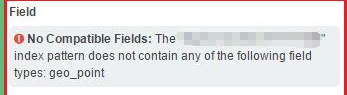
报错信息:
No Compatible Fields: The "logstash_apachelogs" index pattern does not contain any of the following field types: geo_point”
觉得很是奇怪,再来看看我的配置文件
input {

        redis {

                host => "172.16.0.54"

                port =>

                db =>

                password => ""

                data_type => "list"

                key => "apache_filter_index"

                codec => json {

                        charset => "UTF-8"

                }

                add_field => {"[@metadata][myfulltotal]" => "apacheaccess_log"}

        }

}

filter {

        if [@metadata][myfulltotal] == "apacheaccess_log" {

                mutate {

                        gsub => ["message","\\x","\\\x"]

                }

                if ( 'method":"HEAD' in [message] ) {

                        drop{}

                }

                json {

                        source => "message"

                        add_field => {"[@metadata][direct_ip]" => "%{direct_ip}"}

                        remove_field => "message"

                        remove_field => "prospector"

                        remove_field => "beat"

                        remove_field => "host"

                        remove_field => "input"

                        remove_field => "source"

                        remove_field => "offset"

                        remove_field => "fields"

                        remove_field => "@version"

                }

                date {

                        match => ["timestamp","yyyy-MM-dd HH:mm:ss Z"]

                }

                mutate {

                        split => ["client_ip",","]

                }

                mutate {

                        replace => { "client_ip" => "%{client_ip[0]}"}

                }

                mutate {

                        convert => ["body_bytes_sent","integer"]

                        convert => ["total_bytes_sent","integer"]

                }

                if [client_ip] == "-" {

                        if [@metadata][direct_ip] not in ["%{direct_ip}","-"]{

                                mutate {

                                        replace => { "client_ip" => "%{direct_ip}" }

                                }

                        } else {

                                drop {}

                        }

                }

                geoip {

                        source => "client_ip"

                        target => ["geoip"]

                        add_field => ["[geoip][coordinates]", "%{[geoip][longitude]}"]

                        add_field => ["[geoip][coordinates]", "%{[geoip][latitude]}"]

                }

                mutate {

                        convert => ["[geoip][coordinates]","float"]

                }

                mutate {

                        remove_field => ["direct_ip"]

                        remove_field => ["timestamp"]

                }

        }

}

output {

        if [@metadata][myfulltotal] == "apacheaccess_log" {

                elasticsearch {

                        hosts => ["172.16.0.51:9200"]

                        index => "logstash_apachelogs"

                }

        }

}
看上去都是没有问题的,只要是按照这个格式来写,都没有什么错误。只是在报错信息中看出geo的location类型不是geo_point类型的,那我们通过GET命令查看一下mapping
[root@ELK-chaofeng07 httpd]# curl -XGET http://172.16.0.51:9200/logstash_apachelogs/_mapping/

{"logstash-apachelogs":{"mappings":{"_default_":{"dynamic_templates":,{"string_fields":{"match":"*","m,"@version":{"type":"keyword"},"geoip":{"dynamic":"true","properties":{"ip":{"type":"ip"},"latitude":{"type":"half_float"},"location":{"type":"geo_point"},"longitude":{"type":"half_float"}}}}},"doc":{"dynamic_templates":[{"message_field":{"path_match":"message","match_mapping_type":"string","mapping":{"norms":false,"type":"text"}}},{"string_fields":{"match":"*","match_mapping_type":"string","mapping":{"fields":{"keyword":{"ignore_above":,"type":"keyword"}},"norms":false,"type":"text"}}}],"properties":{"@timestamp":{"type":"date"},"@version":{"type":"keyword"},"body_bytes_sent":{"type":"long"},"client_ip":{"type":"text","norms":false,"fields":{"keyword":{"type":"keyword",},"continent_code":{"type":"text","norms":false,"fields":{"keyword":{"type":"keyword","ignore_above":}}},"coordinates":{"type":"float"},"country_code2":{"type":"text","norms":false,"fields":{"keyword":{"type":"keyword","ignore_above":}}},"country_code3":{"type":"text","norms":false,"fields":{"keyword":{"type":"keyword","ignore_above":}}},"country_name":{"type":"text","norms":false,"fields":{"keyword":{"type":"keyword","ignore_above":}}},"ip":{"type":"ip"},"latitude":{"type":"half_float"},"location":{"type":"float"},"longitude":{"type":"half_float"},"region_code":}}}}}}}
看的出来我们此时的location是float类型的。所以如何将它变成geo_point类型是我们的解决目标方法
我们分析一下原因:
索引格式为logstash_apachelogs日志文件由logstash输出到Elasticsearch;在 elasticsearch 中,所有的数据都有一个类型,什么样的类型,就可以在其上做一些对应类型的特殊操作。geo信息中的location字段是经纬度,我们需要使用经纬度来定位地理位置;在 elasticsearch 中,对于经纬度来说,要想使用 elasticsearch 提供的地理位置查询相关的功能,就需要构造一个结构,并且将其类型属性设置为geo_point。
解决方法:
Elasticsearch支持给索引预定义设置和mapping,其实ES中已经有一个默认预定义的模板,我们只要使用预定的模板即可。我们要想使用预定义的模板,那么索引名必须匹配 logstash-* 的索引才会应用这个模板,由于我们在logstash中使用的是logstash_*的索引方式,因此并没有匹配默认模板,所以只需要修改一下索引名即可。然后我们就可以看到map不再报这个错误了。
所以说这是个相当不起眼的错误,但是引发了这个大的问题,搞的让人很懵比,所以接下来我们得好好研究一下mapping是什么,
Kibana中的Coordinate Map地图报索引错误的问题的更多相关文章
- 使用ueditor中的setContent() 时经常报innerHtml错误(笔记)
1)今天遇到个问题,使用ueditor中的setContent() 时经常报innerHtml错误:网上找了下解决方案:发现这个可以用: 不能创建editor之后马上使用ueditor.setCont ...
- MVC中使用jquery uploadify上传图片报302错误
使用jquery uploadify上传图片报302错误研究了半天,发现我上传的action中有根据session判断用户是否登录,如果没有登录就跳到登陆页,所以就出现了302跳转错误.原来更新了fl ...
- virtualbox虚拟机中mysql远程连接登陆报2003错误的解决方法
最近在virtualbox中安装了Ubuntu 14,配置了一个mysql server,设置的桥接网络模式.在其他电脑连接的时候,总是报2003错误.开始以为是localhost没有置换为%,运行u ...
- Kibana:在Kibana中定制Regional Map
- spring中使用HibernateTemplate或HibernateDaoSupport报类型转换错误
使用spring的HibernateDaoSupport的时候.报错例如以下: java.lang.ClassCastException: java.lang.String cannot be cas ...
- 解决vue项目中使用ivew定制主题报 .bezierEasingMixin();错误
背景:在使用view-design(iview)定制主体时(覆盖变量方式)出现less错误 完整错误如下 解决方法: 在vue.config.js中添加 less-loader:5.0.x modul ...
- mutation中修改state中的状态值,却报[vuex] do not mutate vuex store state outside mutation handlers.
网上百度说是在mutation外修改state中的状态值,会报下列错误,可我明明在mutations中修改的状态值,还是报错 接着百度,看到和我类似的问题,说mutations中只能用同步代码,异步用 ...
- ROS中利用V-rep进行地图构建仿真
V-rep中显示激光扫描点 在VREP自带的场景中找到practicalPathPlanningDemo.ttt文件,删除场景中多余的物体只保留静态的地图.然后在Model browser→comp ...
- Arcmap中加载互联网地图资源
本文转载自:http://blog.3snews.net/space.php?uid=6955280&do=blog&id=67981 前一段时间想在Arcmap中打开互联网地图中的地 ...
随机推荐
- Spring Boot之JdbcTemplate多数据源配置与使用
之前在介绍使用JdbcTemplate和Spring-data-jpa时,都使用了单数据源.在单数据源的情况下,Spring Boot的配置非常简单,只需要在application.propertie ...
- 【Promise】Promise实现请求超时处理(加强版)
昨天闲来无事,于是把之前写过的promise优化了一下,代码如下: /*写文件.追加写.读文件*/ var fs = require('fs'); function wrapper(fn,contex ...
- Gradle学习系列之读懂Gradle语法
转载地址: http://www.cnblogs.com/CloudTeng/p/3418072.html Gradle是一种声明式的构建工具.在执行时,Gradle并不会一开始便顺序执行build. ...
- 使用Spring Boot开发 “Hello World” Web应用
环境准备 由于现在很多IDE都支持Maven, 所以我们将使用Maven构建该工程: 开始之前,需要先安装Java和Maven: 本工程将基于Spring Boot 1.4.3.RELEASE开发,推 ...
- Spring Boot + Spring Cloud 实现权限管理系统 后端篇(十四):项目打包部署
项目打包部署 安装MySQL镜像 注意:如果使用docker镜像安装MySQL,也需要在前端部署主机安装MySQL,因为备份还原功能是使用MySQL的本地命令进行操作的. 下载镜像 执行以下命令,拉取 ...
- vue-02-安装-指令
1, vue安装 1), 安装vue-cli npm install -g cnpm --registry=https://registry.npm.taobao.org 之后可以用 淘宝的npm镜像 ...
- php获取父目录的方法 dirname()
dirname() 方法,获取父目录的方法,官方文档:http://php.net/manual/en/function.dirname.php 在 php 7.0 后,dirname() 支持两个参 ...
- docker化java web应用
一.简介 Docker是一个使用Go语言开发的开源的应用容器引擎,让开发者可以打包他们的应用以及依赖包到一个可移植的容器中,然后发布到任何流行的机器上.Docker的发展速度和火爆程度着实令人惊叹,一 ...
- Mysql 5.7 基于组复制(MySQL Group Replication) - 运维小结
之前介绍了Mysq主从同步的异步复制(默认模式).半同步复制.基于GTID复制.基于组提交和并行复制 (解决同步延迟),下面简单说下Mysql基于组复制(MySQL Group Replication ...
- [NOI 2017]蔬菜
Description 题库链接 小 N 是蔬菜仓库的管理员,负责设计蔬菜的销售方案. 在蔬菜仓库中,共存放有 \(n\) 种蔬菜,小 N 需要根据不同蔬菜的特性,综合考虑各方面因素,设计合理的销售方 ...