
CSS常见布局
一、单列布局
1. 水平居中
1.1 使用inline-block和text-align
  .parent{text-align:center;}

  .child{display:inline-block;}
1.2 使用margin:0 auto实现
.child{width:200px;margin:0 auto;}
1.3 使用绝对定位实现
  .parent{position:relative;}
  .child{position:absolute;left:50%;margin-left:-100px;width:200px;}  /*margin-left的负值为盒子宽度的一半*/
1.4 使用flex布局实现
.parent{display:flex;justify-content:center;}
2. 垂直居中
2.1 使用vertical-align
  .parent{line-height:100px}

  .child{display:inline-block;vertical-align:middle;}
2.2 使用绝对定位实现
  .parent{position:relative;}

  .child{position:absolute;top:50%;margin-top:-100px;height:200px;}  /*margin-top的负值为盒子高度的一半*/
2.3 使用flex实现
.parent{display:flex;align-items:center;}
3. 水平垂直居中
3.1 使用inline-block,text-align和vertical-align
  .parent{line-height:100px;text-align:center;}

  .child{display:inline-block;vertical-align:middle}
3.2 使用绝对定位实现
  .parent{position:relative;}

  .child{position:absolute;top:50%;left:50%;margin-top:-100px;margin-left:-100px;width:200px;height:200px;}  /*margin-top的负值为盒子高度的一半,margin-left的负值为盒子宽度的一半*/
3.3 使用flex实现
.parent{display:flex;justify-content:center;align-items:center;}
二、多列布局
1. 圣杯布局:三列布局,左右定宽,中间宽度自适应;中间栏要在浏览器中优先展示渲染;允许任意列的高度最高。
HTML:
 <div class="header">header</div>

 <div class="container">

    <div class="main">main</div>    <!--中间栏优先展示渲染,放在前面-->

    <div class="left">left</div>

    <div class="right">right</div>

 </div>

 <div class="footer">footer</div>
(1) 基础样式
*{margin:;padding:}
body{min-width:800px;}

.header,.footer{

   border: 1px solid #333;

   background: #aaa;

   text-align: center;

}

.container{

   border:2px solid yellow;

}

.left{

   width:200px;

   background:skyblue;
 }

 .right{

   width:200px;

   background:pink;

 }

 .main{

   width:100%;

   background:tomato;

 }
.main,.left,.right{

   min-height:100px;

 }

(2) 三列均设置左浮动
.left,.main,.right{

    float:left;

}
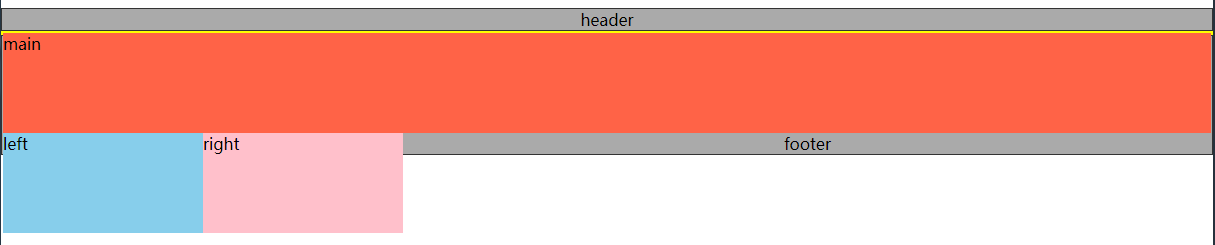
(3) 清除浮动
.container{

   zoom:;

}

.container:after{

   content:"";

   display:block;

   clear:both;
}
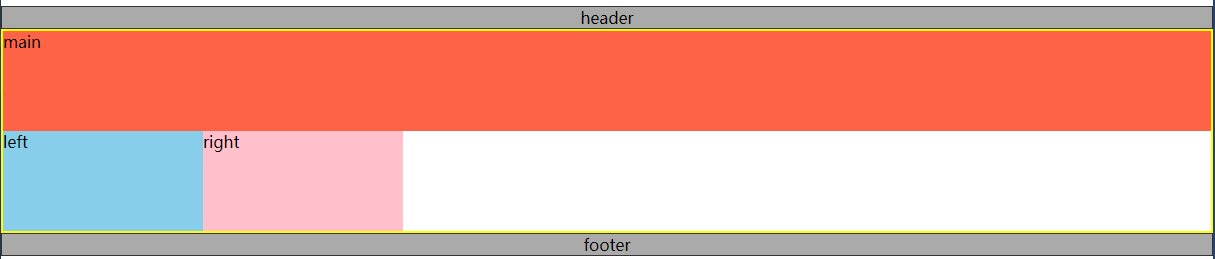
(4) 让left和right上移
.left{

     margin-left:-100%;   /*利用margin-left的负值,将left列移动到上一行的开头*/

     width:200px;

     background:skyblue;

}

.right{

     margin-left:-200px;  /*利用margin-left的负值,将right列移动到上一行的末尾*/

     width:200px;

     background:pink;

}

left列和right列已经上移,但是可以看见,此时main已被遮盖。
(5) 解决遮盖问题
给.containter左右内边距,大小分别为left列的宽和right列的宽。
.container{

   padding:0px 200px;

   border:2px solid yellow;

   zoom:;

}

然后利用相对定位,将left列和right列定位到两侧空白处。
.left{

    position:relative;

    left:-200px;

    margin-left:-100%;

    width:200px;

    background:skyblue;

}

.right{

    position:relative;

    right:-200px;

    margin-left:-200px;

    width:200px;

    background:pink;

}

遮挡问题已解决,main可见啦。
至此,圣杯布局已完成,中间列宽度自适应。
2. 双飞翼布局:三列布局,左右定宽,中间宽度自适应;中间栏要在浏览器中优先展示渲染;允许任意列的高度最高。
双飞翼布局和圣杯布局基本一样,不同之处在于解决遮盖问题的方式不同。
双飞翼布局在main元素中添加了一个子元素content,并给这个子元素设置margin-left和margin-right,以至于content里的内容不被遮盖。
HTML:
<div class="header">header</div>

<div class="container">

   <div class="main">

      <div class="content">content</div>

   </div>

   <div class="left">left</div>

   <div class="right">right</div>

</div>

<div class="footer">footer</div>
CSS:
.content{margin:0 200px}

双飞翼布局也完成了,个人感觉比圣杯布局更简洁;完整代码就不上了,很简单的,不熟悉的可以动手试试哦。
CSS常见布局的更多相关文章
- css常见布局方式
CSS常见布局方式 以下总结一下CSS中常见的布局方式.本人才疏学浅,如有错误,请留言指出. 如需转载,请注明出处:CSS常见布局方式 目录: 使用BFC隐藏属性 float + margin abs ...
- CSS常见布局问题整理
实现div的水平居中和垂直居中 多元素水平居中 实现栅格化布局 1. 实现div的水平居中和垂直居中 实现效果: 这大概是最经典的一个题目了,所以放在第一个. 方法有好多, 一一列来 主要思路其实就是 ...
- css CSS常见布局解决方案
CSS常见布局解决方案说起css布局,那么一定得聊聊盒模型,清除浮动,position,display什么的,但本篇本不是讲这些基础知识的,而是给出各种布局的解决方案.水平居中布局首先我们来看看水平居 ...
- 前端进阶系列(二):css常见布局解决方案
水平居中布局 margin+定宽 <div class="parent"> <div class="child">Demo</di ...
- <转载>div+css布局教程之div+css常见布局结构定义
在使用div+css布局时,首先应该根据网页内容进行结构设计,仔细分析和规划你的页面结构,你可能得到类似这样的几块: 页面层容器.页面头部.标志和站点名称.站点导航(主菜单).主页面内容.子菜单.搜索 ...
- CSS常见布局解决方案
最近要准备移动端项目,大半年没好好写过CSS了,今天恶补了一下CSS的一些布局,下面做一些分享. 水平居中布局 1.margin + 定宽 <div class="parent&quo ...
- css常见布局问题
1.如何实现一个盒子在页面中上下左右居中 方法一:(盒子宽高固定时) .box{ width:400px; height:200px; background:#000; position:absolu ...
- 学习微信小程序之css16常见布局
<!DOCTYPE html> <html lang="en"> <head> <meta charset="UTF-8&quo ...
- 纯CSS实现移动端常见布局——高度和宽度挂钩的秘密
纯CSS实现移动端常见布局--高度和宽度挂钩的秘密 不踩坑不回头.之前我在一个项目中大量使用css3的calc计算属性.写代码的时候真心不要太爽啊-可是在项目上线之后,才让我崩溃了,原因非常easy, ...
随机推荐
- BASH 环境
本节内容 1. 什么是shell 2. 命令的优先级 3. 元字符 4. 登录shell与非登录shell 一 什么是shell shell一般代表两个层面的意思,一个是命令解释器,如bas ...
- 由百度 “PHP薪资” 引发的思考
昨天晚上睡觉的时候百度了一下 “PHP薪资”,看到了各种各样的答案,从百度知道到知乎,再到各个论坛……答案也是从 2k-16k 不等(不过说实话,2k是吓到我了),其中一些答案说到了在中国从事某一行业 ...
- 如果你在it院校学习累了,你能干什么?
文章来源i春秋,未经允许不得转载 工具链接https://bbs.ichunqiu.com/portal.php 如果你在国内的it院校累了,有些厌倦了,你该怎么办? 分享一些joke以前 ...
- redis 缓存
本篇博客只介绍 redis 作为缓存的的一些使用,以及在项目中如何把redis和spring如何集成. 1:redis的maven依赖,redis 依赖 spring-redis 依赖: < ...
- 用vue-cli脚手架搭建一个仿网易云音乐的全家桶vue项目
一,vue-cli环境搭建 1,全局安装webpack npm install webpack -g 2,安装vue脚手架 npm install vue-cli -g 3,新建一个新的project ...
- python网络编程初级
网络编程的专利权应该属于Unix,各个平台(如windows.Linux等).各门语言(C.C++.Python.Java等)所实现的符合自身特性的语法都大同小异.在我看来,懂得了Unix的socke ...
- 分布式作业 Elastic-Job 快速上手指南,从理论到实战一文搞定!
Elastic-Job支持 JAVA API 和 Spring 配置两种方式配置任务,这里我们使用 JAVA API 的形式来创建一个简单的任务入门,现在都是 Spring Boot 时代了,所以不建 ...
- Fiddler怎样抓取手机的包
Fiddler作为代理服务器,可以拦截到手机发出的请求,再经过Fiddler发送到服务器,获取到服务器响应的数据,这个过程,只要设置配置好了,使用过程不受影响. 要想抓取到手机的包,先要给手机设置一个 ...
- [原]ZolltyMVC框架简介
ZolltyMVC框架是一款轻量级的Java应用编程框架(Java Application Framework),融合了常用的IOC/DI.MVC(注解.XML配置式.RESTful风格.模型驱动.视 ...
- oracle查看当前用户,数据库实例
#sysdba用户登录[oracle@oracle ~]$ sqlplus / as sysdba #查看当前用户sql>show user; #查看当前数据库实例sql>show par ...