
Java笔记Spring(一)
一、Spring框架
源码地址:https://github.com/spring-projects/spring-framework
构建工具:Gradle,Gradle教程:https://www.w3cschool.cn/gradle/
Gradle基于Groovy语言,Groovy教程:https://www.w3cschool.cn/groovy/

JSR标准相关的资料: https://jcp.org/en/jsr/all
二、Spring框架Module
官网文档:https://docs.spring.io/spring/docs/4.3.17.RELEASE/spring-framework-reference/htmlsingle/#overview-modules

三、使用Maven构建demo-springmvc项目
File -> New Project -> Maven(勾选Create from archetype,同时选择maven-archetype-webapp) -> Next
GroupId:com.example
ArtifactId:demo-spring
-> Next -> Next ->
Project name:demo-spring
-> Finish

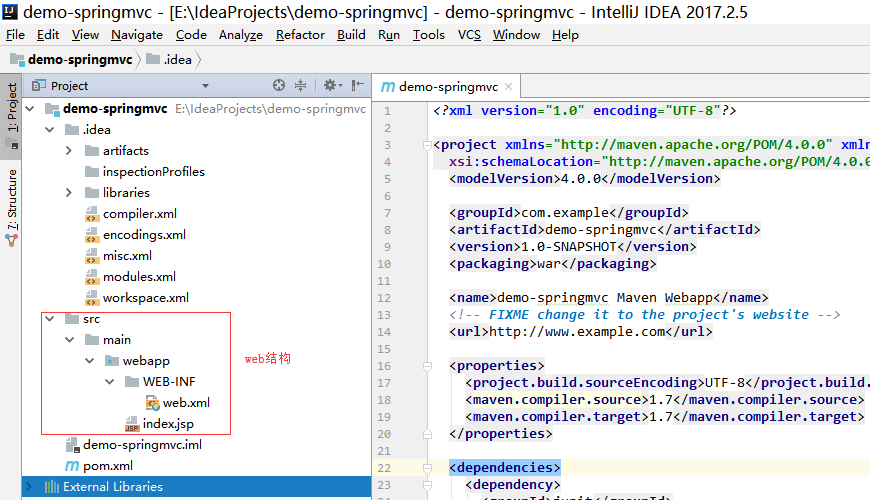
对比上面两图,发现不同点只在于有没有web结构,而且默认的web结构还是需要修改的。 继续...
添加spring mvc框架支持,直接在pom.xml文件中dependencies下添加spring mvc的依赖
<!-- https://mvnrepository.com/artifact/org.springframework/spring-webmvc -->

<dependency>

    <groupId>org.springframework</groupId>

    <artifactId>spring-webmvc</artifactId>

    <version>4.3.17.RELEASE</version>

</dependency>
替换web.xml
<?xml version="1.0" encoding="UTF-8"?>

<web-app xmlns="http://xmlns.jcp.org/xml/ns/javaee"

         xmlns:xsi="http://www.w3.org/2001/XMLSchema-instance"

         xsi:schemaLocation="http://xmlns.jcp.org/xml/ns/javaee http://xmlns.jcp.org/xml/ns/javaee/web-app_3_1.xsd"

         version="3.1">

  <context-param>

    <param-name>contextConfigLocation</param-name>

    <param-value>/WEB-INF/applicationContext.xml</param-value>

  </context-param>

  <listener>

    <listener-class>org.springframework.web.context.ContextLoaderListener</listener-class>

  </listener>

  <servlet>

    <servlet-name>dispatcher</servlet-name>

    <servlet-class>org.springframework.web.servlet.DispatcherServlet</servlet-class>

    <load-on-startup>1</load-on-startup>

  </servlet>

  <servlet-mapping>

    <servlet-name>dispatcher</servlet-name>

    <url-pattern>/</url-pattern>

  </servlet-mapping>

  <welcome-file-list>

    <welcome-file>index.jsp</welcome-file>

  </welcome-file-list>

</web-app>
WEB-INF下添加applicationContext.xml
<?xml version="1.0" encoding="UTF-8"?>

<beans xmlns="http://www.springframework.org/schema/beans"

       xmlns:xsi="http://www.w3.org/2001/XMLSchema-instance"

       xsi:schemaLocation="http://www.springframework.org/schema/beans http://www.springframework.org/schema/beans/spring-beans.xsd">

</beans>
dispatcher-servlet.xml
<?xml version="1.0" encoding="UTF-8"?>

<beans xmlns="http://www.springframework.org/schema/beans"

       xmlns:xsi="http://www.w3.org/2001/XMLSchema-instance"

       xmlns:context="http://www.springframework.org/schema/context"

       xmlns:mvc="http://www.springframework.org/schema/mvc"

       xsi:schemaLocation="http://www.springframework.org/schema/beans http://www.springframework.org/schema/beans/spring-beans.xsd

       http://www.springframework.org/schema/context http://www.springframework.org/schema/context/spring-context.xsd

       http://www.springframework.org/schema/mvc http://www.springframework.org/schema/mvc/spring-mvc.xsd">

    <!--spring基本注解支持 -->

    <context:annotation-config/>

    <!--mvc注解支持-->

    <mvc:annotation-driven/>

    <!--静态资源映射-->

    <mvc:resources mapping="/css/**" location="/WEB-INF/statics/css/"/>

    <mvc:resources mapping="/js/**" location="/WEB-INF/statics/js/"/>

    <mvc:resources mapping="/image/**" location="/WEB-INF/statics/image/"/>

    <!--jsp模板视图支持-->

    <bean id="defaultViewResolver" class="org.springframework.web.servlet.view.InternalResourceViewResolver">

        <property name="viewClass" value="org.springframework.web.servlet.view.JstlView"/>

        <property name="prefix" value="/WEB-INF/view/"/>

        <property name="suffix" value=".jsp"/>

        <property name="exposeContextBeansAsAttributes" value="true"/>

    </bean>

    <!--自动扫描装配-->

    <context:component-scan base-package="com.example.demo"/>

</beans>
写个Controller跑起来看看
在 src -> main 下建两个文件夹,java和test,创建完成后,分别设置资源类型
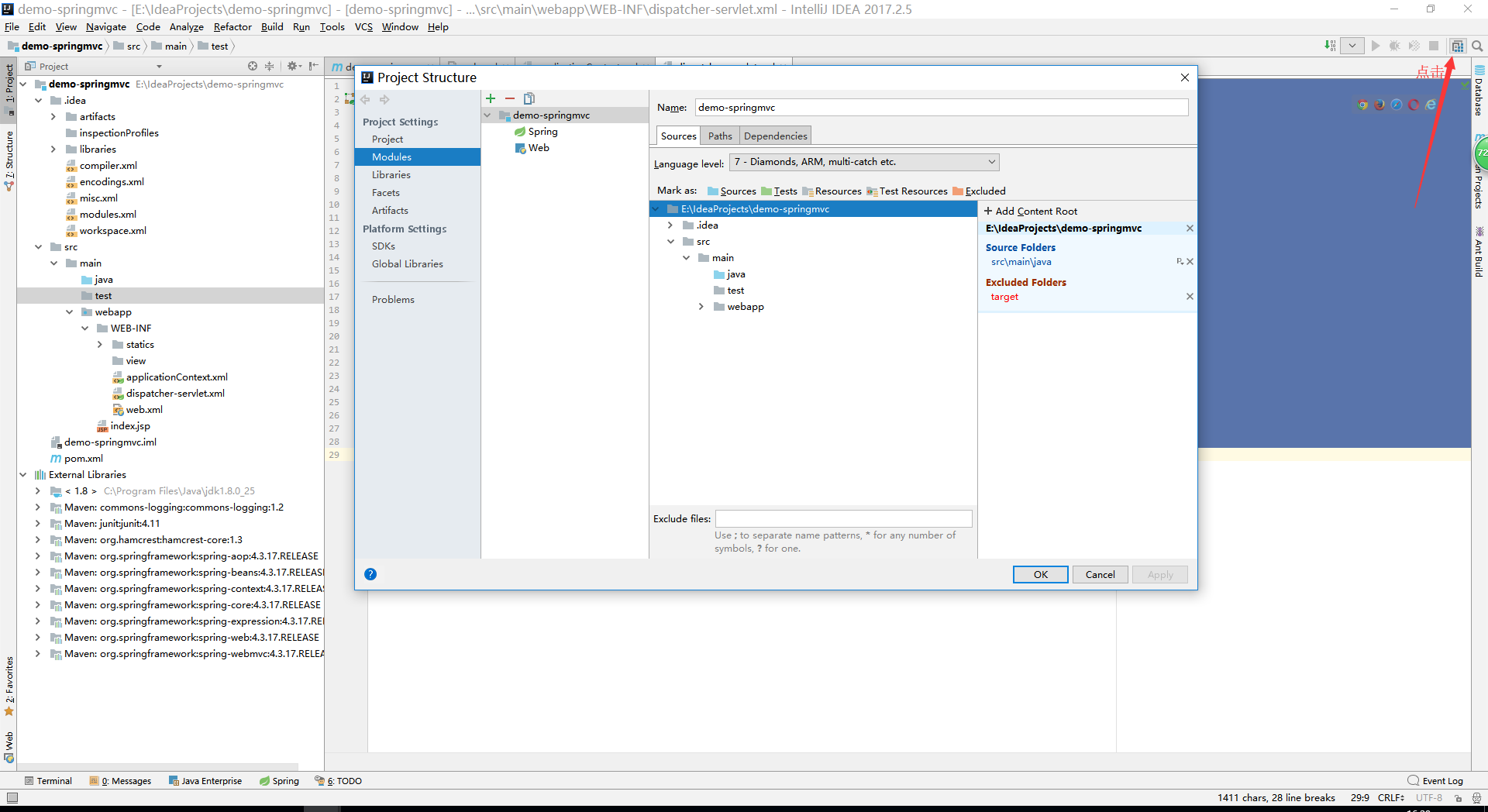
java文件夹设置为 sources,test文件夹设置为 tests
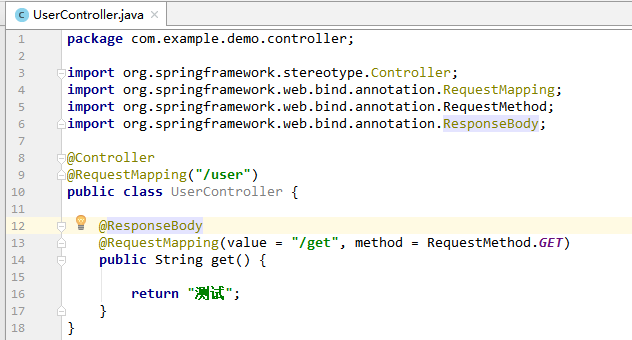
创建一个测试controller
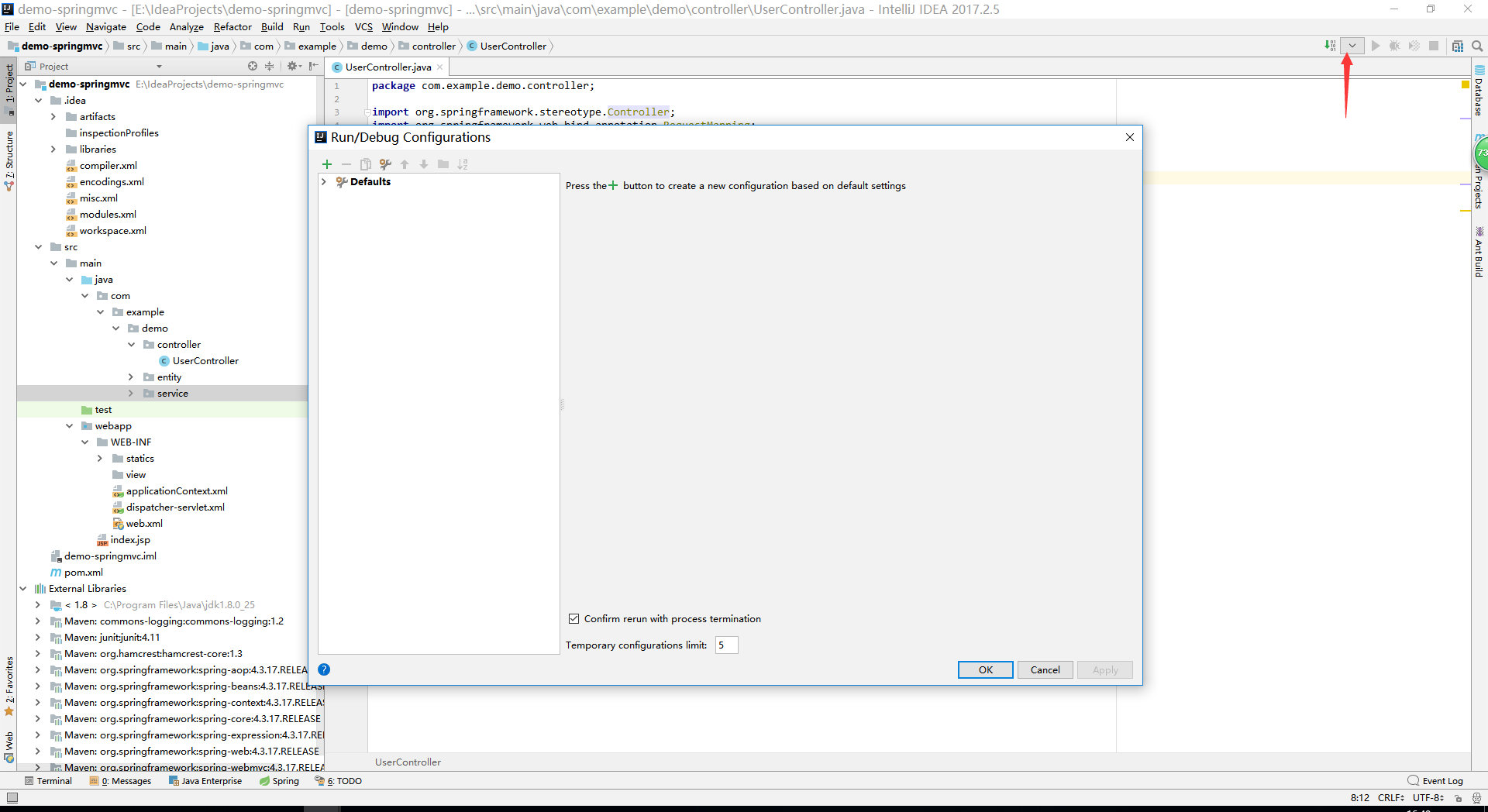
配置测试服务器
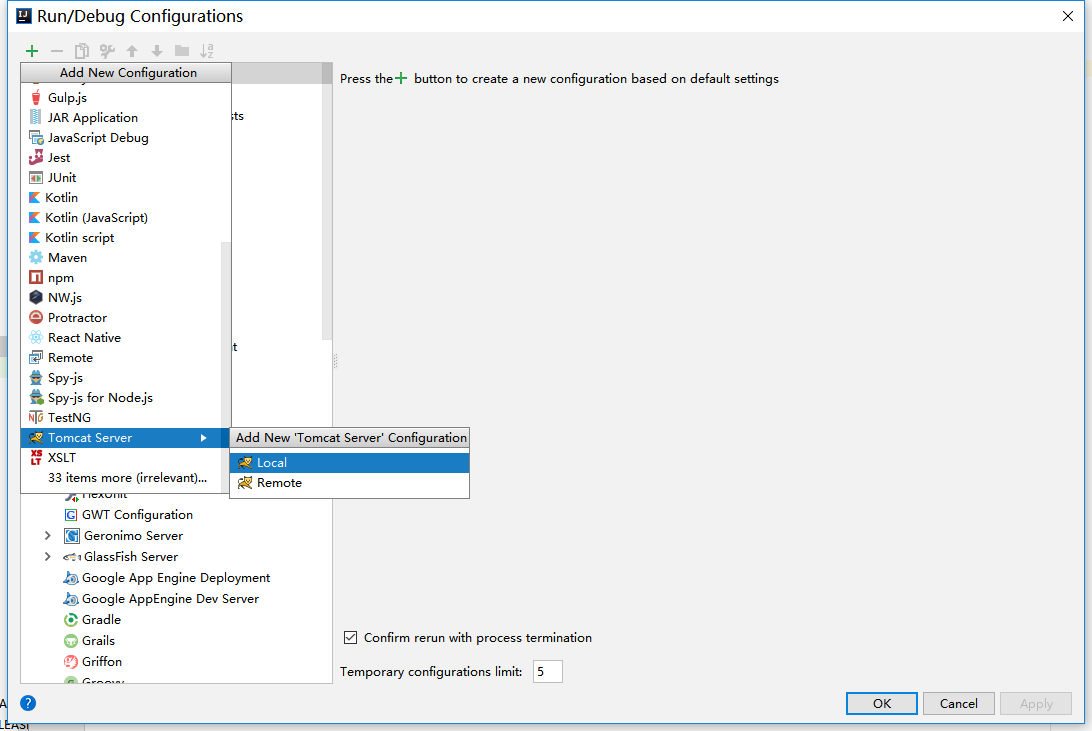

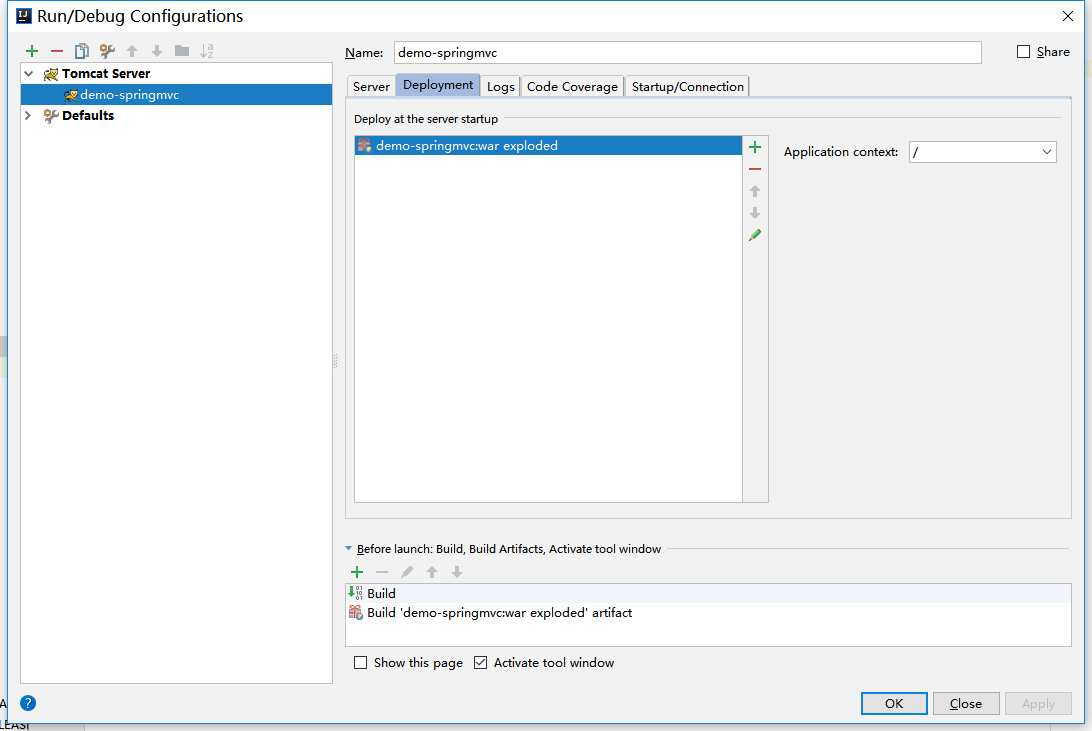
点击启动,访问 localhost:8080/user/get
会显示 ??
原因:spring mvc默认输出字符集 iso-8859-1,需要将输出字符集调整为 utf-8
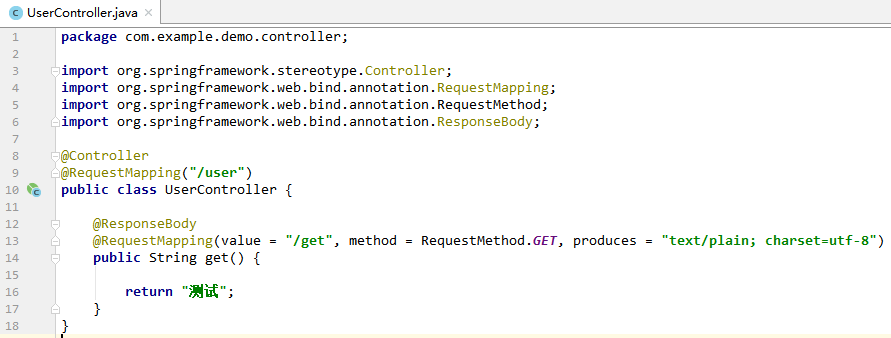
再次启动,访问 localhost:8080/user/get,显示正常。
Java笔记Spring(一)的更多相关文章
- Java笔记Spring(七)
DispatcherServlet初始化,继续分析日志 主要部分: 23-May-2018 17:47:55.457 INFO [RMI TCP Connection(3)-127.0.0.1] or ...
- Java笔记Spring(五)
C:\apache-tomcat-8.0.36\bin\catalina.bat run [2018-05-23 02:30:31,657] Artifact demo-springmvc:war e ...
- Java笔记Spring(四)
spring web项目启动入口 1.首先看一下传统Java Web的配置文件web.xml,网上找的一个,参考地址:https://blog.csdn.net/github_36301064/art ...
- Java笔记Spring(八)
<?xml version="1.0" encoding="UTF-8"?> <beans xmlns="http://www.sp ...
- Java笔记Spring(六)
web.xml各节点加载顺序 <?xml version="1.0" encoding="UTF-8"?> <web-app xmlns=&q ...
- Java笔记Spring(三)
spring-beans和spring-context 一.注解 1.自定义一个注解 @Target({ElementType.METHOD}) @Retention(RetentionPolicy. ...
- Java笔记Spring(二)
spring-core 通过Gradle构建工具,转换包的命名空间为org.springframework下 cglib包,net.sf.cglib -> org.springframework ...
- Java笔记Spring(九)
完整调试springmvc源码 WebApplicationContext = new XmlWebApplicationContext();// XmlWebApplicationContext通过 ...
- Java框架spring Boot学习笔记(六):Spring Boot事务管理
SpringBoot和Java框架spring 学习笔记(十九):事务管理(注解管理)所讲的类似,使用@Transactional注解便可以轻松实现事务管理.
随机推荐
- static_assert enable_if 模板编译期检查
conceptC++ http://www.generic-programming.org/faq/?category=conceptcxx Checking Concept Without Conc ...
- zabbix3.4.7远程命令例子详解
zabbix可以通过远程发送执行命令或脚本来对部分的服务求故障进行修复 zabbix客户端配置 设置zabbix客户端用户的sudo权限 执行命令visudo: Defaults:zabbix !re ...
- 朋友给的IE滚动条
scrollbar-arrow-color: #f4ae21; /*图6,三角箭头的颜色*/scrollbar-face-color: #333; /*图5,立体滚动条的颜色*/scrollbar ...
- MapServer Tutorial——MapServer7.2.1教程学习——教程背景
MapServer Tutorial——MapServer7.2.1教程学习——教程背景 一.前言 目前处于MapServer学习入门阶段,所以每一步都需要打下扎实基础.尽自己最大的努力,去学习知识的 ...
- 说一说本人对linux系统学习的方法和经验
摘要: 相信大伙都听说过linux系统,然而对于这个系统,总使让新手感觉茫然,诺达的系统.下面是一段百度中的介绍: 相信大伙都听说过linux系统,然而对于这个系统,总使让新手感觉茫然,诺达的系统.下 ...
- History of program(1950-2020)
1957年 约翰·巴科斯(John Backus)创建了是全世界第一套高阶语言:FORTRAN. John Backus 1959年 葛丽丝·霍普(Grace Hopper)创造了现代第一个编译器A- ...
- django之Session、Cookie
Session ·Session存在于服务器端 ·Session的设置: request.session['name'] = value ·Session的获取: dic = request.sess ...
- Flask关于请求表单的粗浅应用及理解+简单SQL语句温习
1.请求表单 请求表单的知识点是flask数据请求中很小的一部分,首先要了解一下GET和POST请求:http://www.w3school.com.cn/tags/html_ref_httpmeth ...
- 作用域&&闭包
在了解闭包之前,先了解作用域一,作用域简单来说就是变量和函数可以访问的范围,在es5中变量作用域一般分为全局作用域和局部作用域,这个主要依据是全局变量还是局部变量 情景1: <script> ...
- 19/03/30Python笔记
一.三元运算 a = 1 if (条件) else a = 2 #如果条件成立,a = 1,否则a = 2 二.文件的处理 1.读取 f = open("user.txt",&qu ...