
Spring MVC初始化参数绑定
初始化参数绑定与类型转换很类似,初始化绑定时,主要是参数类型
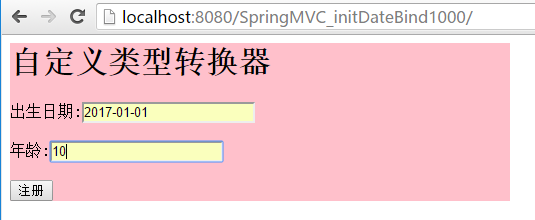
---单日期
在处理器类中配置绑定方法 使用@InitBinder注解
在这里首先注册一个用户编辑器 参数一为目标类型 propertyEditor为属性编辑器,此处我们选用 CustomDateEditor属性编辑器,
参数一为想转换的日期格式,参数二表示是否允许为空
package cn.controller;

import java.text.DateFormat;

import java.text.SimpleDateFormat;

import java.util.Date;

import org.springframework.beans.propertyeditors.CustomDateEditor;

import org.springframework.stereotype.Controller;

import org.springframework.web.bind.WebDataBinder;

import org.springframework.web.bind.annotation.InitBinder;

import org.springframework.web.bind.annotation.RequestMapping;

/**

 *

 * @author 景佩佩

 *

 */

@Controller

public class MyController{

     //处理器方法

    @RequestMapping(value="/first.do")

    public String doFirst(Date birthday,int age) {

        System.out.println("3333");

        return "/welcome.jsp";

    }

    //自定义一个方法

    @InitBinder

    public void initBinder(WebDataBinder binder){

        DateFormat df=new SimpleDateFormat("yyyy-MM-dd");

        binder.registerCustomEditor(Date.class, new CustomDateEditor(df, true));

    }

}
只需在applicationContext.xml配置一个包扫描器就行
<?xml version="1.0" encoding="UTF-8"?>

<beans xmlns="http://www.springframework.org/schema/beans"

    xmlns:xsi="http://www.w3.org/2001/XMLSchema-instance"

    xmlns:context="http://www.springframework.org/schema/context"

    xmlns:aop="http://www.springframework.org/schema/aop"

    xmlns:tx="http://www.springframework.org/schema/tx"

    xmlns:mvc="http://www.springframework.org/schema/mvc"

     xsi:schemaLocation="

        http://www.springframework.org/schema/beans http://www.springframework.org/schema/beans/spring-beans.xsd

        http://www.springframework.org/schema/context http://www.springframework.org/schema/context/spring-context.xsd

        http://www.springframework.org/schema/aop http://www.springframework.org/schema/aop/spring-aop.xsd

        http://www.springframework.org/schema/tx http://www.springframework.org/schema/tx/spring-tx.xsd

        http://www.springframework.org/schema/mvc http://www.springframework.org/schema/mvc/spring-mvc.xsd

        ">

     <!-- 包扫描器 -->

     <context:component-scan base-package="cn.controller"></context:component-scan>

</beans>
index.jsp
<%@ page language="java" import="java.util.*" pageEncoding="utf-8"%>

<%

String path = request.getContextPath();

String basePath = request.getScheme()+"://"+request.getServerName()+":"+request.getServerPort()+path+"/";

%>

<!DOCTYPE HTML PUBLIC "-//W3C//DTD HTML 4.01 Transitional//EN">

<html>

  <head>

    <base href="<%=basePath%>">

    <style type="text/css">

       form{

        background-color:pink;

         width:500px;

       }

    </style>

    <title></title>

  </head>

  <body>

    ${ex.message }

    <form action="${pageContext.request.contextPath }/first.do" method="post">

    <h1>自定义类型转换器</h1>

                 出生日期:<input name="birthday" value="${birthday }"/>${birthdayerror }<br/><br/>

                 年龄:<input name="age" value="${age }"/>${ageerror }<br/><br/>

       <input type="submit" value="注册"/>

    </form>

  </body>

</html>
welcome.jsp
<%@ page language="java" import="java.util.*" pageEncoding="utf-8"%>

<%

String path = request.getContextPath();

String basePath = request.getScheme()+"://"+request.getServerName()+":"+request.getServerPort()+path+"/";

%>

<!DOCTYPE HTML PUBLIC "-//W3C//DTD HTML 4.01 Transitional//EN">

<html>

  <head>

    <base href="<%=basePath%>">

    <title>欢迎页面</title>

  </head>

  <body>

     <h1>欢迎访问${uname }${param.uage }</h1>

  </body>

</html>
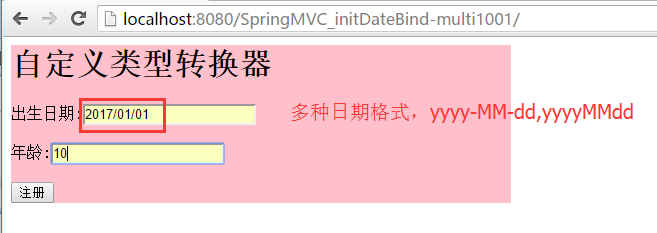
---多日期格式
配置步骤:
在处理器类中使用我们自定的属性编辑器
MyController.java
package cn.controller;

import java.util.Date;

import org.springframework.stereotype.Controller;

import org.springframework.web.bind.WebDataBinder;

import org.springframework.web.bind.annotation.InitBinder;

import org.springframework.web.bind.annotation.RequestMapping;

@Controller

public class MyController{

     //处理器方法

    @RequestMapping(value="/first.do")

    public String doFirst(Date birthday,int age) {

        System.out.println("3333");

        return "/welcome.jsp";

    }

    //自定义一个方法

    @InitBinder

    public void initBinder(WebDataBinder binder){

        System.out.println("==========");

        binder.registerCustomEditor(Date.class, new MyDateEditor());

    }

}
属性编辑器
此时我们需要考虑使用哪个属性编辑器,需要定义自己的属性编辑器
大致的配置方式如单日期相似,只需要更换属性编辑即可
自定义的属性编辑器,需要我们继承PropertiesEditor,重写里面的setAsText方法,使用setValue方法赋值
MyDateEditor.java
package cn.controller;

import java.text.ParseException;

import java.text.SimpleDateFormat;

import java.util.Date;

import java.util.regex.Pattern;

import org.springframework.beans.TypeMismatchException;

import org.springframework.beans.propertyeditors.PropertiesEditor;

/**

 *

 * @author 景佩佩

 *

 */

public class MyDateEditor extends PropertiesEditor{

    /**

     * source:字符串型的日期

     */

    @Override

    public void setAsText(String source) throws IllegalArgumentException {

        //一旦报错,自动调度到异常处理器

        SimpleDateFormat sdf=getDateFormat(source);

        try {

             Date date = sdf.parse(source);

             setValue(date);

        } catch (ParseException e) {

            e.printStackTrace();

        }

    }

    private SimpleDateFormat getDateFormat(String source){

        SimpleDateFormat sdf=new SimpleDateFormat();

        if (Pattern.matches("^\\d{4}-\\d{2}-\\d{2}$", source)) {

            sdf=new SimpleDateFormat("yyyy-MM-dd");

        }else if (Pattern.matches("^\\d{4}/\\d{2}/\\d{2}$", source)) {

            sdf=new SimpleDateFormat("yyyy/MM/dd");

        }else if (Pattern.matches("^\\d{4}\\d{2}\\d{2}$", source)) {

            sdf=new SimpleDateFormat("yyyyMMdd");

        }else {

            throw new TypeMismatchException("",Date.class);

        }

        return sdf;

    }

}
Spring MVC初始化参数绑定的更多相关文章
- Spring MVC温故而知新 – 参数绑定、转发与重定向、异常处理、拦截器
请求参数绑定 当用户发送请求时,根据Spring MVC的请求处理流程,前端控制器会请求处理器映射器返回一个处理器,然后请求处理器适配器之心相应的处理器,此时处理器映射器会调用Spring Mvc 提 ...
- Spring MVC请求参数绑定
所谓请求参数绑定,就是在控制器方法中,将请求参数绑定到方法参数上 @RequestParam 绑定单个请求参数到方法参数上 @RequestParam("id") Integer ...
- Spring MVC请求参数绑定 自定义类型转化 和获取原声带额servlet request response信息
首先还在我们的框架的基础上建立文件 在domian下建立Account实体类 import org.springframework.stereotype.Controller; import org. ...
- springmvc的初始化参数绑定
一.springmvc的初始化参数绑定 此种和我们之前说的类型转换非常相似,可以看作是一种类型转换 在初始化参数绑定时 重要的是参数类型 -------------------单日期的绑定 二. 配 ...
- SpringMvc中初始化参数绑定
初始化参数绑定与类型转换很类似,初始化绑定时,主要是参数类型 ---单日期 在处理器类中配置绑定方法 使用@InitBinder注解 在这里首先注册一个用户编辑器 参数一为目标类型 proper ...
- SpringMVC初始化参数绑定--日期格式
一.初始化参数绑定[一种日期格式] 配置步骤: ①:在applicationcontext.xml中只需要配置一个包扫描器即可 <!-- 包扫描器 --> <context:comp ...
- SpringMVC 的初始化参数绑定
初始化参数绑定:日期格式 一:首先我们先做一种日期格式的绑定,配置初始化参数绑定和自定义类型转换有着异曲同工之妙 配置步骤如下: 1.我们首先配置applicationContext.xml,进行扫描 ...
- Spring MVC接收参数(Map,List,JSON,Date,2个Bean)(记录一次面试惨状)
题目Spring MVC 接收参数 MapListDate2个BeanJSON Spring MVC接收参数 -Map Spring MVC接收参数 -List Spring MVC接收参数 -dat ...
- spring mvc 复杂参数注入
过了这么久,又重新把博客拾起来了 来上海工作也已经有将近两周的时间了, 今天在整理项目的时候,遇到了一个关于参数注入的问题 背景: 我的开发前台用的是extjs4,在对后台spring mvc提交表单 ...
随机推荐
- Javascript 的执行环境(execution context)和作用域(scope)及垃圾回收
执行环境有全局执行环境和函数执行环境之分,每次进入一个新执行环境,都会创建一个搜索变量和函数的作用域链.函数的局部环境不仅有权访问函数作用于中的变量,而且可以访问其外部环境,直到全局环境.全局执行环境 ...
- Jade模板引擎让你飞
写在前面:现在jade改名成pug了 一.安装 npm install jade 二.基本使用 1.简单使用 p hello jade! 渲染后: <p>hello jade!</p ...
- 从Membership 到 .NET4.5 之 ASP.NET Identity
我们前面已经讨论过了如何在一个网站中集成最基本的Membership功能,然后深入学习了Membership的架构设计.正所谓从实践从来,到实践从去,在我们把Membership的结构吃透之后,我们要 ...
- FREERTOS 手册阅读笔记
郑重声明,版权所有! 转载需说明. FREERTOS堆栈大小的单位是word,不是byte. 根据处理器架构优化系统的任务优先级不能超过32,If the architecture optimized ...
- Python的单元测试(二)
title: Python的单元测试(二) date: 2015-03-04 19:08:20 categories: Python tags: [Python,单元测试] --- 在Python的单 ...
- ASP.NET MVC5+EF6+EasyUI 后台管理系统(80)-自由桌面
系列目录 前言 这次我们来做一个有趣的事情,有朋友跟做了很远,找我要自由桌面的代码,这次我们将演示自由桌面的代码. 自由桌面:用户可以随意增删改桌面的布局.个数(只留自己需要看到的数据),这次纯属Ea ...
- 在Linux系统下运行微信Web开发者工具
微信Web开发者工具只有window版本和mac版本,如果想要在Linux系统下运行微信Web开发者工具,需要花费很大周折. 注:带 * 的步骤或文件为不确定是否管用的步骤或文件.本人系统为Linux ...
- MySQL 系列(三)你不知道的 视图、触发器、存储过程、函数、事务、索引、语句
第一篇:MySQL 系列(一) 生产标准线上环境安装配置案例及棘手问题解决 第二篇:MySQL 系列(二) 你不知道的数据库操作 第三篇:MySQL 系列(三)你不知道的 视图.触发器.存储过程.函数 ...
- 程序员必须要知道的Hadoop的一些事实
程序员必须要知道的Hadoop的一些事实.现如今,Apache Hadoop已经无人不知无人不晓.当年雅虎搜索工程师Doug Cutting开发出这个用以创建分布式计算机环境的开源软...... 1: ...
- maven依赖查询地址
http://search.maven.org/#search%7Cga%7C1%7C