
Spring MVC初始化参数绑定
初始化参数绑定与类型转换很类似,初始化绑定时,主要是参数类型
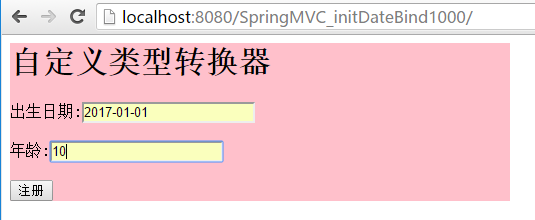
---单日期
在处理器类中配置绑定方法 使用@InitBinder注解
在这里首先注册一个用户编辑器 参数一为目标类型 propertyEditor为属性编辑器,此处我们选用 CustomDateEditor属性编辑器,
参数一为想转换的日期格式,参数二表示是否允许为空
package cn.controller;

import java.text.DateFormat;

import java.text.SimpleDateFormat;

import java.util.Date;

import org.springframework.beans.propertyeditors.CustomDateEditor;

import org.springframework.stereotype.Controller;

import org.springframework.web.bind.WebDataBinder;

import org.springframework.web.bind.annotation.InitBinder;

import org.springframework.web.bind.annotation.RequestMapping;

/**

 *

 * @author 景佩佩

 *

 */

@Controller

public class MyController{

     //处理器方法

    @RequestMapping(value="/first.do")

    public String doFirst(Date birthday,int age) {

        System.out.println("3333");

        return "/welcome.jsp";

    }

    //自定义一个方法

    @InitBinder

    public void initBinder(WebDataBinder binder){

        DateFormat df=new SimpleDateFormat("yyyy-MM-dd");

        binder.registerCustomEditor(Date.class, new CustomDateEditor(df, true));

    }

}
只需在applicationContext.xml配置一个包扫描器就行
<?xml version="1.0" encoding="UTF-8"?>

<beans xmlns="http://www.springframework.org/schema/beans"

    xmlns:xsi="http://www.w3.org/2001/XMLSchema-instance"

    xmlns:context="http://www.springframework.org/schema/context"

    xmlns:aop="http://www.springframework.org/schema/aop"

    xmlns:tx="http://www.springframework.org/schema/tx"

    xmlns:mvc="http://www.springframework.org/schema/mvc"

     xsi:schemaLocation="

        http://www.springframework.org/schema/beans http://www.springframework.org/schema/beans/spring-beans.xsd

        http://www.springframework.org/schema/context http://www.springframework.org/schema/context/spring-context.xsd

        http://www.springframework.org/schema/aop http://www.springframework.org/schema/aop/spring-aop.xsd

        http://www.springframework.org/schema/tx http://www.springframework.org/schema/tx/spring-tx.xsd

        http://www.springframework.org/schema/mvc http://www.springframework.org/schema/mvc/spring-mvc.xsd

        ">

     <!-- 包扫描器 -->

     <context:component-scan base-package="cn.controller"></context:component-scan>

</beans>
index.jsp
<%@ page language="java" import="java.util.*" pageEncoding="utf-8"%>

<%

String path = request.getContextPath();

String basePath = request.getScheme()+"://"+request.getServerName()+":"+request.getServerPort()+path+"/";

%>

<!DOCTYPE HTML PUBLIC "-//W3C//DTD HTML 4.01 Transitional//EN">

<html>

  <head>

    <base href="<%=basePath%>">

    <style type="text/css">

       form{

        background-color:pink;

         width:500px;

       }

    </style>

    <title></title>

  </head>

  <body>

    ${ex.message }

    <form action="${pageContext.request.contextPath }/first.do" method="post">

    <h1>自定义类型转换器</h1>

                 出生日期:<input name="birthday" value="${birthday }"/>${birthdayerror }<br/><br/>

                 年龄:<input name="age" value="${age }"/>${ageerror }<br/><br/>

       <input type="submit" value="注册"/>

    </form>

  </body>

</html>
welcome.jsp
<%@ page language="java" import="java.util.*" pageEncoding="utf-8"%>

<%

String path = request.getContextPath();

String basePath = request.getScheme()+"://"+request.getServerName()+":"+request.getServerPort()+path+"/";

%>

<!DOCTYPE HTML PUBLIC "-//W3C//DTD HTML 4.01 Transitional//EN">

<html>

  <head>

    <base href="<%=basePath%>">

    <title>欢迎页面</title>

  </head>

  <body>

     <h1>欢迎访问${uname }${param.uage }</h1>

  </body>

</html>
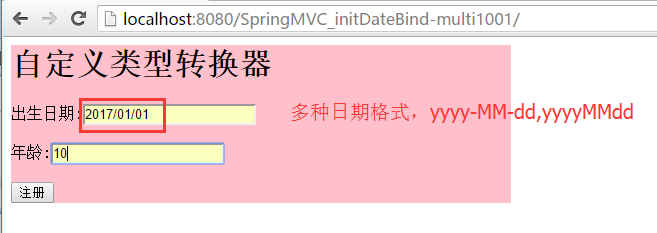
---多日期格式
配置步骤:
在处理器类中使用我们自定的属性编辑器
MyController.java
package cn.controller;

import java.util.Date;

import org.springframework.stereotype.Controller;

import org.springframework.web.bind.WebDataBinder;

import org.springframework.web.bind.annotation.InitBinder;

import org.springframework.web.bind.annotation.RequestMapping;

@Controller

public class MyController{

     //处理器方法

    @RequestMapping(value="/first.do")

    public String doFirst(Date birthday,int age) {

        System.out.println("3333");

        return "/welcome.jsp";

    }

    //自定义一个方法

    @InitBinder

    public void initBinder(WebDataBinder binder){

        System.out.println("==========");

        binder.registerCustomEditor(Date.class, new MyDateEditor());

    }

}
属性编辑器
此时我们需要考虑使用哪个属性编辑器,需要定义自己的属性编辑器
大致的配置方式如单日期相似,只需要更换属性编辑即可
自定义的属性编辑器,需要我们继承PropertiesEditor,重写里面的setAsText方法,使用setValue方法赋值
MyDateEditor.java
package cn.controller;

import java.text.ParseException;

import java.text.SimpleDateFormat;

import java.util.Date;

import java.util.regex.Pattern;

import org.springframework.beans.TypeMismatchException;

import org.springframework.beans.propertyeditors.PropertiesEditor;

/**

 *

 * @author 景佩佩

 *

 */

public class MyDateEditor extends PropertiesEditor{

    /**

     * source:字符串型的日期

     */

    @Override

    public void setAsText(String source) throws IllegalArgumentException {

        //一旦报错,自动调度到异常处理器

        SimpleDateFormat sdf=getDateFormat(source);

        try {

             Date date = sdf.parse(source);

             setValue(date);

        } catch (ParseException e) {

            e.printStackTrace();

        }

    }

    private SimpleDateFormat getDateFormat(String source){

        SimpleDateFormat sdf=new SimpleDateFormat();

        if (Pattern.matches("^\\d{4}-\\d{2}-\\d{2}$", source)) {

            sdf=new SimpleDateFormat("yyyy-MM-dd");

        }else if (Pattern.matches("^\\d{4}/\\d{2}/\\d{2}$", source)) {

            sdf=new SimpleDateFormat("yyyy/MM/dd");

        }else if (Pattern.matches("^\\d{4}\\d{2}\\d{2}$", source)) {

            sdf=new SimpleDateFormat("yyyyMMdd");

        }else {

            throw new TypeMismatchException("",Date.class);

        }

        return sdf;

    }

}
Spring MVC初始化参数绑定的更多相关文章
- Spring MVC温故而知新 – 参数绑定、转发与重定向、异常处理、拦截器
请求参数绑定 当用户发送请求时,根据Spring MVC的请求处理流程,前端控制器会请求处理器映射器返回一个处理器,然后请求处理器适配器之心相应的处理器,此时处理器映射器会调用Spring Mvc 提 ...
- Spring MVC请求参数绑定
所谓请求参数绑定,就是在控制器方法中,将请求参数绑定到方法参数上 @RequestParam 绑定单个请求参数到方法参数上 @RequestParam("id") Integer ...
- Spring MVC请求参数绑定 自定义类型转化 和获取原声带额servlet request response信息
首先还在我们的框架的基础上建立文件 在domian下建立Account实体类 import org.springframework.stereotype.Controller; import org. ...
- springmvc的初始化参数绑定
一.springmvc的初始化参数绑定 此种和我们之前说的类型转换非常相似,可以看作是一种类型转换 在初始化参数绑定时 重要的是参数类型 -------------------单日期的绑定 二. 配 ...
- SpringMvc中初始化参数绑定
初始化参数绑定与类型转换很类似,初始化绑定时,主要是参数类型 ---单日期 在处理器类中配置绑定方法 使用@InitBinder注解 在这里首先注册一个用户编辑器 参数一为目标类型 proper ...
- SpringMVC初始化参数绑定--日期格式
一.初始化参数绑定[一种日期格式] 配置步骤: ①:在applicationcontext.xml中只需要配置一个包扫描器即可 <!-- 包扫描器 --> <context:comp ...
- SpringMVC 的初始化参数绑定
初始化参数绑定:日期格式 一:首先我们先做一种日期格式的绑定,配置初始化参数绑定和自定义类型转换有着异曲同工之妙 配置步骤如下: 1.我们首先配置applicationContext.xml,进行扫描 ...
- Spring MVC接收参数(Map,List,JSON,Date,2个Bean)(记录一次面试惨状)
题目Spring MVC 接收参数 MapListDate2个BeanJSON Spring MVC接收参数 -Map Spring MVC接收参数 -List Spring MVC接收参数 -dat ...
- spring mvc 复杂参数注入
过了这么久,又重新把博客拾起来了 来上海工作也已经有将近两周的时间了, 今天在整理项目的时候,遇到了一个关于参数注入的问题 背景: 我的开发前台用的是extjs4,在对后台spring mvc提交表单 ...
随机推荐
- C# 在腾讯的发展
本文首发我的微信公众号"dotnet跨平台", 内容得到大家热烈的欢迎,全文重新发布在博客,欢迎转载,请注明出处. .NET 主要的开发语言是 C# , .NET 平台泛指遵循EC ...
- Elasticsearch 5.0 中term 查询和match 查询的认识
Elasticsearch 5.0 关于term query和match query的认识 一.基本情况 前言:term query和match query牵扯的东西比较多,例如分词器.mapping ...
- 探索ASP.NET MVC5系列之~~~4.模型篇---包含模型常用特性和过度提交防御
其实任何资料里面的任何知识点都无所谓,都是不重要的,重要的是学习方法,自行摸索的过程(不妥之处欢迎指正) 汇总:http://www.cnblogs.com/dunitian/p/4822808.ht ...
- clr 元数据
clr相关编译器编译生成的托管模块由四部分组成:PE32或32+头.clr头.元数据.IL代码. 元数据和IL代码完全对应,保持一致(:>)性. 元数据有很多用途: VS的智能感知,自动补全: ...
- 预览github里面的网页或dome
1.问题所在: 之前把项目提交到github都可以在路径前面加上http://htmlpreview.github.io/?来预览demo,最近发现这种方式预览的时候加载不出来css,js(原因不详) ...
- 浅谈web攻防
CSRF 跨站请求伪造(Cross-Site Request Forgery) -原理- 从上图可以看出,要完成一次CSRF攻击,受害者必须依次完成两个步骤: 1.登录受信任网站A,并在本地生成Coo ...
- 浅谈 LayoutInflater
浅谈 LayoutInflater 版权声明:本文为博主原创文章,未经博主允许不得转载. 微博:厉圣杰 源码:AndroidDemo/View 文中如有纰漏,欢迎大家留言指出. 在 Android 的 ...
- VS2015在创建项目时的一些注意事项
一.下面是在创建一个新的项目是我最常用的,现在对他们一一做一个详细的介绍: 1.Win32控制台应用程序我平时编写小的C/C++程序都用它,它应该是用的最多的. 2.名称和解决方案名称的区别:名称是项 ...
- 浅析SQL查询语句未显式指定排序方式,无法保证同样的查询每次排序结果都一致的原因
本文出处:http://www.cnblogs.com/wy123/p/6189100.html 标题有点拗口,来源于一个开发人员遇到的实际问题 先抛出问题:一个查询没有明确指定排序方式,那么,第二次 ...
- 【Knockout.js 学习体验之旅】(1)ko初体验
前言 什么,你现在还在看knockout.js?这货都已经落后主流一千年了!赶紧去学Angular.React啊,再不赶紧的话,他们也要变out了哦.身旁的90后小伙伴,嘴里还塞着山东的狗不理大蒜包, ...