
three.js 场景入门
<!DOCTYPE html>

<html>

<head>

    <title>Example 01.02 - First Scene</title>

    <script type="text/javascript" src="../libs/three.js"></script>

    <script type="text/javascript" src="../libs/jquery-1.9.0.js"></script>

    <style>

        body{

            /* set margin to 0 and overflow to hidden, to go fullscreen */

            margin: 0;

            overflow: hidden;

        }

    </style>

</head>

<body>

<!-- Div which will hold the Output -->

<div id="WebGL-output">

</div>

<!-- Javascript code that runs our Three.js examples -->

<script type="text/javascript">

    // once everything is loaded, we run our Three.js stuff.

    $(function () {

        // create a scene, that will hold all our elements such as objects, cameras and lights.

        var scene = new THREE.Scene();

        // create a camera, which defines where we're looking at.

        var camera = new THREE.PerspectiveCamera(45, window.innerWidth / window.innerHeight, 0.1, 1000);

        // create a render and set the size

        var renderer = new THREE.WebGLRenderer();

        renderer.setClearColorHex(0xEEEEEE);//渲染器背景颜色:白色

        renderer.setSize(window.innerWidth, window.innerHeight);//渲染场景的尺寸

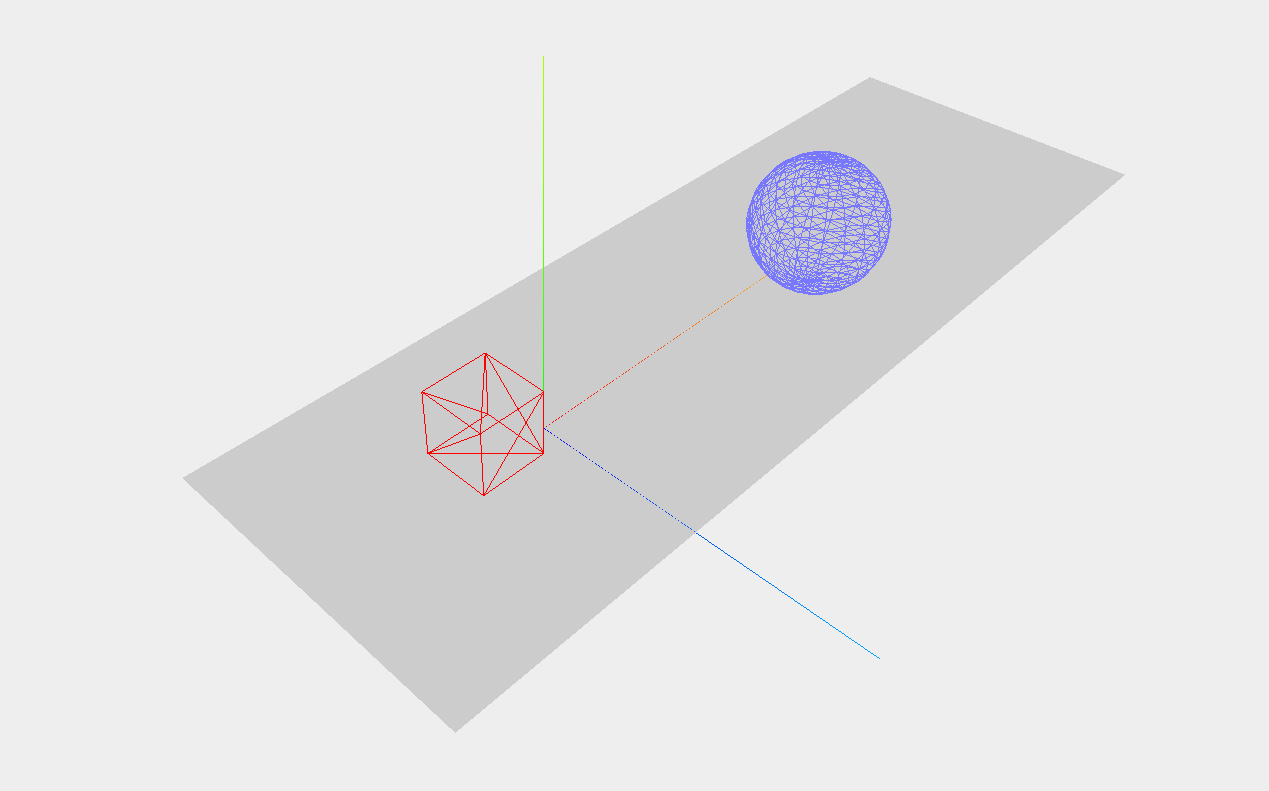
        var axes = new THREE.AxisHelper( 20 );//创建一个axes(坐标轴)对象

        scene.add(axes);//用scene.add()函数将坐标轴添加到场景中

        // create the ground plane 创建场景

        var planeGeometry = new THREE.PlaneGeometry(60,20);//定义平面的尺寸,宽60,高20

        var planeMaterial = new THREE.MeshBasicMaterial({color: 0xcccccc});//定义平面的外观 如颜色,透明度,这里我们创建了一个基本的材质MeshBasicMaterial()方法,还有颜色

        var plane = new THREE.Mesh(planeGeometry,planeMaterial);//把这两个对象合并到一个名为plane的网格中

        // rotate and position the plane  绕x轴旋转90度然后通过设置位置属性定义它在场景中的位置。

        plane.rotation.x=-0.5*Math.PI;

        plane.position.x=15

        plane.position.y=0

        plane.position.z=0

        // add the plane to the scene

        scene.add(plane);//把plane添加到scene

        // create a cube 方块

        var cubeGeometry = new THREE.CubeGeometry(4,4,4);

        var cubeMaterial = new THREE.MeshBasicMaterial({color: 0xff0000, wireframe: true});//线框属性:true

        var cube = new THREE.Mesh(cubeGeometry, cubeMaterial);

        // position the cube

        cube.position.x=-4;

        cube.position.y=3;

        cube.position.z=0;

        // add the cube to the scene

        scene.add(cube);

        //create a  sphere 球体

        var sphereGeometry = new THREE.SphereGeometry(4,20,20);

        var sphereMaterial = new THREE.MeshBasicMaterial({color: 0x7777ff, wireframe: true});

        var sphere = new THREE.Mesh(sphereGeometry,sphereMaterial);

        // position the sphere

        sphere.position.x=20;

        sphere.position.y=4;

        sphere.position.z=2;

        // add the sphere to the scene

        scene.add(sphere);

        // position and point the camera to the center of the scene指定相机的位置,即悬挂在场景的上方,以确保我们能够拍摄到这些物体

        camera.position.x = -30;

        camera.position.y = 40;

        camera.position.z = 30;

        camera.lookAt(scene.position);//使用lookat()函数指向场景的中心

        // add the output of the renderer to the html element

        $("#WebGL-output").append(renderer.domElement);//使用jQuery来选择正确的输出元素

        // render the scene

        renderer.render(scene, camera);//并告诉渲染器使用相机把场景渲染出来

    });

</script>

</body>

</html>
three.js 场景入门的更多相关文章
- Vue.js+vue-element搭建属于自己的后台管理模板:Vue.js快速入门(二)
Vue.js+vue-element搭建属于自己的后台管理模板:Vue.js快速入门(二) 前言 上篇文章对Vue.js有了初步理解,接下来我们把Vue.js基础语法快速的过一遍,先混个脸熟留个印象就 ...
- Node.js快速入门
Node.js是什么? Node.js是建立在谷歌Chrome的JavaScript引擎(V8引擎)的Web应用程序框架. 它的最新版本是:v0.12.7(在编写本教程时的版本).Node.js在官方 ...
- doT js模板入门
doT.js github地址: doT.js 官方站点 实例1:简单 <!DOCTYPE html> <html lang="en"> <head& ...
- Angular JS从入门基础 mvc三层架构 常用指令
Angular JS从入门基础 mvc模型 常用指令 ★ 最近一直在复习AngularJS,它是一款优秀的前端JS框架,已经被用于Google的多款产品当中.AngularJS有着诸多特性,最为核心 ...
- EChart.js 简单入门
EChart.js 简单入门 最近有一个统计的项目要做,在前端的数据需要用图表的形式展示.网上搜索了一下,发现有几种统计图库. MSChart 这个是Visual Studio里的自带控件,使用比 ...
- HTML5游戏开发引擎Pixi.js新手入门讲解
在线演示 本地下载 这篇文章中,介绍HTML5游戏引擎pixi.js的基本使用. 相关代码如下: Javascript 导入类库:(使用极客的cdn服务:http://cdn.gbtags.com) ...
- Node.js开发入门—使用cookie保持登录
这次来做一个站点登录的小样例,后面会用到. 这个演示样例会用到Cookie.HTML表单.POST数据体(body)解析. 第一个版本号,我们的用户数据就写死在js文件中. 第二个版本号会引入Mong ...
- Node.js开发入门—HelloWorld再分析
在Node.js开发入门(1)我们用http模块实现了一个简单的HelloWorld站点,这次我们再来细致分析下代码.了解很多其它的细节. 先看看http版本号的HelloWorld代码: 代码就是这 ...
- doT js模板入门 2
doT js 使用{{}} 非常相似于JSP,所以用起来感觉非常亲切,非常顺手 {{–><% }}–>%> 比如: <div id="evaluationtmp ...
随机推荐
- September 30th 2016 Week 40th Friday
Elegance is the only beauty that never fades. 优雅是唯一不会褪色的美. Even the most beautiful apperance may los ...
- JAVA addShutdownHook测试
public static void main(String[] args) { System.out.println("1111111111"); try { Thread.sl ...
- MyBatis mapper文件中的变量引用方式#{}与${}的差别
MyBatis mapper文件中的变量引用方式#{}与${}的差别 #{},和 ${}传参的区别如下:使用#传入参数是,sql语句解析是会加上"",当成字符串来解析,这样相比于$ ...
- jquery学习笔记---闭包,原型链,this关键字
网上的资料很多,关于闭包,原型链,面向对象之内的.本人也有一点自己的总结. 关于this: this 的值取决于 function 被调用的方式,一共有四种, 如果一个 function 是一个对象的 ...
- jQuery – 7.动态创建Dom、删除节点
动态创建Dom节点 1.使用$(html字符串)来创建Dom节点 2.append方法用来在元素的末尾追加元素 案例:动态生成网站列表 3.prepend,在元素的开始 ...
- 在python多进程中使用manager和Barrier
注意:Barrier是PYTHON3才有的功能,在2中无法测试. #!/usr/bin/env python # -*- coding: utf-8 -*- import multiprocessin ...
- react.js 多个组件集成示例
这个看得有点懵, 可能要结合其它实例看. html <!DOCTYPE html> <html> <head> <script src="http: ...
- BI 项目管理之生命周期跟踪和任务区域
DW/BI 系统是复杂的实体,构建这种系统的方法必须有助于简化复杂性.13 个方框显示了构建成功的数据仓库的主要任务区域,以及这些任务之间的主要依赖关系. 在生命周期这一级可以进行多方观察 ...
- Ubuntu / Win7 安装db2 v10.5
抓紧下载v10.5fp1_linuxx64_expc.tar.gz到~/Downloads/java_softcd java_softtar xf v10.5fp1_linuxx64_expc.tar ...
- wp8 入门到精通 生命周期