
Web Pages - Efficient Paging Without The WebGrid
Web Pages - Efficient Paging Without The WebGrid
If you want to display your data over a number of pages using WebMatrix Beta1, you have two options. One is to use the built-in paging support that comes with the WebGrid helper. But that means that your data will be displayed within an HTML table. If that is not your preferred layout choice, you need to write your own paging code. Let's look at how you can do that.
Actually, there is another problem with paging within the WebGrid helper apart from being restricted to html tables, and that is that's it's not particularly efficient out of the box. If you have 10,000 rows of data, and you want to display 10 rows per page, all 10,000 rows are retrieved from the database for each page. The pager works out how to only show the current 10, and wastes the other 9,990 rows. That's a fair sized overhead on each page. Ideally, you should only retrieve the data you need for each page. Sql Server CE 4.0 offers OFFSET and FETCH, which enable paging queries.
I'm going to add a page to the Books application I introduced in my first look at WebMatrix. I've called it Paging.cshtml. If you followed the second of my WebMatrix articles, you should already know that I have fiddled around with the original download and added some support for layout pages and so on to create a consistent look and feel. So if you are using the download as a basis to add paging functionality, you may want to quickly look at what I described in the second article, or just go to the bottom of this article to get the updated download. Back to Paging.cshtml, I have removed all the default markup so that this page becomes a content page. At the top of the page, I declare a number of variables:
var pageSize = 3;

var totalPages = 0;

var count = 0;

var page = UrlData[0].AsInt(1);

var offset = (page -1) * pageSize;
The first variable is pageSize. This dictates how many records per page I want to display. I've set it at 3. totalPages will be used to calculate how many pages of data there are in the database that match the selection criteria. count will be used to store the total number of matching records that match the selection criteria. page is used to identify what the current page is. It will actually obtain its value from the URL of the page. I've decided to take advantage of the built in routing support that comes with Web Pages, but more of that a bit later. The current page defaults to 1 if no value is present. Finally, offset will be used to specify how many rows of data within the database should be ignored before the current "page" of data is retrieved. The calculation for offset's value is actually quite straightforward. If the current page is 1, offset will equal 1 - 1 * 3. Since that results in zero, no rows of data will be skipped. If the current page is determined to be 3, offset will equal 3 - 1 * 3 (or 6). In other words, we want to ignore rows 1 - 6 and show rows 7, 8 and 9 on page 3.
We need to get the total number of records that can be displayed, first. This will be used to calulcate the totalPages.
var db = Database.Open("Books");

var sql = "Select Count(*) From Books " +

           "Inner Join Authors on Books.AuthorId = Authors.AuthorId " +

           "Inner Join Categories on Books.CategoryId = Categories.CategoryId";

count = (int)db.QueryValue(sql);

totalPages = count/pageSize;

if(count % pageSize > 0){

    totalPages += 1;

}
If you only want a single value returned from the database query, Database.QueryValue() is the method that should be used. It returns something of type object, which needs to be cast to the correct type (in this case an int) for you to be able to work with it. The code above simply returns a number, containing the COUNT of all matching rows in the database. That's divided by the number of records per page, and the result is the total number of full pages of 3 records available. The modulus operator (%) is also used here to calculate whether there are still records left over after the previous division because it rounds down. If there are, another page is added to totalPages to take account of these extra records.
Now we have all the elements required to calculate the pages of data needed, and which page the user is on. All that's needed is a way to pass this information to the SQL query which is responsible for getting the current page of data:
sql = "Select Title, ISBN, Description, FirstName, LastName, Category From Books " +

           "Inner Join Authors on Books.AuthorId = Authors.AuthorId " +

           "Inner Join Categories on Books.CategoryId = Categories.CategoryId " +

           "Order By BookId OFFSET @0 ROWS FETCH NEXT @1 ROWS  ONLY;";

var result = db.Query(sql, offset, pageSize);
This query shows the OFFSET and FETCH keywords in use. As I alluded to earlier, OFFSET is the starting point at which records should be retrieved, and FETCH dictates how many should be retrieved. OFFSET and FETCH need an ORDER BY clause to be able to work, so I decided to order the results by the BookId value. @0 and @1 are parameter markers. This allows for values to be passed in dynamically, and is the preferred way to pass in variable values to a SQL query.
I mentioned earlier that the current page is calculated from the URL, and that I have taken advantage of the inbuilt support that for Routing that comes with Web Pages. Now is the time to examine that in a bit more detail. Routing is a mechnism whereby URLS are mapped to resources on the web server. The whole topic deserves more explanation than I am going to give here, but fundamentally, a URL of www.mysite.com/Paging will map to www.mysite.com/Paging.cshtml. Equally, www.mysite.com/Paging/3 can be used to request page 3 of the data. The /3 part of the url is available within UrlData, which is a zero based collection. Referencing the element within the collection by its index is done by putting the index in square brackets: UrlData[indexvalue]. So UrlData[0] in this case will return the current page number from the address in the browser. So, if we run the query having requested page 3. it translates to "Get me these records, offsetting the first 6 rows, and only fetch the next 3 rows".
The next bit of code shows how the records are to be displayed, but at the top of this page, I have also added a bit of code which shows the user which page they are currently on, and how many pages there are in total:
<p>Page @page of @totalPages</p>

@foreach(var row in result){

   <h2>@row.Title</h2>

   <p><strong>Author:</strong> @row.FirstName @row.LastName<br />

   <strong>ISBN:</strong> @row.ISBN <br/>

   <strong>Description:</strong> @row.Description <br />

   <strong>Category: </strong> @row.Category</p>

}
Finally, we need some paging links. These will be responsible for ensuring that the correct page number appears in the URL so that the user can navigate the records successfully.
 @{

    for (var i = 1; i < totalPages + 1; i++){

         <a href="/Paging/@i">@i</a>

    }

}
This code sets up a counter to loop through from 1 to the total number of pages, and writes a link for each page of data. When you first run the page, by hitting F12 or clicking the Launch button, you will see the first 3 records in the database appear, and you can also see that the URL in the browser address bar is Paging.cshtml.
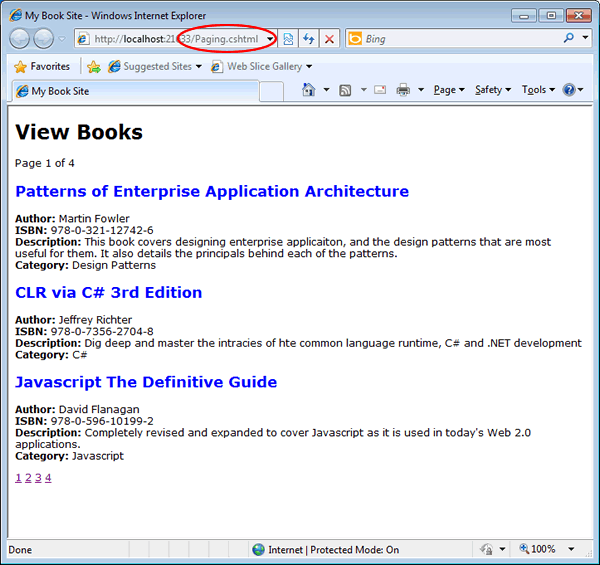
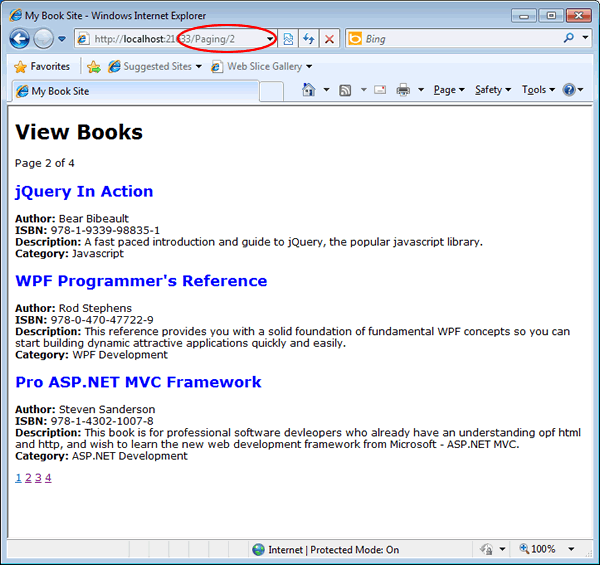
If you click the second paging link, you should see that change to Paging/2, and routing come into play.
Download the code from here. To run it, simply unzip the folder, and then use the Create Site From Folder option in WebMatrix.
Web Pages - Efficient Paging Without The WebGrid的更多相关文章
- ASP.NET Web Pages:WebGrid 帮助器
ylbtech-.Net-ASP.NET Web Pages:WebGrid 帮助器 1.返回顶部 1. ASP.NET Web Pages - WebGrid 帮助器 WebGrid - 众多有用的 ...
- Web Pages razor 学习
1. Web Pages razor Web Pages 是三种 ASP.NET 编程模型中的一种,用于创建 ASP.NET 网站和 web 应用程序. 其他两种编程模型是 Web Forms 和 M ...
- ASP.NET Web Pages:C# 和 VB 实例
ylbtech-.Net-ASP.NET Web Pages:C# 和 VB 实例 1.返回顶部 1. ASP.NET Web Pages - C# 和 VB 实例 通过 C# 和 Visual Ba ...
- ASP.NET Web Pages:Chart 帮助器
ylbtech-.Net-ASP.NET Web Pages:Chart 帮助器 1.返回顶部 1. ASP.NET Web Pages - Chart 帮助器 Chart 帮助器 - 众多有用的 A ...
- ASP.NET Web Pages:帮助器
ylbtech-.Net-ASP.NET Web Pages:帮助器 1.返回顶部 1. ASP.NET Web Pages - 帮助器 Web 帮助器大大简化了 Web 开发和常见的编程任务. AS ...
- ASP.NET Web Pages (Razor) API Quick Reference
ASP.NET Web Pages (Razor) API Quick Reference By Tom FitzMacken|February 10, 2014 Print This page co ...
- 如何在ASP.NET Web站点中统一页面布局[Creating a Consistent Layout in ASP.NET Web Pages(Razor) Sites]
如何在ASP.NET Web站点中统一页面布局[Creating a Consistent Layout in ASP.NET Web Pages(Razor) Sites] 一.布局页面介绍[Abo ...
- Displaying Data in a Chart with ASP.NET Web Pages (Razor)
This article explains how to use a chart to display data in an ASP.NET Web Pages (Razor) website by ...
- ASP.NET MVC3 系列教程 – Web Pages 1.0
http://www.cnblogs.com/highend/archive/2011/04/14/aspnet_mvc3_web_pages.html I:Web Pages 1.0中以“_”开头的 ...
随机推荐
- Windows命令 dos
1.dos下运行netstat -na 查看本机开启的端口
- 用MathType编辑横三角形的方法
如果常常接触数学公式,你会发现同一个符号如果变换方向使用就可以代表不同的数学含义,这是非常常见的一种数学现象了.对于这种情况在数学公式编辑器中,我们可以使用不同的模板来进行编辑.比如横着的三角形符号, ...
- spring第一课,beans配置(上)
1.通过property配置bean <!-- 配置一个 bean --> <bean id="helloWorld" class="com.atgui ...
- win7下php5.6安装redis扩展
redis扩展下载 http://windows.php.net/downloads/pecl/snaps/redis/ 查看phpinfo()信息 Compiler Architecture 选择合 ...
- 解决bind错误 bind: Address already in use
关于bind错误的处理: bind: Address already in use 原因: 操作系统没有立即释放端口 解决一: 等待一段时间运行网络程序即可 解决二:通过setsockopt进行设置, ...
- GraphX的三大图算法
1. PageRank http://blog.csdn.net/hguisu/article/details/7996185 2. Connected Components 3. Triangle ...
- Spark MLib 数据类型
1. MLlib Apache Spark's scalable machine learning library, with APIs in Java, Scala and Python. 2. ...
- 【BZOJ-2527】Meteors 整体二分 + 树状数组
2527: [Poi2011]Meteors Time Limit: 60 Sec Memory Limit: 128 MBSubmit: 831 Solved: 306[Submit][Stat ...
- .net社区
英文社区: 名称:MSDN 地址:http://msdn.microsoft.com/zh-cn/default.aspx 描述:这个网站是大家学.Net的初始网站,也是.net方面官方和权威的资料, ...
- VisualSVN Server搭建VDFS分布式仓研究(未成功)
FSFS与VDFS的使用区别在于FSFS是本地仓库,VDFS是分布式仓库,实现在同一个局域网内多台仓库进行同步:以下是我的猜测,因为没搭建成功: 1.必须是同一个局域网,如果有外内网基本是不可实现,需 ...