
2.15 学习总结 之 天气预报APP volley(HTTP库)之StringRequest
一、说在前面
| 昨天 |
学习了序列化的相关知识 |
| 今天 |
1、学习 volley(HTTP库)的 StringRequest请求 2、使用序列化完成相关案例 |
| 遇到问题 |
请求到的参数的出现中文乱码问题 |
问题的解决:自定义StringRequest类 修改volley编码为utf-8, 默认为Latin1 中文显示乱码。
package com.me.myvolley;

import androidx.annotation.Nullable;

import com.android.volley.NetworkResponse;

import com.android.volley.Response;

import com.android.volley.toolbox.HttpHeaderParser;

import com.android.volley.toolbox.StringRequest;

import java.io.UnsupportedEncodingException;

public class Utf8StringRequest extends StringRequest {

    public Utf8StringRequest(int method, String url, Response.Listener<String> listener, @Nullable Response.ErrorListener errorListener) {

        super(method, url, listener, errorListener);

    }

    @Override

    protected Response<String> parseNetworkResponse(NetworkResponse response) {

        String parsed = "";

        try {

            parsed = new String(response.data,"utf-8");

        } catch (UnsupportedEncodingException e) {

            e.printStackTrace();

        }

        return Response.success(parsed, HttpHeaderParser.parseCacheHeaders(response));

    }

}
二、volley 简介
1、特点
1)Volley是一个HTTP库,它使Android应用程序的网络更容易,最重要的是,更快,适合高并发的网络请求。网络请求 cancel 机制。我们可以取消单个请求,或者指定取消请求队列中的一个区域;自动调度网络请求;
2)Volley不适合大型下载或流式操作,因为Volley在解析期间将所有响应保存在内存中。对于大型下载操作,请考虑使用类似的替代方法DownloadManager。
2、组成
2)图片加载 ImageLoader
3)自定义ImageView NetworkImageView
三、案例:获取邯郸市当天的天气信息
1、设计思路
2、代码:
{

    "status": "0",       //反馈代码 0成功

    "msg": "反馈信息",      //反馈信息

    "cityen": "changchun",       //城市名称英文

    "city": "长春",       //城市名称

    "citycode": "101060101",       //城市编码

    "temp": "10",       //实时温度

    "tempf": "50",       //华氏温度

    "wd": "西风",       //风向

    "wden": "W",       //风向英文

    "wdforce": "3级",       //风力

    "wdspd": "<12km/h",       //风速

    "uptime": "12:00",       //更新时间

    "weather": "晴",       //天气状况

    "weatheren": "Sunny",       //天气状况英文

    "weatherimg": "d00",       //天气状况图标

    "stp": "994",       //气压

    "wisib": "35000",       //能见度

    "humidity": "46%",       //湿度

    "prcp": "0",       //降雨

    "prcp24h": "2.2",       //24小时降雨量

    "aqi": "22",       //AQI

    "pm25": "20",       //PM2.5

    "today": "10月17日(星期一)"      //今天日期

}
2)天气实体类
package com.me.myvolley;

public class TianQi {

    private String city;

    private String today;

    private String weather;

    private int pm25;

    private int temp;

    private String wd;

    private String wdforce;

    public String getCity() {

        return city;

    }

    public void setCity(String city) {

        this.city = city;

    }

    public String getToday() {

        return today;

    }

    public void setToday(String today) {

        this.today = today;

    }

    public String getWeather() {

        return weather;

    }

    public void setWeather(String weather) {

        this.weather = weather;

    }

    public int getPm25() {

        return pm25;

    }

    public void setPm25(int pm25) {

        this.pm25 = pm25;

    }

    public int getTemp() {

        return temp;

    }

    public void setTemp(int temp) {

        this.temp = temp;

    }

    public String getWd() {

        return wd;

    }

    public void setWd(String wd) {

        this.wd = wd;

    }

    public String getWdforce() {

        return wdforce;

    }

    public void setWdforce(String wdforce) {

        this.wdforce = wdforce;

    }

}
<?xml version="1.0" encoding="utf-8"?>

<androidx.constraintlayout.widget.ConstraintLayout xmlns:android="http://schemas.android.com/apk/res/android"

    xmlns:app="http://schemas.android.com/apk/res-auto"

    xmlns:tools="http://schemas.android.com/tools"

    android:layout_width="match_parent"

    android:layout_height="match_parent"

    tools:context=".MainActivity">

    <TextView

        android:id="@+id/textViewWdforce"

        android:layout_width="wrap_content"

        android:layout_height="wrap_content"

        android:textSize="36sp"

        app:layout_constraintBottom_toTopOf="@+id/guideline"

        app:layout_constraintEnd_toEndOf="parent"

        app:layout_constraintHorizontal_bias="0.5"

        app:layout_constraintStart_toStartOf="parent"

        app:layout_constraintTop_toBottomOf="@+id/textViewWd"

        tools:text="tianqi" />

    <TextView

        android:id="@+id/textViewCity"

        android:layout_width="wrap_content"

        android:layout_height="wrap_content"

        android:textSize="@dimen/title_font_size"

        app:layout_constraintBottom_toBottomOf="parent"

        app:layout_constraintEnd_toEndOf="parent"

        app:layout_constraintStart_toStartOf="parent"

        app:layout_constraintTop_toTopOf="parent"

        app:layout_constraintVertical_bias="0.05"

        tools:text="handan1111" />

    <TextView

        android:id="@+id/textViewDate"

        android:layout_width="wrap_content"

        android:layout_height="wrap_content"

        android:textSize="36sp"

        app:layout_constraintBottom_toTopOf="@+id/textViewWeather"

        app:layout_constraintEnd_toEndOf="@+id/textViewWeather"

        app:layout_constraintStart_toStartOf="@+id/textViewWeather"

        app:layout_constraintTop_toBottomOf="@+id/textViewCity"

        tools:text="tianqi" />

    <TextView

        android:id="@+id/textViewWeather"

        android:layout_width="wrap_content"

        android:layout_height="wrap_content"

        android:textSize="36sp"

        app:layout_constraintBottom_toTopOf="@+id/textViewPm25"

        app:layout_constraintEnd_toEndOf="@+id/textViewPm25"

        app:layout_constraintStart_toStartOf="@+id/textViewPm25"

        app:layout_constraintTop_toBottomOf="@+id/textViewDate"

        tools:text="tianqi" />

    <TextView

        android:id="@+id/textViewPm25"

        android:layout_width="wrap_content"

        android:layout_height="wrap_content"

        android:textSize="36sp"

        app:layout_constraintBottom_toTopOf="@+id/textViewTemp"

        app:layout_constraintEnd_toEndOf="@+id/textViewTemp"

        app:layout_constraintStart_toStartOf="@+id/textViewTemp"

        app:layout_constraintTop_toBottomOf="@+id/textViewWeather"

        tools:text="tianqi" />

    <TextView

        android:id="@+id/textViewTemp"

        android:layout_width="wrap_content"

        android:layout_height="wrap_content"

        android:textSize="36sp"

        app:layout_constraintBottom_toTopOf="@+id/textViewWd"

        app:layout_constraintEnd_toEndOf="@+id/textViewWd"

        app:layout_constraintStart_toStartOf="@+id/textViewWd"

        app:layout_constraintTop_toBottomOf="@+id/textViewPm25"

        tools:text="tianqi" />

    <TextView

        android:id="@+id/textViewWd"

        android:layout_width="wrap_content"

        android:layout_height="wrap_content"

        android:textSize="36sp"

        app:layout_constraintBottom_toTopOf="@+id/textViewWdforce"

        app:layout_constraintEnd_toEndOf="@+id/textViewWdforce"

        app:layout_constraintStart_toStartOf="@+id/textViewWdforce"

        app:layout_constraintTop_toBottomOf="@+id/textViewTemp"

        tools:text="tianqi" />

    <androidx.constraintlayout.widget.Guideline

        android:id="@+id/guideline"

        android:layout_width="wrap_content"

        android:layout_height="wrap_content"

        android:orientation="horizontal"

        app:layout_constraintGuide_percent="0.9" />

</androidx.constraintlayout.widget.ConstraintLayout>
package com.me.myvolley;

import androidx.appcompat.app.AppCompatActivity;

import android.os.Bundle;

import android.widget.TextView;

import com.android.volley.RequestQueue;

import com.android.volley.Response;

import com.android.volley.VolleyError;

import com.android.volley.toolbox.StringRequest;

import com.android.volley.toolbox.Volley;

import com.google.gson.Gson;

public class MainActivity extends AppCompatActivity {

    @Override

    protected void onCreate(Bundle savedInstanceState) {

        super.onCreate(savedInstanceState);

        setContentView(R.layout.activity_main);

        //String url = "https://www.baidu.com";

        String url = "https://api.help.bj.cn/apis/weather/?id=101091001";

        final TextView textViewWeather = findViewById(R.id.textViewWeather);

        final TextView textViewCity = findViewById(R.id.textViewCity);

        final TextView textViewDate = findViewById(R.id.textViewDate);

        final TextView textViewPm25 = findViewById(R.id.textViewPm25);

        final TextView textViewTemp = findViewById(R.id.textViewTemp);

        final TextView textViewWd = findViewById(R.id.textViewWd);

        final TextView textViewWdforce = findViewById(R.id.textViewWdforce);

        //1、创建一个队列

        RequestQueue queue = Volley.newRequestQueue(this);

        //2、创建一个request

        final Utf8StringRequest request = new Utf8StringRequest(

                StringRequest.Method.GET,    //1、请求方式

                url,    //2、请求网址

                new Response.Listener<String>() {

                    @Override

                    public void onResponse(String response) {

                        Gson gson = new Gson();

                        TianQi tianQi = gson.fromJson(response,TianQi.class);

                        textViewCity.setText(tianQi.getCity());

                        textViewDate.setText(tianQi.getToday());

                        textViewPm25.setText("PM2.5:" + String.valueOf(tianQi.getPm25()));

                        textViewTemp.setText("温度:" + String.valueOf(tianQi.getTemp()));

                        textViewWd.setText("风向:" + tianQi.getWd());

                        textViewWdforce.setText("风力:" + tianQi.getWdforce());

                        textViewWeather.setText("天气:" + tianQi.getWeather());

                        //First first = gson.fromJson(response,First.class);

                        //textView.setText(response);

                    }

                },    //3、成功的回调函数

                new Response.ErrorListener() {

                    @Override

                    public void onErrorResponse(VolleyError error) {

                        textViewCity.setText("请求错误!");

                    }

                }    //4、失败的回调函数

        );

        queue.add(request);

    }

}
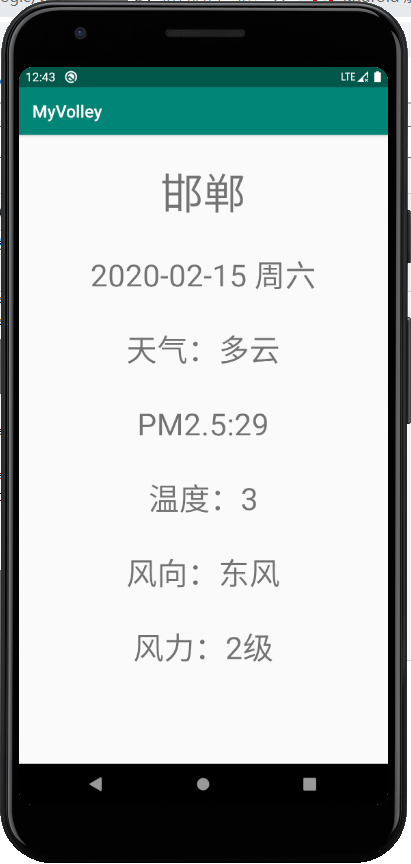
四、案例运行测试
2.15 学习总结 之 天气预报APP volley(HTTP库)之StringRequest的更多相关文章
- android入门学习-天气预报app(一)
引言 学习<android第一行代码>根据书本开发的天气预报app,主要用于熟练操作android开发(android studio3.0平台). 今天主要分享一下从服务器上获取天气信息, ...
- 毕业设计--天气预报App
9月中旬,开始动手做我的毕业设计了,之前一直在纠结做啥,后来想想,既然是做毕业设计,那就大胆地做点自己没接触过的东西吧.然后网上查找资料得知做天气预报需要用到开放的API,而且要用那种现在还在维护的, ...
- 用Swift实现一款天气预报APP(三)
这个系列的目录: 用Swift实现一款天气预报APP(一) 用Swift实现一款天气预报APP(二) 用Swift实现一款天气预报APP(三) 通过前面的学习,一个天气预报的APP已经基本可用了.至少 ...
- 用Swift实现一款天气预报APP(二)
这个系列的目录: 用Swift实现一款天气预报APP(一) 用Swift实现一款天气预报APP(二) 用Swift实现一款天气预报APP(三) 上篇中主要讲了界面的一些内容,这篇主要讨论网络请求,获得 ...
- 天气预报APP(1)
一个天气预报APP至少应该具备以下功能: *可以罗列出全国所有的省.市.县: *可以查看全国任意城市的天气信息: *可以自由的切换城市,去查看其他城市的天气: *提供手动更新以及后台自动更新天气的功能 ...
- React Native指南汇集了各类react-native学习资源、开源App和组件
来自:https://github.com/ele828/react-native-guide React Native指南汇集了各类react-native学习资源.开源App和组件 React-N ...
- 用Swift实现一款天气预报APP(一)
这个系列的目录: 用Swift实现一款天气预报APP(一) 用Swift实现一款天气预报APP(二) 用Swift实现一款天气预报APP(三) Swift作为现在苹果极力推广的语言,发展的非常快.这个 ...
- 基于Android开发的天气预报app(源码下载)
原文:基于Android开发的天气预报app(源码下载) 基于AndroidStudio环境开发的天气app -系统总体介绍:本天气app使用AndroidStudio这个IDE工具在Windows1 ...
- Python Cookbook(第3版)中文版:15.14 传递Unicode字符串给C函数库
15.14 传递Unicode字符串给C函数库¶ 问题¶ 你要写一个扩展模块,需要将一个Python字符串传递给C的某个库函数,但是这个函数不知道该怎么处理Unicode. 解决方案¶ 这里我们需要考 ...
随机推荐
- 「JSOI2014」支线剧情2
「JSOI2014」支线剧情2 传送门 不难发现原图是一个以 \(1\) 为根的有根树,所以我们考虑树形 \(\text{DP}\). 设 \(f_i\) 表示暴力地走完以 \(i\) 为根的子树的最 ...
- Nessus忘记用户名和密码
以管理员身份运行cmd,切换到Nessus的安装目录,执行以下操作.
- Lesson 16 The modern city
What is the author's main argument about the modern city? In the organization of industrial life the ...
- java事务/springboot事务/redis事务
java事务(数据库事务):jdbc事务--ACID springboot事务:@Transactional--ACID redis事务:命令集合 将redis事务与mysql事务对比: Mysq ...
- 吴裕雄 Bootstrap 前端框架开发——Bootstrap 表格:在 <tbody> 内添加斑马线形式的条纹 ( IE8 不支持)
<!DOCTYPE html> <html> <head> <meta charset="utf-8"> <title> ...
- Java--对象与类(二)
final 实例域 可以将实例域定义为final.构建对象时必须初始化这样的域.也就是说在一个构造器执行之后,这个域被设置,并且之后无法对其修改 final 修饰符大多应用于基本(primitive) ...
- MySQL : INSERT INTO SELECT
INSERT INTO wx_announcement_push ( title, content, STATUS, del_flag, user_login_name ) SELECT '大家好', ...
- Python 基础之面向对象初识与类的封装
一.面向对象类的初识 1.类的定义 #三种方式:#1.class MyClass: pass #2.推荐class MyClass(): pass #3.class MyClass(obj ...
- Spring Boot+Jpa(MYSQL)做一个登陆注册系统(前后端数据库一站式编程)
Spring Boot最好的学习方法就是实战训练,今天我们用很短的时间启动我们第一个Spring Boot应用,并且连接我们的MySQL数据库. 我将假设读者为几乎零基础,在实战讲解中会渗透Sprin ...
- UITextField的使用、介绍、讲解、全解、简介、说明
[2018年中秋节良心写作]文章将尽可能的全面介绍UITextField的所有相关知识,逻辑连贯,需要认真理解,一气呵成. 关键词: 屏幕键盘(onscreen keyboard).键盘自定义.键盘类 ...