
C# 反射详解一
首先反射是基于System.Reflection命名空间下,.Net框架提供的帮助类库,可以读取并使用metadata(元数据:描述对象信息的数据).
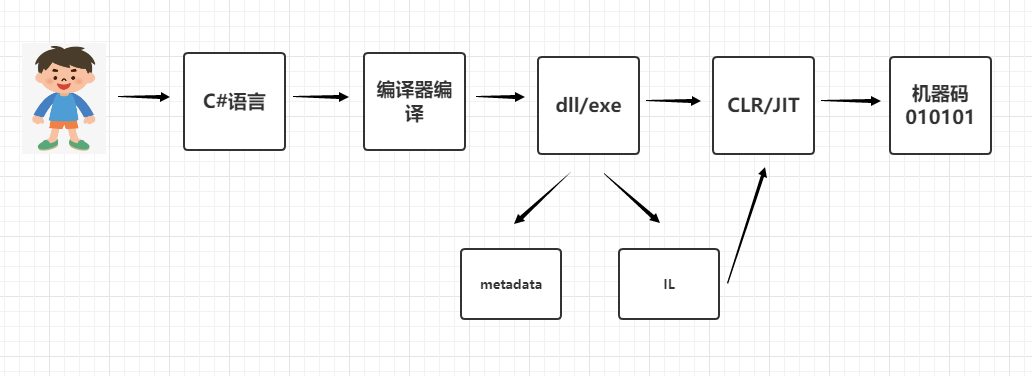
我们再来看下代码生成编译的总过程。
编译器编译(一次编译):类库生成的都是dll,控制台生成的是exe文件
dll和exe都包含两大块metadata和IL(中间语言)
dll和exe的运行环境依赖于CLR,我们安装.net frmework时会自动配置CLR和JIT(及时编译器)
JIT(二次编译(编译之后,可以在不同平台使用))会将dll和exe文件转为机器码
反射基础
三种加载dll程序集的方法
//根据dll名称加载,不带dll后缀

Assembly assembly = Assembly.Load("Bussiness");

//完整路径加载,注意web层要引用加载的Bussiness层,如果没有依赖项,使用时会报错

Assembly assembly1 = Assembly.LoadFile(@"E:\反射\Rel\bin\Debug\netcoreapp3.1\Bussiness.dll");

//根据dll名称加载,带dll后缀

Assembly assembly2 = Assembly.Load("Bussiness.dll");

//获取该dll中的模块信息

foreach (var item in assembly.GetModules())

{

    Console.WriteLine(item.FullyQualifiedName);

    // => E:\反射\Rel\bin\Debug\netcoreapp3.1\Bussiness.dll

}

//获取该dll中的类型信息

foreach (var item in assembly.GetTypes())

{

    Console.WriteLine(item.FullName);

    // => Bussiness.Class1

    // => Bussiness.Method

}
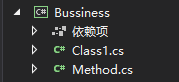
这是Bussiness层信息
根据反射创建对象
//加载程序集

Assembly assembly3 = Assembly.Load("Common");

//获取指定类型对象的(类型)信息

Type type = assembly3.GetType("Common.StringHelper");

//创建对象

object o = Activator.CreateInstance(type);
Common层内容

当我们创建对象时,会打印 StringHelper被构造了! 因为每一个类都 自带一个构造函数,间接执行了WriteLine语句。
但是当我们调用QueryString方法时就报错了

原因是编译器不认可,编译器只把他当成是一个onject对象。
我们可以这样写
//加载程序集

Assembly assembly3 = Assembly.Load("Common");

//获取指定类型对象的(类型)信息

Type type = assembly3.GetType("Common.StringHelper");

//创建对象

dynamic o = Activator.CreateInstance(type);

o.QueryString("今天真热");
dynamic会避开编译器的检查,相当于弱语言类型,从而达到我们的预想.
对此我们可以加以封装一下
public static StringHelper CreateHelper()

{

    //加载程序集

    Assembly assembly3 = Assembly.Load("Common");

    //获取指定类型对象的(类型)信息

    Type type = assembly3.GetType("Common.StringHelper");

    //创建对象

    dynamic o = Activator.CreateInstance(type);

    return o;

}

//=>调用
/*
StringHelper stringHelper = Factory.CreateHelper();
await stringHelper.QueryString("开空调");
*/
反射破坏单例:单例类在内存中是唯一的,本来是不能实例化,但是可通过反射来创建对象,从而调用其私有构造函数。
public sealed class Single

{

    private Single()

    {

        Console.WriteLine($"{this.GetType().Name}已被构造");

    }

    private static Single single = null;

    public static Single CreateInstance()

    {

        if (single == null)

        {

            single = new Single();

        }

        return single;

    }

}
//加载程序集

Assembly assembly3 = Assembly.Load("Common");

//获取指定类型对象的(类型)信息

Type type = assembly3.GetType("Common.Single");

//创建对象

Common.Single single = (Common.Single)Activator.CreateInstance(type, true);
根据参数调用不同的构造函数
public class TestClass

{

    public TestClass(string parameter)

    {

        Console.WriteLine($"{this.GetType().Name}已被构造");

    }

    public TestClass(int parameter)

    {

        Console.WriteLine($"{this.GetType().Name}已被构造");

    }

}
//加载程序集

Assembly assembly4 = Assembly.Load("Common");

//获取指定类型对象的(类型)信息

Type type = assembly4.GetType("Common.TestClass");

//创建对象  这里有一个参数数组,会根据参数的顺序和类型匹配对应的构造函数,如果参数是空数组或null,则构造函数不接受任何参数(无参数构造函数)

Common.TestClass single = (Common.TestClass)Activator.CreateInstance(type, );

Common.TestClass single1 = (Common.TestClass)Activator.CreateInstance(type, "");
反射操作泛型
public class GenericClass<T, R, E>

{

    public void Show(T t, R r, E e)

    {

        Console.WriteLine($"{t.GetType().Name},{r.GetType().Name},{e.GetType().Name}");

    }

}
//加载程序集

Assembly assembly4 = Assembly.Load("Common");

//获取指定类型对象的(类型)信息  注意:`3是占位符,该泛型对象中有几个泛型参数

Type type = assembly4.GetType("Common.GenericClass`3");

//不能像这样创建对象,因为泛型对象在实例化的时候要指定参数及类型

//object o = Activator.CreateInstance(type);

//指定泛型对象的参数类型

Type type1 = type.MakeGenericType(new Type[] { typeof(decimal), typeof(Guid), typeof(Enum) });

object oGeneric = Activator.CreateInstance(type1);
调用无参方法
public class ReflectionTest

{

    public void show1()

    {

        Console.WriteLine($"调用了{this.GetType()}中的方法show1");

    }

}
//加载程序集

Assembly assembly4 = Assembly.Load("Common");

//获取指定类型对象的(类型)信息

Type type = assembly4.GetType("Common.ReflectionTest");

//创建对象

object o = Activator.CreateInstance(type);

MethodInfo methodInfo = type.GetMethod("show1");

//调用方法,第一个参数是实例类型,第二个是参数列表

methodInfo.Invoke(o, null);
有参方法的调用
public void show2(int i)

{

    Console.WriteLine($"调用了{this.GetType()}中的方法show2");

}
//加载程序集

Assembly assembly4 = Assembly.Load("Common");

//获取指定类型对象的(类型)信息

Type type = assembly4.GetType("Common.ReflectionTest");

//创建对象

object o = Activator.CreateInstance(type);

MethodInfo methodInfo = type.GetMethod("show2");

//第一个参数是实例类型,第二个是参数列表

methodInfo.Invoke(o, new object[] {  });
静态方法的调用
public static void show3(int i)

{

    Console.WriteLine($"调用了{typeof(ReflectionTest)}中的方法show3");

}
//加载程序集

Assembly assembly4 = Assembly.Load("Common");

//获取指定类型对象的(类型)信息

Type type = assembly4.GetType("Common.ReflectionTest");

//创建对象

object o = Activator.CreateInstance(type);

MethodInfo methodInfo = type.GetMethod("show3");

//第一个参数是实例类型,第二个是参数列表

//因为是静态方法,所以不需要传实例对象(可传可不传),静态方法是可以通过方法名直接访问的

methodInfo.Invoke(null, new object[] {  });
重载方法的调用
public static void show4()

{

    Console.WriteLine($"调用了{typeof(ReflectionTest)}中的方法show4");

}

public static void show4(int i)

{

    Console.WriteLine($"调用了{typeof(ReflectionTest)}中的方法show4");

}

public static void show4(string s)

{

    Console.WriteLine($"调用了{typeof(ReflectionTest)}中的方法show4");

}

public static void show4(string s, int i)

{

    Console.WriteLine($"调用了{typeof(ReflectionTest)}中的方法show4");

}
//加载程序集

Assembly assembly4 = Assembly.Load("Common");

//获取指定类型对象的(类型)信息

Type type = assembly4.GetType("Common.ReflectionTest");

//创建对象

object o = Activator.CreateInstance(type);

MethodInfo methodInfo = type.GetMethod("show4", new Type[] { });

//第一个参数是实例类型,第二个是参数列表

//因为是静态方法,所以不需要传实例对象(可传可不传),静态方法是可以通过方法名直接访问的

methodInfo.Invoke(null, new object[] { });

{

    MethodInfo methodInfo1 = type.GetMethod("show4", new Type[] { typeof(int) });

    methodInfo1.Invoke(null, new object[] {  });

}

{

    MethodInfo methodInfo2 = type.GetMethod("show4", new Type[] { typeof(string) });

    methodInfo2.Invoke(null, new object[] { "" });

}

{

    MethodInfo methodInfo3 = type.GetMethod("show4", new Type[] { typeof(string), typeof(int) });

    methodInfo3.Invoke(null, new object[] { "",  });

}
私有方法的调用
private void show5(string s)

{

    Console.WriteLine($"调用了{typeof(ReflectionTest)}中的方法show5");

}
//加载程序集

Assembly assembly4 = Assembly.Load("Common");

//获取指定类型对象的(类型)信息

Type type = assembly4.GetType("Common.ReflectionTest");

//创建对象

object o = Activator.CreateInstance(type);

MethodInfo methodInfo = type.GetMethod("show5", BindingFlags.Instance | BindingFlags.NonPublic);

//第一个参数是实例类型,第二个是参数列表

methodInfo.Invoke(o, new object[] { "" });
调用泛型类中的方法
public void Show(T t, R r, E e)

{

    Console.WriteLine($"{t.GetType().Name},{r.GetType().Name},{e.GetType().Name}");

}
//加载程序集

Assembly assembly4 = Assembly.Load("Common");

//获取指定类型对象的(类型)信息 注意:`3是占位符,该泛型对象中有几个泛型参数

Type type = assembly4.GetType("Common.GenericClass`3");

//指定泛型对象的参数类型

Type type1 = type.MakeGenericType(new Type[] { typeof(double), typeof(Guid), typeof(DateTime) });

object oGeneric = Activator.CreateInstance(type1);

MethodInfo methodInfo = type1.GetMethod("Show");

methodInfo.Invoke(oGeneric, new object[] { 1.02, Guid.NewGuid(), DateTime.Now });
调用泛型类中的泛型方法
public class GenericClass<T, R, E>

{

    public void Show<X>(T t, R r, E e, X x)

    {

        Console.WriteLine($"{t.GetType().Name},{r.GetType().Name},{e.GetType().Name},{x.GetType().Name}");

    }

}
//加载程序集

Assembly assembly4 = Assembly.Load("Common");

//获取指定类型对象的(类型)信息 注意:`3是占位符,该泛型对象中有几个泛型参数

Type type = assembly4.GetType("Common.GenericClass`3");

//指定泛型对象的参数类型

Type type1 = type.MakeGenericType(new Type[] { typeof(double), typeof(Guid), typeof(DateTime) });

object oGeneric = Activator.CreateInstance(type1);

MethodInfo methodInfo = type1.GetMethod("Show");
//指定泛型方法的参数类型

MethodInfo methodInfo1 = methodInfo.MakeGenericMethod(new Type[] { typeof(string) });

methodInfo1.Invoke(oGeneric, new object[] { 1.2, Guid.NewGuid(), DateTime.Now, "" });
反射操作实体字段、属性
public class People

{

    public People()

    {

        Console.WriteLine($"{this.GetType().FullName}构造了一次");

    }

    public int id { get; set; }

    public string name { get; set; }

    public string description { get; set; }

}
Type type = typeof(People);

object o = Activator.CreateInstance(type);

//type.GetFields()也可以,操作也是一样的

foreach (var item in type.GetProperties())

{

    //Console.WriteLine(item.Name);//打印字段属性名

    //Console.WriteLine(item.GetValue(o));//打印字段值

    if (item.Name.Equals("id"))

        item.SetValue(o, );//设置字段值

    if (item.Name.Equals("name"))

        item.SetValue(o, "");

    Console.WriteLine($"{type.Name}.{item.Name}={item.GetValue(o)}");

}
反射映射字段,对象中字段数据转换赋值
public class People

{

    public People()

    {

        Console.WriteLine($"{this.GetType().FullName}构造了一次");

    }

    public int id { get; set; }

    public string name { get; set; }

    public string description { get; set; }

}

public class DtoPeople

{

    public DtoPeople()

    {

        Console.WriteLine($"{this.GetType().FullName}构造了一次");

    }

    public int id { get; set; }

    public string name { get; set; }

    public string description { get; set; }

}
People people = new People();

people.id = ;

people.name = "";

people.description = "";

Type typePeople = typeof(People);

Type typeDtoPeople = typeof(DtoPeople);
//需要赋值的对象

object o = Activator.CreateInstance(typeDtoPeople);

foreach (var item in typeDtoPeople.GetFields())

{

    //找出源类型字段的值  item.Name为字段属性名

    object value = typePeople.GetProperty(item.Name).GetValue(people);

    //赋值

    item.SetValue(o, value);

}
反射的优点:动态获取对象.可扩展
反射的缺点:1.写起来复杂.2.避开编译器的检查,错误风险很大.3.性能不好
C# 反射详解一的更多相关文章
- C#反射の反射详解
C#反射の反射详解(点击跳转)C#反射の反射接口(点击跳转)C#反射反射泛型接口(点击跳转)C#反射の一个泛型反射实现的网络请求框架(点击跳转) 一.什么是反射 反射(Reflection):这是.N ...
- java 反射详解
反射的概念和原理 类字节码文件是在硬盘上存储的,是一个个的.class文件.我们在new一个对象时,JVM会先把字节码文件的信息读出来放到内存中,第二次用时,就不用在加载了,而是直接使用之前缓存的这个 ...
- Java 反射详解 转载
java 反射 定义 功能 示例 概要: Java反射机制详解 | |目录 1反射机制是什么 2反射机制能做什么 3反射机制的相关API ·通过一个对象获得完整的包名和类名 ·实例化Class类对象 ...
- java反射 详解!!!!
java反射(特别通俗易懂) 反射是框架设计的灵魂 (使用的前提条件:必须先得到代表的字节码的Class,Class类用于表示.class文件(字节码)) 一.反射的概述 JAVA反射机制是在运行状态 ...
- java反射详解
本篇文章依旧采用小例子来说明,因为我始终觉的,案例驱动是最好的,要不然只看理论的话,看了也不懂,不过建议大家在看完文章之后,在回过头去看看理论,会有更好的理解. 下面开始正文. [案例1]通过一个对象 ...
- java反射详解(转)
本篇文章依旧采用小例子来说明,因为我始终觉的,案例驱动是最好的,要不然只看理论的话,看了也不懂,不过建议大家在看完文章之后,在回过头去看看理论,会有更好的理解. 下面开始正文. [案例1]通过一个对象 ...
- Java反射详解及应用示例
反射是Java中最重要的内容之一,了解反射原理对我们学习各种框架具有很大的帮助 反射的原理: 反射应用示例: import java.lang.reflect.Constructor; import ...
- 【转】java反射详解
转自:http://www.cnblogs.com/rollenholt/archive/2011/09/02/2163758.html 本篇文章依旧采用小例子来说明,因为我始终觉的,案例驱动是最好的 ...
- .net反射详解(转)
摘自:http://www.cnblogs.com/knowledgesea/archive/2013/03/02/2935920.html 概述反射 通过反射可以提供类型信息,从而使得我们开发人员在 ...
- 你应该知道的c# 反射详解
C#反射 首先了解C#反射的概念,反射是一个运行库类型发现的过程.通过反射可以得到一个给定程序集所包含的所有类型的列表, 这个列表包括给定类型中定义的方法.字段.属性和事件.也可以动态的发现一组给定类 ...
随机推荐
- css3及css技巧
左右对齐:
- Spark Streaming与流处理
Spark Streaming与流处理 一.流处理 1.1 静态数据处理 1.2 流处理二.Spark Streaming 2.1 简介 2 ...
- CleanWebpackPlugin最新版本使用问题
如果在webpack 安装 CleanWebpackPlugin最新版本报错 如果是报下面的错误的话 然后在控制台向上翻 会发现 TypeError: CleanWebpackPlugin is no ...
- DPDK Hash Library原理(学习笔记)
0 前言 本文主要翻译至DPDK的官方编程指南,在谷歌翻译的基础上根据自己的理解做了一些修改.网上搜索的很多中文翻译大多是翻译后直接黏贴上来,有时候连语句都读不通.希望本文能够对你有所帮助. 1 介绍 ...
- Antd 修改主题颜色填坑记录
首先,让我想说的是,现在有很多的更新,网上的一些也有的没用了, 接下来让我来分享一些我的解决方法,时间:2018.12/18. 1.和网上的一样,我用的是creat-react-app创建的项目,修改 ...
- 简述 zookeeper 基于 Zab 协议实现选主及事务提交
Zab 协议:zookeeper 基于 Paxos 协议的改进协议 zookeeper atomic broadcast 原子广播协议. zookeeper 基于 Zab 协议实现选主及事务提交. 一 ...
- 处理TableVIew SectionHeader悬停问题
1,plain类型的tableview 才会悬停 grouped类型不会悬停 2,通过改变contentInset达到部分悬停遮罩的处理,对所有的Sectionheader都有效,不可以单独处理某 ...
- Pyqt5_QMessageBox
QMessageBox header:会话窗标题 info:会话窗内容 #弹出5种不同类型的消息框 reply1=QMessageBox.information(self,"title&qu ...
- 【原创】CentOS 7搭建多实例MySQL8(想要几个搞几个)
起因 最近项目上开始重构,可能会用到主从加读写分离的情况,就想先在本地搭一个出来试试效果,结果百度一搜出来一大堆,然而自己去踩坑的没几个,绝大多数都是去抄的别人的内容,关键是实际应用中还会出错,浏览器 ...
- solr学习(笔记) windows10+jdk1.8+tomcat8环境部署
一:准备环境 1.1 »tomcat8.5下载地址:https://tomcat.apache.org/download-80.cgi 1.2 solr各版本下载地址:http://archive.a ...