
vue全家桶(4.3)
5.3.Vuex的核心概念
store: 每一个 Vuex 应用的核心就是 store(仓库)。“store”基本上就是一个容器,它包含着你的应用中大部分的状态 (state)

state:包含所有应用级别状态的对象

Getter: 在组件内部获取store中状态的函数,可以认为是 store 的计算属性

Mutation: 唯一修改状态的事件回调函数

Action:Action 类似于 mutation,不同在于:1、Action 提交的是 mutation,而不是直接变更状态。2、Action 可以包含任意异步操

Modules: 将store分割成不同的模块
5.3.1.Mutation
注意; 在Mutation中,是不能提交异步代码的,例如:
import Vue from 'vue'

import Vuex from 'vuex'

// 让vuex作为vue的插件来使用

Vue.use(Vuex)

// 创建一个容器

let store = new Vuex.Store({

  state: {

    goods_num: 0

  },

  mutations: {

    changeCar (state, num) {

      console.log(state)

      setTimeout(() => {

        state.goods_num += num

      }, 2000)

    }

  }

})

// 把这个store实例导出 方便在vue中注入

export default store
5.3.2.Action
在mutation中提交异步代码,状态的改变是没办法追踪的,如果有异步代码,需要放到Action中去,等异步代码执行完成后再提交 store/index.js中的代码
import Vue from 'vue'

import Vuex from 'vuex'

// 让vuex作为vue的插件来使用

Vue.use(Vuex)

// 创建一个容器

let store = new Vuex.Store({

  state: {

    goods_num: 0

  },

  mutations: {

    changeCar (state, num) {

      state.goods_num += num

    }

  },

  actions: {

    changeCarAction (context, num) {

      console.log(context)

      setTimeout(() => {

        context.commit('changeCar', num)

      }, 2000)

    }

  }

})

// 把这个store实例导出 方便在vue中注入

export default store
触发这个action,在VuexGoodsItem中去修改
export default {

  data () {

    return {

      num: 12

    }

  },

  components: {

  },

  methods: {

    increase () {

      this.num++

    },

    decrease () {

      this.num--

    },

    addCar () {

      // this.$store.commit('changeCar', this.num)

      this.$store.dispatch('changeCarAction', this.num)

    }

  }

}
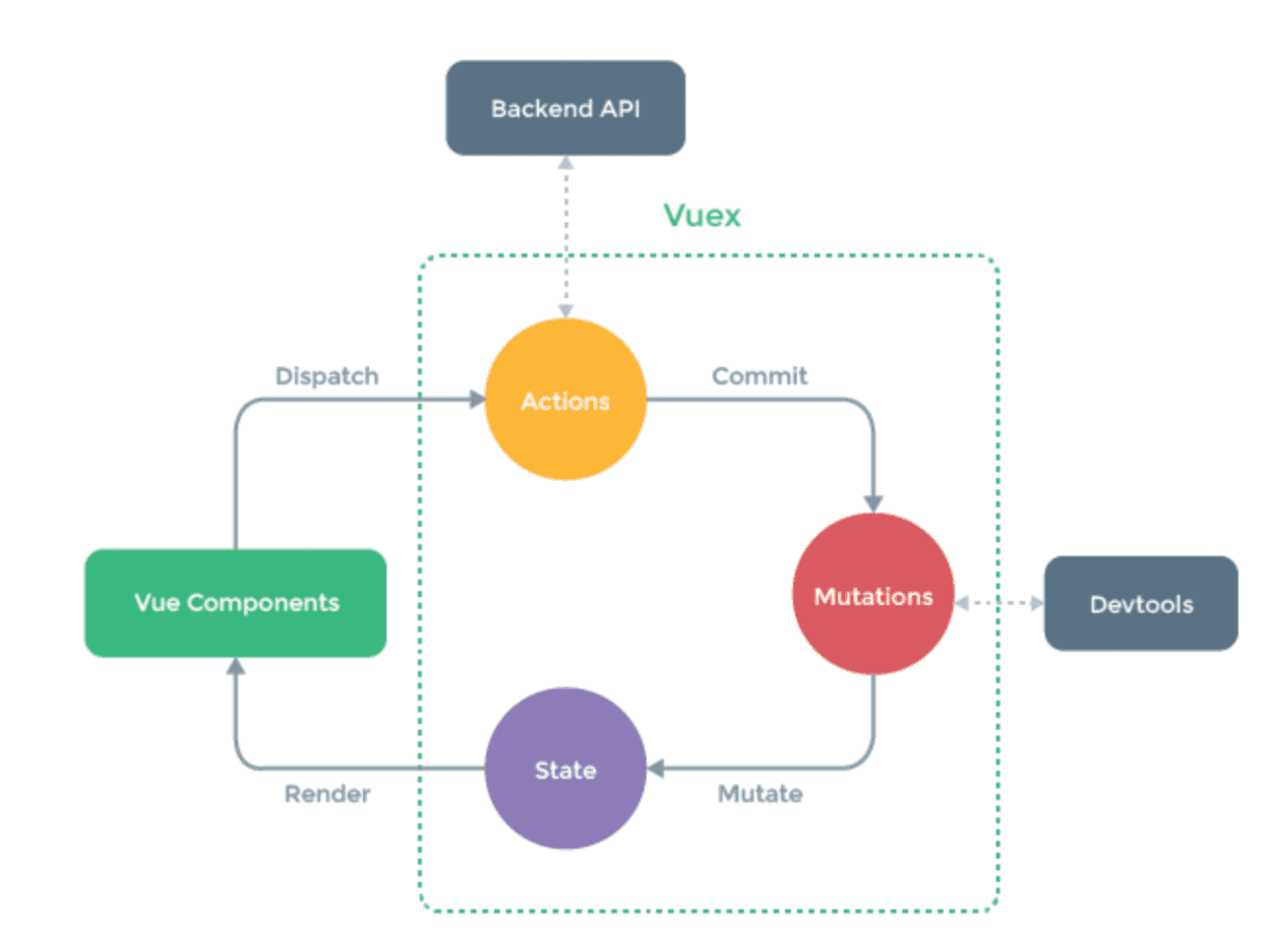
如果上面的都搞定了,再来看执行的流程图就轻松了
5.3.3.Getter
Getter可以认为是 store 的计算属性,可以对数据进行处理。为了掩饰效果,我们新建一个Count组件来说明
<template>

  <div class="page">

    <span>{{this.$store.state.count}}</span>

    <button @click="increase">+</button>

  </div>

</template>

<script type="text/ecmascript-6">

export default {

  data () {

    return {

    }

  },

  components: {

  },

  methods: {

    increase () {

      this.$store.commit('add')

    }

  }

}

</script>

<style scoped>

.page{

  width: 300px;

  margin: 100px auto

}

</style>
在store中增加mutation函数和count变量,以下是部分代码
  state: {

    goods_num: 0,

    count: 0

  },

  mutations: {

    changeCar (state, num) {

      state.goods_num += num

    },

    add (state) {

      state.count++

    }

  }
这样我们就实现了vuex版的加法计数器,如果对count这个变量有一些逻辑判断怎么办呢?我们可以在组件内部使用computed来实现,如果这个逻辑是全局通用的,你可以把它放到Getter里面去,举例:
需求:当计数器加到10的时候就不能继续加了
在store中增加getters选项
import Vue from 'vue'

import Vuex from 'vuex'

// 让vuex作为vue的插件来使用

Vue.use(Vuex)

// 创建一个容器

let store = new Vuex.Store({

  state: {

    goods_num: 0,

    count: 0

  },

  mutations: {

    changeCar (state, num) {

      state.goods_num += num

    },

    add (state) {

      state.count++

    }

  },

  actions: {

    changeCarAction (context, num) {

      console.log(context)

      setTimeout(() => {

        context.commit('changeCar', num)

      }, 2000)

    }

  },

  getters: {

    newCount (state) {

      return state.count > 10 ? 10 : state.count

    }

  }

})

// 把这个store实例导出 方便在vue中注入

export default store
使用到时候,从store.getters对象中去获取
<p><span>{{this.$store.getters.newCount}}</span></p>
注意:如果要给getters里面的函数传参数,需要写成这样
  getters: {

    newCount (state) {

      return state.count > 10 ? 10 : state.count

    },

    newCount2 (state) {

      // 返回一个函数

      return (num) => state.count > num ? num : state.count

    }

  }
调用的时候,这样调用
<p><span>{{this.$store.getters.newCount2(5)}}</span></p>
5.3.4.辅助函数mapState、mapGetters、mapActions
这几个辅助函数可以帮助我们简化一些写法
注意:在使用之前一定要先引入
import { mapState, mapMutations, mapActions, mapGetters } from 'vuex'
1.mapState,这个函数是和computed的映射,可以把传入mapState的对象或者数组,转化成计算属性
mapState里面可以传入数组和对象,首先来看传入数组的写法
computed: {

  ...mapState(['num3', 'num4', 'num5'])

}
注意,这里传入的num3、num4、num5需要和state里面定义的状态同名
state: {

  goods_num: 0,

  count: 0,

  num3: 9,

  num4: 10,

  num5: 11

}
这样写就可以直接去批量拿到state里面的数据,不用再去使用this.$store.state.num3 来获取值了,这就是辅助函数的作用,可以简化一些写法
有些时候,我们需要从state里面取值进行处理,例如这样:
computed: {

  num3 () {

    return this.$store.state.num3 > 10 ? 10 : 20

  }

}
如果使用辅助函数,我们就需要以对象的形式传入了
computed: {

  // num3 () {

  //   return this.$store.state.num3 > 10 ? 10 : 20

  // }

  ...mapState({

    num3: state => state.num3 > 10 ? 10 : 20

  })

}
使用箭头函数可以简化代码,同时还可以给state里的状态重命名,例如:
computed: {

  // num3 () {

  //   return this.$store.state.num3 > 10 ? 10 : 20

  // }

  ...mapState({

    num3: state => state.num3 > 10 ? 10 : 20,

    num100: 'num4'   //给num4 取一个别名 num4

  })

}
如果你要使用this这个关键字,就不能用箭头函数,因此,可以简写成这样
computed: {

  // num3 () {

  //   return this.$store.state.num3 > 10 ? 10 : 20

  // }

  ...mapState({

    num3: state => state.num3 > 10 ? 10 : 20,

    num100: 'num4',

    num6 (state) {

      //需要取data里面的num99和state里面的num6相加,这个时候需要用到this

      return this.num99 + state.num6

    }

  })

}
以上就是mapState的基本用法,mapMutations、mapGetters、mapActions的用法也一样, 简单举例:
//mapMutations的用法

methods: {

  // increase () {

  //   this.$store.commit('add')

  // }

  ...mapMutations({

    increase: 'add'

  })

}

//mapActions的用法

methods: {

  // increase () {

  //   this.$store.commit('add')

  // }

  ...mapMutations({

    increase: 'add'

  }),

  // decrease () {

  //   this.$store.dispatch('decreaseAction')

  // },

  ...mapActions({

    decrease: 'decreaseAction'

  })

},

//mapGetters的用法

computed: {

    // num3 () {

    //   return this.$store.state.num3 > 10 ? 10 : 20

    // }

    ...mapState({

      num3: state => state.num3 > 10 ? 10 : 20,

      num100: 'num4',

      num6 (state) {

        return this.num99 + state.num6

      }

    }),

    ...mapGetters({

      num5: 'newCount'

    })

  }
5.3.5.Module
由于使用单一状态树,应用的所有状态会集中到一个比较大的对象。当应用变得非常复杂时,store 对象就有可能变得相当臃肿。
为了解决以上问题,Vuex 允许我们将 store 分割成模块(module)。每个模块拥有自己的 state、mutation、action、getter、甚至是嵌套子模块, 下面是我们的store/index.js文件,我们可以尝试将其拆分一个子模块出来
import Vue from 'vue'

import Vuex from 'vuex'

// 让vuex作为vue的插件来使用

Vue.use(Vuex)

// 创建一个容器

let store = new Vuex.Store({

  state: {

    goods_num: 0,

    //下面状态是count组件里面的状态

    count: 0,

    num3: 9,

    num4: 10,

    num5: 11,

    num6: 6

  },

  mutations: {

    changeCar (state, num) {

      state.goods_num += num

    },

    //下面方法是count里面的方法

    add (state) {

      state.count++

    },

    decreaseMutation (state) {

      state.count--

    }

  },

  actions: {

    changeCarAction (context, num) {

      console.log(context)

      setTimeout(() => {

        context.commit('changeCar', num)

      }, 2000)

    },

    //下面方法是count里面的方法

    decreaseAction (context) {

      setTimeout(() => {

        context.commit('decreaseMutation')

      }, 1000)

    }

  },

  getters: {

    //下面方法是count里面的方法

    newCount (state) {

      return state.count > 10 ? 10 : state.count

    },

    newCount2 (state) {

      return (num) => state.count > num ? num : state.count

    }

  }

})

// 把这个store实例导出 方便在vue中注入

export default store
下面开始拆分
1 自定义一个对象
 // 直接定义一个子模块

let countModule = {

  state: {

    count: 0,

    num3: 9,

    num4: 10,

    num5: 11,

    num6: 6

  },

  mutations: {

    add (state) {

      state.count++

    },

    decreaseMutation (state) {

      state.count--

    }

  },

  actions: {

    decreaseAction (context) {

      setTimeout(() => {

        context.commit('decreaseMutation')

      }, 1000)

    }

  },

  getters: {

    newCount (state, getters, rootState) {

      return state.count > 10 ? 10 : state.count

    },

    newCount2 (state) {

      return (num) => state.count > num ? num : state.count

    }

  }

}
2 将这个对象挂在store上
// 创建一个容器

let store = new Vuex.Store({

  state: {

    goods_num: 0

  },

  mutations: {

    changeCar (state, num) {

      state.goods_num += num

    }

  },

  actions: {

    changeCarAction (context, num) {

      console.log(context)

      setTimeout(() => {

        context.commit('changeCar', num)

      }, 2000)

    }

  },

  modules: {

    countModule  //子模块

  }

})
完整代码:
import Vue from 'vue'

import Vuex from 'vuex'

// 让vuex作为vue的插件来使用

Vue.use(Vuex)

// 直接定义一个子模块

let countModule = {

  state: {

    count: 0,

    num3: 9,

    num4: 10,

    num5: 11,

    num6: 6

  },

  mutations: {

    add (state) {

      state.count++

    },

    decreaseMutation (state) {

      state.count--

    }

  },

  actions: {

    decreaseAction (context) {

      setTimeout(() => {

        context.commit('decreaseMutation')

      }, 1000)

    }

  },

  getters: {

    newCount (state, getters, rootState) {

      return state.count > 10 ? 10 : state.count

    },

    newCount2 (state) {

      return (num) => state.count > num ? num : state.count

    }

  }

}

// 创建一个容器

let store = new Vuex.Store({

  state: {

    goods_num: 0

  },

  mutations: {

    changeCar (state, num) {

      state.goods_num += num

    }

  },

  actions: {

    changeCarAction (context, num) {

      console.log(context)

      setTimeout(() => {

        context.commit('changeCar', num)

      }, 2000)

    }

  },

  modules: {

    countModule

  }

})

// 把这个store实例导出 方便在vue中注入

export default store
5.5.什么时候使用vuex
虽然 Vuex 可以帮助我们管理共享状态,但也附带了更多的概念和框架。这需要对短期和长期效益进行权衡。
如果您不打算开发大型单页应用,使用 Vuex 可能是繁琐冗余的。确实是如此——如果您的应用够简单,您最好不要使用 Vuex。一个简单的 store 模式就足够您所需了。但是,如果您需要构建一个中大型单页应用,您很可能会考虑如何更好地在组件外部管理状态,Vuex 将会成为自然而然的选择。
螺钉课堂视频课程地址:http://edu.nodeing.com
vue全家桶(4.3)的更多相关文章
- 用 Vue 全家桶二次开发 V2EX 社区
一.开发背景 为了全面的熟悉Vue+Vue-router+Vuex+axios技术栈,结合V2EX的开放API开发了这个简洁版的V2EX. 在线预览 (为了实现跨域,直接npm run dev部署的, ...
- Vue全家桶
简介 “简单却不失优雅,小巧而不乏大匠”. Vue.js 是一个JavaScriptMVVM库,是一套构建用户界面的渐进式框架.它是以数据驱动和组件化的思想构建的,采用自底向上增量开发的设计. 为什么 ...
- 从零开始系列之vue全家桶(3)安装使用vuex
什么是vuex? vuex:Vue提供的状态管理工具,用于同一管理我们项目中各种数据的交互和重用,存储我们需要用到数据对象. 即data中属性同时有一个或几个组件同时使用,就是data中共用的属性. ...
- 使用vue全家桶制作博客网站
前面的话 笔者在做一个完整的博客上线项目,包括前台.后台.后端接口和服务器配置.本文将详细介绍使用vue全家桶制作的博客网站 概述 该项目是基于vue全家桶(vue.vue-router.vuex.v ...
- 转载: 使用vue全家桶制作博客网站 HTML5 移动网站制作的好教程
使用vue全家桶制作博客网站 前面的话 笔者在做一个完整的博客上线项目,包括前台.后台.后端接口和服务器配置.本文将详细介绍使用vue全家桶制作的博客网站 概述 该项目是基于vue全家桶(vue. ...
- Vue全家桶介绍
一直不清楚全家桶是什么玩意,上网搜了一下,才知道就是平时项目中使用的几个依赖包,下面分享一下 Vue 全家桶介绍 Vue有著名的全家桶系列,包含了vue-router(http://router.vu ...
- 一个简单的假vue全家桶(vue+vue-router+require)
首先说明我觉得这是一个比较好理解的vue全家桶(虽然是假的),模块化也是用require来做的,而且如果后期有必要压缩我也会用gulp来做 1.依赖个个本地模块,require只是用来载入page,这 ...
- Vue 全家桶 + Electron 开发的一个跨三端的应用
代码地址如下:http://www.demodashi.com/demo/11738.html GitHub Repo:vue-objccn Follow: halfrost · GitHub 利用 ...
- Vue全家桶了解一下(待补充)
vue全家桶了解一下 一.vue+vue-router+vuex+axios1.vue:使用vue-cli,生成最基本的vue项目2.vue-router:vue项目中的路由管理插件3.vuex:vu ...
- 升级vue全家桶过程记录
背景 如果你使用了element-ui的el-tabs组件,并且想要单独升级element-ui至2.10.0,你会发现,使用了el-tabs组件的页面只要打开就卡死.原因是element-ui~2. ...
随机推荐
- Java实现 LeetCode 515 在每个树行中找最大值
515. 在每个树行中找最大值 您需要在二叉树的每一行中找到最大的值. 示例: 输入: 1 / \ 3 2 / \ \ 5 3 9 输出: [1, 3, 9] /** * Definition for ...
- Java实现 LeetCode 322 零钱兑换
322. 零钱兑换 给定不同面额的硬币 coins 和一个总金额 amount.编写一个函数来计算可以凑成总金额所需的最少的硬币个数.如果没有任何一种硬币组合能组成总金额,返回 -1. 示例 1: 输 ...
- Java实现 LeetCode 241 为运算表达式设计优先级
241. 为运算表达式设计优先级 给定一个含有数字和运算符的字符串,为表达式添加括号,改变其运算优先级以求出不同的结果.你需要给出所有可能的组合的结果.有效的运算符号包含 +, - 以及 * . 示例 ...
- Java实现 蓝桥杯VIP 算法训练 字符删除
算法训练 字符删除 时间限制:1.0s 内存限制:512.0MB 问题描述 编写一个程序,先输入一个字符串str(长度不超过20),再输入单独的一个字符ch,然后程序会把字符串str当中出现的所有的c ...
- java实现第三届蓝桥杯数量周期
数量周期 [结果填空](满分9分) 复杂现象背后的推动力,可能是极其简单的原理.科学的目标之一就是发现纷繁复杂的自然现象背后的简单法则.爱因斯坦的相对论是这方面的典范例证. 很早的时候,生物学家观察某 ...
- Java实现第九届蓝桥杯复数幂
复数幂 题目描述 设i为虚数单位.对于任意正整数n,(2+3i)^n 的实部和虚部都是整数. 求 (2+3i)^123456 等于多少? 即(2+3i)的123456次幂,这个数字很大,要求精确表示. ...
- python——公司年会抽奖小程序
张三科技有限公司有300名员工,开年会抽奖,奖项如下一等奖3名 : 泰国五日游二等奖6名 :iphone手机三等奖30名 :避孕套一盒规则:1.一共抽3次,第一次抽3等奖,第二次抽2等奖,第三次压轴抽 ...
- Tomcat线程模型分析及源码解读
1 四种线程模型 配置方法:在tomcat conf 下找到server.xml,在<Connector port="8080" protocol="HTTP/1 ...
- 一篇关于Android M以后权限介绍的不错的文章
文章地址:http://www.jianshu.com/p/e1ab1a179fbb/
- Logstash下字段以及嵌套Json字段类型转换
前言 从filebeat传输到Logstash的数据,某个字段需要由string类型装换成float类型.但是不管怎么改logstash的配置文件都不生效,其实官方文档都有,但是具体细节方面的东西就得 ...