
vue全家桶(4.3)
5.3.Vuex的核心概念
store: 每一个 Vuex 应用的核心就是 store(仓库)。“store”基本上就是一个容器,它包含着你的应用中大部分的状态 (state)

state:包含所有应用级别状态的对象

Getter: 在组件内部获取store中状态的函数,可以认为是 store 的计算属性

Mutation: 唯一修改状态的事件回调函数

Action:Action 类似于 mutation,不同在于:1、Action 提交的是 mutation,而不是直接变更状态。2、Action 可以包含任意异步操

Modules: 将store分割成不同的模块
5.3.1.Mutation
注意; 在Mutation中,是不能提交异步代码的,例如:
import Vue from 'vue'

import Vuex from 'vuex'

// 让vuex作为vue的插件来使用

Vue.use(Vuex)

// 创建一个容器

let store = new Vuex.Store({

  state: {

    goods_num: 0

  },

  mutations: {

    changeCar (state, num) {

      console.log(state)

      setTimeout(() => {

        state.goods_num += num

      }, 2000)

    }

  }

})

// 把这个store实例导出 方便在vue中注入

export default store
5.3.2.Action
在mutation中提交异步代码,状态的改变是没办法追踪的,如果有异步代码,需要放到Action中去,等异步代码执行完成后再提交 store/index.js中的代码
import Vue from 'vue'

import Vuex from 'vuex'

// 让vuex作为vue的插件来使用

Vue.use(Vuex)

// 创建一个容器

let store = new Vuex.Store({

  state: {

    goods_num: 0

  },

  mutations: {

    changeCar (state, num) {

      state.goods_num += num

    }

  },

  actions: {

    changeCarAction (context, num) {

      console.log(context)

      setTimeout(() => {

        context.commit('changeCar', num)

      }, 2000)

    }

  }

})

// 把这个store实例导出 方便在vue中注入

export default store
触发这个action,在VuexGoodsItem中去修改
export default {

  data () {

    return {

      num: 12

    }

  },

  components: {

  },

  methods: {

    increase () {

      this.num++

    },

    decrease () {

      this.num--

    },

    addCar () {

      // this.$store.commit('changeCar', this.num)

      this.$store.dispatch('changeCarAction', this.num)

    }

  }

}
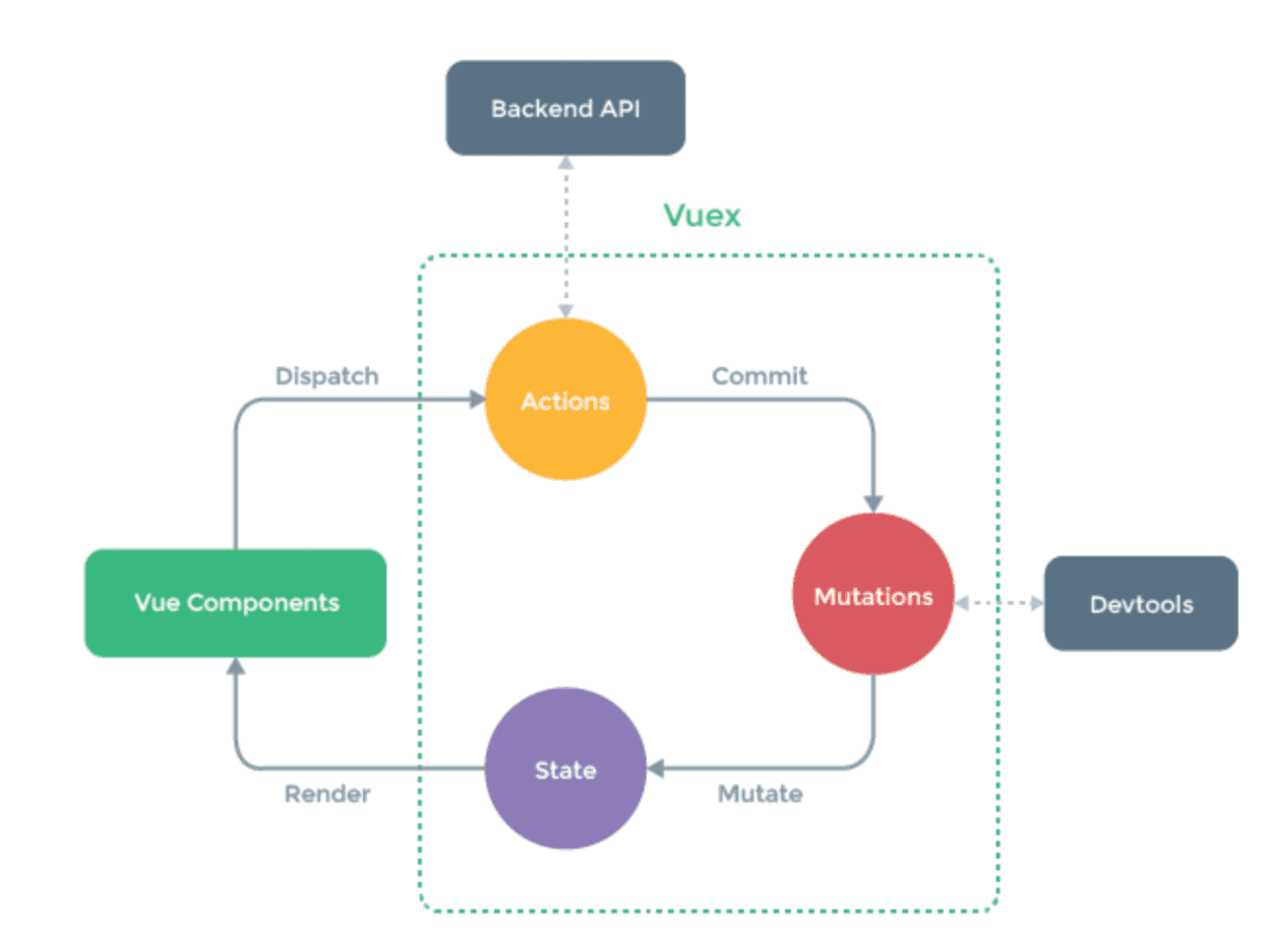
如果上面的都搞定了,再来看执行的流程图就轻松了
5.3.3.Getter
Getter可以认为是 store 的计算属性,可以对数据进行处理。为了掩饰效果,我们新建一个Count组件来说明
<template>

  <div class="page">

    <span>{{this.$store.state.count}}</span>

    <button @click="increase">+</button>

  </div>

</template>

<script type="text/ecmascript-6">

export default {

  data () {

    return {

    }

  },

  components: {

  },

  methods: {

    increase () {

      this.$store.commit('add')

    }

  }

}

</script>

<style scoped>

.page{

  width: 300px;

  margin: 100px auto

}

</style>
在store中增加mutation函数和count变量,以下是部分代码
  state: {

    goods_num: 0,

    count: 0

  },

  mutations: {

    changeCar (state, num) {

      state.goods_num += num

    },

    add (state) {

      state.count++

    }

  }
这样我们就实现了vuex版的加法计数器,如果对count这个变量有一些逻辑判断怎么办呢?我们可以在组件内部使用computed来实现,如果这个逻辑是全局通用的,你可以把它放到Getter里面去,举例:
需求:当计数器加到10的时候就不能继续加了
在store中增加getters选项
import Vue from 'vue'

import Vuex from 'vuex'

// 让vuex作为vue的插件来使用

Vue.use(Vuex)

// 创建一个容器

let store = new Vuex.Store({

  state: {

    goods_num: 0,

    count: 0

  },

  mutations: {

    changeCar (state, num) {

      state.goods_num += num

    },

    add (state) {

      state.count++

    }

  },

  actions: {

    changeCarAction (context, num) {

      console.log(context)

      setTimeout(() => {

        context.commit('changeCar', num)

      }, 2000)

    }

  },

  getters: {

    newCount (state) {

      return state.count > 10 ? 10 : state.count

    }

  }

})

// 把这个store实例导出 方便在vue中注入

export default store
使用到时候,从store.getters对象中去获取
<p><span>{{this.$store.getters.newCount}}</span></p>
注意:如果要给getters里面的函数传参数,需要写成这样
  getters: {

    newCount (state) {

      return state.count > 10 ? 10 : state.count

    },

    newCount2 (state) {

      // 返回一个函数

      return (num) => state.count > num ? num : state.count

    }

  }
调用的时候,这样调用
<p><span>{{this.$store.getters.newCount2(5)}}</span></p>
5.3.4.辅助函数mapState、mapGetters、mapActions
这几个辅助函数可以帮助我们简化一些写法
注意:在使用之前一定要先引入
import { mapState, mapMutations, mapActions, mapGetters } from 'vuex'
1.mapState,这个函数是和computed的映射,可以把传入mapState的对象或者数组,转化成计算属性
mapState里面可以传入数组和对象,首先来看传入数组的写法
computed: {

  ...mapState(['num3', 'num4', 'num5'])

}
注意,这里传入的num3、num4、num5需要和state里面定义的状态同名
state: {

  goods_num: 0,

  count: 0,

  num3: 9,

  num4: 10,

  num5: 11

}
这样写就可以直接去批量拿到state里面的数据,不用再去使用this.$store.state.num3 来获取值了,这就是辅助函数的作用,可以简化一些写法
有些时候,我们需要从state里面取值进行处理,例如这样:
computed: {

  num3 () {

    return this.$store.state.num3 > 10 ? 10 : 20

  }

}
如果使用辅助函数,我们就需要以对象的形式传入了
computed: {

  // num3 () {

  //   return this.$store.state.num3 > 10 ? 10 : 20

  // }

  ...mapState({

    num3: state => state.num3 > 10 ? 10 : 20

  })

}
使用箭头函数可以简化代码,同时还可以给state里的状态重命名,例如:
computed: {

  // num3 () {

  //   return this.$store.state.num3 > 10 ? 10 : 20

  // }

  ...mapState({

    num3: state => state.num3 > 10 ? 10 : 20,

    num100: 'num4'   //给num4 取一个别名 num4

  })

}
如果你要使用this这个关键字,就不能用箭头函数,因此,可以简写成这样
computed: {

  // num3 () {

  //   return this.$store.state.num3 > 10 ? 10 : 20

  // }

  ...mapState({

    num3: state => state.num3 > 10 ? 10 : 20,

    num100: 'num4',

    num6 (state) {

      //需要取data里面的num99和state里面的num6相加,这个时候需要用到this

      return this.num99 + state.num6

    }

  })

}
以上就是mapState的基本用法,mapMutations、mapGetters、mapActions的用法也一样, 简单举例:
//mapMutations的用法

methods: {

  // increase () {

  //   this.$store.commit('add')

  // }

  ...mapMutations({

    increase: 'add'

  })

}

//mapActions的用法

methods: {

  // increase () {

  //   this.$store.commit('add')

  // }

  ...mapMutations({

    increase: 'add'

  }),

  // decrease () {

  //   this.$store.dispatch('decreaseAction')

  // },

  ...mapActions({

    decrease: 'decreaseAction'

  })

},

//mapGetters的用法

computed: {

    // num3 () {

    //   return this.$store.state.num3 > 10 ? 10 : 20

    // }

    ...mapState({

      num3: state => state.num3 > 10 ? 10 : 20,

      num100: 'num4',

      num6 (state) {

        return this.num99 + state.num6

      }

    }),

    ...mapGetters({

      num5: 'newCount'

    })

  }
5.3.5.Module
由于使用单一状态树,应用的所有状态会集中到一个比较大的对象。当应用变得非常复杂时,store 对象就有可能变得相当臃肿。
为了解决以上问题,Vuex 允许我们将 store 分割成模块(module)。每个模块拥有自己的 state、mutation、action、getter、甚至是嵌套子模块, 下面是我们的store/index.js文件,我们可以尝试将其拆分一个子模块出来
import Vue from 'vue'

import Vuex from 'vuex'

// 让vuex作为vue的插件来使用

Vue.use(Vuex)

// 创建一个容器

let store = new Vuex.Store({

  state: {

    goods_num: 0,

    //下面状态是count组件里面的状态

    count: 0,

    num3: 9,

    num4: 10,

    num5: 11,

    num6: 6

  },

  mutations: {

    changeCar (state, num) {

      state.goods_num += num

    },

    //下面方法是count里面的方法

    add (state) {

      state.count++

    },

    decreaseMutation (state) {

      state.count--

    }

  },

  actions: {

    changeCarAction (context, num) {

      console.log(context)

      setTimeout(() => {

        context.commit('changeCar', num)

      }, 2000)

    },

    //下面方法是count里面的方法

    decreaseAction (context) {

      setTimeout(() => {

        context.commit('decreaseMutation')

      }, 1000)

    }

  },

  getters: {

    //下面方法是count里面的方法

    newCount (state) {

      return state.count > 10 ? 10 : state.count

    },

    newCount2 (state) {

      return (num) => state.count > num ? num : state.count

    }

  }

})

// 把这个store实例导出 方便在vue中注入

export default store
下面开始拆分
1 自定义一个对象
 // 直接定义一个子模块

let countModule = {

  state: {

    count: 0,

    num3: 9,

    num4: 10,

    num5: 11,

    num6: 6

  },

  mutations: {

    add (state) {

      state.count++

    },

    decreaseMutation (state) {

      state.count--

    }

  },

  actions: {

    decreaseAction (context) {

      setTimeout(() => {

        context.commit('decreaseMutation')

      }, 1000)

    }

  },

  getters: {

    newCount (state, getters, rootState) {

      return state.count > 10 ? 10 : state.count

    },

    newCount2 (state) {

      return (num) => state.count > num ? num : state.count

    }

  }

}
2 将这个对象挂在store上
// 创建一个容器

let store = new Vuex.Store({

  state: {

    goods_num: 0

  },

  mutations: {

    changeCar (state, num) {

      state.goods_num += num

    }

  },

  actions: {

    changeCarAction (context, num) {

      console.log(context)

      setTimeout(() => {

        context.commit('changeCar', num)

      }, 2000)

    }

  },

  modules: {

    countModule  //子模块

  }

})
完整代码:
import Vue from 'vue'

import Vuex from 'vuex'

// 让vuex作为vue的插件来使用

Vue.use(Vuex)

// 直接定义一个子模块

let countModule = {

  state: {

    count: 0,

    num3: 9,

    num4: 10,

    num5: 11,

    num6: 6

  },

  mutations: {

    add (state) {

      state.count++

    },

    decreaseMutation (state) {

      state.count--

    }

  },

  actions: {

    decreaseAction (context) {

      setTimeout(() => {

        context.commit('decreaseMutation')

      }, 1000)

    }

  },

  getters: {

    newCount (state, getters, rootState) {

      return state.count > 10 ? 10 : state.count

    },

    newCount2 (state) {

      return (num) => state.count > num ? num : state.count

    }

  }

}

// 创建一个容器

let store = new Vuex.Store({

  state: {

    goods_num: 0

  },

  mutations: {

    changeCar (state, num) {

      state.goods_num += num

    }

  },

  actions: {

    changeCarAction (context, num) {

      console.log(context)

      setTimeout(() => {

        context.commit('changeCar', num)

      }, 2000)

    }

  },

  modules: {

    countModule

  }

})

// 把这个store实例导出 方便在vue中注入

export default store
5.5.什么时候使用vuex
虽然 Vuex 可以帮助我们管理共享状态,但也附带了更多的概念和框架。这需要对短期和长期效益进行权衡。
如果您不打算开发大型单页应用,使用 Vuex 可能是繁琐冗余的。确实是如此——如果您的应用够简单,您最好不要使用 Vuex。一个简单的 store 模式就足够您所需了。但是,如果您需要构建一个中大型单页应用,您很可能会考虑如何更好地在组件外部管理状态,Vuex 将会成为自然而然的选择。
螺钉课堂视频课程地址:http://edu.nodeing.com
vue全家桶(4.3)的更多相关文章
- 用 Vue 全家桶二次开发 V2EX 社区
一.开发背景 为了全面的熟悉Vue+Vue-router+Vuex+axios技术栈,结合V2EX的开放API开发了这个简洁版的V2EX. 在线预览 (为了实现跨域,直接npm run dev部署的, ...
- Vue全家桶
简介 “简单却不失优雅,小巧而不乏大匠”. Vue.js 是一个JavaScriptMVVM库,是一套构建用户界面的渐进式框架.它是以数据驱动和组件化的思想构建的,采用自底向上增量开发的设计. 为什么 ...
- 从零开始系列之vue全家桶(3)安装使用vuex
什么是vuex? vuex:Vue提供的状态管理工具,用于同一管理我们项目中各种数据的交互和重用,存储我们需要用到数据对象. 即data中属性同时有一个或几个组件同时使用,就是data中共用的属性. ...
- 使用vue全家桶制作博客网站
前面的话 笔者在做一个完整的博客上线项目,包括前台.后台.后端接口和服务器配置.本文将详细介绍使用vue全家桶制作的博客网站 概述 该项目是基于vue全家桶(vue.vue-router.vuex.v ...
- 转载: 使用vue全家桶制作博客网站 HTML5 移动网站制作的好教程
使用vue全家桶制作博客网站 前面的话 笔者在做一个完整的博客上线项目,包括前台.后台.后端接口和服务器配置.本文将详细介绍使用vue全家桶制作的博客网站 概述 该项目是基于vue全家桶(vue. ...
- Vue全家桶介绍
一直不清楚全家桶是什么玩意,上网搜了一下,才知道就是平时项目中使用的几个依赖包,下面分享一下 Vue 全家桶介绍 Vue有著名的全家桶系列,包含了vue-router(http://router.vu ...
- 一个简单的假vue全家桶(vue+vue-router+require)
首先说明我觉得这是一个比较好理解的vue全家桶(虽然是假的),模块化也是用require来做的,而且如果后期有必要压缩我也会用gulp来做 1.依赖个个本地模块,require只是用来载入page,这 ...
- Vue 全家桶 + Electron 开发的一个跨三端的应用
代码地址如下:http://www.demodashi.com/demo/11738.html GitHub Repo:vue-objccn Follow: halfrost · GitHub 利用 ...
- Vue全家桶了解一下(待补充)
vue全家桶了解一下 一.vue+vue-router+vuex+axios1.vue:使用vue-cli,生成最基本的vue项目2.vue-router:vue项目中的路由管理插件3.vuex:vu ...
- 升级vue全家桶过程记录
背景 如果你使用了element-ui的el-tabs组件,并且想要单独升级element-ui至2.10.0,你会发现,使用了el-tabs组件的页面只要打开就卡死.原因是element-ui~2. ...
随机推荐
- SpringBoot 之 视图解析与模板引擎、 热部署、日志配置(四)
个人博客网:https://wushaopei.github.io/ (你想要这里多有) 一 . SpringBoot环境下的视图解析技术 1. JSP JSP 是我们常用的视图技术了,但是Sp ...
- Java实现 LeetCode 210 课程表 II(二)
210. 课程表 II 现在你总共有 n 门课需要选,记为 0 到 n-1. 在选修某些课程之前需要一些先修课程. 例如,想要学习课程 0 ,你需要先完成课程 1 ,我们用一个匹配来表示他们: [0, ...
- Java实现 蓝桥杯VIP 算法提高 高精度乘法
算法提高 高精度乘法 时间限制:1.0s 内存限制:256.0MB 问题描述 在C/C++语言中,整型所能表示的范围一般为-231到231(大约21亿),即使long long型,一般也只能表示到-2 ...
- Java实现 LeetCode 11 盛最多水的容器
11. 盛最多水的容器 给定 n 个非负整数 a1,a2,-,an,每个数代表坐标中的一个点 (i, ai) .在坐标内画 n 条垂直线,垂直线 i 的两个端点分别为 (i, ai) 和 (i, 0) ...
- 【python】【开源】使用Tkinter和matplotlib实时显示图像,打造属于自己的性能测试小工具
在腾讯的perfdog工具还未公开时,当时需要查看内存使用情况等信息,就用python写了个小工具 为了提升开发效率,就直接借用了雷子开源的性能测试工具的布局,自己美化了一下,然后加入了实时显示数据的 ...
- linux基础相关命令
请参照以下文章 shell常用命令:https://www.cnblogs.com/pengtangtang/articles/PengTangTang_linux_base_one.html 通配符 ...
- 【Spring注解驱动开发】组件注册-@ComponentScan-自动扫描组件&指定扫描规则
写在前面 在实际项目中,我们更多的是使用Spring的包扫描功能对项目中的包进行扫描,凡是在指定的包或子包中的类上标注了@Repository.@Service.@Controller.@Compon ...
- 安装apoc插件
APOC是Neo4j 3.3版本推出时推荐的一个Java存储过程包,包含丰富的函数和存储过程,作为对Cypher所不能提供的复杂图算法和数据操作功能的补充,APOC还具有使用灵活.高性能等优势. 1. ...
- 实验二 Linux系统简单文件操作命令
项目 内容 这个作业属于哪个课程 班级课程的主页链接 这个作业的要求在哪里 作业要求链接接地址 学号-姓名 17041428-朱槐健 作业学习目标 1.学习在Linux系统终端下进行命令行操作 2.掌 ...
- 解读Spring源码之前的准备
请忽略以下的文章,现在回过头来才发现学习源码不用如此复杂 1.IDEA 新建一个maven项目, 2.pom 中倒入 spring5 的基本包,然后利用maven 插件down下源码 3.然后就可以开 ...