
Linux服务器架设篇,Nginx服务器的架设
1.安装 nginx依赖包
(1)安装pcre
yum install pcre-devel(2)安装openssl
yum -y install openssl-devel(3)安装zlib
yum install zlib-devel2.安装nginx软件
(1)从 http://nginx.org 官网下载nginx源码包
(2)解包nginx软件
tar -zxvf nginx-1.16.1.tar.gz 注意:具体解压的文件名依据你所下载的文件
(3)添加nginx软件管理用户nginx
useradd nginx

passwd nginx
(4)安装nginx软件
./configure \

> --user=nginx \

> --group=nginx \

> --prefix=/opt/nginx \

> --sbin-path=/usr/sbin/nginx \

> --conf-path=/etc/nginx/nginx.conf \

> --error-log-path=/var/log/nginx/error.log \

> --http-log-path=/var/log/nginx/access.log \

> --http-client-body-temp-path=/tmp/nginx/client_body \

> --http-proxy-temp-path=/tmp/nginx/proxy \

> --http-fastcgi-temp-path=/tmp/nginx/fastcgi \

> --pid-path=/var/run/nginx.pid \

> --lock-path=/var/lock/subsys/nginx \

> --with-http_stub_status_module \

> --with-http_ssl_module \

> --with-http_gzip_static_module

注意:

--user ===> 启动程序所属用户

--group ===> 启动程序所属组

--prefix ===> 安装路径

--sbin-path ===> 设置二进制文件路径名

--conf-path ===> 配置文件路径

--error-log-path ===> 错误日志文件路径

--http-log-path ===> 访问日志文件路径

--http-client-body-temp-path ===> 存储HTTP客户端请求主体的临时文件路径

--http-proxy-temp-path ===> 存储HTTP代理临时文件的路径

--http-fastcgi-temp-path ===> 存储HTTP fastcgi的临时文件路径

--pid-path ===> nginx.pid文件路径

--lock-path ===> nginx.lock文件路径

--with-http_stub_status_module \ ===> 安装可以监控Nginx状态的模块

--with-http_ssl_module \ ===> 启用SSL支持

--with-http_gzip_static_module ===> 启用gzip压缩
./configure --user=nginx --group=nginx --prefix=/opt/nginx --sbin-path=/usr/sbin/nginx --conf-path=/etc/nginx/nginx.conf --error-log-path=/var/log/nginx/error.log --http-log-path=/var/log/nginx/access.log --http-client-body-temp-path=/tmp/nginx/client_body --http-proxy-temp-path=/tmp/nginx/proxy --http-fastcgi-temp-path=/tmp/nginx/fastcgi --pid-path=/var/run/nginx.pid --lock-path=/var/lock/subsys/nginx --with-http_stub_status_module --with-http_ssl_module --with-http_gzip_static_module
make && make install

注意:

这里可能会报很多诸如 leaving xxx directory 之类的信息。这里先不要管它。下一步用

nginx -t

根据报错信息修改即可。
(5)检测Nginx配置文件是否出错
nginx -t根据报错信息修改配置。
(6)代开浏览器,输入 127.0.0.1,如果出现下面页面即代表成功。

(7)查看80端口占用情况
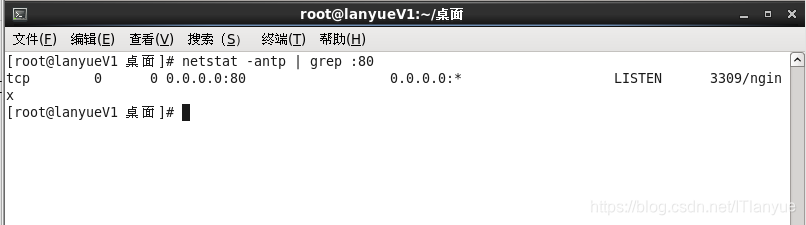
2.配置文件详解
/etc/nginx/nginx.conf
该配置文件主要包含四部分
- main ===> 全局设置(设置将会影响其他所有的设置)
- server ===> 主机设置(用户指定主机或端口)
- upstream ===> 负载均衡服务器设置(设置一系列的后端服务器来维持负载均衡)
- location ===> URL匹配特定位置的设置(用于匹配网页位置)
注意:
location继承server
server继承main
(1)配置文件
#=================================参数设置================================

#user  nobody;

#<设置运行用户和组群>

worker_processes  1;

#<设置进程数量,通常设置和CPU数量一样>

#error_log  logs/error.log;

#error_log  logs/error.log  notice;

#error_log  logs/error.log  info;

#<设置全局错误日志文件。类型有:debug,info,notice,warn,error,crit>

#pid        logs/nginx.pid;

#<设置pid文件>

#=================================设置最大连接数================================

events {

    worker_connections  1024;

}

#<单个进程最大并发连接数量>

#================================================================================

#====================================Web服务器设置================================

http {

    include       mime.types;

#<设置文件扩展名与文件类型映射表>

    default_type  application/octet-stream;

#<设置默认文件类型>

#==============================设置访问日志文件格式==============================

    #log_format  main  '$remote_addr - $remote_user [$time_local] "$request" '

    #                  '$status $body_bytes_sent "$http_referer" '

    #                  '"$http_user_agent" "$http_x_forwarded_for"';

    #access_log  logs/access.log  main;

#<设置Nginx访问日志文件>

    sendfile        on;

#<设置高效文件传输模式>

    #tcp_nopush     on;

#<在一个数据包里发送所有的头文件,而不是一个接一个的发送>

    #keepalive_timeout  0;

    keepalive_timeout  65;

#<客户端超时连接时间设置>

    #gzip  on;

#<是否开启gzip压缩>

#====================================设置HTTP服务器================================

    server {

        listen       80;

#<设置监听端口>

        server_name  localhost;

#<绑定主机名或域名或IP地址>

        #charset koi8-r;

#<设置字符编码格式>

        #access_log  logs/host.access.log  main;

#<设置虚拟主机访问日志文件>

#====================================默认请求================================

        location / {

            root   html;

#<设置Nginx服务器默认网站的根目录位置>

            index  index.html index.htm;

#<设置首页文件>

#=====================设置虚拟主机的错误信息返回页面============================

        #error_page  404              /404.html;

#<设置错误页面,注意必须大于512KB,否则会被替换>

        # redirect server error pages to the static page /50x.html

        #

        error_page   500 502 503 504  /50x.html;

        location = /50x.html {

            root   html;

        }

#===================代理PHP脚本到Apache侦听127.0.0.1:80=======================

        # proxy the PHP scripts to Apache listening on 127.0.0.1:80

        #

        #location ~ \.php$ {

        #    proxy_pass   http://127.0.0.1;

        #}

#===========PHP脚本请求全部转发到FastCGI处理,使用FastCGI默认配置=================

        # pass the PHP scripts to FastCGI server listening on 127.0.0.1:9000

        #

        #location ~ \.php$ {

        #    root           html;

        #    fastcgi_pass   127.0.0.1:9000;

        #    fastcgi_index  index.php;

        #    fastcgi_param  SCRIPT_FILENAME  /scripts$fastcgi_script_name;

        #    include        fastcgi_params;

        #}

#===============================禁止访问.htaccess文件===========================

        # deny access to .htaccess files, if Apache's document root

        # concurs with nginx's one

        #

        #location ~ /\.ht {

        #    deny  all;

        #}

    }

#==================================设置虚拟主机================================

    # another virtual host using mix of IP-, name-, and port-based configuration

    #

    #server {

    #    listen       8000;

    #    listen       somename:8080;

    #    server_name  somename  alias  another.alias;

    #    location / {

    #        root   html;

    #        index  index.html index.htm;

    #    }

    #}

#=================================设置HTTPS服务器===============================

    # HTTPS server

    #

    #server {

    #    listen       443 ssl;

    #    server_name  localhost;

    #    ssl_certificate      cert.pem;

#<指定SSL证书>

    #    ssl_certificate_key  cert.key;

#<指定SSL证书秘钥>

    #    ssl_session_cache    shared:SSL:1m;

    #    ssl_session_timeout  5m;

    #    ssl_ciphers  HIGH:!aNULL:!MD5;

    #    ssl_prefer_server_ciphers  on;

    #    location / {

    #        root   html;

    #        index  index.html index.htm;

    #    }

    #}

}
3.控制Nginx服务器
nginx

-p <前缀> ===> 设置前缀路径,默认为/opt/nginx

-c <文件名> ===> 设置配置文件,默认为/etc/nginx/nginx.conf

-v ===> 显示版本

-V ===> 显示版本信息和配置选项目

-t ===> 测试配置并退出

-q ===> 测试配置过程中抑制非错误信息

-s [stop | quit | reopen | reload]
4.设置服务开机自启动
注意:
新安装的nginx不可以用service和chkconfig命令控制nginx服务。因为/etc/rc.d/init.d目录中没有脚本文件。因此可以通过创建
/etc/rc.d/init.d/nginx
文件来实现service和chkconfig命令来控制。
(1)编辑启动文件
vim /etc/rc.d/init.d/nginx#!/bin/sh
#
# nginx - this script starts and stops the nginx daemon
#
# chkconfig: - 85 15
# description: NGINX is an HTTP(S) server, HTTP(S) reverse \
# proxy and IMAP/POP3 proxy server
# processname: nginx
# config: /etc/nginx/nginx.conf
# config: /etc/sysconfig/nginx
# pidfile: /var/run/nginx.pid
# Source function library.
. /etc/rc.d/init.d/functions
# Source networking configuration.
. /etc/sysconfig/network
# Check that networking is up.
[ "$NETWORKING" = "no" ] && exit 0
nginx="/usr/sbin/nginx"
prog=$(basename $nginx)
NGINX_CONF_FILE="/etc/nginx/nginx.conf"
[ -f /etc/sysconfig/nginx ] && . /etc/sysconfig/nginx
lockfile=/var/lock/subsys/nginx
make_dirs() {
# make required directories
user=`$nginx -V 2>&1 | grep "configure arguments:.*--user=" | sed 's/[^*]*--user=\([^ ]*\).*/\1/g' -`
if [ -n "$user" ]; then
if [ -z "`grep $user /etc/passwd`" ]; then
useradd -M -s /bin/nologin $user
fi
options=`$nginx -V 2>&1 | grep 'configure arguments:'`
for opt in $options; do
if [ `echo $opt | grep '.*-temp-path'` ]; then
value=`echo $opt | cut -d "=" -f 2`
if [ ! -d "$value" ]; then
# echo "creating" $value
mkdir -p $value && chown -R $user $value
fi
fi
done
fi
}
start() {
[ -x $nginx ] || exit 5
[ -f $NGINX_CONF_FILE ] || exit 6
make_dirs
echo -n $"Starting $prog: "
daemon $nginx -c $NGINX_CONF_FILE
retval=$?
echo
[ $retval -eq 0 ] && touch $lockfile
return $retval
}
stop() {
echo -n $"Stopping $prog: "
killproc $prog -QUIT
retval=$?
echo
[ $retval -eq 0 ] && rm -f $lockfile
return $retval
}
restart() {
configtest || return $?
stop
sleep 1
start
}
reload() {
configtest || return $?
echo -n $"Reloading $prog: "
killproc $nginx -HUP
RETVAL=$?
echo
}
force_reload() {
restart
}
configtest() {
$nginx -t -c $NGINX_CONF_FILE
}
rh_status() {
status $prog
}
rh_status_q() {
rh_status >/dev/null 2>&1
}
case "$1" in
start)
rh_status_q && exit 0
$1
;;
stop)
rh_status_q || exit 0
$1
;;
restart|configtest)
$1
;;
reload)
rh_status_q || exit 7
$1
;;
force-reload)
force_reload
;;
status)
rh_status
;;
condrestart|try-restart)
rh_status_q || exit 0
;;
*)
echo $"Usage: $0 {start|stop|status|restart|condrestart|try-restart|reload|force-reload|configtest}"
exit 2
esac
(2)给予执行权限
chmod u+x /etc/rc.d/init.d/nginx (3)使用service管理Nginx服务
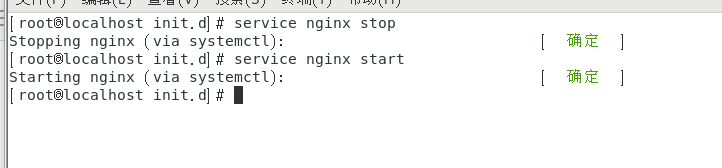
5.添加统计功能
(1)基于所有用户的管理
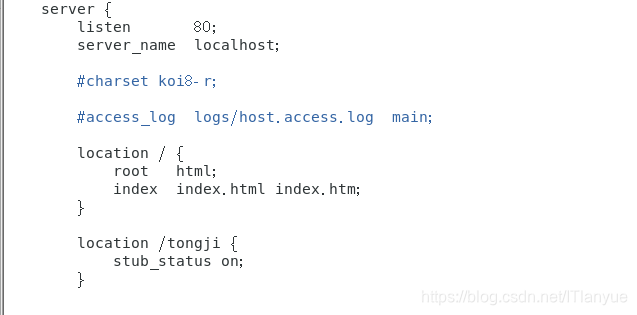
在配置文件中添加统计代码
vim /etc/nginx/nginx.conflocation /tongji {
stub_status on;
}
如图:
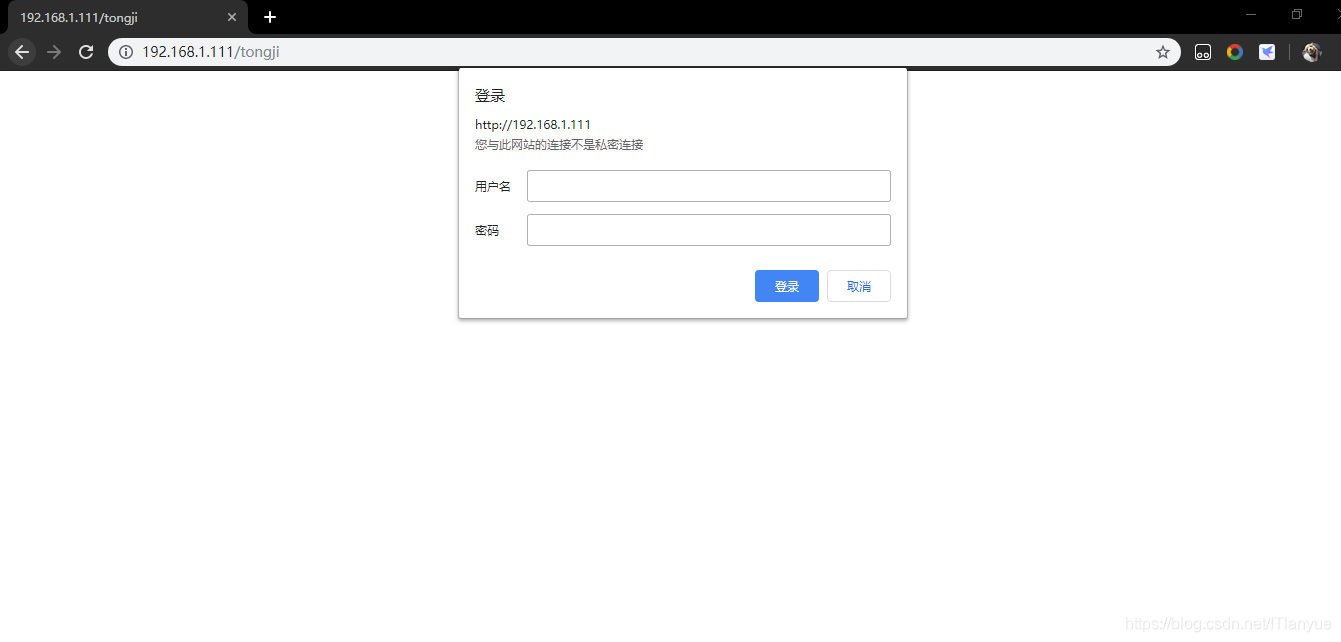
重启服务,访问如下页面

(2)基于特定用户的管理
①新建用户认证文件
touch /opt/nginx/html/a.psd②添加用户并且设置密码
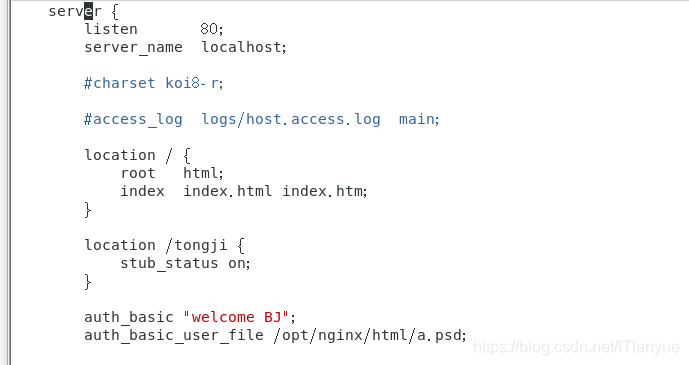
htpasswd -c /opt/nginx/html/a.psd zhangsan③修改配置文件
vim /etc/nginx/nginx.confauth_basic "welcome BJ";
auth_basic_user_file /opt/nginx/html/a.psd;
如图:
④访问测试
Linux服务器架设篇,Nginx服务器的架设的更多相关文章
- 修改Linux内核参数提高Nginx服务器并发性能
当linux下Nginx达到并发数很高,TCP TIME_WAIT套接字数量经常达到两.三万,这样服务器很容易被拖死.事实上,我们可以简单的通过修改Linux内核参数,可以减少Nginx服务器 的TI ...
- 修改Linux内核参数提高Nginx服务器在高的时候的性能
并发 Linux下高并发的Nginx服务器,当TCP TIME_WAIT套接字数量经常达到两.三万,服务器很容易被拖死.通过修改Linux内核参数,可以减少Nginx服务器的TIME_WAIT套接字数 ...
- nginx入门篇----nginx服务器基础配置
1.nginx.conf文件结构... #全局块 events{ ... } http #http块{ ...
- Windows服务器学习篇:服务器连接与退出
此文是我早期在公司内部发布的一篇给予新入职程序员基础技术培训的文章,非常基础简单,现拿出来给大家分享.当然,已工作人士可直接忽略... 一.Windows服务器连接 1. 在桌面菜单中的“运行”里,输 ...
- 浅谈linux 下,利用Nginx服务器代理实现ajax跨域请求。
ajax跨域请求对于前端开发者几乎在任何一个项目中都会用到,众所周知,跨域请求有三种方式: jsonp; XHR2 代理: jsonp: 这种应该是开发中是使用的最多的,最常见的跨域请求方法,其实aj ...
- Nginx服务器
什么是Nginx? Nginx是一种服务器软件,如同apache.tomcat.是一种高性能的HTTP和反向代理服务器以及代理邮件服务器.也就是说Nginx服务器可以发布网站,也可以负载均衡,还可以作 ...
- Nginx服务器的使用与反向代理负载均衡
目录 Nginx服务器 一:什么是Nginx? 什么是Nginx - Nginx与其他服努器的性能比较 二:如何在Linux中搭建Nginx服务器? 常见的错误 三:Nginx的反向代理和负载均衡 什 ...
- SpringMvc + Jsp+ 富文本 kindeditor 进行 图片ftp上传nginx服务器 实现
一:html 原生态的附件上传 二:实现逻辑分析: 1.1.1 需求分析 Common.js 1.绑定事件 2.初始化参数 3.上传图片的url: /pic/upload 4.上图片参数名称: upl ...
- Nginx服务器 之反向代理与负载均衡
一.反向代理 正向代理: 客户端要获取的资源就在服务器上,客户端请求的资源路径就是最终响应资源的服务器路径,这就是正向代理.正向代理的特点:就是我们明确知道要访问哪个网站地址. 反向代理: 客户端想获 ...
- Nginx 服务器的安装部署(CentOS系统)
1.准备安装环境yum -y install gcc gcc-c++ automake pcre pcre-devel zlib zlib-devel open openssl-develgcc编译器 ...
随机推荐
- 《JavaScript 模式》读书笔记(2)— 基本技巧2
前一篇,简单介绍了一些js代码的基本技巧.那么这篇文章,我们继续后续的内容. 一.for循环 for循环经常用在遍历数组或者类数组对象,如引数(arguments)和HTML容器(HTMLCollti ...
- macOS Catalina 升级软件问题
最近升级macOS Catalina系统,升级失败时多尝试几次就可以执行成功了,在使用过程中发现以下问题,大家谨慎升级!!! 存在软件启动不兼容,不存在已软件激活失效问题. 有道词典不兼容,启动异常 ...
- vue后台管理系统权限处理
vue后台管理系统权限 1.权限问题:用户和管理员进入管理系统看到的模块是不一样的,管理员看的的要比用户看到的多.需要用到动态加载路由,router.addRouters()来动态的挂载路由 // 1 ...
- Jenkinsfile里定义对象和函数,获取git提交人, 发送钉钉通知
自从开始使用Jenkinsfile作为Jenkins配置后就一发不可收,因为开发者自定义CI脚本实在太方便了. 比如,最近开发的以一个项目涉及多人,提交冲突挺多的,有的人自己没编译通过就提交了,导致后 ...
- 基于Docker搭建Nginx图片服务器
前言 一般开发中,都会把图片上传到一个目录,然后将目录和文件名拼接存储在数据库中,但是,这种方法如果没弄好的话可能有一定的缺陷. 若项目搬迁,即时这台服务器本身还在用,存放在服务器的跟项目相关的图片也 ...
- JAVA--利用HttpClient模拟浏览器登陆请求获取响应的Cookie
在通过java采集网页数据时,我们常常会遇到这样的问题: 站点需要登陆才能访问 而这种网站,一般都会对请求进行账号密码的验证,验证的方式也有多种,需要具体分析. 今天分析其中的一种情况: 站点对登陆密 ...
- ajax原理及封装
一:AJAX 简介 AJAX 是一种在无需重新加载整个网页的情况下,能够更新部分网页的技术,通过在后台与服务器进行少量数据交换,AJAX 可以使网页实现异步更新. AJAX = 异步 JavaScri ...
- 大型Java进阶专题(五) 设计模式之单例模式与原型模式
前言 今天开始我们专题的第四课了,最近公司项目忙,没时间写,今天抽空继续.上篇文章对工厂模式进行了详细的讲解,想必大家对设计模式合理运用的好处深有感触.本章节将介绍:单例模式与原型模式.本章节参考 ...
- SuperMap许可常见问题及解决办法
一.试用许可申请可以直接在北京超图软件股份有限公司官网的“SuperMap 技术资源中心”申请试用许可,申请后您将获得:1.如果申请的是 SuperMap GIS 7C 系列产品的许可,您将获得 一个 ...
- n次方
1.问题描述 计算 an 2.算法分析 先将 n 变一变,寻找新的计算路径.预处理就是变治法的根本. 如果单纯循环执行 n 次相乘,那么时间复杂度为 O(n).可以利用二进制幂大大改进效率. 主要思路 ...