
Python——铅球飞行计算问题
一、
1、IPO描述为:
输入:铅球发射角度、 初始速度(m/s)、 初始高度(m)
处理:模拟铅球飞行,时刻更新铅球在飞行中的位置
输出:铅球飞行距离(m)
可以拆分小的时间段。任意时刻的位置,都是 由前面的位置叠加新的时间段位移引起的,最终的控制条件为,当落地时结束,即y轴坐标为0时结束。微分的思想
(1)
 #from math import pi,sin,cos,radians

 import math

 def main():

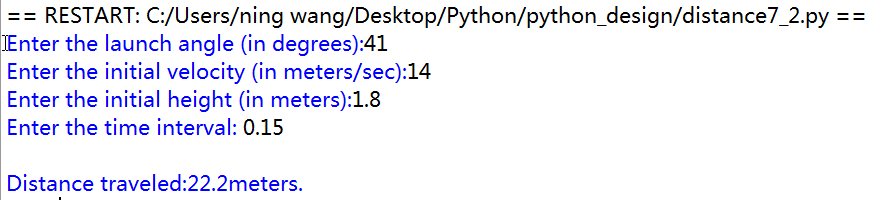
     angle = eval(input("Enter the launch angle (in degrees):"))

     vel = eval(input("Enter the initial velocity (in meters/sec):"))

     h0 = eval(input("Enter the initial height (in meters):"))

     time = eval(input("Enter the time interval: "))

     xpos = 0

     ypos = h0

     theta = math.radians(angle)

     xvel = vel * math.cos(theta)

     yvel = vel * math.sin(theta)

     while ypos >= 0:

         xpos = xpos + time * xvel

         yvell = yvel - time * 9.8

         ypos = ypos + time * (yvel + yvell)/2.0

         yvel = yvell

     print("\nDistance traveled:{0:0.1f}meters.".format(xpos))

 if __name__ == "__main__":

     main()

(2)画出轨迹
 from math import pi,sin,cos,radians

 import turtle

 def drawLine(x, y):#画线

     turtle.pendown()

     turtle.goto (x, y)

 def drawText(x, y,n):

     turtle.penup()

     turtle.goto (x, y)

     turtle.pendown()

     turtle.write((float("%2.f"%x)/n,float("%2.f"%y)/n))#注意表达方式,只保留两位小数

 def main():

     angle = eval(input("Enter the launch angle (in degrees):"))

     vel = eval(input("Enter the initial velocity (in meters/sec):"))

     h0 = eval(input("Enter the initial height (in meters):"))

     time = eval(input("Enter the time interval: "))

     n=20#显示系数

     xpos = 0

     ypos = h0

     drawLine(500,0) #初始坐标轴

     drawLine(0,0)

     drawLine(0,300)

     drawLine(0,18)

     theta = radians(angle)

     xvel = vel * cos(theta)

     yvel = vel * sin(theta)

     while ypos >= 0:

         xpos = xpos + time * xvel

         yvell = yvel - time * 9.8

         ypos = ypos + time * (yvel + yvell)/2.0

         yvel = yvell

         drawLine(xpos*n,ypos*n)

         drawText(xpos*n,ypos*n,n)

     turtle.hideturtle()#隐藏箭头

     print("\nDistance traveled:{0:0.1f}meters.".format(xpos))

 if __name__=="__main__":

     main()

引入turtle库,画出轨迹图
(3)程序模块化
 from math import pi,sin,cos,radians

 def getInputs():

     angle=eval(input("enter the launch angle (degree):"))

     vel = eval(input("Enter the initial velocity (in meters/sec):"))

     h0 = eval(input("Enter the initial height (in meters):"))

     time = eval(input("Enter the time interval: "))

     return angle,vel,h0,time

 def getXYComponents(vel,angle):

     theta=radians(angle)

     x=vel*cos(theta)

     y=vel*sin(theta)

     return x,y

 def updatePosition(time,xpos,ypos,xvel,yvel):

     xpos=xpos+time*xvel

     yvell=yvel-9.8*time

     ypos=ypos+(yvell+yvel)*time/2

     yvel=yvell

     return xpos,ypos,yvel

 def main():

     angle,vel,h0,time=getInputs()

     xvel,yvel=getXYComponents(vel,angle)

     xpos,ypos=0,h0

     while ypos>=0:

         xpos,ypos,yvel=updatePosition(time,xpos,ypos,xvel,yvel)

     print("distance traveled:{0:0.1f}meters.".format(xpos))

 if __name__=="__main__":

     main()
Python——铅球飞行计算问题的更多相关文章
- 使用python做科学计算
这里总结一个guide,主要针对刚开始做数据挖掘和数据分析的同学 说道统计分析工具你一定想到像excel,spss,sas,matlab以及R语言.R语言是这里面比较火的,它的强项是强大的绘图功能以及 ...
- 使用Python做科学计算初探
今天在搞定Django框架的blog搭建后,尝试一下python的科学计算能力. python的科学计算有三剑客:numpy,scipy,matplotlib. numpy负责数值计算,矩阵操作等: ...
- 使用Python做科学计算初探(转)
今天在搞定Django框架的blog搭建后,尝试一下python的科学计算能力. python的科学计算有三剑客:numpy,scipy,matplotlib. numpy负责数值计算,矩阵操作等: ...
- windows下如何快速优雅的使用python的科学计算库?
Python是一种强大的编程语言,其提供了很多用于科学计算的模块,常见的包括numpy.scipy.pandas和matplotlib.要利用Python进行科学计算,就需要一一安装所需的模块,而这些 ...
- Python之字符串计算(计算器)
Python之字符串计算(计算器) import re expression = '-1-2*((60+2*(-3-40.0+42425/5)*(9-2*5/3+357/553/3*99/4*2998 ...
- Python实现的计算马氏距离算法示例
Python实现的计算马氏距离算法示例 本文实例讲述了Python实现的计算马氏距离算法.分享给大家供大家参考,具体如下: 我给写成函数调用了 python实现马氏距离源代码: # encod ...
- 使用python装饰器计算函数运行时间的实例
使用python装饰器计算函数运行时间的实例 装饰器在python里面有很重要的作用, 如果能够熟练使用,将会大大的提高工作效率 今天就来见识一下 python 装饰器,到底是怎么工作的. 本文主要是 ...
- 《Python之BMI计算》
<Python之BMI计算> 前段时间写了个 BMI 因为刚刚开始学 有几个错误 第一个: 厘米我当时也没注意因为觉得去掉0.00的话后面1866666666是正确的BMI值 刚刚去看看去 ...
- 用Python进行实时计算——PyFlink快速入门
Flink 1.9.0及更高版本支持Python,也就是PyFlink. 在最新版本的Flink 1.10中,PyFlink支持Python用户定义的函数,使您能够在Table API和SQL中注册和 ...
随机推荐
- Flutter 拖拽排序组件 ReorderableListView
注意:无特殊说明,Flutter版本及Dart版本如下: Flutter版本: 1.12.13+hotfix.5 Dart版本: 2.7.0 ReorderableListView是通过长按拖动某一项 ...
- Spring Cloud Gateway 实现Token校验
在我看来,在某些场景下,网关就像是一个公共方法,把项目中的都要用到的一些功能提出来,抽象成一个服务.比如,我们可以在业务网关上做日志收集.Token校验等等,当然这么理解很狭隘,因为网关的能力远不止如 ...
- 后台管理遇到的坑一、style中css样式怎么传入变量值
第一.给标签定义style变量 第二.在data中定义 第三.在methods中的方法中给样式赋值
- 安装ArchLinux时遇到的部分问题
目录 一.网络问题 1.安装刚开始时连接wifi 2.安装完桌面后 二.卸载gnome桌面 三.启动桌面(以kde桌面为例) 1.立即启动桌面(start , stop) 2.设置开启自启动 (ena ...
- C++ 顺序表练习
#include <stdio.h> #include <stdlib.h> #include <string.h> struct Array //定义一个数据存储 ...
- layui的form表单的checkbox全选与全不选问题
<!DOCTYPE html> <html> <head> <meta charset="utf-8"> <m ...
- 练习div出现的小问题
一.出现图片不显示状况1.class中设定的名字不对2.在高单位后面出现了 “:“ 所以也不显示3.上一个div盒子没有写结束标签 4.在添加背景图,把height的值改成auto后不显示,填上具体数 ...
- linux无文件执行— fexecve 揭秘
前言 良好的习惯是人生产生复利的有力助手. 继续2020年的flag,至少每周更一篇文章. 无文件执行 之前的文章中,我们讲到了无文件执行的方法以及混淆进程参数的方法,今天我们继续讲解一种linux上 ...
- Java内部类的四种分类以及作用介绍
内部类内容解析 内部类的区分 内部类分别有成员内部类.局部内部类.匿名内部类.静态内部类,接下来将分别介绍. 成员内部类 就是位于外部类成员位置的类.与外部类的属性.方法并列. 成员内部类作为外部类的 ...
- JDK_API关于时间的表达
判断日期是否是闰年 给定格式格式化 第二种表示时间的 Date java.util 类 Date 表示特定的瞬间,精确到毫秒. 构造方法 Date( ...