
gitlab在k8s上运行的一些优化
由 林坤创建,最终由 林坤修改于七月02,2020
gitlab组件图
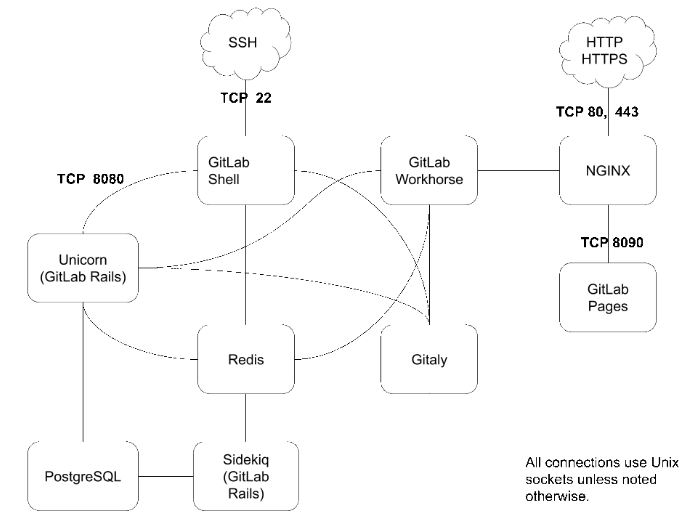
gitlab在k8s上占用资源
kubectl top pods -n default | grep git*
gitlab-gitaly-0 9m 444Mi
gitlab-gitlab-exporter-59c6bdb69c-gz9nf 5m 36Mi
gitlab-gitlab-shell-547cc48d99-kmrbp 10m 21Mi
gitlab-gitlab-shell-547cc48d99-szg74 8m 25Mi
gitlab-minio-5746f7f7c7-tdff5 0m 47Mi
gitlab-prometheus-server-7d8bcf896d-vm5kq 14m 650Mi
gitlab-redis-cd6b45457-2s4cg 9m 17Mi
gitlab-registry-6c5df4646f-mbdkr 0m 15Mi
gitlab-registry-6c5df4646f-mqkxl 0m 31Mi
gitlab-sidekiq-all-in-1-576d89544d-8swmw 28m 967Mi
gitlab-unicorn-68f8f8d8d9-6clpv 8m 1510Mi
gitlab-unicorn-68f8f8d8d9-xbt8j 10m 1522Mi
gitlab组件简介
对比kubectl top pods -n default | grep git* 输出
- gitlab-gitaly:Gitaly是一项由GitLab设计的服务,旨在消除在GitLab的分布式部署(请考虑GitLab.com或高可用性部署)中对Git存储使用NFS的需求。从11.3.0开始,此服务处理GitLab中的所有Git级别访问。
- gitlab-gitlab-exporter:GitLab Exporter是一个内部设计的流程,允许我们将有关GitLab应用程序内部的度量导出到Prometheus。可以在项目的README中阅读更多内容。
- gitlab-gitlab-shell:GitLab Shell是GitLab设计的程序,用于处理基于SSH的git会话,并修改授权密钥的列表。GitLab Shell不是Unix Shell,也不是Bash或Zsh的替代品。
- gitlab-minio:MinIO是根据Apache License v2.0发布的对象存储服务器。它与Amazon S3云存储服务兼容。它最适合存储非结构化数据,例如照片,视频,日志文件,备份和容器/ VM映像。一个对象的大小范围可以从几个KB到最大5TB。
- gitlab-prometheus-server:Prometheus是一个时序工具,可帮助GitLab管理员公开有关用于向GitLab提供服务的各个流程的指标。
- gitlab-redis:键值存储/非持久数据库。
- gitlab-registry:gitlab自带镜像仓库
- gitlab-sidekiq:Sidekiq是Ruby后台作业处理器,可从Redis队列中提取作业并进行处理。后台作业使GitLab通过将工作移至后台来提供更快的请求/响应周期。
- gitlab-unicorn:Unicorn是一个Ruby应用程序服务器,用于运行核心的Rails应用程序,该应用程序在GitLab中提供面向用户的功能。通常,过程输出,你会认为这bundle还是config.ru取决于GitLab版本。
疑问点
目的
对在k8s上部署的gitlab进行内存优化
思路: - 寻找限制内存的方法((1)gitlab自身的资源限制策略【最好】,k8s做资源限制【最差】)
2.删除非必要的应用程序(如删除prometheus【后期会把gitlab迁移到裸机并且对这个集群系统做监控】)。
策略
尝试关闭prometheus组件,看是否对gitlab有影响
查看与gitlab-prometheus有关的资源清单
kubectl get svc,pod,ingress,deployment | grep prom
发现没有prometheus的ingress,这说明没有走ingress-nginx代理,也能说明没有人曾访问过!!!
导出gitlab_prometheus_deployment.yaml
kubectl get deployment gitlab-prometheus-server -o yaml > gitlab_prometheus_deployment.yaml
cat gitlab_prometheus_deployment.yaml
apiVersion: extensions/v1beta1
kind: Deployment
metadata:
annotations:
deployment.kubernetes.io/revision: "1"
creationTimestamp: "2019-10-21T04:14:50Z"
generation: 1
labels:
app: prometheus
chart: prometheus-5.5.3
component: server
heritage: Tiller
release: gitlab
name: gitlab-prometheus-server
namespace: default
resourceVersion: "1438304832"
selfLink: /apis/extensions/v1beta1/namespaces/default/deployments/gitlab-prometheus-server
uid: 5360e3bf-f3b9-11e9-800a-8ad2fc7e2fa8
spec:
progressDeadlineSeconds: 2147483647
replicas: 1
revisionHistoryLimit: 2147483647
selector:
matchLabels:
app: prometheus
component: server
release: gitlab
strategy:
rollingUpdate:
maxSurge: 1
maxUnavailable: 1
type: RollingUpdate
template:
metadata:
creationTimestamp: null
labels:
app: prometheus
component: server
release: gitlab
spec:
containers:
- args:
- --volume-dir=/etc/config
- --webhook-url=http://localhost:9090/-/reload
image: jimmidyson/configmap-reload:v0.1
imagePullPolicy: IfNotPresent
name: prometheus-server-configmap-reload
resources: {}
terminationMessagePath: /dev/termination-log
terminationMessagePolicy: File
volumeMounts:
- mountPath: /etc/config
name: config-volume
readOnly: true
- args:
- --storage.tsdb.retention=15d
- --config.file=/etc/config/prometheus.yml
- --storage.tsdb.path=/data
- --web.console.libraries=/etc/prometheus/console_libraries
- --web.console.templates=/etc/prometheus/consoles
- --web.enable-lifecycle
image: prom/prometheus:v2.2.1
imagePullPolicy: IfNotPresent
livenessProbe:
failureThreshold: 3
httpGet:
path: /-/healthy
port: 9090
scheme: HTTP
initialDelaySeconds: 30
periodSeconds: 10
successThreshold: 1
timeoutSeconds: 30
name: prometheus-server
ports:
- containerPort: 9090
protocol: TCP
readinessProbe:
failureThreshold: 3
httpGet:
path: /-/ready
port: 9090
scheme: HTTP
initialDelaySeconds: 30
periodSeconds: 10
successThreshold: 1
timeoutSeconds: 30
resources: {}
terminationMessagePath: /dev/termination-log
terminationMessagePolicy: File
volumeMounts:
- mountPath: /etc/config
name: config-volume
- mountPath: /data
name: storage-volume
dnsPolicy: ClusterFirst
initContainers:
- command:
- chown
- -R
- 65534:65534
- /data
image: busybox:latest
imagePullPolicy: IfNotPresent
name: init-chown-data
resources: {}
terminationMessagePath: /dev/termination-log
terminationMessagePolicy: File
volumeMounts:
- mountPath: /data
name: storage-volume
restartPolicy: Always
schedulerName: default-scheduler
securityContext: {}
serviceAccount: gitlab-prometheus-server
serviceAccountName: gitlab-prometheus-server
terminationGracePeriodSeconds: 300
volumes:
- configMap:
defaultMode: 420
name: gitlab-prometheus-server
name: config-volume
- name: storage-volume
persistentVolumeClaim:
claimName: gitlab-prometheus-server
导出gitlab_prometheus_svc.yaml
kubectl get svc gitlab-prometheus-server -o yaml > gitlab_prometheus_svc.yaml
cat gitlab_prometheus_svc.yaml
apiVersion: v1
kind: Service
metadata:
creationTimestamp: "2019-10-21T04:14:50Z"
labels:
app: prometheus
chart: prometheus-5.5.3
component: server
heritage: Tiller
release: gitlab
name: gitlab-prometheus-server
namespace: default
resourceVersion: "144804734"
selfLink: /api/v1/namespaces/default/services/gitlab-prometheus-server
uid: 535378f3-f3b9-11e9-800a-8ad2fc7e2fa8
spec:
clusterIP: 192.168.247.105
ports:
- name: http
port: 80
protocol: TCP
targetPort: 9090
selector:
app: prometheus
component: server
release: gitlab
sessionAffinity: None
type: ClusterIP
大胆删除deployment和svc,能有啥事?
kubectl delete -f
手动测试,似乎没得啥问题。
导出gitlab_exporter_deployment.yaml
kubectl get deployment gitlab-gitlab-exporter -o yaml > gitlab_exporter_deployment.yaml
cat gitlab_exporter_deployment.yaml
apiVersion: extensions/v1beta1
kind: Deployment
metadata:
annotations:
deployment.kubernetes.io/revision: "2"
creationTimestamp: "2019-10-21T04:14:50Z"
generation: 2
labels:
app: gitlab-exporter
chart: gitlab-exporter-2.4.6
heritage: Tiller
release: gitlab
name: gitlab-gitlab-exporter
namespace: default
resourceVersion: "1399100783"
selfLink: /apis/extensions/v1beta1/namespaces/default/deployments/gitlab-gitlab-exporter
uid: 5358e5e4-f3b9-11e9-800a-8ad2fc7e2fa8
spec:
progressDeadlineSeconds: 600
replicas: 1
revisionHistoryLimit: 10
selector:
matchLabels:
app: gitlab-exporter
release: gitlab
strategy:
rollingUpdate:
maxSurge: 25%
maxUnavailable: 25%
type: RollingUpdate
template:
metadata:
annotations:
checksum/config: 158ed2dba0a2fbaa0d3fda906d70cf0eb7a80650e8f01d3046aa9a6fa0bba59a
prometheus.io/path: /metrics
prometheus.io/port: "9168"
prometheus.io/scrape: "true"
creationTimestamp: null
labels:
app: gitlab-exporter
release: gitlab
spec:
affinity:
podAntiAffinity:
preferredDuringSchedulingIgnoredDuringExecution:
- podAffinityTerm:
labelSelector:
matchLabels:
app: gitlab-exporter
release: gitlab
topologyKey: kubernetes.io/hostname
weight: 1
containers:
- env:
- name: CONFIG_TEMPLATE_DIRECTORY
value: /var/opt/gitlab-exporter/templates
- name: CONFIG_DIRECTORY
value: /etc/gitlab-exporter
image: registry.gitlab.com/gitlab-org/build/cng/gitlab-exporter:5.0.1
imagePullPolicy: IfNotPresent
lifecycle:
preStop:
exec:
command:
- /bin/bash
- -c
- pkill -f 'gitlab-exporter'
livenessProbe:
exec:
command:
- pgrep
- -f
- gitlab-exporter
failureThreshold: 3
periodSeconds: 10
successThreshold: 1
timeoutSeconds: 1
name: gitlab-exporter
ports:
- containerPort: 9168
name: gitlab-exporter
protocol: TCP
readinessProbe:
exec:
command:
- pgrep
- -f
- gitlab-exporter
failureThreshold: 3
periodSeconds: 10
successThreshold: 1
timeoutSeconds: 1
resources:
requests:
cpu: 50m
memory: 100M
terminationMessagePath: /dev/termination-log
terminationMessagePolicy: File
volumeMounts:
- mountPath: /var/opt/gitlab-exporter/templates/gitlab-exporter.yml.erb
name: gitlab-exporter-config
subPath: gitlab-exporter.yml.erb
- mountPath: /etc/gitlab
name: gitlab-exporter-secrets
readOnly: true
- mountPath: /etc/ssl/certs/
name: etc-ssl-certs
readOnly: true
dnsPolicy: ClusterFirst
initContainers:
- image: registry.gitlab.com/gitlab-org/build/cng/alpine-certificates:20171114-r3
imagePullPolicy: IfNotPresent
name: certificates
resources:
requests:
cpu: 50m
terminationMessagePath: /dev/termination-log
terminationMessagePolicy: File
volumeMounts:
- mountPath: /etc/ssl/certs
name: etc-ssl-certs
- command:
- sh
- /config/configure
image: busybox:latest
imagePullPolicy: Always
name: configure
resources:
requests:
cpu: 50m
terminationMessagePath: /dev/termination-log
terminationMessagePolicy: File
volumeMounts:
- mountPath: /config
name: gitlab-exporter-config
readOnly: true
- mountPath: /init-config
name: init-gitlab-exporter-secrets
readOnly: true
- mountPath: /init-secrets
name: gitlab-exporter-secrets
restartPolicy: Always
schedulerName: default-scheduler
securityContext:
fsGroup: 1000
runAsUser: 1000
terminationGracePeriodSeconds: 30
volumes:
- configMap:
defaultMode: 420
name: gitlab-gitlab-exporter
name: gitlab-exporter-config
- name: init-gitlab-exporter-secrets
projected:
defaultMode: 256
sources:
- secret:
items:
- key: postgres-password
path: postgres/psql-password
name: gitlab-postgresql-password
- secret:
items:
- key: secret
path: redis/password
name: gitlab-redis-secret
- emptyDir:
medium: Memory
name: gitlab-exporter-secrets
- emptyDir:
medium: Memory
name: etc-ssl-certs
资源清单好长,有点不想看 emmmmm 还是分析一波吧
看过后,删除exporter的资源清单
kubectl delete -f gitlab_exporter_deployment.yaml
deployment.extensions "gitlab-gitlab-exporter" deleted
导出gitlab-exporter的svc资源清单
kubectl get svc gitlab-gitlab-exporter -o yaml > gitlab_exporter_svc.yaml
[root@mobanji gitlab]# cat gitlab_exporter_svc.yaml
apiVersion: v1
kind: Service
metadata:
creationTimestamp: "2019-10-21T04:14:50Z"
labels:
app: gitlab-exporter
chart: gitlab-exporter-2.4.6
heritage: Tiller
release: gitlab
name: gitlab-gitlab-exporter
namespace: default
resourceVersion: "219393250"
selfLink: /api/v1/namespaces/default/services/gitlab-gitlab-exporter
uid: 534c0460-f3b9-11e9-800a-8ad2fc7e2fa8
spec:
clusterIP: 192.168.180.175
ports:
- name: gitlab-exporter
port: 9168
protocol: TCP
targetPort: 9168
selector:
app: gitlab-exporter
release: gitlab
sessionAffinity: None
type: ClusterIP
分析一下,没发现重要信息,也删了吧
kubectl delete -f gitlab_exporter_svc.yaml
service "gitlab-gitlab-exporter" deleted
至此,与prometheus有关的资源被从kubernetes上删除。
测试验证。1. 手动刷新gitlab界面看有问题没 2. 使用gitlab发布一个临时项目看有问题没。
经过验证暂时没的问题
限制gitlab unicorn内存使用
gitlab在k8s上运行的一些优化的更多相关文章
- 在 K8s 上运行 GraphScope
本文将详细介绍:1) 如何基于 Kubernetes 集群部署 GraphScope ; 2) 背后的工作细节; 3) 如何在分布式环境中使用自己构建的 GraphScope 开发镜像. 上篇文章介绍 ...
- 优化:在k8s上部署的gitlab
gitlab组件图 gitlab在k8s上占用资源 # kubectl top pods -n default | grep git* gitlab-gitaly-0 9m 444Mi gitlab- ...
- .net core i上 K8S(二)运行简单.netcore程序
上一章我们搭建了k8s集群,这一章我们开始在k8s集群上运行.netcore程序 1.kubectl run 在我的Docker系列教程里,我曾往docker hub中推送过一个镜像“webdokce ...
- 从认证到调度,K8s 集群上运行的小程序到底经历了什么?
导读:不知道大家有没有意识到一个现实:大部分时候,我们已经不像以前一样,通过命令行,或者可视窗口来使用一个系统了. 前言 现在我们上微博.或者网购,操作的其实不是眼前这台设备,而是一个又一个集群.通常 ...
- Kubernetes学习之路(二十)之K8S组件运行原理详解总结
目录 一.看图说K8S 二.K8S的概念和术语 三.K8S集群组件 1.Master组件 2.Node组件 3.核心附件 四.K8S的网络模型 五.Kubernetes的核心对象详解 1.Pod资源对 ...
- 在k8s上部署日志系统elfk
日志系统elfk 前言 经过上周的技术预研,在本周一通过开会研究,根据公司的现有业务流量和技术栈,决定选择的日志系统方案为:elasticsearch(es)+logstash(lo)+filebea ...
- Spark学习之在集群上运行Spark
一.简介 Spark 的一大好处就是可以通过增加机器数量并使用集群模式运行,来扩展程序的计算能力.好在编写用于在集群上并行执行的 Spark 应用所使用的 API 跟本地单机模式下的完全一样.也就是说 ...
- Bing.com在.NET Core 2.1上运行!
Bing.com在.NET Core 2.1上运行! 相关知识请参考.netCore开发团队博客(https://blogs.msdn.microsoft.com/dotnet/) Bing.com是 ...
- 在集群上运行Spark
Spark 可以在各种各样的集群管理器(Hadoop YARN.Apache Mesos,还有Spark 自带的独立集群管理器)上运行,所以Spark 应用既能够适应专用集群,又能用于共享的云计算环境 ...
随机推荐
- Java实现 洛谷 P1618 三连击(升级版)
import java.util.Arrays; import java.util.Scanner; public class Main { private static Scanner cin; p ...
- vector常用方法
1.find使用 不同于map(map有find方法),vector本身是没有find这一方法,其find是依靠algorithm来实现的. #include <iostream>#inc ...
- (二)linux三剑客之awk
1.awk是什么和上一节的grep有什么区别? 2.awk解决了哪些问题? 3.awk的工作原理? 4.awk的基础用法? 5.awk技术常用[收藏] 1.awk是什么? awk 用于处理文本,gre ...
- c# 不同单例的不同意义
前言 在c#,可能有很多五花八门的单例给你选择,分什么懒汉模式等等什么模式,其实不同的写法对程序是有一定影响的. 正文 为什么需要单例呢?其实我们自己是可以控制单例的,只是单例模式给了我们一个好的设计 ...
- @codeforces - 668E@ Little Artem and 2-SAT
目录 @description@ @solution@ @accepted code@ @details@ @description@ 给定两个 2-sat 问题,询问两个问题的解集是否相同. 如果不 ...
- Java——int、double型数组常用操作工具类
学了数组之后,感觉有好多操作需要经常去写,很不方便,因此自己做了一个工具类,方便调用,方法可能不全,希望大家可以添加,让我使用也方便一点儿. public class ArrayUtils { //求 ...
- 重学 Java 设计模式:实战享元模式「基于Redis秒杀,提供活动与库存信息查询场景」
作者:小傅哥 博客:https://bugstack.cn 沉淀.分享.成长,让自己和他人都能有所收获! 一.前言 程序员的上下文是什么? 很多时候一大部分编程开发的人员都只是关注于功能的实现,只 ...
- webdriver中的等待
强制等待:sleep() 设置固定休眠时间,单位为秒. 由python的time包提供, 导入 time 包后就可以使用. 缺点:不智能,使用太多的sleep会影响脚本运行速度. 隐式等待:impli ...
- Dotnet core基于ML.net的销售数据预测实践
ML.net已经进到了1.5版本.作为Microsoft官方的机器学习模型,你不打算用用? 一.前言 ML.net可以让我们很容易地在各种应用场景中将机器学习加入到应用程序中.这是这个框架很重要的 ...
- SpringMVC整合mybaitis
目录 一.新建一个基于Maven的Web项目 二.创建数据库与表 三.添加依赖包 四.新建POJO实体层 五.新建MyBatis SQL映射层 六.完成Spring整合MyBatis配置 七.创建服务 ...