
(28)ASP.NET Core AutoMapper组件
1.什么是AutoMapper?
AutoMapper是一个对象-对象映射器。对象-对象映射通过将一种类型的输入对象转换为另一种类型的输出对象来工作。使AutoMapper变得有趣的是,它提供了一些有趣的约定,免去用户不需要了解如何将类型A映射为类型B。只要类型B遵循AutoMapper既定的约定,就需要几乎零配置来映射两个类型。映射代码虽然比较无聊,但是AutoMapper为我们提供简单的类型配置以及简单的映射测试,而映射可以在应用程序中的许多地方发生,但主要发生在层之间的边界中,比如,UI /域层之间或服务/域层之间。一层的关注点通常与另一层的关注点冲突,因此对象-对象映射导致分离的模型,其中每一层的关注点仅会影响该层中的类型。
2.如何在Core上面使用AutoMapper组件?
先在Startup.ConfigureServices注入AutoMapper组件服务,然后在Startup.Configure上获取AutoMapper服务配置扩展类创建对象-对象映射关系,为了好统一管理代码,可以新建一个AutoMapperExtension静态类,把以下代码封装一下:
public static class AutoMapperExtension

{

    /// <summary>

    /// 新增自动映射服务

    /// </summary>

    /// <param name="service"></param>

    /// <returns></returns>

    public static IServiceCollection AddAutoMapper(this IServiceCollection services)

    {

        #region 方案一

        //注册AutoMapper配置扩展类服务

        services.TryAddSingleton<MapperConfigurationExpression>();

        //注册AutoMapper配置扩展类到AutoMapper配置服务去

        services.TryAddSingleton(serviceProvider =>

        {

            var mapperConfigurationExpression = serviceProvider.GetRequiredService<MapperConfigurationExpression>();

            var mapperConfiguration = new MapperConfiguration(mapperConfigurationExpression);

            mapperConfiguration.AssertConfigurationIsValid();

            return mapperConfiguration;

        });

        //注入IMapper接口DI服务

        services.TryAddSingleton(serviceProvider =>

        {

            var mapperConfiguration = serviceProvider.GetRequiredService<MapperConfiguration>();

            return mapperConfiguration.CreateMapper();

        });

        return services;

        #endregion

    }

    /// <summary>

    /// 使用自动映射配置扩展类

    /// </summary>

    /// <param name="applicationBuilder"></param>

    /// <returns></returns>

    public static IMapperConfigurationExpression UseAutoMapper(this IApplicationBuilder applicationBuilder)

    {

        //获取已注册服务AutoMapper配置扩展类

        return applicationBuilder.ApplicationServices.GetRequiredService<MapperConfigurationExpression>();

    }

}

// This method gets called by the runtime. Use this method to add services to the container.

public void ConfigureServices(IServiceCollection services)

{

    ......

    //添加自动映射组件DI服务

    services.AddAutoMapper();

}

// This method gets called by the runtime. Use this method to configure the HTTP request pipeline.

public void Configure(IApplicationBuilder app, IHostingEnvironment env)

{

    ......

    //注册组件之后,创建映射对象

  var expression = app.UseAutoMapper();

    expression.CreateMap<Customer, CustomerDto>();

    expression.CreateMap<Address, AddressDto>();

}
因为IMapper接口已经在ConfigureServices方法注入DI服务了,所以无需再重新注入,只需要直接使用IMapper调用其方法就可以:
public class BlogsController : Controller

{

    private IMapper _iMapper { get; }

    public BlogsController(IMapper iMapper)

    {

        _iMapper = iMapper;

    }

    // GET: Blogs

    public async Task<IActionResult> Index()

    {

    //对象-对象数据传输

        var dto = _iMapper.Map<CustomerDto>(CustomerInitialize());

        ......

    }

    //手动赋值客户对象数据

    private Customer CustomerInitialize()

    {

        var _customer = new Customer()

        {

            Id = ,

            Name = "Eduardo Najera",

            Credit = 234.7m,

            Address = new Address() { City = "istanbul", Country = "turkey", Id = , Street = "istiklal cad." },

            HomeAddress = new Address() { City = "istanbul", Country = "turkey", Id = , Street = "istiklal cad." },

            WorkAddresses = new List<Address>()

            {

                new Address() {City = "istanbul", Country = "turkey", Id = , Street = "istiklal cad."},

                new Address() {City = "izmir", Country = "turkey", Id = , Street = "konak"}

            },

            Addresses = new List<Address>()

            {

                new Address() {City = "istanbul", Country = "turkey", Id = , Street = "istiklal cad."},

                new Address() {City = "izmir", Country = "turkey", Id = , Street = "konak"}

            }.ToArray()

        };

        return _customer;

    }

}
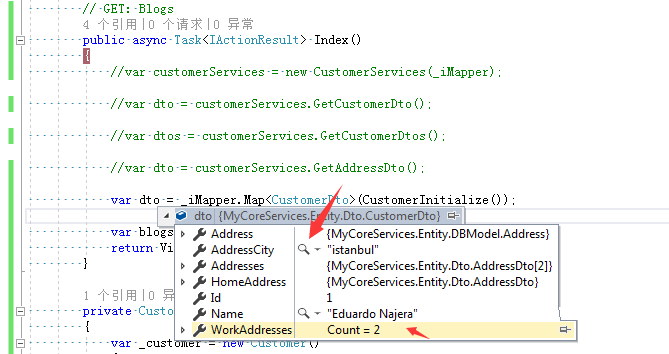
运行效果:
3.如果更加灵活使用AutoMapper组件?
相信在第二章节时候,相信大家都会发现一个问题,如果生产场景业务越来越庞大,需创建对应业务对象也会越来越多,如果面对这样的业务场景难道要在Configure方法里面创建越来越多的映射关系吗?例:
var expression = app.UseAutoMapper();

expression.CreateMap<A, ADto>();

expression.CreateMap<B, BDto>();

expression.CreateMap<C, CDto>();

expression.CreateMap<D, DDto>();

......
很显然这样子是不可行的,这样会导致后续代码越来越多,难以维护。那么现在让我们来解决这个问题。首先新建一个自动注入属性的AutoInjectAttribute密封类,具体代码如下:
public sealed class AutoInjectAttribute : Attribute

{

    public Type SourceType { get; }

    public Type TargetType { get; }

    public AutoInjectAttribute(Type sourceType, Type targetType)

    {

        SourceType = sourceType;

        TargetType = targetType;

    }

}
新增这个AutoInjectAttribute密封类,目的是声明每个DTO对象(数据传输对象)与对应数据源对象是传输关系,方便在Configure里面自动注册创建映射关系,例:
//声明源对象,目标对象

[AutoInject(sourceType: typeof(Customer),targetType:typeof(CustomerDto))]

public class CustomerDto

{

    public int Id { get; set; }

    public string Name { get; set; }

    public Address Address { get; set; }

    public AddressDto HomeAddress { get; set; }

    public AddressDto[] Addresses { get; set; }

    public List<AddressDto> WorkAddresses { get; set; }

    public string AddressCity { get; set; }

}
然后创建一个自动注入AutoInjectFactory工厂类,检测运行中的程序集是否有AutoInjectAttribute属性声明,如果有则插入一个类型数据集中返回,目的是把所有声明需要映射DTO对象跟数据源对象自动创建映射关系:
public class AutoInjectFactory

{

    public List<(Type, Type)> AddAssemblys

    {

        get

        {

            var assemblys =new List<Assembly>() { Assembly.GetExecutingAssembly() };

            List<(Type, Type)> ConvertList = new List<(Type, Type)>();

            foreach (var assembly in assemblys)

            {

                var atributes = assembly.GetTypes()

                    .Where(_type => _type.GetCustomAttribute<AutoInjectAttribute>() != null)

                    .Select(_type => _type.GetCustomAttribute<AutoInjectAttribute>());

                foreach (var atribute in atributes)

                {

                    ConvertList.Add((atribute.SourceType, atribute.TargetType));

                }

            }

            return ConvertList;

        }

    }

}
在第2小节AutoMapperExtension静态类的AddAutoMapper方法内修改如下代码:
#region 方案二

//注入AutoMapper配置扩展类服务

services.TryAddSingleton<MapperConfigurationExpression>();

//注入自动注入工厂类服务

services.TryAddSingleton<AutoInjectFactory>();

//注入AutoMapper配置扩展类到AutoMapper配置服务去

services.TryAddSingleton(serviceProvider =>

{

    var mapperConfigurationExpression = serviceProvider.GetRequiredService<MapperConfigurationExpression>();

    //通过自动注入工厂类获取声明数据源对象与DTO对象自动创建映射关系

    var factory = serviceProvider.GetRequiredService<AutoInjectFactory>();

    foreach (var (sourceType, targetType) in factory.AddAssemblys)

    {

        mapperConfigurationExpression.CreateMap(sourceType, targetType);

    }

    var mapperConfiguration = new MapperConfiguration(mapperConfigurationExpression);

    mapperConfiguration.AssertConfigurationIsValid();

    return mapperConfiguration;

});

//注入IMapper接口DI服务

services.TryAddSingleton(serviceProvider =>

{

    var mapperConfiguration = serviceProvider.GetRequiredService<MapperConfiguration>();

    return mapperConfiguration.CreateMapper();

});

return services;

#endregion
再新增一个使用自动注入工厂类服务静态方法:
/// <summary>

/// 使用自动注入工厂类

/// </summary>

/// <param name="applicationBuilder"></param>

public static void UseAutoInject(this IApplicationBuilder applicationBuilder)

{

   applicationBuilder.ApplicationServices.GetRequiredService<AutoInjectFactory>();

}
然后在Startup.ConfigureServices注入AutoMapper组件服务,然后在Startup.Configure上调用UseAutoInject静态方法,具体代码如下:
app.UseAutoInject();
运行效果: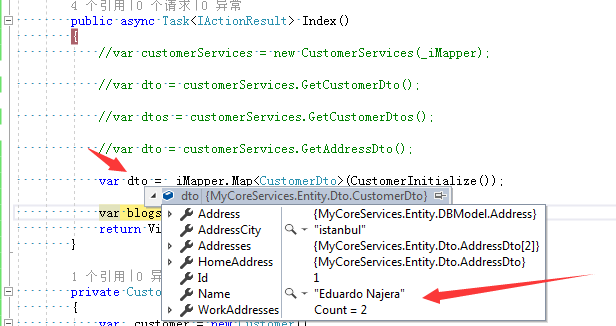
从运行结果来看依然是这个酸爽!
参考文献:
AutoMapper
(28)ASP.NET Core AutoMapper组件的更多相关文章
- 笔记: ASP.NET Core视图组件
视图组件 asp.net core mvc 提供了部分视图的新替代品:视图组件. 视图组件与分布视图的主要区别在于视图组件与控制器不相关.可使用在独立于单个控制器的场景,如:菜单导航.侧边栏.分页栏等 ...
- Blazor入门:ASP.NET Core Razor 组件
目录 关于组件 组件类 静态资产 路由与路由参数 组件参数 请勿创建会写入其自己的组参数属性的组件 子内容 属性展开 任意参数 捕获对组件的引用 在外部调用组件方法以更新状态 使用 @ 键控制是否保留 ...
- asp.net core 视图组件(转)
介绍视图组件 视图组件是 ASP.NET Core MVC 中的新特性,与局部视图相似,但是它们更加的强大.视图组件不使用模型绑定,只取决于调用它时所提供的数据.视图组件有以下特点: 渲染一个块,而不 ...
- asp.net core日志组件
日志介绍 Logging的使用 1. appsettings.json中Logging的介绍 Logging的配置信息是保存在appsettings.json配置文件中的.因为之前介绍配置文件的时候我 ...
- asp.net core 视图组件化
视图组件可以通过partial view或viewcomponent实现 partialview https://docs.microsoft.com/zh-cn/aspnet/core/mvc/vi ...
- asp.net core视图组件(ViewComponent)简单使用
一.组成: 一个视图组件包括两个部分,派生自ViewComponent的类及其返回结果.类似控制器. 定义一个视图组件,如控制器一样,必须是公开,非嵌套,非抽象的类.一般,视图组件名称为类名去掉&qu ...
- Asp.Net core 视图组件ViewComponent
视图组件 ViewComponent 最近用了一下视图组件,还挺方便的,如果遇到公共的部分,可以抽出来,写成视图组件,方便调用 先上图看一下效果:比如首页的4个画红框的地方是4个模块,有些地方可能要重 ...
- [转]asp.net core视图组件(ViewComponent)简单使用
本文转自:http://www.cnblogs.com/dralee/p/6170496.html 一.组成: 一个视图组件包括两个部分,派生自ViewComponent的类及其返回结果.类似控制器. ...
- ASP NET Core ---Automapper
官方文档:http://docs.automapper.org/en/stable/index.html 一.安装和配置: 二.使用: 1.建立 Profile文件: public class Map ...
随机推荐
- COMET探索系列二【Ajax轮询复用模型】
写在前面:Ajax轮询相信大家都信手拈来在用,可是有这么一个问题,如果一个网站中同时有好多个地方需要用到这种轮询呢?就拿我们网站来说,有一个未读消息数提醒.还有一个时实时加载最新说说.昨天又加了一个全 ...
- iOS传感器集锦、飞机大战、开发调试工具、强制更新、Swift仿QQ空间头部等源码
iOS精选源码 飞机大作战 MUPhotoPreview -简单易用的图片浏览器 LLDebugTool是一款针对开发者和测试者的调试工具,它可以帮... 多个UIScrollView.UITable ...
- 学习python-20191107
一.导入模块的两种方式 方式1:import 包名.模块名 [ as 别名]方式2:from 包名 import 模块名 from 包名.模块名 import 变量|函数|类 # ...
- python学习笔记(1)python数据类型
一.数据类型计算机顾名思义就是可以做数学计算的机器,因此,计算机程序理所当然地可以处理各种数值.但是,计算机能处理的远不止数值,还可以处理文本.图形.音频.视频.网页等各种各样的数据,不同的数据,需要 ...
- html和jsp页面中把文本框禁用,只能读不能写的方法
方法常用有三种: 第一种,使用 onfocus="this.blur()" <input name="deptno" type="text& ...
- 提高你css技能的css开发技巧
好久没整理博客了 进来啰嗦两句 继续抄别人的博客 一.resize实现图片对比 resize的语法如下: resize:none | both | horizontal | vertical 案例 ...
- js中对Object对象的一些常用操作总结
前言我前面的文章,写过js中“类”与继承的一些文章.ES5我们可以通过 构造函数 或者 Object.create()等方式来模拟出js中的“类”,当然,对象呢是类的实例化,我们可以通过如下方式创建对 ...
- 吴裕雄--天生自然KITTEN编程:忍者追宝
- Soldier and Badges
题目链接:https://vjudge.net/problem/CodeForces-546B AC代码: #include<iostream> #include<algorithm ...
- CentOS使用epel安装不同版本php-fpm
针对CentOS使用epel安装 yum -y install epel-release安装好后可以通过如下命令查看yum info epel-releaseyum repolist查看php版本ph ...