
(28)ASP.NET Core AutoMapper组件
1.什么是AutoMapper?
AutoMapper是一个对象-对象映射器。对象-对象映射通过将一种类型的输入对象转换为另一种类型的输出对象来工作。使AutoMapper变得有趣的是,它提供了一些有趣的约定,免去用户不需要了解如何将类型A映射为类型B。只要类型B遵循AutoMapper既定的约定,就需要几乎零配置来映射两个类型。映射代码虽然比较无聊,但是AutoMapper为我们提供简单的类型配置以及简单的映射测试,而映射可以在应用程序中的许多地方发生,但主要发生在层之间的边界中,比如,UI /域层之间或服务/域层之间。一层的关注点通常与另一层的关注点冲突,因此对象-对象映射导致分离的模型,其中每一层的关注点仅会影响该层中的类型。
2.如何在Core上面使用AutoMapper组件?
先在Startup.ConfigureServices注入AutoMapper组件服务,然后在Startup.Configure上获取AutoMapper服务配置扩展类创建对象-对象映射关系,为了好统一管理代码,可以新建一个AutoMapperExtension静态类,把以下代码封装一下:
public static class AutoMapperExtension

{

    /// <summary>

    /// 新增自动映射服务

    /// </summary>

    /// <param name="service"></param>

    /// <returns></returns>

    public static IServiceCollection AddAutoMapper(this IServiceCollection services)

    {

        #region 方案一

        //注册AutoMapper配置扩展类服务

        services.TryAddSingleton<MapperConfigurationExpression>();

        //注册AutoMapper配置扩展类到AutoMapper配置服务去

        services.TryAddSingleton(serviceProvider =>

        {

            var mapperConfigurationExpression = serviceProvider.GetRequiredService<MapperConfigurationExpression>();

            var mapperConfiguration = new MapperConfiguration(mapperConfigurationExpression);

            mapperConfiguration.AssertConfigurationIsValid();

            return mapperConfiguration;

        });

        //注入IMapper接口DI服务

        services.TryAddSingleton(serviceProvider =>

        {

            var mapperConfiguration = serviceProvider.GetRequiredService<MapperConfiguration>();

            return mapperConfiguration.CreateMapper();

        });

        return services;

        #endregion

    }

    /// <summary>

    /// 使用自动映射配置扩展类

    /// </summary>

    /// <param name="applicationBuilder"></param>

    /// <returns></returns>

    public static IMapperConfigurationExpression UseAutoMapper(this IApplicationBuilder applicationBuilder)

    {

        //获取已注册服务AutoMapper配置扩展类

        return applicationBuilder.ApplicationServices.GetRequiredService<MapperConfigurationExpression>();

    }

}

// This method gets called by the runtime. Use this method to add services to the container.

public void ConfigureServices(IServiceCollection services)

{

    ......

    //添加自动映射组件DI服务

    services.AddAutoMapper();

}

// This method gets called by the runtime. Use this method to configure the HTTP request pipeline.

public void Configure(IApplicationBuilder app, IHostingEnvironment env)

{

    ......

    //注册组件之后,创建映射对象

  var expression = app.UseAutoMapper();

    expression.CreateMap<Customer, CustomerDto>();

    expression.CreateMap<Address, AddressDto>();

}
因为IMapper接口已经在ConfigureServices方法注入DI服务了,所以无需再重新注入,只需要直接使用IMapper调用其方法就可以:
public class BlogsController : Controller

{

    private IMapper _iMapper { get; }

    public BlogsController(IMapper iMapper)

    {

        _iMapper = iMapper;

    }

    // GET: Blogs

    public async Task<IActionResult> Index()

    {

    //对象-对象数据传输

        var dto = _iMapper.Map<CustomerDto>(CustomerInitialize());

        ......

    }

    //手动赋值客户对象数据

    private Customer CustomerInitialize()

    {

        var _customer = new Customer()

        {

            Id = ,

            Name = "Eduardo Najera",

            Credit = 234.7m,

            Address = new Address() { City = "istanbul", Country = "turkey", Id = , Street = "istiklal cad." },

            HomeAddress = new Address() { City = "istanbul", Country = "turkey", Id = , Street = "istiklal cad." },

            WorkAddresses = new List<Address>()

            {

                new Address() {City = "istanbul", Country = "turkey", Id = , Street = "istiklal cad."},

                new Address() {City = "izmir", Country = "turkey", Id = , Street = "konak"}

            },

            Addresses = new List<Address>()

            {

                new Address() {City = "istanbul", Country = "turkey", Id = , Street = "istiklal cad."},

                new Address() {City = "izmir", Country = "turkey", Id = , Street = "konak"}

            }.ToArray()

        };

        return _customer;

    }

}
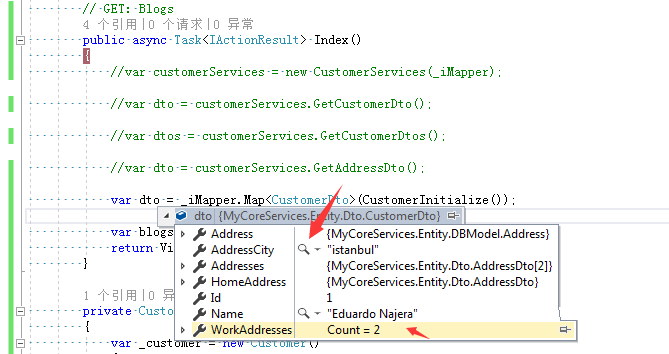
运行效果:
3.如果更加灵活使用AutoMapper组件?
相信在第二章节时候,相信大家都会发现一个问题,如果生产场景业务越来越庞大,需创建对应业务对象也会越来越多,如果面对这样的业务场景难道要在Configure方法里面创建越来越多的映射关系吗?例:
var expression = app.UseAutoMapper();

expression.CreateMap<A, ADto>();

expression.CreateMap<B, BDto>();

expression.CreateMap<C, CDto>();

expression.CreateMap<D, DDto>();

......
很显然这样子是不可行的,这样会导致后续代码越来越多,难以维护。那么现在让我们来解决这个问题。首先新建一个自动注入属性的AutoInjectAttribute密封类,具体代码如下:
public sealed class AutoInjectAttribute : Attribute

{

    public Type SourceType { get; }

    public Type TargetType { get; }

    public AutoInjectAttribute(Type sourceType, Type targetType)

    {

        SourceType = sourceType;

        TargetType = targetType;

    }

}
新增这个AutoInjectAttribute密封类,目的是声明每个DTO对象(数据传输对象)与对应数据源对象是传输关系,方便在Configure里面自动注册创建映射关系,例:
//声明源对象,目标对象

[AutoInject(sourceType: typeof(Customer),targetType:typeof(CustomerDto))]

public class CustomerDto

{

    public int Id { get; set; }

    public string Name { get; set; }

    public Address Address { get; set; }

    public AddressDto HomeAddress { get; set; }

    public AddressDto[] Addresses { get; set; }

    public List<AddressDto> WorkAddresses { get; set; }

    public string AddressCity { get; set; }

}
然后创建一个自动注入AutoInjectFactory工厂类,检测运行中的程序集是否有AutoInjectAttribute属性声明,如果有则插入一个类型数据集中返回,目的是把所有声明需要映射DTO对象跟数据源对象自动创建映射关系:
public class AutoInjectFactory

{

    public List<(Type, Type)> AddAssemblys

    {

        get

        {

            var assemblys =new List<Assembly>() { Assembly.GetExecutingAssembly() };

            List<(Type, Type)> ConvertList = new List<(Type, Type)>();

            foreach (var assembly in assemblys)

            {

                var atributes = assembly.GetTypes()

                    .Where(_type => _type.GetCustomAttribute<AutoInjectAttribute>() != null)

                    .Select(_type => _type.GetCustomAttribute<AutoInjectAttribute>());

                foreach (var atribute in atributes)

                {

                    ConvertList.Add((atribute.SourceType, atribute.TargetType));

                }

            }

            return ConvertList;

        }

    }

}
在第2小节AutoMapperExtension静态类的AddAutoMapper方法内修改如下代码:
#region 方案二

//注入AutoMapper配置扩展类服务

services.TryAddSingleton<MapperConfigurationExpression>();

//注入自动注入工厂类服务

services.TryAddSingleton<AutoInjectFactory>();

//注入AutoMapper配置扩展类到AutoMapper配置服务去

services.TryAddSingleton(serviceProvider =>

{

    var mapperConfigurationExpression = serviceProvider.GetRequiredService<MapperConfigurationExpression>();

    //通过自动注入工厂类获取声明数据源对象与DTO对象自动创建映射关系

    var factory = serviceProvider.GetRequiredService<AutoInjectFactory>();

    foreach (var (sourceType, targetType) in factory.AddAssemblys)

    {

        mapperConfigurationExpression.CreateMap(sourceType, targetType);

    }

    var mapperConfiguration = new MapperConfiguration(mapperConfigurationExpression);

    mapperConfiguration.AssertConfigurationIsValid();

    return mapperConfiguration;

});

//注入IMapper接口DI服务

services.TryAddSingleton(serviceProvider =>

{

    var mapperConfiguration = serviceProvider.GetRequiredService<MapperConfiguration>();

    return mapperConfiguration.CreateMapper();

});

return services;

#endregion
再新增一个使用自动注入工厂类服务静态方法:
/// <summary>

/// 使用自动注入工厂类

/// </summary>

/// <param name="applicationBuilder"></param>

public static void UseAutoInject(this IApplicationBuilder applicationBuilder)

{

   applicationBuilder.ApplicationServices.GetRequiredService<AutoInjectFactory>();

}
然后在Startup.ConfigureServices注入AutoMapper组件服务,然后在Startup.Configure上调用UseAutoInject静态方法,具体代码如下:
app.UseAutoInject();
运行效果: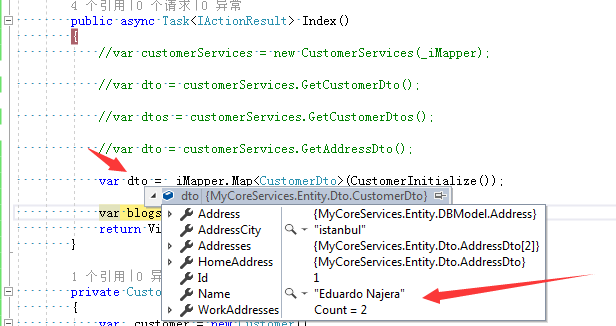
从运行结果来看依然是这个酸爽!
参考文献:
AutoMapper
(28)ASP.NET Core AutoMapper组件的更多相关文章
- 笔记: ASP.NET Core视图组件
视图组件 asp.net core mvc 提供了部分视图的新替代品:视图组件. 视图组件与分布视图的主要区别在于视图组件与控制器不相关.可使用在独立于单个控制器的场景,如:菜单导航.侧边栏.分页栏等 ...
- Blazor入门:ASP.NET Core Razor 组件
目录 关于组件 组件类 静态资产 路由与路由参数 组件参数 请勿创建会写入其自己的组参数属性的组件 子内容 属性展开 任意参数 捕获对组件的引用 在外部调用组件方法以更新状态 使用 @ 键控制是否保留 ...
- asp.net core 视图组件(转)
介绍视图组件 视图组件是 ASP.NET Core MVC 中的新特性,与局部视图相似,但是它们更加的强大.视图组件不使用模型绑定,只取决于调用它时所提供的数据.视图组件有以下特点: 渲染一个块,而不 ...
- asp.net core日志组件
日志介绍 Logging的使用 1. appsettings.json中Logging的介绍 Logging的配置信息是保存在appsettings.json配置文件中的.因为之前介绍配置文件的时候我 ...
- asp.net core 视图组件化
视图组件可以通过partial view或viewcomponent实现 partialview https://docs.microsoft.com/zh-cn/aspnet/core/mvc/vi ...
- asp.net core视图组件(ViewComponent)简单使用
一.组成: 一个视图组件包括两个部分,派生自ViewComponent的类及其返回结果.类似控制器. 定义一个视图组件,如控制器一样,必须是公开,非嵌套,非抽象的类.一般,视图组件名称为类名去掉&qu ...
- Asp.Net core 视图组件ViewComponent
视图组件 ViewComponent 最近用了一下视图组件,还挺方便的,如果遇到公共的部分,可以抽出来,写成视图组件,方便调用 先上图看一下效果:比如首页的4个画红框的地方是4个模块,有些地方可能要重 ...
- [转]asp.net core视图组件(ViewComponent)简单使用
本文转自:http://www.cnblogs.com/dralee/p/6170496.html 一.组成: 一个视图组件包括两个部分,派生自ViewComponent的类及其返回结果.类似控制器. ...
- ASP NET Core ---Automapper
官方文档:http://docs.automapper.org/en/stable/index.html 一.安装和配置: 二.使用: 1.建立 Profile文件: public class Map ...
随机推荐
- file_get_contents为何无法采集某些压缩过的网站
有些网站直接用file_get_contents就能采集, 但是有些不行. 于是可以在网址前加入 'compress.zlib://‘ $url = 'compress.zlib://' . 'htt ...
- 类加载器ClassLoader的理解
最近在做一个热加载Class的小组件,这个组件需要对类加载器ClassLoader有所了解,我就顺便借这个机会把学到的一点皮毛与大家分享一下. 从Class文件开始 ClassLoader,顾名思义就 ...
- win10安装MAYA失败,怎么强力卸载删除注册表并重新安装
一些搞设计的朋友在win10系统下安装MAYA失败或提示已安装,也有时候想重新安装MAYA的时候会出现本电脑windows系统已安装MAYA,你要是不留意直接安装MAYA,只会安装MAYA的附件或者直 ...
- react全家桶从0搭建一个完整的react项目(react-router4、redux、redux-saga)
react全家桶从0到1(最新) 本文从零开始,逐步讲解如何用react全家桶搭建一个完整的react项目.文中针对react.webpack.babel.react-route.redux.redu ...
- 小码哥哥 FastJson--阿里巴巴公司开源的速度最快的Json和对象转换工具
转载地址:http://www.oschina.net/code/snippet_228315_35122?_t_t_t=0.4667952097048127 class User{ private ...
- jenkins使用(4)-发邮件
邮箱配置 邮件触发器:达到条件就会发邮件 对单独的服务设置邮件 系统设置如下 回到单个任务的设置 配置中的主题设置如下: 回到单个任务的设置 配置中如下: 选择工作空间中的一个文件 发送多个附件: 邮 ...
- cesium入门示例-探测效果
动画实现方式通过多个canvas实现,参考的https://www.yueyanshaosun.cn/ysCesium/views/5_geometricObj2_entityCanvas.html ...
- python 添加字符串的七种方法
#使用{}的方法 s1 = 'Hello {}! My name is {}.'.format('World', 'Python猫') print(s1) s2 = 'Hello {0} My nam ...
- (七)spring+druid多数据源配置
druid多数据源配置 一.druid简介 Druid首先是一个数据库连接池,但它不仅仅是一个数据库连接池,它还包含一个ProxyDriver,一系列内置的JDBC组件库,一个SQL Parser. ...
- CORS’s source, Principle and Implementation
跨域资源共享(CORS) 是一种机制,它使用额外的 HTTP 头来告诉浏览器 让运行在一个 origin (domain) 上的Web应用被准许访问来自不同源服务器上的指定的资源.当一个资源从与该资源 ...