
ERROR 2013 (HY000): Lost connection to MySQL server at 'reading authorization packet', system error: 0
最近遇到一个MySQL连接的问题,远程连接MySQL时遇到“ERROR 2013 (HY000): Lost connection to MySQL server at 'reading authorization packet', system error: 0”错误,如下所示:
[root@DB-Server ~]# mysql -h 10.13.65.93 -u onecard -p
Enter password:
ERROR 2013 (HY000): Lost connection to MySQL server at 'reading authorization packet', system error: 0
这个测试的MySQL位于阿里云Kubernetes(K8s)中Docker容器里面,而且在远程连接MySQL出现上面错误的时候,Docker也会出现下面错误。

一般出现“ERROR 2013 (HY000): Lost connection to MySQL server at 'reading authorization packet'”错误的原因较多:
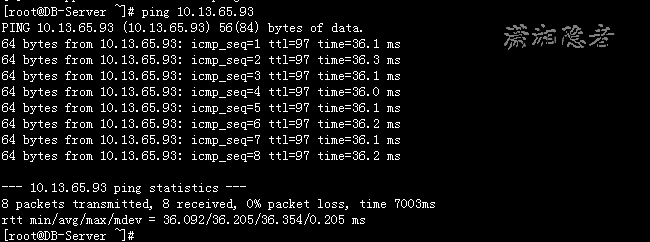
1:网络异常或时延非常高的时候, 超过连接时间限制(系统变量connect_timeout)会导致这个错误。MySQL客户端与数据库建立连接需要发起三次握手协议,正常情况下,这个时间非常短,但是一旦网络异常,网络超时等因素出现,就会导致这个握手协议无法完成,MySQL有个参数connect_timeout,它是MySQL服务端进程mysqld等待连接建立完成的时间,单位为秒。如果超过connect_timeout时间范围内,仍然无法完成协议握手话,MySQL客户端会收到异常。 更多详细信息可以参考我这篇博客“MySQL参数max_connect_errors分析释疑”,但是当前这个案例中,不存在网络延时情况,如下所示:
[root@DB-Server ~]# ping 10.13.65.93
PING 10.13.65.93 (10.13.65.93) 56(84) bytes of data.
64 bytes from 10.13.65.93: icmp_seq=1 ttl=97 time=36.1 ms
64 bytes from 10.13.65.93: icmp_seq=2 ttl=97 time=36.3 ms
64 bytes from 10.13.65.93: icmp_seq=3 ttl=97 time=36.1 ms
64 bytes from 10.13.65.93: icmp_seq=4 ttl=97 time=36.0 ms
64 bytes from 10.13.65.93: icmp_seq=5 ttl=97 time=36.1 ms
64 bytes from 10.13.65.93: icmp_seq=6 ttl=97 time=36.2 ms
64 bytes from 10.13.65.93: icmp_seq=7 ttl=97 time=36.1 ms
64 bytes from 10.13.65.93: icmp_seq=8 ttl=97 time=36.2 ms
--- 10.13.65.93 ping statistics ---
8 packets transmitted, 8 received, 0% packet loss, time 7003ms
rtt min/avg/max/mdev = 36.092/36.205/36.354/0.205 ms
2:域名解析会导致这个问题。当客户端连接上来,服务器端都会对客户端进来的IP地址进行DNS解析,来获得客户端的域名或主机名,如果DNS解析出了问题或DNS解析相当慢,就会导致连接验证用户出现问题。而skip-name-resolve这个参数的意义就是禁止域名解析。官方文档解释如下:
For each new client connection, the server uses the client IP address to check whether the client host name is in the host cache. If so, the server refuses or continues to process the connection request depending on whether or not the host is blocked. If the host is not in the cache, the server attempts to resolve the host name. First, it resolves the IP address to a host name and resolves that host name back to an IP address. Then it compares the result to the original IP address to ensure that they are the same. The server stores information about the result of this operation in the host cache. If the cache is full, the least recently used entry is discarded.
The server handles entries in the host cache like this:
- When the first TCP client connection reaches the server from a given IP address, a new cache entry is created to record the client IP, host name, and client lookup validation flag. Initially, the host name is set to NULL and the flag is false. This entry is also used for subsequent client TCP connections from the same originating IP.
当有一个新的客户端连接通过TCP进来时,MySQL Server会为这个IP在host cache中建立一个新的记录,包括IP,主机名和client lookup validation flag,分别对应host_cache表中的IP,HOST和HOST_VALIDATED这三列。第一次建立连接因为只有IP,没有主机名,所以HOST将设置为NULL,HOST_VALIDATED将设置为FALSE。
- If the validation flag for the client IP entry is false, the server attempts an IP-to-host name-to-IP DNS resolution. If that is successful, the host name is updated with the resolved host name and the validation flag is set to true. If resolution is unsuccessful, the action taken depends on whether the error is permanent or transient. For permanent failures, the host name remains NULL and the validation flag is set to true. For transient failures, the host name and validation flag remain unchanged. (In this case, another DNS resolution attempt occurs the next time a client connects from this IP.)
MySQL Server检测HOST_VALIDATED的值,如果为FALSE,它会试图进行DNS解析,如果解析成功,它将更新HOST的值为主机名,并将HOST_VALIDATED值设为TRUE。如果没有解析成功,判断失败的原因是永久的还是临时的,如果是永久的,则HOST的值依旧为NULL,且将HOST_VALIDATED的值设置为TRUE,后续连接不再进行解析,如果该原因是临时的,则HOST_VALIDATED依旧为FALSE,后续连接会再次进行DNS解析。
- If an error occurs while processing an incoming client connection from a given IP address, the server updates the corresponding error counters in the entry for that IP. For a description of the errors recorded, see Section 26.12.17.1, “The host_cache Table”.
如果在处理来自给定IP地址的传入客户端连接时发生错误,则服务器会更新该IP条目中的相应错误计数器。 有关记录的错误的说明,请参见第26.12.17.1节“host_cache表”。
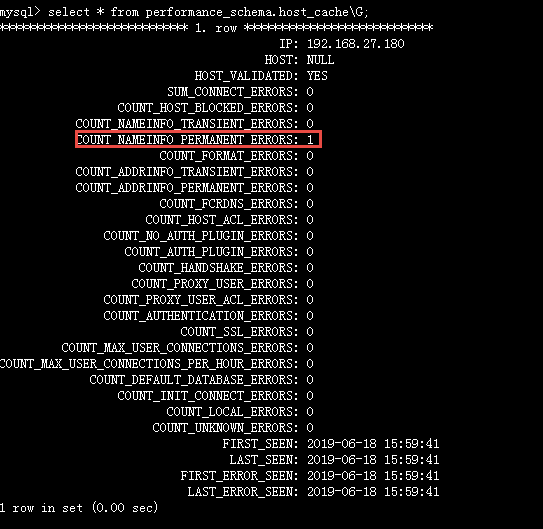
这个案例里面,因为MySQL位于阿里云Kubernetes(K8s)中Docker容器里面,对公司内部的IP地址进行DNS解析确实会出现问题。我们在配置文件设置skip_name_resolve后,确实解决了这个问题。然后本来以为找到了原因的我,在本地两台机器上测试时发现(一台MySQL版本为5.6.41, 一台MySQL版本为5.6.23),即使两台服务器相互不能做DNS解析,如下截图所示,但是从192.168.27.180连接DB-Server时,并不会报这个错误。Why? 即使我将connect_timeout调整为2,依然不会出现这个错误。看来MySQL的连接不像我们表面看的那样简单。还是相当复杂。只是目前的技术水平,还做不到进一步分析!
另外,在这个案例的测试过程中,发现skip_name_resolve为OFF的情况下,将connect_timeout设大,也不会出现这个错误
mysql> show variables like '%connect_timeout%';
+-----------------+-------+
| Variable_name | Value |
+-----------------+-------+
| connect_timeout | 10 |
+-----------------+-------+
1 row in set (0.01 sec)
mysql> set global connect_timeout=30;
Query OK, 0 rows affected (0.00 sec)
mysql>
然后从客户端连接MySQL数据库就成功了,如下所示,只是IP地址并不是客户端的IP地址,而是Port IP。
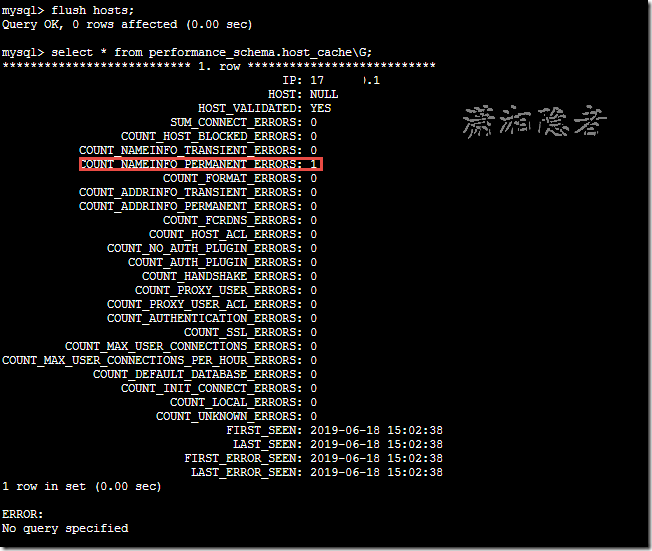
当然这种情况下Kubernetes(K8s)中Docker下MySQL并没有挂掉,反而当系统变量connect_timeout=10的情况下,如果没有开启系统变量skip_name_resolve,每次远程连接MySQL就会出现Kubernetes(K8s)中Docker下MySQL挂掉,重启的过程,所以极度怀疑是疑因为在连接过程,Docker下MySQL挂掉重启才出现这个错误。但是对K8s了解不多,涉及太广,没法进一步分析具体原因了。
ERROR 2013 (HY000): Lost connection to MySQL server at 'reading authorization packet', system error: 0的更多相关文章
- 连接 MySQL 报错:Lost connection to MySQL server at 'reading authorization packet', system error: 34
报错信息: Lost connection to MySQL server at 解决方案: use mysql; ; flush privileges; 参考: https://blog.csdn. ...
- Lost connection to MySQL server at 'reading authorization packet', system error: 0_Mysql
1.大多数时候设置"set global connect_timeout=60:"是可以解决问题的. 我们可以通过执行“SHOWSTATUS LIKE 'aborted%'”,可以 ...
- mysql登陆时出现ERROR 2013 (HY000): Lost connection to MySQL server at 'reading initial communication packet', system error: 0
有4到5天没开mysql,这天晚上打=打开phpstudy,想进去mysql练习练习,结果丢给我这个 ERROR 2013 (HY000): Lost connection to MySQL serv ...
- MySQL5.1升级5.6后,执行grant出错:ERROR 2013 (HY000): Lost connection to MySQL server during query【转载】
转载: MySQL5.5升级5.6后,执行grant出错:ERROR 2013 (HY000): Lost connection to -mysql教程-数据库-壹聚教程网http://www.111 ...
- [奇葩问题] ERROR 2013 (HY000): Lost connection to MySQL server during query
查询一条耗时30s以上语句,实际为2分钟多. mysql> select version(); +------------+ | version() | +------------+ | 5.6 ...
- ERROR 2013 (HY000): Lost connection to MySQL server at 'waiting for initial communication packet', system error: 2
ERROR (HY000): Lost connection to MySQL server at 'waiting for initial communication packet', system ...
- MySQL远程连接丢失问题解决方法Lost connection to MySQL server at ‘reading initial communication packet’, system error: 0
最近远程连接mysql总是提示 Lost connection 很明显这是连接初始化阶段就丢失了连接的错误 其实问题很简单,都是MySQL的配置文件默认没有为远程连接配置好,只需要更改下MySQL的配 ...
- 虚拟机中MySQL连接问题:Lost connection to MySQL server at 'reading initial communication packet, system error: 0 以及 host is not allowed to connect mysql
环境:在VirtualBox中安装了Ubuntu虚拟机,网络使用了NAT模式,开启了端口转发. 局域网内其他计算机访问虚拟机中的MySQL Server出现两个问题: Lost connection ...
- Lost connection to MySQL server at ‘reading initial communication packet', system error: 0 mysql远程连接问题
在用Navicat for MySQL远程连接mysql的时候,出现了 Lost connection to MySQL server at ‘reading initial communicatio ...
随机推荐
- [翻译]Nativescript 中 Web 视图与 Android/IOS 的双向通信
English document From http://shripalsoni.com/blog/nativescript-webview-native-bi-directional-communi ...
- MVC动态生成的表单:表单元素比较多 你就这样写
MVC动态生成的表单:表单元素比较多 你就这样写: public ActionResult ShoudaanActionResult(FormCollection from,T_UserM user) ...
- 30个物联网传感器小实验:三行代码点亮LED灯
30个物联网传感器小实验:三行代码点亮LED灯 三行代码点亮LED灯 LED灯闪烁 LED灯调亮度 LED淡入淡出 不写一行代码点亮LED灯 全彩RGB灯 面包板 30个物联网传感器小实验:三行代码点 ...
- 《深度学习-改善深层神经网络》-第二周-优化算法-Andrew Ng
目录 1. Mini-batch gradient descent 1.1 算法原理 1.2 进一步理解Mini-batch gradient descent 1.3 TensorFlow中的梯度下降 ...
- Unity命令行打包
http://www.66acg.com/?post=137 补充 unity编辑器端获取打包命令行自定义参数,这个可以获取到所有打包时的参数 string[] runArgs = System.En ...
- ios 自定义cell类中获取当前controller push
有时候在自定义cell的过程中,当cell中又button的时候,把button的点击时间写在cell中的时候,需要获取到cell的父视图控制器然后push,可以自建一个类,命名为: GetCurre ...
- git push error: ! [rejected] failed to push some refs to . . .
报错情况: 报错原因:远程库与本地库不一致造成的,需要把远程库同步到本地库! 解决办法: git pull --rebase origin master 这条指令是将远程库中的更新合并到本地库,--r ...
- redids
Redis 地理位置(geo) Redis 键(key) Redis 字符串(String) Redis 哈希(Hash) Redis 列表(List) Redis 集合(Set) Redis 有序集 ...
- Java代码读取文件
用Java代码读取文件时,保持文件本来的格式(主要是保持换行),这点有时候比较重要.用代码实现也相当简单. private static void readFile() { StringBuilder ...
- PostgreSQL - raise函数打印字符串
raise函数 在PostgreSQL中,该函数用于打印字符串,类似于Java中的System.out.println(),Oracle中的dbms_output.put_line(). 用法如下: ...