
SpringBoot2.0 基础案例(03):配置系统全局异常映射处理
本文源码:GitHub·点这里 || GitEE·点这里
一、异常分类
这里的异常分类从系统处理异常的角度看,主要分类两类:业务异常和系统异常。
1、业务异常
业务异常主要是一些可预见性异常,处理业务异常,用来提示用户的操作,提高系统的可操作性。
常见的业务异常提示:
1)请输入xxx
2)xxx不能为空
3)xxx重复,请更换
2、系统异常
系统异常主要是一些不可预见性异常,处理系统异常,可以让展示出一个友好的用户界面,不易给用户造成反感。如果是一个金融类系统,在用户界面出现一个系统异常的崩溃界面,很有可能直接导致用户流失。
常见的系统异常提示:
1)页面丢失404
2)服务器异常500
二、解决应用启动后404界面

1、引入页面Jar包
<dependency>

    <groupId>org.springframework.boot</groupId>

    <artifactId>spring-boot-starter-thymeleaf</artifactId>

</dependency>
2、自定义首页接口
import org.springframework.stereotype.Controller;

import org.springframework.ui.ModelMap;

import org.springframework.web.bind.annotation.RequestMapping;

@Controller

public class IndexController {

    @RequestMapping("/")

    public String index(ModelMap modelMap) {

        modelMap.addAttribute("name","知了一笑") ;

        return "index";

    }

}
3、首页界面
<!DOCTYPE html>

<html>

<head lang="en">

    <meta charset="UTF-8" />

    <title></title>

</head>

<body>

<h1 th:text="${name}"></h1>

</body>

</html>
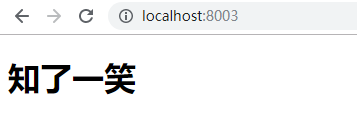
4、运行效果
三、SpringBoot2.0中异常处理
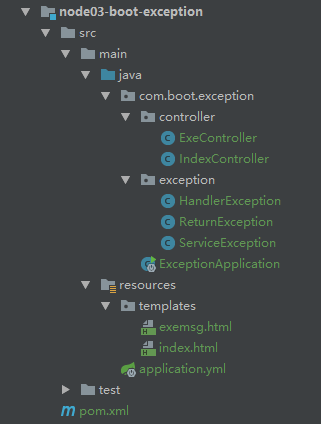
1、项目结构图
2、自定义业务异常类
public class ServiceException extends Exception {

    public ServiceException (String msg){

        super(msg);

    }

}
3、自定义异常描述对象
public class ReturnException {

    // 响应码

    private Integer code;

    // 异常描述

    private String msg;

    // 请求的Url

    private String url;

	// 省略 get set 方法

}
4、统一异常处理格式
1)两个基础注解
@ControllerAdvice 定义统一的异常处理类
@ExceptionHandler 定义异常类型对应的处理方式
2)代码实现
import org.springframework.web.bind.annotation.ControllerAdvice;

import org.springframework.web.bind.annotation.ExceptionHandler;

import org.springframework.web.bind.annotation.ResponseBody;

import org.springframework.web.servlet.ModelAndView;

import javax.servlet.http.HttpServletRequest;

@ControllerAdvice

// 异常以Json格式返回 等同 ExceptionHandler + ResponseBody 注解

// @RestControllerAdvice

public class HandlerException {

    /**

     * 自定义业务异常映射,返回JSON格式提示

     */

    @ExceptionHandler(value = ServiceException.class)

    @ResponseBody

    public ReturnException handler01 (HttpServletRequest request,ServiceException e){

        ReturnException returnException = new ReturnException() ;

        returnException.setCode(600);

        returnException.setMsg(e.getMessage());

        returnException.setUrl(String.valueOf(request.getRequestURL()));

        return returnException ;

    }

    /**

     * 服务异常

     */

    @ExceptionHandler(value = Exception.class)

    public ModelAndView handler02 (HttpServletRequest request,Exception e){

        ModelAndView modelAndView = new ModelAndView() ;

        modelAndView.addObject("ExeMsg", e.getMessage());

        modelAndView.addObject("ReqUrl", request.getRequestURL());

        modelAndView.setViewName("/exemsg");

        return modelAndView ;

    }

}
5、简单的测试接口
@Controller

public class ExeController {

    /**

     *  {

     *    "code": 600,

     *    "msg": "业务异常:ID 不能为空",

     *    "url": "http://localhost:8003/exception01"

     *  }

     */

    @RequestMapping("/exception01")

    public String exception01 () throws ServiceException {

        throw new ServiceException("业务异常:ID 不能为空");

    }

    @RequestMapping("/exception02")

    public String exception02 () throws Exception {

        throw new Exception("出现异常,全体卧倒");

    }

}

四、源代码地址
GitHub·地址

https://github.com/cicadasmile/spring-boot-base

GitEE·地址

https://gitee.com/cicadasmile/spring-boot-base
SpringBoot2.0 基础案例(03):配置系统全局异常映射处理的更多相关文章
- SpringBoot2.0 基础案例(12):基于转账案例,演示事务管理操作
本文源码 GitHub地址:知了一笑 https://github.com/cicadasmile/spring-boot-base 一.事务管理简介 1.事务基本概念 一组业务操作ABCD,要么全部 ...
- 三:SpringBoot-配置系统全局异常映射处理
三:SpringBoot-配置系统全局异常映射处理 1.异常分类 1.1 业务异常 1.2 系统异常 2.自定义异常处理 2.1 自定义业务异常类 2.2 自定义异常描述对象 2.3 统一异常处理格式 ...
- SpringBoot2.0 基础案例(16):配置Actuator组件,实现系统监控
本文源码 GitHub地址:知了一笑 https://github.com/cicadasmile/spring-boot-base 一.Actuator简介 1.监控组件作用 在生产环境中,需要实时 ...
- SpringBoot2.0 基础案例(14):基于Yml配置方式,实现文件上传逻辑
本文源码 GitHub地址:知了一笑 https://github.com/cicadasmile/spring-boot-base 一.文件上传 文件上传是项目开发中一个很常用的功能,常见的如头像上 ...
- SpringBoot2.0 基础案例(07):集成Druid连接池,配置监控界面
一.Druid连接池 1.druid简介 Druid连接池是阿里巴巴开源的数据库连接池项目.Druid连接池为监控而生,内置强大的监控功能,监控特性不影响性能.功能强大,能防SQL注入,内置Login ...
- SpringBoot2.0 基础案例(11):配置AOP切面编程,解决日志记录业务
本文源码 GitHub地址:知了一笑 https://github.com/cicadasmile/spring-boot-base 一.AOP切面编程 1.什么是AOP编程 在软件业,AOP为Asp ...
- SpringBoot2.0 基础案例(15):配置MongoDB数据库,实现增删改查逻辑
本文源码:GitHub·点这里 || GitEE·点这里 一.NoSQL简介 1.NoSQL 概念 NoSQL( Not Only SQL ),意即"不仅仅是SQL".对不同于传统 ...
- SpringBoot2.0 基础案例(05):多个拦截器配置和使用场景
一.拦截器简介 1.拦截器定义 拦截器,请求的接口被访问之前,进行拦截然后在之前或之后加入某些操作.拦截是AOP的一种实现策略. 拦截器主要用来按照指定规则拒绝请求. 2.拦截器中应用 Token令牌 ...
- SpringBoot2.0基础案例(01):环境搭建和RestFul风格接口
一.SpringBoot 框架的特点 1.SpringBoot2.0 特点 1)SpringBoot继承了Spring优秀的基因,上手难度小 2)简化配置,提供各种默认配置来简化项目配置 3)内嵌式容 ...
随机推荐
- REST、DRF(View源码解读、APIView源码解读)
一 . REST 前言 1 . 编程 : 数据结构和算法的结合 .小程序如简单的计算器,我们输入初始数据,经过计算,得到最终的数据,这个过程中,初始数据和结果数据都是数据,而计算 ...
- Wannafly挑战赛12 B T95要减肥 【贪心】
链接:https://www.nowcoder.com/acm/contest/79/B 来源:牛客网 时间限制:C/C++ 1秒,其他语言2秒 空间限制:C/C++ 262144K,其他语言5242 ...
- python中的编码转换
今天遇到了一个问题,将字符串“\uxxxx\uxxxx”转换成汉字.网上查了很多资料都不行. 后来看到,发现一个函数就OK了. str = str.decode('unicode_escape') 等 ...
- WCF异常处理
[读书笔记] 在进行分布式应用的异常处理时需要解决和考虑的基本要素: 异常的封装:服务端抛出的异常如何序列化传递到客户端 敏感信息的屏蔽:抛出的异常往往包含一些敏感的信息,直接将服务操作执行过程抛出的 ...
- Sql 工资第二高(考虑并列)
--题目:Employee表中有ID,Name,Salary三列,求薪资排序第二高的Employee的Name select * FROM [Employee] --等于2时为空,因为有并列第一 SE ...
- latex 技巧汇总
最近打算详细的学习一下latex,所以在学习的过程中遇到了一些问题.随时出问题,随时记录更新. 我是萌萌的Latex, x_0. 再写具体的技巧之前,先说一个关于打公式的小技巧.有时候你不知道怎么设置 ...
- Oracle约束的使用
--5个约束,主键约束.外键约束.唯一约束.检查约束.非空约束. --添加主键约束 Alter table table_name Add constraints constraint_name Pri ...
- html5--1.18 div元素与布局
1.18 div元素与布局 1.元素的分类2.div元素与布局 1.元素的分类 块元素:主要特征是会产生换行效果,自动与其他元素分离成两行:通常可以作为容器在内部添加其他元素. 已经学过的块元素有: ...
- hdu 1042 N!(大数)
题意:求n!(0 ≤ N ≤ 10000) 思路:大数,用数组存储 1.首先要考虑数据N!的位数,因为最大是10000!,可以计算一下大概是5+9000*4+900*3+90*2+10*1=38865 ...
- listen 80
Facebook Quietly Created New Email Addresses For a company that made its name by building one of the ...