
python 之 time模块、datetime模块(打印进度条)
6.9 time 模块
| 方法 | 含义 | 备注 |
|---|---|---|
| time.time() | 时间戳 | 1561013092.997079 |
| time.strftime('%Y-%m-%d %H:%M:%S %p') | 结构化时间struct_time 转 格式化的字符串 | 2019-06-20 10:21:13 AM |
| time.strptime('2011-05-05 16:37:06', '%Y-%m-%d %X') | 格式化的字符串 转 结构化时间struct_time | time.struct_time(tm_year=2011, tm_mon=5...) |
| time.localtime() | 时间戳转结构化时间struct_time 东八区时间 | time.struct_time(tm_year=2019,tm_mon...) |
| time.gmtime() | 时间戳转结构化时间 UTC时区 | time.struct_time(tm_year=2019,tm_mon=6...) |
| time.mktime(time.localtime() | 将一个struct_time 转 为时间戳 | 15663646462642646 |
| time.asctime(time.localtime() | 将一个struct_time 转 为Linux显示风格 | Thu Jun 20 14:32:05 2019 |
| time.ctime(12312312321) | 将一个时间戳 转 为Linux显示风格 | Mon Feb 29 22:45:21 2360 |
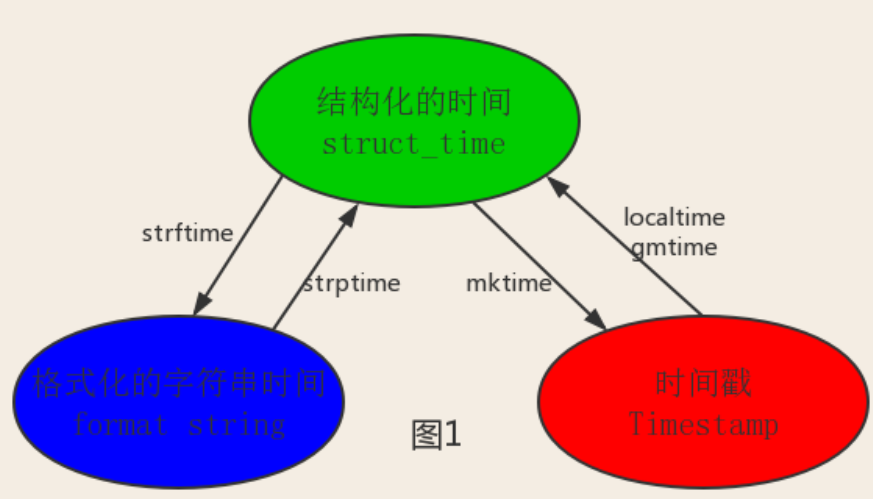
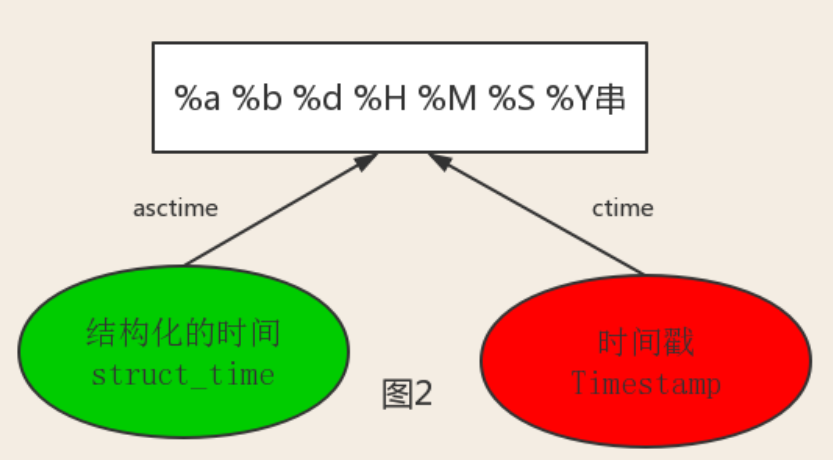
1、时间戳(以秒计算)
import time

print(time.time())

start_time=time.time()

time.sleep(3)

stop_time=time.time()

print(stop_time-start_time)
2、格式化的字符串
print(time.strftime('%Y-%m-%d %H:%M:%S %p')) # 2019-06-20 10:21:13 AM

print(time.strftime('%Y-%m-%d %X %p'))      # 2019-06-20 10:21:13 AM

strftime(format[, t]) #把一个代表时间的元组或者struct_time(如由time.localtime()和time.gmtime()返回)转化为格式化的时间字符串。如果t未指定,将传入time.localtime()。如果元组中任何一个元素越界,ValueError的错误将会被抛出。

print(time.strftime("%Y-%m-%d %X", time.localtime())) #2019-06-20 00:49:56
3、struct_time()对象
print(time.localtime()) # 上海:东八区 time.struct_time(tm_year=2019,tm_mon=6,tm_mday=20,tm_hour=10,                                       tm_min=24, tm_sec=52, tm_wday=3, tm_yday=171, tm_isdst=0)

print(time.localtime(1111111111))   #将秒转换成 time.struct_time()格式,不填默认当前时间

print(time.localtime().tm_year)     #

print(time.localtime().tm_mday)     #

print(time.gmtime())               #UTC时区 差八个小时

#time.struct_time(tm_year=2019,tm_mon=6,tm_mday=20,tm_hour=2,tm_min=29,tm_sec=51,tm_wday=3,tm_yday=171,tm_isdst=0)
4、 mktime( t ) : 将一个struct_time转化为时间戳
print(time.mktime(time.localtime())) #
5、time.strptime()
print(time.strptime('2017/04/08','%Y/%m/%d'))

time.strptime(string[, format]) # 把一个格式化时间字符串转化为struct_time。实际上它和strftime()是逆操作。

print(time.strptime('2011-05-05 16:37:06', '%Y-%m-%d %X'))

#time.struct_time(tm_year=2011, tm_mon=5, tm_mday=5, tm_hour=16, tm_min=37, tm_sec=6,

#  tm_wday=3, tm_yday=125, tm_isdst=-1)

#在这个函数中,format默认为:"%a %b %d %H:%M:%S %Y"。
6、time.asctime()
print(time.asctime(time.localtime()))# Thu Jun 20 14:32:05 2019

asctime([t]) : 把一个表示时间的元组或者struct_time表示为这种形式:'Sun Jun 20 23:21:05 1993'。

print(time.asctime())#如果没有参数,将会将time.localtime()作为参数传入。Sun Sep 11 00:43:43 2016
7、time.ctime()
print(time.ctime(12312312321)) # Mon Feb 29 22:45:21 2360

#ctime([secs]) : 把一个时间戳(按秒计算的浮点数)转化为time.asctime()的形式。如果参数未给或者为None的时候,将会默认time.time()为参数。它的作用相当于time.asctime(time.localtime(secs))。

print(time.ctime())  # Sun Sep 11 00:46:38 2016

print(time.ctime(time.time()))  # Sun Sep 11 00:46:38 2016
6.10 datetime 模块
| 方法 | 含义 | 备注 |
|---|---|---|
| datetime.datetime.now() | 2019-06-20 17:06:25.170859 | |
| datetime.datetime.now() + datetime.timedelta(days=3) | 当前时间+3天 | 2019-06-23 17:14:24.660116 |
| current_time.replace(year=1977) | 更改当前时间 | 1977-06-20 17:18:11.543876 |
| datetime.date.fromtimestamp(time.time()) | 时间戳直接转成日期格式 | 2019-08-19 |
import datetime

print(datetime.datetime.now() + datetime.timedelta(3)) #当前时间+3天

print(datetime.datetime.now() + datetime.timedelta(-3)) #当前时间-3天

print(datetime.datetime.now() + datetime.timedelta(hours=3)) #当前时间+3小时

print(datetime.datetime.now() + datetime.timedelta(minutes=30)) #当前时间+30分

current_time=datetime.datetime.now()

print(current_time.replace(year=1977))#1977-06-20 17:18:11.543876

print(datetime.date.fromtimestamp(1111111111))#2005-03-18

print(datetime.date.fromtimestamp(time.time()) )  # 时间戳直接转成日期格式 2016-08-19
6.11 打印进度条
def progress(percent,width=50):
if percent > 1:
percent=1
show_str=('[%%-%ds]' %width) %(int(width*percent) * '#')
print('\r%s %d%%' %(show_str,int(100*percent)),end='')
import time
recv_size=0
total_size=8097
while recv_size < total_size:
time.sleep(0.1)
recv_size+=80
percent=recv_size / total_size
progress(percent)
python 之 time模块、datetime模块(打印进度条)的更多相关文章
- Python的time和datetime模块
Python的time和datetime模块 time 常用的有time.time()和time.sleep()函数. import time print(time.time()) 149930555 ...
- python中time、datetime模块的使用
目录 python中time.datetime模块的使用 1.前言 2.time模块 1.时间格式转换图 2.常用方法 3.datetime模块 python中time.datetime模块的使用 1 ...
- Python 入门之 内置模块 -- datetime模块
Python 入门之 内置模块 -- datetime模块 1.datetime模块 from datetime import datetime (1)datetime.now() 获取当前时间和日期 ...
- Python模块01/自定义模块/time模块/datetime模块/random模块
Python模块01/自定义模块/time模块/datetime模块/random模块 内容大纲 1.自定义模块 2.time模块 3.datetime模块 4.random模块 1.自定义模块 1. ...
- 来看看Python炫酷的颜色输出与进度条打印
英语单词优化 上篇文章写到了Python开发英语单词记忆工具,其中依赖了bootstrap.css jQuery.js 基础html模块以及片段的css样式.有些朋友问,怎么能将这个练习题打包成单独的 ...
- 利用Python计算π的值,并显示进度条
利用Python计算π的值,并显示进度条 第一步:下载tqdm 第二步;编写代码 from math import * from tqdm import tqdm from time import ...
- 打印进度条——(progress bar才是专业的)
# 打印进度条——(progress bar是专业的) import time for i in range(0,101,2): time.sleep(0.1) char_num = i//2 #打印 ...
- python3如何打印进度条
Python3 中打印进度条(#)信息: 代码: import sys,time for i in range(50): sys.stdout.write("#") sys.std ...
- Python中time和datetime模块的简单用法
python中与时间相关的一个模块是time模块,datetime模块可以看为是time模块的高级封装. time模块中经常用到的有一下几个方法: time()用来获取时间戳,表示的结果为从1970年 ...
随机推荐
- xutils3基本使用
根目录下新建一个类继承application,调用xUtils3初始化方法 public class AtguiguApplication extends Application { @Overrid ...
- Codeforces - 828C String Reconstruction —— 并查集find()函数
题目链接:http://codeforces.com/contest/828/problem/C C. String Reconstruction time limit per test 2 seco ...
- JAVA- String类练习
JAVA- String类练习 需求1:去除字符串两边空格的函数,写一个自己的trim(); public class TestTrim { public static void main(Strin ...
- 安装与设置hexo
普通用户(非全局)安装nodejs和npm wget -qO- https://raw.github.com/creationix/nvm/master/install.sh | sh nvm ins ...
- JavaUtil_03_图片处理工具类
一.源码 功能:缩放图像.切割图像.图像类型转换.彩色转黑白.文字水印.图片水印等 package com.ray.dingtalk.util; import java.awt.AlphaCompos ...
- COM对象创建过程
在客户端需要调用COM组件时,通常调用windowAPI函数: STDAPI CoCreateInstance( REFCLSID rclsid, //创建的Com对象的类标识符(CLSID) LPU ...
- android自定义控件(三) 自定义属性
书接上回 在xml里建立属性,然后java代码里用typedArray获得这些属性,得到属性后,利用属性做一些事.例:得到xml里的color,赋给paint. 1.在res/values/下新建at ...
- 作业3rd
第三周作业 课本学习 使用nmap扫描特定靶机 使用nessus扫描特定靶机 靶机网络情况如下 在攻击机使用Nessus,步骤如下 新建一个扫描 填入目的主机ip,点击开始进行扫描 等待 扫描结果如下 ...
- requests模拟上传照片
博客园相册管理中有上传照片的功能 现在通过requests库模拟上传图片功能 先手动上传图片,用Fiddler转包,查看到上传图片接口请求格式, ------WebKitFormBoundarySKZ ...
- 跑monkey前开启/关闭下拉栏
@echo off cls title 别忘了跑monkey啊 :menu cls color 0A echo. echo 1.禁用systemui并重启 echo. echo 2.启用systemu ...