
zabbix-server新增zabbix-agent
zabbix监控系统搭建好了之后,就需要为各种角色host加入进来,现在新增一台zabbix-agent:
1.在172.16.23.128上安装zabbix-agent,zabbix-server:172.16.23.131
# rpm -Uvh http://repo.zabbix.com/zabbix/3.4/rhel/7/x86_64/zabbix-release-3.4-2.el7.noarch.rpm

# cd /etc/yum.repos.d/

# mv epel.repo epel.repo.bak

# yum install zabbix zabbix-agent -y

# mv epel.repo.bak epel.repo
安装完成agent端程序之后,现在做一些简单配置:
# sed -i 's/Server=127.0.0.1/Server=172.16.23.131/g' /etc/zabbix/zabbix_agentd.conf

# sed -i 's/ServerActive=127.0.0.1/ServerActive=172.16.23.131/g' /etc/zabbix/zabbix_agentd.conf

Hostname=172.16.23.128
然后开启服务,并检查日志是否报错:
# systemctl start zabbix-agent

# systemctl status zabbix-agent

# tail -f /var/log/zabbix/zabbix_agentd.log

[root@master zabbix_agentd.d]# tail -f /var/log/zabbix/zabbix_agentd.log

  7681:20181209:123239.539 IPv6 support:          YES

  7681:20181209:123239.539 TLS support:           YES

  7681:20181209:123239.539 **************************

  7681:20181209:123239.539 using configuration file: /etc/zabbix/zabbix_agentd.conf

  7681:20181209:123239.540 agent #0 started [main process]

  7682:20181209:123239.540 agent #1 started [collector]

  7683:20181209:123239.540 agent #2 started [listener #1]

  7684:20181209:123239.541 agent #3 started [listener #2]

  7686:20181209:123239.542 agent #5 started [active checks #1]

  7685:20181209:123239.543 agent #4 started [listener #3]
然后配置zabbix的web页面:
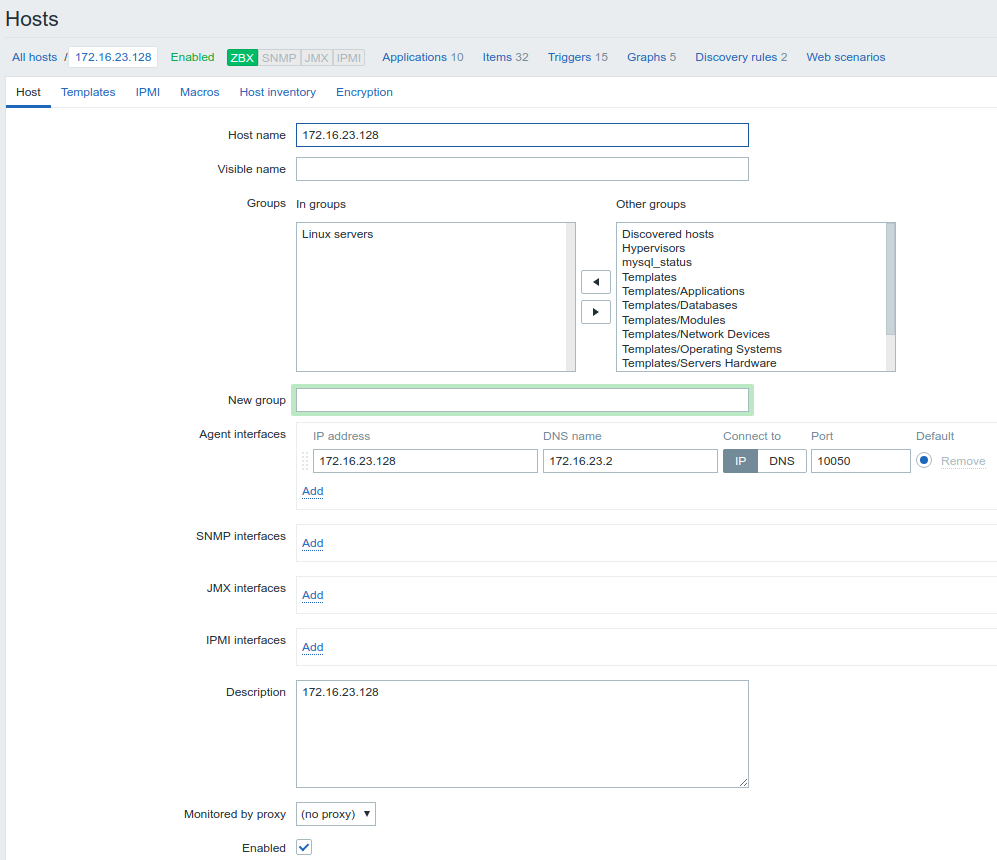
注意:这里的hostname一定要和zabbix-agent端配置文件的hostname一致,不然会报错如下:
[root@master zabbix_agentd.d]# tail -f /var/log/zabbix/zabbix_agentd.log

  7644:20181209:122919.996 TLS support:           YES

  7644:20181209:122919.996 **************************

  7644:20181209:122919.996 using configuration file: /etc/zabbix/zabbix_agentd.conf

  7644:20181209:122919.997 agent #0 started [main process]

  7645:20181209:122919.997 agent #1 started [collector]

  7646:20181209:122919.998 agent #2 started [listener #1]

  7648:20181209:122919.999 agent #4 started [listener #3]

  7647:20181209:122919.999 agent #3 started [listener #2]

  7649:20181209:122920.000 agent #5 started [active checks #1]

  7649:20181209:122920.007 no active checks on server [172.16.23.131:10051]: host [master] not found

  7649:20181209:123120.077 no active checks on server [172.16.23.131:10051]: host [master] not found
当只添加了host而没有添加template,那么日志并不会报错,但是web页面那里的agent不会变绿:

上面是添加template之后的,所以agent变为了绿色
zabbix-agent:172.16.23.128 zabbix-server:172.16.23.131
现在在agent端配置自定义item:
/etc/zabbix/zabbix_agentd.d/userparameter_script.conf
[root@master zabbix_agentd.d]# cat userparameter_script.conf

UserParameter=getupload,/etc/zabbix/getupload.py
配置文件确保这里是打开的:Include=/etc/zabbix/zabbix_agentd.d/*.conf,/etc/zabbix/getupload.py该脚本必须有执行权限
[root@master zabbix_agentd.d]# cat /etc/zabbix/getupload.py

#!/usr/bin/env python

def getload():

    with open("/proc/loadavg", "r") as f:

        con2 = f.read().split()

    f.close()

    return con2

print(getload()[0])
agent配置完成后重启zabbix-agent服务:systemctl restart zabbix-agent
然后在zabbix-server端手动获取该值:
[root@zabbix-server zabbix_agentd.d]# zabbix_get -s 172.16.23.128  -k getupload

0.00
上面-s 后面接上zabbix-agent的ip,如果agent在server上就和server ip一致,-k后面接命名的item
zabbix-server新增zabbix-agent的更多相关文章
- docker 一键安装zabbix server、zabbix agent
基本原理.须知:1.zabbix 分为zabbix server和zabbix agent,其中zabbix server需要web环境,并且其数据存储在独立的数据库中:2.docker是一种容器服务 ...
- Zabbix Server 和 Zabbix Agentd 开机自动运行
Zabbix Server 和 Zabbix Agentd 开机自动运行 请问:怎样 Zabbix Server 和 Zabbix Agentd 开机自动运行? 注:如果你的命令行写进了 /etc/r ...
- zabbix server端与agent端源码安装 自定义监控项
ZabbixServer的安装(只有源码装zabbix才能装支持java) 搭建自定义yum仓库并安装支持包 yum -y install createrepo #下载依赖关系命令 createrep ...
- zabbix之 zabbix server 跟 agent 更换ip地址
描述: zabbix server端跟agent端更改 ip . 改完之后,相应配置文件 (zabbix_agentd.conf.zabbix_server.conf)的ip也进行了替换 但是依旧报错 ...
- zabbix Server 4.0 部署及之内置item使用案例
zabbix Server 4.0 部署及之内置item使用案例 作者:尹正杰 版权声明:原创作品,谢绝转载!否则将追究法律责任. 一.zabbix组件架构概述(图片摘自网络) 1>.zabbi ...
- 运维监控-使用Zabbix Server 添加自定义 item
运维监控-使用Zabbix Server 监控自定义 item 作者:尹正杰 版权声明:原创作品,谢绝转载!否则将追究法律责任. 本篇博客就直接开门见山如何使用Zabbix Server 监控自定义 ...
- zabbix server总是stoped,找到此方法解决了问题
zabbix日志报错: One child process died (PID:8885,exitcode/signal:1). Exiting ... syncing history data... ...
- 使用zabbix server监控tomcat实战案例
使用zabbix server监控tomcat实战案例 作者:尹正杰 版权声明:原创作品,谢绝转载!否则将追究法律责任. 大家都知道,zabbix server效率高是使用C语言编写的,有很多应用程序 ...
- Zabbix Server宕机报“__zbx_mem_malloc(): out of memory (requested 96 bytes)”
早上登录Zabbix的时候,发现其提示"Zabbix server is not running: the information displayed may not be current& ...
- 转 zabbix debug and zabbix使用percona插件监控mysql
########## https://www.cnblogs.com/keithtt/p/8542987.html zabbix使用percona插件监控mysql 1.添加percona仓库. ...
随机推荐
- NEFU 117 - 素数个数的位数 - [简单数学题]
题目链接:http://acm.nefu.edu.cn/JudgeOnline/problemShow.php?problem_id=117 Time Limit:1000ms Memory Limi ...
- 区块链,Ethereum-Wallet
https://blockchain.info/charts/transactions-per-second https://slock.it/ https://en.wikipedia.or ...
- Nginx日志切割之Logrotate篇
不管是什么日志文件,都是会越来越大的,大到一定程度就是个可怕的事情了,所以要及早的做处理,方法之一就是按时间段来存储,不过linux系统提供了Logrotate的日志管理工具,很好用,不用写计划任务脚 ...
- python count()
count() 描述 Python count() 方法用于统计字符串里某个字符出现的次数.可选参数为在字符串搜索的开始与结束位置. 语法 count()方法语法: str.count(sub, st ...
- [svc]sublime text3设置py环境最佳姿势
搞个py虚拟环境 待sublim调用 - for windows pip install virtualenv pip install virtualenvwrapper pip install vi ...
- Python自动发邮件-yagmail库
之前写过用标准库使用Python Smtplib和email发送邮件,感觉很繁琐,久了不用之后便忘记了.前几天看知乎哪些Python库让你相见恨晚?,看到了yagmail第三方库,学习过程中遇到一些问 ...
- python 根据路径导入模块
Import python module NOT on path http://stackoverflow.com/questions/10161568/import-python-module-no ...
- Centos expect spawn、linux expect 用法
使用expect实现自动登录的脚本,网上有很多,可是都没有一个明白的说明,初学者一般都是照抄.收藏.可是为什么要这么写却不知其然.本文用一个最短的例子说明脚本的原理. 脚本代码如下: ###### ...
- POJ3169:Layout(差分约束)
http://poj.org/problem?id=3169 题意: 一堆牛在一条直线上按编号站队,在同一位置可以有多头牛并列站在一起,但编号小的牛所占的位置不能超过编号大的牛所占的位置,这里用d[i ...
- 轮廓的查找、表达、绘制、特性及匹配(How to Use Contour? Find, Component, Construct, Features & Match)
http://www.cnblogs.com/xrwang/archive/2010/02/09/HowToUseContour.html 作者:王先荣 前言 轮廓是构成任何一个形状的边界或外形 ...