
mysql5.6升级及mysql无密码登录
mysql5.6升级
mysql5.6的升级可以分为以下几个步骤:
- 安全关闭正在运行的MySQL实例
- 把/usr/local/mysql 的连接由MySQL5.6更改为MySQL5.7
- 启动MySQL实例,查看是否是MySQL5.7版本
- 使用mysql_upgrade命令升级系统表
首先:停止当前运行的MySQL实例,然后做如下操作
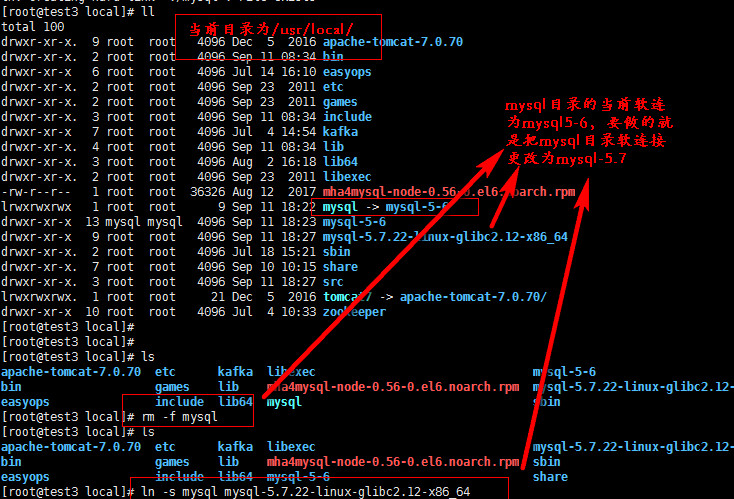
更改之后启动MySQL实例:
[root@test3 local]# service mysqld start

Starting MySQL.. SUCCESS!

[root@test3 local]# netstat -lntp

Active Internet connections (only servers)

Proto Recv-Q Send-Q Local Address               Foreign Address             State       PID/Program name

tcp               0.0.0.0:                  0.0.0.0:*                   LISTEN      /sshd

tcp               :::                       :::*                        LISTEN      /sshd

tcp               :::                     :::*                        LISTEN      /grafana-serve

tcp               :::
然后连接MySQL,可以看到MySQL已经有原来的5.6版本升级为5.7版本:
[root@test3 ~]# mysql -S /tmp/mysql.sock -p

Enter password:

Welcome to the MariaDB monitor.  Commands end with ; or \g.

Your MySQL connection id is

Server version: 5.7.-log MySQL Community Server (GPL)

Copyright (c) , , Oracle, SkySQL Ab and others.

Type 'help;' or '\h' for help. Type '\c' to clear the current input statement.

MySQL [(none)]> exit

Bye

[root@test3 ~]#
这时候利用mysql_upgrade命令升级用户表
[root@test3 ~]# mysql_upgrade -s -p

Enter password:

The --upgrade-system-tables option was used, databases won't be touched.

Checking if update is needed.

Checking server version.

Running queries to upgrade MySQL server.

Upgrading the sys schema.

Upgrade process completed successfully.

Checking if update is needed.

#需要注意的是这个命令在执行过程中会重构数据库中所有的表,但是升级的时候,用户的数据表,是不需要重构的,因此我们使用看-s参数,表示只是重构系统表。
如果这一步的操作没有报错,那就说明MySQL实例升级完毕!
mysql的无密码登录
第一种:我们可以把用户名和密码写进配置文件中,来实现无密码登录。
查看一下mysql默认读取配置文件的路径:
[root@test3 mysql]# mysql --help |grep my.cnf

                      order of preference, my.cnf, $MYSQL_TCP_PORT,

/etc/my.cnf /etc/mysql/my.cnf /usr/local/mysql/etc/my.cnf ~/.my.cnf

[root@test3 mysql]#
我们可以在当前用户的家目录下面创建用户名和密码,如下:
[root@test2 ~]# cat .my.cnf

[client]

user=root

password=

[root@test2 ~]# mysql

Welcome to the MySQL monitor.  Commands end with ; or \g.

Your MySQL connection id is

Server version: 5.6.-log Source distribution

Copyright (c) , , Oracle and/or its affiliates. All rights reserved.

Oracle is a registered trademark of Oracle Corporation and/or its

affiliates. Other names may be trademarks of their respective

owners.

Type 'help;' or '\h' for help. Type '\c' to clear the current input statement.

mysql>
但是这种方式是明码保存的很不安全,接下来,我们使用mysql自带的mysql_condif_editory命令的设置无密码登录。
[root@test2 ~]# mysql_config_editor --help

mysql_config_editor Ver 1.0 Distrib 5.6., for Linux on x86_64

Copyright (c) , , Oracle and/or its affiliates. All rights reserved.

Oracle is a registered trademark of Oracle Corporation and/or its

affiliates. Other names may be trademarks of their respective

owners.

MySQL Configuration Utility.

Usage: mysql_config_editor [program options] [command [command options]]

  -?, --help          Display this help and exit.

  -v, --verbose       Write more information.

  -V, --version       Output version information and exit.

Variables (--variable-name=value)

and boolean options {FALSE|TRUE}  Value (after reading options)

--------------------------------- ----------------------------------------

verbose                           FALSE

Where command can be any one of the following :

       set [command options]     Sets user name/password/host name/socket/port

                                 for a given login path (section).

       remove [command options]  Remove a login path from the login file.

       print [command options]   Print all the options for a specified

                                 login path.

       reset [command options]   Deletes the contents of the login file.

       help                      Display this usage/help information.
mysql_config_editor命令
实例:
[root@test2 ~]# mysql_config_editor set --user=root --host=localhost --password

Enter password:

[root@test2 ~]# ls .mylogin.cnf

.mylogin.cnf

[root@test2 ~]#

#这里的密码必须在交互输入,然后就可以直接无密码登录

[root@test2 ~]# mysql

Welcome to the MySQL monitor.  Commands end with ; or \g.

Your MySQL connection id is

Server version: 5.6.-log Source distribution

Copyright (c) , , Oracle and/or its affiliates. All rights reserved.

Oracle is a registered trademark of Oracle Corporation and/or its

affiliates. Other names may be trademarks of their respective

owners.

Type 'help;' or '\h' for help. Type '\c' to clear the current input statement.

mysql>
生成的文件是一个二进制文件,可以使用print参数查看
[root@test2 ~]# mysql_config_editor print --all

[client]

user = root

password = *****

host = localhost

[root@test2 ~]#
此命令还可以使用使用--login-path命令,如下:
[root@test2 ~]# mysql_config_editor set --login-path=test --user=root --host=localhost --password

Enter password:

[root@test2 ~]# mysql_config_editor print --login-path=test

[test]

user = root

password = *****

host = localhost

[root@test2 ~]# mysql --login-path=test

Welcome to the MySQL monitor.  Commands end with ; or \g.

Your MySQL connection id is

Server version: 5.6.-log Source distribution

Copyright (c) , , Oracle and/or its affiliates. All rights reserved.

Oracle is a registered trademark of Oracle Corporation and/or its

affiliates. Other names may be trademarks of their respective

owners.

Type 'help;' or '\h' for help. Type '\c' to clear the current input statement.

mysql>
--login-path也是在当前家目录下面生成.mylogin.cnf文件,这个文件以 [ ] 进行标识!
mysql5.6升级及mysql无密码登录的更多相关文章
- mysql无密码登陆
mysql登陆不上或者密码忘记可以尝试一下无密码登陆 以下一波神操作!! 首先关闭数据库服务(数据库在Centos7版本以上或者Redhat版本上被改名为mariadb) systemctl stop ...
- MySQL5.1升级5.6后,执行grant出错:ERROR 2013 (HY000): Lost connection to MySQL server during query【转载】
转载: MySQL5.5升级5.6后,执行grant出错:ERROR 2013 (HY000): Lost connection to -mysql教程-数据库-壹聚教程网http://www.111 ...
- MySQL 5.1.73升级为MySQL 5.5.35详解
一.前言 二.概述 三.安装MySQL 5.1.73 四.升级为MySQL 5.5.35 五.总结 注,测试环境 CentOS 6.4 x86_64,MySQL 版本(5.1.73.5.5.35)目前 ...
- Mac安装Mysql无法登录
Mac安装的Mysql5.7.10 执行mysql -u root -p 就要求输入密码,但是新安装是没密码的.然后就会报错. ERROR 1045 (28000): Access denied fo ...
- linux下MySQL安装登录及操作
linux下MySQL安装登录及操作 二.安装Mysql 1.下载MySQL的安装文件 安装MySQL需要下面两个文件: MySQL-server-4.0.16-0.i386.rpm MySQL-cl ...
- 对于mariadb安装后可以默认使用无密码登录的问题解决方案
mariadb安装后默认可以无密码登录 所以首先我们要设置root用户的密码 mysqladmin -u root -p password 密码 [遇到enter直接enter就行,注意,如果是重新设 ...
- P1-Linux下安装MySQL及登录用户配置
Linux下安装MySQL及登录用户配置 环境:Centos7.4 Mysql5.6 1. 查询是否安装 MySQL和MariaDB rpm -qa | grep -i mysql rpm -q ...
- 开启mysql远程登录
开发过程中经常遇到远程访问mysql的问题,每次都需要搜索,感觉太麻烦,这里记录下,也方便我以后查阅. 首先访问本机的mysql(用ssh登录终端,输入如下命令): mysql -uroot -p 输 ...
- 如何在忘记mysql的登录密码时更改mysql登录的密码(window及linux)
最近一直在边学习边开发java项目,理所当然的就少不了跟数据库打交道了,但是有时候就会脑子一短路,把mysql的登录密码给忘记了,这个时候我们又很急切的需要进到数据库中查看数据,那这个时候要怎么才能改 ...
随机推荐
- 利用反射生成JDK动态代理
利用反射生成JDK动态代理 在Java的java.lang.reflect包下提供了一个Proxy类和一个InvocationHandler接口,通过使用这个类和接口可以生成JDK动态代理类和动态代理 ...
- 自己封装framworks上传到应用商店报错
参考链接: http://www.jianshu.com/p/60ac3ded34a0 http://ikennd.ac/blog/2015/02/stripping-unwanted-archite ...
- django模板语言转义处理
模板变量的内容,如果含html的话,django的模板系统默认会对输出进行转义,比如把<p>转义成了<p> ,然后再显示出来的时候就如实地显示为<p>.要解决这个问 ...
- android 打开系统相机,
1.第一步在androidmanifest.xml中注册 <uses-permission android:name="android.permission.WRITE_EXTERNA ...
- python框架之Django(2)-简单的CRUD
写一个简单的项目小例子来了解Django中的O/RM操作 前戏 创建app #在Django项目根目录下执行 python3 manage.py startapp [app name] 配置数据库连接 ...
- 纯代码实现WordPress上传图片自动重命名的方法
在我们使用 WordPress 发布文章时,经常都需要添加图片.多媒体什么的.然而,大家都知道 WordPress 是舶来物,对于中文用户来说,我们都会把图片命名为中文的,由于 WordPress 机 ...
- Spark2.x学习笔记:Spark SQL快速入门
Spark SQL快速入门 本地表 (1)准备数据 [root@node1 ~]# mkdir /tmp/data [root@node1 ~]# cat data/ml-1m/users.dat | ...
- [django]JsonResponse序列化数据
def home(request): data = { 'name': 'maotai', 'age': 22 } import json return HttpResponse(json.dumps ...
- oj1500(Message Flood)字典树
大意:输入几个字符串,然后再输入几个字符串,看第一次输入的字符串有多少没有在后面的字符串中出现(后输入的字符串不一定出现在之前的字符串中) #include <stdio.h> #incl ...
- html的img标签 强大的title
示例: <img src="smiley-2.gif" alt="Smiley face" width="42" height=&qu ...