
zabbix 微信报警脚本
不知道是什么原因直接用Python脚本zabbix无法执行脚本,需要一个shell来启动
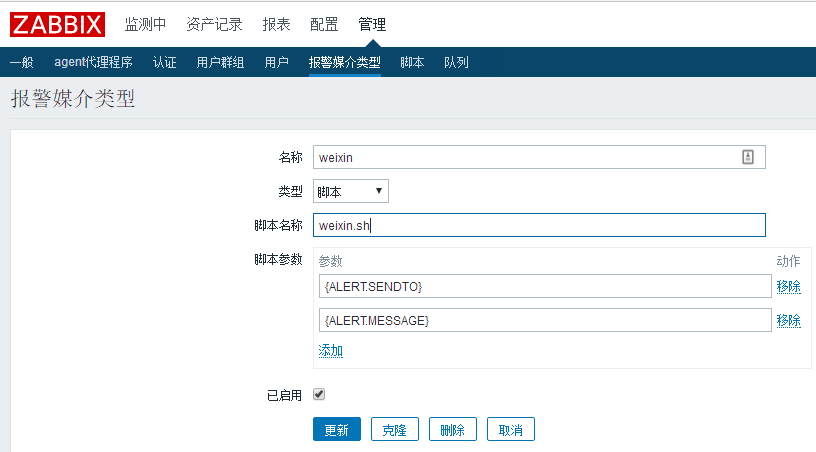
#! /bin/bash

userid=$

content=$

python /data/zabbix/alertscripts/weixin.py  $userid $content
#!/usr/bin/env python

# _*_ coding:utf8 _*_

import urllib2

import simplejson as json

import sys

class weChat:

    def __init__(self,url,Corpid,Secret):

        url = '%s/cgi-bin/gettoken?corpid=%s&corpsecret=%s' % (url,Corpid,Secret)

        res = self.url_req(url)

        self.token = res['access_token']

    def url_req(self,url,method='get',data={}):

        if method == 'get':

            req = urllib2.Request(url)

            res = json.loads(urllib2.urlopen(req).read())

        elif method == 'post':

                        req = urllib2.Request(url,data)

                        res = json.loads(urllib2.urlopen(req).read())

        else:

            print 'error request method...exit'

            sys.exit()

        return res

    def send_message(self,userlist,content,agentid=):

        self.userlist = userlist

        self.content = content

        url = 'https://qyapi.weixin.qq.com/cgi-bin/message/send?access_token=%s' % self.token

        data = {

                      "touser": "",

                      "toparty": "",

                      "totag": "",

                      "msgtype": "text",

                      "agentid": "",

                      "text": {

                          "content": ""

                      },

                      "safe":""

                   }

        data['touser'] = userlist

        data['agentid'] = agentid

        data['text']['content'] = content

        data = json.dumps(data,ensure_ascii=False)

    #   print data

        res = self.url_req(url,method='post',data=data)

        if res['errmsg'] == 'ok':

            print 'send sucessed!!!'

        else:

            print 'send failed!!'

            print res

if __name__ == '__main__':

      userlist = sys.argv[]

#      userlist = 'ZhangSen'

      content = sys.argv[:]

      content = '\n'.join(content)

#      content = 'test1'

      Corpid = 'xxx'  #此处对应修改

      Secret = 'xxx'  #此处对应修改

      url = 'https://qyapi.weixin.qq.com'

wechat = weChat(url,Corpid,Secret)

wechat.send_message(userlist,content)
上面这脚本有个问题不能发中文消息,下面这个可以发中文
#!/usr/bin/python

# _*_coding:utf- _*_

import urllib2

import json

import sys

reload(sys)

sys.setdefaultencoding('utf-8')

def gettoken(corpid, corpsecret):

    gettoken_url = 'https://qyapi.weixin.qq.com/cgi-bin/gettoken?corpid=' + corpid + '&corpsecret=' + corpsecret

    try:

        token_file = urllib2.urlopen(gettoken_url)

    except urllib2.HTTPError as e:

        e.code

        e.read().decode("utf8")

        sys.exit()

    token_data = token_file.read().decode('utf-8')

    token_json = json.loads(token_data)

    token_json.keys()

    token = token_json['access_token']

    return token

def senddata(access_token, user, party, agent, subject, content):

    send_url = 'https://qyapi.weixin.qq.com/cgi-bin/message/send?access_token=' + access_token

    send_values = "{\"touser\":\"" + user + "\",\"toparty\":\"" + party + "\",\"totag\":\"\",\"msgtype\":\"text\",\"agentid\":\"" + agent + "\",\"text\":{\"content\":\"" + subject + content + "\"},\"safe\":\"0\"}"

    send_request = urllib2.Request(send_url, send_values)

    response = json.loads(urllib2.urlopen(send_request).read())

    print "send sucessed!!!"

    str(response)

if __name__ == '__main__':

    user = str(sys.argv[])  # 参数1:发送给用户的账号,必须关注企业号,并对企业号有发消息权限

    party = str('')  # 参数2:发送给组的id号,必须对企业号有权限

    agent = str('')  # 参数3:企业号中的应用id

    subject = str('')  # 参数4:标题【消息内容的一部分】

    content = str(sys.argv[])  # 参数5:文本具体内容

    corpid = 'xxx'  # CorpID是企业号的标识

    corpsecret = 'xxx'   # corpsecretSecret是管理组凭证密钥

    try:

        accesstoken = gettoken(corpid, corpsecret)

        senddata(accesstoken, user, party, agent, subject, content)

    except Exception, e:

        print "error"

        str(e) + "Error Please Check \"corpid\" or \"corpsecret\" Config"
zabbix 微信报警脚本的更多相关文章
- Zabbix微信报警脚本及写触发记录
一.Zabbix微信报警 默认路径:/usr/lib/zabbix/scripts/weixin.py #!/usr/bin/python # -*- coding: utf-8 -*- import ...
- 通过脚本发送zabbix微信报警
实现zabbix通过微信报警的方式也是通过脚本来实现,与邮件报警不同的是,脚本调用的微信的相关接口的获取相对复杂一点 1.申请一个微信公众号(企业号) 申请方法不多说,如果已申请请忽略 2.在微信企业 ...
- Zabbix微信报警触发
(1) 企业应用-创建应用 1.除了对个人添加微信报警之外,还可以添加不同管理组,接受同一个应用推送的消息, 成员账号,组织部门ID,应用Agent ID,CorpID和Secret, ...
- (五)zabbix微信报警
1.注册微信企业号 1)注册微信企业号 https://work.weixin.qq.com 2)通讯录添加用户 3)记住部门id 4)创建应用 5)点击刚创建的应用,记住Agentld和secret ...
- Zabbix 微信报警Python版(带监控项波动图片)
#!/usr/bin/python # -*- coding: UTF- -*- #Function: 微信报警python版(带波动图) #Environment: python import ur ...
- zabbix 微信报警
http://blog.csdn.net/wh211212/article/details/52735236 Zabbix可以通过多种方式把告警信息发送到指定人,常用的有邮件,短信报警方式,但是越来越 ...
- filebeat+logstash通过zabbix微信报警
一.安装软件: 1.在要收集日志的机器上安装filebeat: 1).下载安装: cd /usr/local/src wget https://artifacts.elastic.co/downloa ...
- zabbix微信报警
[root@LinuxS04 jiaoben]# ./weixin 联系人 baojing baojingok[root@LinuxS04 jiaoben]# pwd/usr/local/zabbix ...
- zabbix邮件报警脚本(Python)
#!/usr/bin/python #coding:utf-8 import smtplib from email.mime.text import MIMEText import sys mail_ ...
随机推荐
- sencha touch 在线实战培训 第一期 第八节 (完结)
2014.1.15晚上8点开的课 这是本期课程的最后一课,下期课程预计在春节后继续. 如果你有什么意见和建议可以将他们发送到邮箱:534502520@qq.com 本期培训一共八节,前三堂免费,后面的 ...
- Unity3D Shader描边效果
Shader "Custom/RimColor" { Properties { _MainTex ("Base (RGB)", 2D) = "whit ...
- Metrics.Net构建指标监控中心
Metrics.NET(https://github.com/etishor/Metrics.NET)是一个给CLR 提供度量工具的包,它是移植自Java的metrics,支持的平台 .NET 4.5 ...
- Notepad++如何关闭最近打开的文件的历史记录功能
Notepad++是Windows 操作系统下的一套非常有特色的自由软件的纯文字编辑器(许可证:GPL),有完整的中文化接口及支持多国语言编写的 功能(UTF8 技术).它的功能比Windows中的N ...
- 【CF840E】In a Trap 分块
[CF840E]In a Trap 题意:一棵n个点的树,第i个点权值为ai,q次询问,每次给定u,v(u是v的祖先),求对于所有在u-v上的点i,$a_i\ \mathrm{xor}\ dis(i, ...
- 【CF884F】Anti-Palindromize 费用流
[CF884F]Anti-Palindromize 题意:定义一个串是反回文的,当且仅当对于1<=i<=len,$a_i!=a_{len-i+1}$. 现在给出一个长度为n的串S(n是偶数 ...
- Java虚拟机九 java.lang.String在虚拟机中的实现
在Java中,Java的设计者对String对象进行了大量的优化,主要有三个特点: 1.不变性: 不变性是指String对象一旦生成,则不能再对它进行改变.String的这个特点可以泛化成不变(imm ...
- spring jdbcTemplate 操作存储过程
Spring的SimpleJdbcTemplate将存储过程的调用进行了良好的封装,下面列出使用JdbcTemplate调用Oracle存储过程的三种情况: 一.无返回值的存储过程调用 1.存储过程代 ...
- thinkCMF----使用自定义函数
thinkCMF使用自定义函数:app 下新建 common.php
- HDU 1243 反恐训练营(最长公共序列)
反恐训练营 Time Limit: 2000/1000 MS (Java/Others) Memory Limit: 65536/32768 K (Java/Others) Total Submiss ...