
zabbix 微信报警脚本
不知道是什么原因直接用Python脚本zabbix无法执行脚本,需要一个shell来启动
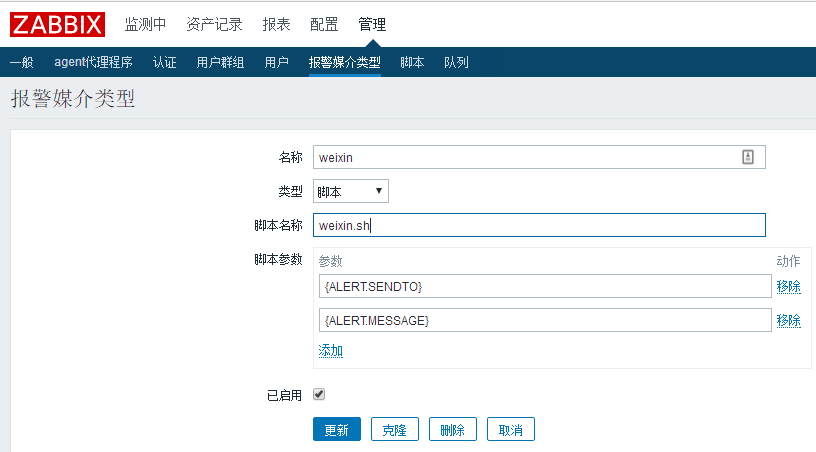
#! /bin/bash

userid=$

content=$

python /data/zabbix/alertscripts/weixin.py  $userid $content
#!/usr/bin/env python

# _*_ coding:utf8 _*_

import urllib2

import simplejson as json

import sys

class weChat:

    def __init__(self,url,Corpid,Secret):

        url = '%s/cgi-bin/gettoken?corpid=%s&corpsecret=%s' % (url,Corpid,Secret)

        res = self.url_req(url)

        self.token = res['access_token']

    def url_req(self,url,method='get',data={}):

        if method == 'get':

            req = urllib2.Request(url)

            res = json.loads(urllib2.urlopen(req).read())

        elif method == 'post':

                        req = urllib2.Request(url,data)

                        res = json.loads(urllib2.urlopen(req).read())

        else:

            print 'error request method...exit'

            sys.exit()

        return res

    def send_message(self,userlist,content,agentid=):

        self.userlist = userlist

        self.content = content

        url = 'https://qyapi.weixin.qq.com/cgi-bin/message/send?access_token=%s' % self.token

        data = {

                      "touser": "",

                      "toparty": "",

                      "totag": "",

                      "msgtype": "text",

                      "agentid": "",

                      "text": {

                          "content": ""

                      },

                      "safe":""

                   }

        data['touser'] = userlist

        data['agentid'] = agentid

        data['text']['content'] = content

        data = json.dumps(data,ensure_ascii=False)

    #   print data

        res = self.url_req(url,method='post',data=data)

        if res['errmsg'] == 'ok':

            print 'send sucessed!!!'

        else:

            print 'send failed!!'

            print res

if __name__ == '__main__':

      userlist = sys.argv[]

#      userlist = 'ZhangSen'

      content = sys.argv[:]

      content = '\n'.join(content)

#      content = 'test1'

      Corpid = 'xxx'  #此处对应修改

      Secret = 'xxx'  #此处对应修改

      url = 'https://qyapi.weixin.qq.com'

wechat = weChat(url,Corpid,Secret)

wechat.send_message(userlist,content)
上面这脚本有个问题不能发中文消息,下面这个可以发中文
#!/usr/bin/python

# _*_coding:utf- _*_

import urllib2

import json

import sys

reload(sys)

sys.setdefaultencoding('utf-8')

def gettoken(corpid, corpsecret):

    gettoken_url = 'https://qyapi.weixin.qq.com/cgi-bin/gettoken?corpid=' + corpid + '&corpsecret=' + corpsecret

    try:

        token_file = urllib2.urlopen(gettoken_url)

    except urllib2.HTTPError as e:

        e.code

        e.read().decode("utf8")

        sys.exit()

    token_data = token_file.read().decode('utf-8')

    token_json = json.loads(token_data)

    token_json.keys()

    token = token_json['access_token']

    return token

def senddata(access_token, user, party, agent, subject, content):

    send_url = 'https://qyapi.weixin.qq.com/cgi-bin/message/send?access_token=' + access_token

    send_values = "{\"touser\":\"" + user + "\",\"toparty\":\"" + party + "\",\"totag\":\"\",\"msgtype\":\"text\",\"agentid\":\"" + agent + "\",\"text\":{\"content\":\"" + subject + content + "\"},\"safe\":\"0\"}"

    send_request = urllib2.Request(send_url, send_values)

    response = json.loads(urllib2.urlopen(send_request).read())

    print "send sucessed!!!"

    str(response)

if __name__ == '__main__':

    user = str(sys.argv[])  # 参数1:发送给用户的账号,必须关注企业号,并对企业号有发消息权限

    party = str('')  # 参数2:发送给组的id号,必须对企业号有权限

    agent = str('')  # 参数3:企业号中的应用id

    subject = str('')  # 参数4:标题【消息内容的一部分】

    content = str(sys.argv[])  # 参数5:文本具体内容

    corpid = 'xxx'  # CorpID是企业号的标识

    corpsecret = 'xxx'   # corpsecretSecret是管理组凭证密钥

    try:

        accesstoken = gettoken(corpid, corpsecret)

        senddata(accesstoken, user, party, agent, subject, content)

    except Exception, e:

        print "error"

        str(e) + "Error Please Check \"corpid\" or \"corpsecret\" Config"
zabbix 微信报警脚本的更多相关文章
- Zabbix微信报警脚本及写触发记录
一.Zabbix微信报警 默认路径:/usr/lib/zabbix/scripts/weixin.py #!/usr/bin/python # -*- coding: utf-8 -*- import ...
- 通过脚本发送zabbix微信报警
实现zabbix通过微信报警的方式也是通过脚本来实现,与邮件报警不同的是,脚本调用的微信的相关接口的获取相对复杂一点 1.申请一个微信公众号(企业号) 申请方法不多说,如果已申请请忽略 2.在微信企业 ...
- Zabbix微信报警触发
(1) 企业应用-创建应用 1.除了对个人添加微信报警之外,还可以添加不同管理组,接受同一个应用推送的消息, 成员账号,组织部门ID,应用Agent ID,CorpID和Secret, ...
- (五)zabbix微信报警
1.注册微信企业号 1)注册微信企业号 https://work.weixin.qq.com 2)通讯录添加用户 3)记住部门id 4)创建应用 5)点击刚创建的应用,记住Agentld和secret ...
- Zabbix 微信报警Python版(带监控项波动图片)
#!/usr/bin/python # -*- coding: UTF- -*- #Function: 微信报警python版(带波动图) #Environment: python import ur ...
- zabbix 微信报警
http://blog.csdn.net/wh211212/article/details/52735236 Zabbix可以通过多种方式把告警信息发送到指定人,常用的有邮件,短信报警方式,但是越来越 ...
- filebeat+logstash通过zabbix微信报警
一.安装软件: 1.在要收集日志的机器上安装filebeat: 1).下载安装: cd /usr/local/src wget https://artifacts.elastic.co/downloa ...
- zabbix微信报警
[root@LinuxS04 jiaoben]# ./weixin 联系人 baojing baojingok[root@LinuxS04 jiaoben]# pwd/usr/local/zabbix ...
- zabbix邮件报警脚本(Python)
#!/usr/bin/python #coding:utf-8 import smtplib from email.mime.text import MIMEText import sys mail_ ...
随机推荐
- IOS设计模式第五篇之装饰设计模式的代理设计模式
版权声明:原创作品,谢绝转载!否则将追究法律责任. 代理: 另一个装饰设计模式,代理,是一个代表或者协调另一个对象的行为机制.例如当你用一个tableView,你必须实现他里面的一个tableView ...
- WP8.1学习系列(第十九章)——事件和路由事件概述
我们将介绍在使用 C#.Visual Basic 或 Visual C++ 组件扩展 (C++/CX) 作为编程语言并使用 XAML 进行 UI 定义时,针对 Windows 运行时应用的事件的编程概 ...
- Mavan学习之pom聚合
所有用Maven管理的真实的项目都应该是分模块的,每个模块都对应着一个pom.xml.它们之间通过继承和聚合(也称作多模块,multi-module)相互关联.那么,为什么要这么做呢?我们明明在开发一 ...
- SecureCRT无法使用root账户远程连接ubuntu
========1.问题============ SecureCRT无法使用root账户远程连接ubuntu 用其他账户连接,正常 用root账户连接,不能连接 =========2.原因====== ...
- JVM工具jcmd实践
暂时参考以下链接,后续补充自己的实践. https://www.jianshu.com/p/388e35d8a09b
- 【黑金原创教程】【FPGA那些事儿-驱动篇I 】实验十:PS/2模块④ — 普通鼠标
实验十:PS/2模块④ - 普通鼠标 学习PS/2键盘以后,接下来就要学习 PS/2 鼠标.PS/2鼠标相较PS/2键盘,驱动难度稍微高了一点点,因为FPGA(从机)不仅仅是从PS/2鼠标哪里读取数据 ...
- Android - dhroid 开发框架
extends:http://www.eoeandroid.com/thread-326973-1-1.html 开源中国地址:http://www.oschina.net/p/dhroid 开源项目 ...
- mac操作
资料搜集: mac终端 常用命令操作 mac osx常用快捷键一览 mac chrome快捷键
- 高斯混合模型Gaussian Mixture Model (GMM)
混合高斯模型GMM是指对样本的概率密度分布进行估计,而估计采用的模型(训练模型)是几个高斯模型的加权和(具体是几个要在模型训练前建立好).每个高斯模型就代表了一个类(一个Cluster).对样本中的数 ...
- iOS多线程编程之GCD的基本使用(转载)
一.主队列介绍 主队列:是和主线程相关联的队列,主队列是GCD自带的一种特殊的串行队列,放在主队列中得任务,都会放到主线程中执行. 提示:如果把任务放到主队列中进行处理,那么不论处理函数是异步的还是同 ...