
Java-Shiro(三):Shiro与Spring MVC集成
新建Java Daynamic Web项目
导入Spring、SpringMVC依赖包:
导入Spring & Spring MVC包(导入如下所有开发包):
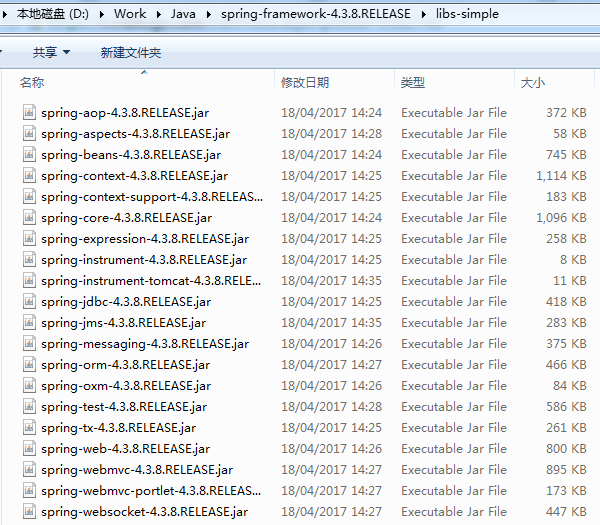
Spring AOP依赖扩展包:

配置Spring :
1)修改web.xml导入“#contextLoaderListener”
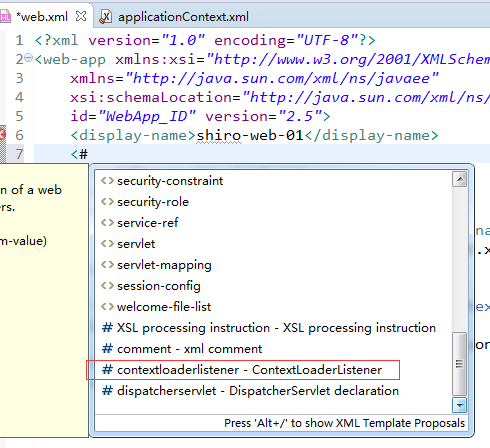
配置如下:
<?xml version="1.0" encoding="UTF-8"?>

<web-app xmlns:xsi="http://www.w3.org/2001/XMLSchema-instance"

    xmlns="http://java.sun.com/xml/ns/javaee"

    xsi:schemaLocation="http://java.sun.com/xml/ns/javaee http://java.sun.com/xml/ns/javaee/web-app_2_5.xsd"

    id="WebApp_ID" version="2.5">

    <display-name>shiro-web-01</display-name>

    <!-- 配置Spring的 ContextLoaderListener -->

    <!-- needed for ContextLoaderListener -->

    <context-param>

        <param-name>contextConfigLocation</param-name>

        <param-value>classpath:applicationContext.xml</param-value>

    </context-param>

    <!-- Bootstraps the root web application context before servlet initialization -->

    <listener>

        <listener-class>org.springframework.web.context.ContextLoaderListener</listener-class>

    </listener>

</web-app>
2)在src下添加Spring Bean配置文件applicationContext.xml
配置Spring MVC
1)在web.xm中导入“#dispatcherservlet”
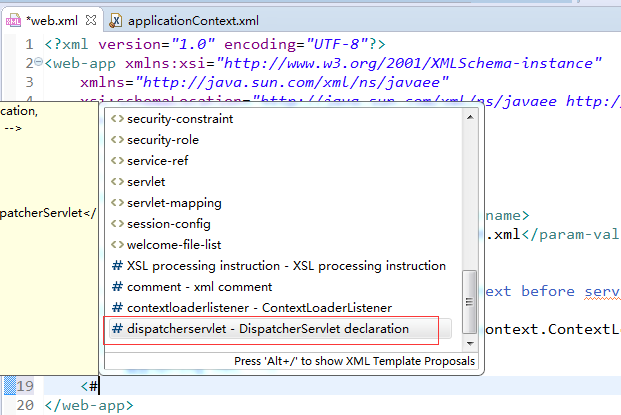
配置后web.xml文件内容为:
<?xml version="1.0" encoding="UTF-8"?>

<web-app xmlns:xsi="http://www.w3.org/2001/XMLSchema-instance"

    xmlns="http://java.sun.com/xml/ns/javaee"

    xsi:schemaLocation="http://java.sun.com/xml/ns/javaee http://java.sun.com/xml/ns/javaee/web-app_2_5.xsd"

    id="WebApp_ID" version="2.5">

    <display-name>shiro-web-01</display-name>

    <!-- 配置Spring的 ContextLoaderListener -->

    <!-- needed for ContextLoaderListener -->

    <context-param>

        <param-name>contextConfigLocation</param-name>

        <param-value>classpath:applicationContext.xml</param-value>

    </context-param>

    <!-- Bootstraps the root web application context before servlet initialization -->

    <listener>

        <listener-class>org.springframework.web.context.ContextLoaderListener</listener-class>

    </listener>

    <!-- 配置Spring MVC -->

    <!-- The front controller of this Spring Web application, responsible for handling all application requests -->

    <servlet>

        <servlet-name>spring</servlet-name>

        <servlet-class>org.springframework.web.servlet.DispatcherServlet</servlet-class>

        <!--

        <init-param>

            <param-name>contextConfigLocation</param-name>

            <param-value>location</param-value>

        </init-param>

         -->

        <load-on-startup>1</load-on-startup>

    </servlet>

    <!-- Map all requests to the DispatcherServlet for handling -->

    <servlet-mapping>

        <servlet-name>spring</servlet-name>

        <url-pattern>/</url-pattern>

    </servlet-mapping>

</web-app>
2)在WEB-INF下新建Spring MVC配置文件spring-servlet.xml,并添加spring mvc配置
<?xml version="1.0" encoding="UTF-8"?>

<beans xmlns="http://www.springframework.org/schema/beans"

    xmlns:xsi="http://www.w3.org/2001/XMLSchema-instance" xmlns:context="http://www.springframework.org/schema/context"

    xmlns:mvc="http://www.springframework.org/schema/mvc"

    xsi:schemaLocation="http://www.springframework.org/schema/mvc http://www.springframework.org/schema/mvc/spring-mvc-4.3.xsd

        http://www.springframework.org/schema/beans http://www.springframework.org/schema/beans/spring-beans.xsd

        http://www.springframework.org/schema/context http://www.springframework.org/schema/context/spring-context-4.3.xsd">

    <context:component-scan base-package="com.dx.shiro"></context:component-scan>

    <bean

        class="org.springframework.web.servlet.view.InternalResourceViewResolver">

        <property name="prefix" value="/"></property>

        <property name="suffix" value=".jsp"></property>

    </bean>

    <mvc:annotation-driven></mvc:annotation-driven>

    <mvc:default-servlet-handler />

</beans>
配置Shiro环境
1)导入shiro jar包
导入Shiro开发包:

或者通过pom.xml配置:
        <dependency>

            <groupId>org.apache.shiro</groupId>

            <artifactId>shiro-all</artifactId>

            <version>1.3.2</version>

        </dependency>

        <dependency>

            <groupId>org.slf4j</groupId>

            <artifactId>slf4j-log4j12</artifactId>

            <version>1.7.13</version>

        </dependency>
2)配置web.xml,导入shiroFilter
可以参考
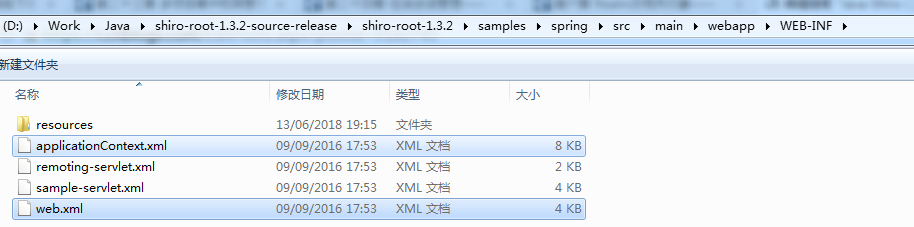
配置后web.xml内容为:
<?xml version="1.0" encoding="UTF-8"?>

<web-app xmlns:xsi="http://www.w3.org/2001/XMLSchema-instance"

    xmlns="http://java.sun.com/xml/ns/javaee"

    xsi:schemaLocation="http://java.sun.com/xml/ns/javaee http://java.sun.com/xml/ns/javaee/web-app_2_5.xsd"

    id="WebApp_ID" version="2.5">

    <display-name>shiro-web-01</display-name>

    <!-- 配置Spring的 ContextLoaderListener -->

    <!-- needed for ContextLoaderListener -->

    <context-param>

        <param-name>contextConfigLocation</param-name>

        <param-value>classpath:applicationContext.xml</param-value>

    </context-param>

    <!-- Bootstraps the root web application context before servlet initialization -->

    <listener>

        <listener-class>org.springframework.web.context.ContextLoaderListener</listener-class>

    </listener>

    <!-- 配置Spring MVC -->

    <!-- The front controller of this Spring Web application, responsible for

        handling all application requests -->

    <servlet>

        <servlet-name>spring</servlet-name>

        <servlet-class>org.springframework.web.servlet.DispatcherServlet</servlet-class>

        <!-- <init-param> <param-name>contextConfigLocation</param-name> <param-value>location</param-value>

            </init-param> -->

        <load-on-startup>1</load-on-startup>

    </servlet>

    <!-- Map all requests to the DispatcherServlet for handling -->

    <servlet-mapping>

        <servlet-name>spring</servlet-name>

        <url-pattern>/</url-pattern>

    </servlet-mapping>

    <!-- Shiro配置 -->

    <!-- ==================================================================

        Filters ================================================================== -->

    <!-- Shiro Filter is defined in the spring application context: -->

    <filter>

        <filter-name>shiroFilter</filter-name>

        <filter-class>org.springframework.web.filter.DelegatingFilterProxy</filter-class>

        <init-param>

            <param-name>targetFilterLifecycle</param-name>

            <param-value>true</param-value>

        </init-param>

    </filter>

    <filter-mapping>

        <filter-name>shiroFilter</filter-name>

        <url-pattern>/*</url-pattern>

    </filter-mapping>

</web-app>
3)配置Spring的配置文件中来配置Shiro,即在Src下来的applicationContext.xml中配置shiro
配置后的applicationContext.xml内容如下:
<?xml version="1.0" encoding="UTF-8"?>

<beans xmlns="http://www.springframework.org/schema/beans"

    xmlns:xsi="http://www.w3.org/2001/XMLSchema-instance"

    xsi:schemaLocation="http://www.springframework.org/schema/beans http://www.springframework.org/schema/beans/spring-beans.xsd">

    <!-- 1.配置SecurityManager -->

    <!-- Shiro's main business-tier object for web-enabled applications (use

        DefaultSecurityManager instead when there is no web environment) -->

    <bean id="securityManager" class="org.apache.shiro.web.mgt.DefaultWebSecurityManager">

        <property name="cacheManager" ref="cacheManager" />

        <!-- Single realm app. If you have multiple realms, use the 'realms' property

            instead. -->

        <property name="sessionMode" value="native" />

        <property name="realm" ref="jdbcRealm" />

    </bean>

    <!-- 2.配置CacheManager 2.1.配置ehcache的jar包及ehcache的配置文件 -->

    <!-- Let's use some enterprise caching support for better performance. You

        can replace this with any enterprise caching framework implementation that

        you like (Terracotta+Ehcache, Coherence, GigaSpaces, etc -->

    <bean id="cacheManager" class="org.apache.shiro.cache.ehcache.EhCacheManager">

        <!-- <property name="cacheManager" ref="ehCacheManager"/> -->

        <property name="cacheManagerConfigFile" value="classpath:ehcache.xml" />

    </bean>

    <!-- Used by the SecurityManager to access security data (users, roles,

        etc). Many other realm implementations can be used too (PropertiesRealm,

        LdapRealm, etc. -->

    <!-- 3.配置Realm -->

    <bean id="jdbcRealm" class="com.dx.shiro.realms.MyRealm">

    </bean>

    <!-- Post processor that automatically invokes init() and destroy() methods

        for Spring-configured Shiro objects so you don't have to 1) specify an init-method

        and destroy-method attributes for every bean definition and 2) even know

        which Shiro objects require these methods to be called. -->

    <!-- 4.配置org.apache.shiro.spring.LifecycleBeanPostProcessor,可以自动的来调用配置在Spring

        IOC容器中的 shiro bean的生命周期方法。 -->

    <bean id="lifecycleBeanPostProcessor" class="org.apache.shiro.spring.LifecycleBeanPostProcessor" />

    <!-- 5.启用IOC容器中使用shiro的注解,但必须在配置了DefaultAdvisorAutoProxyCreator之后才可以使用 -->

    <!-- Enable Shiro Annotations for Spring-configured beans. Only run after

        the lifecycleBeanProcessor has run: -->

    <bean

        class="org.springframework.aop.framework.autoproxy.DefaultAdvisorAutoProxyCreator"

        depends-on="lifecycleBeanPostProcessor" />

    <bean

        class="org.apache.shiro.spring.security.interceptor.AuthorizationAttributeSourceAdvisor">

        <property name="securityManager" ref="securityManager" />

    </bean>

    <!-- Define the Shiro Filter here (as a FactoryBean) instead of directly

        in web.xml - web.xml uses the DelegatingFilterProxy to access this bean.

        This allows us to wire things with more control as well utilize nice Spring

        things such as PropertiesPlaceholderConfigurer and abstract beans or anything

        else we might need: -->

    <!--

        6.配置shiroFilter

        6.1. bean的id必须和web.xml中配置的DelegatingFilterProxy的<filter-name>一致

        6.2. anon/authc是过滤器,anon允许匿名访问,authc需要认证才可以访问的页面。

        -->

    <bean id="shiroFilter" class="org.apache.shiro.spring.web.ShiroFilterFactoryBean">

        <property name="securityManager" ref="securityManager" />

        <property name="loginUrl" value="/login.jsp" />

        <property name="successUrl" value="/list.jsp" />

        <property name="unauthorizedUrl" value="/unauthorized.jsp" />

        <!-- The 'filters' property is not necessary since any declared javax.servlet.Filter

            bean defined will be automatically acquired and available via its beanName

            in chain definitions, but you can perform overrides or parent/child consolidated

            configuration here if you like: -->

        <!-- <property name="filters"> <util:map> <entry key="aName" value-ref="someFilterPojo"/>

            </util:map> </property> -->

        <property name="filterChainDefinitions">

            <value>

                /login.jsp = anon

                # everything else requires authentication:

                /** = authc

            </value>

        </property>

    </bean>

</beans>
3.1)配置ehcache的jar包及ehcache的配置文件
ehcache.xml从hibernate中找:
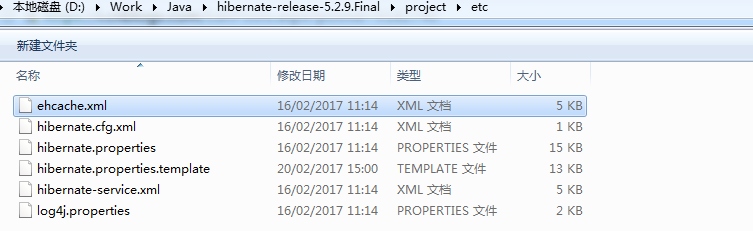
将其拷贝到src下
ehcache.jar也可以从hibernate开发包中找到:
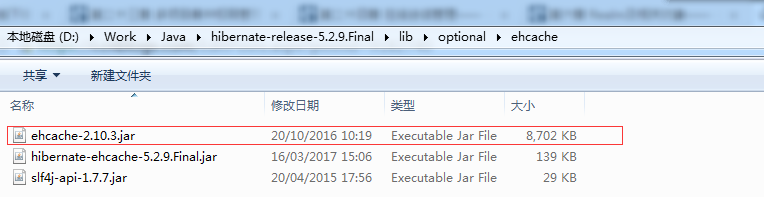
将其拷贝到WEB-INF/lib下,导入到项目中。
3.2)添加shiro realm
新建包com.dx.shiro.realms,在包下新建一个MyRealm.java
package com.dx.shiro.realms;

import org.apache.shiro.authc.AuthenticationException;

import org.apache.shiro.authc.AuthenticationInfo;

import org.apache.shiro.authc.AuthenticationToken;

import org.apache.shiro.realm.Realm;

public class MyRealm implements Realm {

    public AuthenticationInfo getAuthenticationInfo(AuthenticationToken arg0) throws AuthenticationException {

        // TODO Auto-generated method stub

        return null;

    }

    public String getName() {

        // TODO Auto-generated method stub

        return null;

    }

    public boolean supports(AuthenticationToken arg0) {

        // TODO Auto-generated method stub

        return false;

    }

}
这里采用咱不实现具体的接口的方式。
3.3)在webcontent下添加页面
添加页面login.jsp,list.jsp,unauthorized.jsp
测试
此时访问网址:

其他任何页面都不允许访问。
Java-Shiro(三):Shiro与Spring MVC集成的更多相关文章
- Spring MVC集成slf4j-logback
转自: Spring MVC集成slf4j-logback 1. Spring MVC集成slf4j-log4j 关于slf4j和log4j的相关介绍和用法,网上有很多文章可供参考,但是关于logb ...
- spring mvc集成velocity使用
目前流行的三大页面视图神器是:老牌大哥jsp.后起之秀freemarker和velocity.这里不详细比较这三者的优劣,总体来说,jsp是标配,但后面两个更严格的执行了视图与业务的分离,页面里是不允 ...
- spring mvc集成freemarker使用
freemarker作为视图技术出现的比velocity早,想当年struts风靡一时,freemarker作为视图层也风光了一把.但现在velocity作为后起之秀的轻量级模板引擎,更容易得到青睐. ...
- spring mvc 集成freemarker模板
主要使用到的jar 文件:spring mvc +freemarker.jar 第一步:spring mvc 集成 freemarker <!-- 定义跳转的文件的前后缀 ,视图模式配置--&g ...
- Spring Boot 2.X(三):使用 Spring MVC + MyBatis + Thymeleaf 开发 web 应用
前言 Spring MVC 是构建在 Servlet API 上的原生框架,并从一开始就包含在 Spring 框架中.本文主要通过简述 Spring MVC 的架构及分析,并用 Spring Boot ...
- 【Java Web开发学习】Spring MVC异常统一处理
[Java Web开发学习]Spring MVC异常统一处理 文采有限,若有错误,欢迎留言指正. 转载:https://www.cnblogs.com/yangchongxing/p/9271900. ...
- Java-Spring MVC:JAVA之常用的一些Spring MVC的路由写法以及参数传递方式
ylbtech-Java-Spring MVC:JAVA之常用的一些Spring MVC的路由写法以及参数传递方式 1.返回顶部 1. 常用的一些Spring MVC的路由写法以及参数传递方式. 这是 ...
- 【Java Web开发学习】Spring MVC 使用HTTP信息转换器
[Java Web开发学习]Spring MVC 使用HTTP信息转换器 转载:https://www.cnblogs.com/yangchongxing/p/10186429.html @Respo ...
- 【Java Web开发学习】Spring MVC添加自定义Servlet、Filter、Listener
[Java Web开发学习]Spring MVC添加自定义Servlet.Filter.Listener 转载:https://www.cnblogs.com/yangchongxing/p/9968 ...
- 【Java Web开发学习】Spring MVC 拦截器HandlerInterceptor
[Java Web开发学习]Spring MVC 拦截器HandlerInterceptor 转载:https://www.cnblogs.com/yangchongxing/p/9324119.ht ...
随机推荐
- ConcurrentHashMap内存溢出问题
写在前面 上周,同事写了一段ConcurrentHashMap的测试代码,说往map里放了32个元素就内存溢出了,我大致看了一下他的代码及运行的jvm参数,觉得很奇怪,于是就自己捣鼓了一下.首先上一段 ...
- 使用 IntraWeb (7) - 主模板
TIWLayoutMgrHTML.TIWTemplateProcessorHTML 属于页面级的模板, 如果要全站统一模板, 当然要用主模板. TIWTemplateProcessorHTML 通过其 ...
- CentOS 7下宿主机使用virsh console访问KVM的设置
在CentOS 6下要实现宿主机使用virsh console访问KVM可以说是非常麻烦,但这一问题在CentOS 7已经解决了,只需要两条命令在KVM下即可实现. 1.在KVM(客户机)下开机启动并 ...
- 性能优化:使用SparseArray代替HashMap<Integer,Object>(转)
HashMap是java里比较常用的一个集合类,我比较习惯用来缓存一些处理后的结果.最近在做一个Android项目,在代码中定义这样一个变量,实例化时,Eclipse却给出了一个 performanc ...
- .net core下的dotnet全局工具
.net core 2.1后支持了一个全新的部署和扩展命令,可以自己注册全局命令行. dotnet install tool -g dotnetsaydotnetsay 也可以自己构建自己的命令行,一 ...
- DG449 High Voltage Single SPDT Analog Switch in SOT23-8
DESCRIPTION The DG449 is a dual supply single-pole/double-throw (SPDT) switches. On resistance is 38 ...
- 执行nova-manage db sync时出错,提示’Specified key was too long; max key length is 1000 bytes’
执行nova-manage db sync时出错: 2012-03-24 14:07:01 CRITICAL nova [-] (OperationalError) (1071, ‘Specified ...
- poi workbook转成流
try { ByteArrayOutputStream bos = new ByteArrayOutputStream(); workbook.write(bos); byte[] barray = ...
- Android App组件之Fragment说明和示例
Android App组件之Fragment说明和示例 1 Fragement介绍 Android从3.0开始引入Fragment,主要是为了支持更动态更灵活的界面设计. Fragment是activ ...
- POJ 2135 Farm Tour && HDU 2686 Matrix && HDU 3376 Matrix Again 费用流求来回最短路
累了就要写题解,近期总是被虐到没脾气. 来回最短路问题貌似也能够用DP来搞.只是拿费用流还是非常方便的. 能够转化成求满流为2 的最小花费.一般做法为拆点,对于 i 拆为2*i 和 2*i+1.然后连 ...