
xslt基础学习
今天下午工作完成没事,登w3c的网站学习了一下xslt的基础知识,主要是因为工作中xml用的比较多,xslt也有用到,所以在这里学习一下。
XSLT:一种用于转换 XML 文档的语言。
XSLT 用于将一种 XML 文档转换为另外一种 XML 文档,或者可被浏览器识别的其他类型的文档,比如 HTML 和 XHTML。通常,XSLT 是通过把每个 XML 元素转换为 (X)HTML 元素来完成这项工作的。XSLT 使用 XPath 在 XML 文档中查找信息。XPath 被用来通过元素和属性在 XML 文档中进行导航。
声明:<xsl:stylesheet version="1.0" xmlns:xsl="http://www.w3.org/1999/XSL/Transform">或<xsl:transform version="1.0" xmlns:xsl="http://www.w3.org/1999/XSL/Transform">,还要加上xml声明。
例子:
<?xml version="1.0" encoding="ISO-8859-1"?>

<xsl:stylesheet version="1.0" xmlns:xsl="http://www.w3.org/1999/XSL/Transform">

<xsl:template match="/">

  <html>

  <body>

    <h2>My CD Collection</h2>

    <table border="1">

    <tr bgcolor="#9acd32">

      <th align="left">Title</th>

      <th align="left">Artist</th>

    </tr>

    <xsl:for-each select="catalog/cd">

    <tr>

      <td><xsl:value-of select="title"/></td>

      <td><xsl:value-of select="artist"/></td>

    </tr>

    </xsl:for-each>

    </table>

  </body>

  </html>

</xsl:template>

</xsl:stylesheet>
要转换的xml数据文件
<?xml version="1.0" encoding="ISO-8859-1"?>

<!-- Edited with XML Spy v2007 (http://www.altova.com) -->

<catalog>

    <cd>

        <title>Empire Burlesque</title>

        <artist>Bob Dylan</artist>

        <country>USA</country>

        <company>Columbia</company>

        <price>10.90</price>

        <year>1985</year>

    </cd>

    <cd>

        <title>Hide your heart</title>

        <artist>Bonnie Tyler</artist>

        <country>UK</country>

        <company>CBS Records</company>

        <price>9.90</price>

        <year>1988</year>

    </cd>

    <cd>

        <title>Greatest Hits</title>

        <artist>Dolly Parton</artist>

        <country>USA</country>

        <company>RCA</company>

        <price>9.90</price>

        <year>1982</year>

    </cd>

    <cd>

        <title>Still got the blues</title>

        <artist>Gary Moore</artist>

        <country>UK</country>

        <company>Virgin records</company>

        <price>10.20</price>

        <year>1990</year>

    </cd>

    <cd>

        <title>Eros</title>

        <artist>Eros Ramazzotti</artist>

        <country>EU</country>

        <company>BMG</company>

        <price>9.90</price>

        <year>1997</year>

    </cd>

    <cd>

        <title>One night only</title>

        <artist>Bee Gees</artist>

        <country>UK</country>

        <company>Polydor</company>

        <price>10.90</price>

        <year>1998</year>

    </cd>

    <cd>

        <title>Sylvias Mother</title>

        <artist>Dr.Hook</artist>

        <country>UK</country>

        <company>CBS</company>

        <price>8.10</price>

        <year>1973</year>

    </cd>

    <cd>

        <title>Maggie May</title>

        <artist>Rod Stewart</artist>

        <country>UK</country>

        <company>Pickwick</company>

        <price>8.50</price>

        <year>1990</year>

    </cd>

    <cd>

        <title>Romanza</title>

        <artist>Andrea Bocelli</artist>

        <country>EU</country>

        <company>Polydor</company>

        <price>10.80</price>

        <year>1996</year>

    </cd>

    <cd>

        <title>When a man loves a woman</title>

        <artist>Percy Sledge</artist>

        <country>USA</country>

        <company>Atlantic</company>

        <price>8.70</price>

        <year>1987</year>

    </cd>

    <cd>

        <title>Black angel</title>

        <artist>Savage Rose</artist>

        <country>EU</country>

        <company>Mega</company>

        <price>10.90</price>

        <year>1995</year>

    </cd>

    <cd>

        <title>1999 Grammy Nominees</title>

        <artist>Many</artist>

        <country>USA</country>

        <company>Grammy</company>

        <price>10.20</price>

        <year>1999</year>

    </cd>

    <cd>

        <title>For the good times</title>

        <artist>Kenny Rogers</artist>

        <country>UK</country>

        <company>Mucik Master</company>

        <price>8.70</price>

        <year>1995</year>

    </cd>

    <cd>

        <title>Big Willie style</title>

        <artist>Will Smith</artist>

        <country>USA</country>

        <company>Columbia</company>

        <price>9.90</price>

        <year>1997</year>

    </cd>

    <cd>

        <title>Tupelo Honey</title>

        <artist>Van Morrison</artist>

        <country>UK</country>

        <company>Polydor</company>

        <price>8.20</price>

        <year>1971</year>

    </cd>

    <cd>

        <title>Soulsville</title>

        <artist>Jorn Hoel</artist>

        <country>Norway</country>

        <company>WEA</company>

        <price>7.90</price>

        <year>1996</year>

    </cd>

    <cd>

        <title>The very best of</title>

        <artist>Cat Stevens</artist>

        <country>UK</country>

        <company>Island</company>

        <price>8.90</price>

        <year>1990</year>

    </cd>

    <cd>

        <title>Stop</title>

        <artist>Sam Brown</artist>

        <country>UK</country>

        <company>A and M</company>

        <price>8.90</price>

        <year>1988</year>

    </cd>

    <cd>

        <title>Bridge of Spies</title>

        <artist>T`Pau</artist>

        <country>UK</country>

        <company>Siren</company>

        <price>7.90</price>

        <year>1987</year>

    </cd>

    <cd>

        <title>Private Dancer</title>

        <artist>Tina Turner</artist>

        <country>UK</country>

        <company>Capitol</company>

        <price>8.90</price>

        <year>1983</year>

    </cd>

    <cd>

        <title>Midt om natten</title>

        <artist>Kim Larsen</artist>

        <country>EU</country>

        <company>Medley</company>

        <price>7.80</price>

        <year>1983</year>

    </cd>

    <cd>

        <title>Pavarotti Gala Concert</title>

        <artist>Luciano Pavarotti</artist>

        <country>UK</country>

        <company>DECCA</company>

        <price>9.90</price>

        <year>1991</year>

    </cd>

    <cd>

        <title>The dock of the bay</title>

        <artist>Otis Redding</artist>

        <country>USA</country>

        <company>Atlantic</company>

        <price>7.90</price>

        <year>1987</year>

    </cd>

    <cd>

        <title>Picture book</title>

        <artist>Simply Red</artist>

        <country>EU</country>

        <company>Elektra</company>

        <price>7.20</price>

        <year>1985</year>

    </cd>

    <cd>

        <title>Red</title>

        <artist>The Communards</artist>

        <country>UK</country>

        <company>London</company>

        <price>7.80</price>

        <year>1987</year>

    </cd>

    <cd>

        <title>Unchain my heart</title>

        <artist>Joe Cocker</artist>

        <country>USA</country>

        <company>EMI</company>

        <price>8.20</price>

        <year>1987</year>

    </cd>

</catalog>
转换结果(部分)
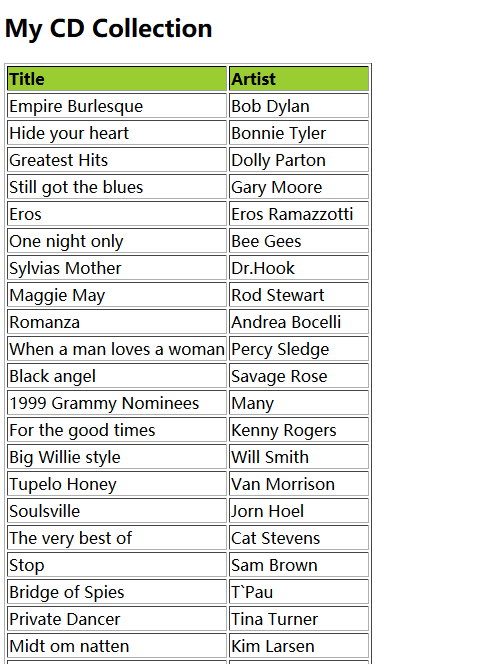
想要完成转换必须在xml数据文件中引入xsl文件
<?xml version="1.0" encoding="ISO-8859-1"?>

<!-- 引入xsl文件 -->

<?xml-stylesheet type="text/xsl" href="cdcatalog.xsl"?>

<catalog>

  <cd>

    <title>Empire Burlesque</title>

    <artist>Bob Dylan</artist>

    <country>USA</country>

    <company>Columbia</company>

    <price>10.90</price>

    <year>1985</year>

  </cd>

.

.

.

</catalog>
下面学习一些基本的xslt元素
<xsl:template>元素用于构建模板
match 属性用于关联 XML 元素和模板。match 属性也可用来为整个文档定义模板。match 属性的值是 XPath 表达式(举例,match="/" 定义整个文档)。
例:
<?xml version="1.0" encoding="ISO-8859-1"?>

<xsl:stylesheet version="1.0"

xmlns:xsl="http://www.w3.org/1999/XSL/Transform">

<xsl:template match="/">

 <html>

 <body>

   <h2>My CD Collection</h2>

   <table border="1">

     <tr bgcolor="#9acd32">

       <th>Title</th>

       <th>Artist</th>

     </tr>

     <tr>

       <td>.</td>

       <td>.</td>

     </tr>

   </table>

 </body>

 </html>

</xsl:template>

</xsl:stylesheet>
结果:

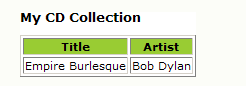
<xsl:value-of>:用于提取某个选定节点的值,并把值添加到转换的输出流中:
例子:
<?xml version="1.0" encoding="ISO-8859-1"?>

<xsl:stylesheet version="1.0"

xmlns:xsl="http://www.w3.org/1999/XSL/Transform">

<xsl:template match="/">

 <html>

 <body>

   <h2>My CD Collection</h2>

   <table border="1">

     <tr bgcolor="#9acd32">

       <th>Title</th>

       <th>Artist</th>

     </tr>

     <tr>

      <td><xsl:value-of select="catalog/cd/title"/></td>

      <td><xsl:value-of select="catalog/cd/artist"/></td>

     </tr>

   </table>

 </body>

 </html>

</xsl:template>

</xsl:stylesheet>
结果:
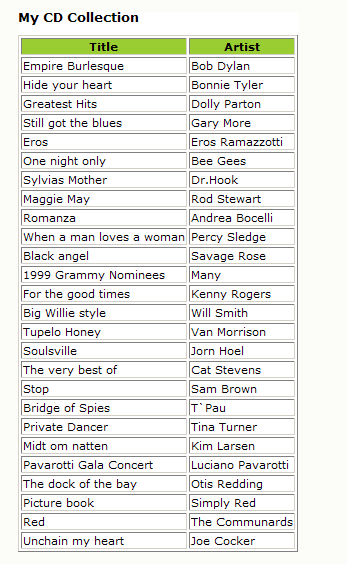
<xsl:for-each>:元素可用于选取指定的节点集中的每个 XML 元素
<?xml version="1.0" encoding="ISO-8859-1"?>

<xsl:stylesheet version="1.0"

xmlns:xsl="http://www.w3.org/1999/XSL/Transform">

<xsl:template match="/">

  <html>

  <body>

    <h2>My CD Collection</h2>

    <table border="1">

      <tr bgcolor="#9acd32">

        <th>Title</th>

        <th>Artist</th>

      </tr>

      <xsl:for-each select="catalog/cd">

      <tr>

        <td><xsl:value-of select="title"/></td>

        <td><xsl:value-of select="artist"/></td>

      </tr>

      </xsl:for-each>

    </table>

  </body>

  </html>

</xsl:template>

</xsl:stylesheet>
结果:
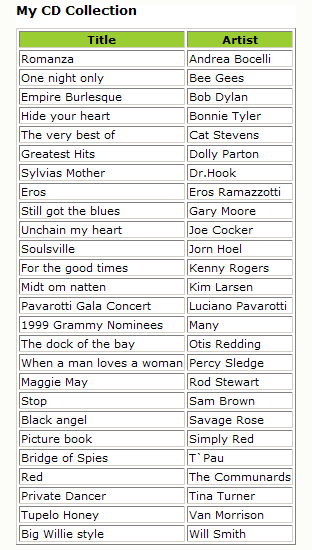
<xsl:sort>:如需对结果进行排序,只要简单地在 XSL 文件中的 <xsl:for-each> 元素内部添加一个 <xsl:sort> 元素
例子:
<?xml version="1.0" encoding="ISO-8859-1"?>

<xsl:stylesheet version="1.0"

xmlns:xsl="http://www.w3.org/1999/XSL/Transform">

<xsl:template match="/">

  <html>

  <body>

    <h2>My CD Collection</h2>

    <table border="1">

      <tr bgcolor="#9acd32">

        <th>Title</th>

        <th>Artist</th>

      </tr>

      <xsl:for-each select="catalog/cd">

      <xsl:sort select="artist"/>

      <tr>

        <td><xsl:value-of select="title"/></td>

        <td><xsl:value-of select="artist"/></td>

      </tr>

      </xsl:for-each>

    </table>

  </body>

  </html>

</xsl:template>

</xsl:stylesheet>
结果:
<xsl:if>:如需放置针对 XML 文件内容的条件测试,请向 XSL 文档添加 <xsl:if> 元素。
<?xml version="1.0" encoding="ISO-8859-1"?>
<xsl:stylesheet version="1.0"
xmlns:xsl="http://www.w3.org/1999/XSL/Transform">
<xsl:template match="/">
<html>
<body>
<h2>My CD Collection</h2>
<table border="1">
<tr bgcolor="#9acd32">
<th>Title</th>
<th>Artist</th>
</tr>
<xsl:for-each select="catalog/cd">
<xsl:if test="price > 10">
<tr>
<td><xsl:value-of select="title"/></td>
<td><xsl:value-of select="artist"/></td>
</tr>
</xsl:if>
</xsl:for-each>
</table>
</body>
</html>
</xsl:template>
</xsl:stylesheet>
结果:
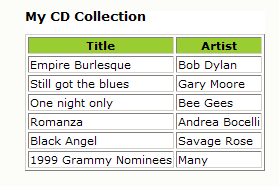
<xsl:choose>:<xsl:choose> 元素用于结合 <xsl:when> 和 <xsl:otherwise> 来表达多重条件测试。
<?xml version="1.0" encoding="ISO-8859-1"?>
<xsl:stylesheet version="1.0"
xmlns:xsl="http://www.w3.org/1999/XSL/Transform">
<xsl:template match="/">
<html>
<body>
<h2>My CD Collection</h2>
<table border="1">
<tr bgcolor="#9acd32">
<th>Title</th>
<th>Artist</th>
</tr>
<xsl:for-each select="catalog/cd">
<tr>
<td><xsl:value-of select="title"/></td>
<xsl:choose>
<xsl:when test="price > 10">
<td bgcolor="#ff00ff">
<xsl:value-of select="artist"/></td>
</xsl:when>
<xsl:when test="price > 9">
<td bgcolor="#cccccc">
<xsl:value-of select="artist"/></td>
</xsl:when>
<xsl:otherwise>
<td><xsl:value-of select="artist"/></td>
</xsl:otherwise>
</xsl:choose>
</tr>
</xsl:for-each>
</table>
</body>
</html>
</xsl:template>
</xsl:stylesheet>
结果:
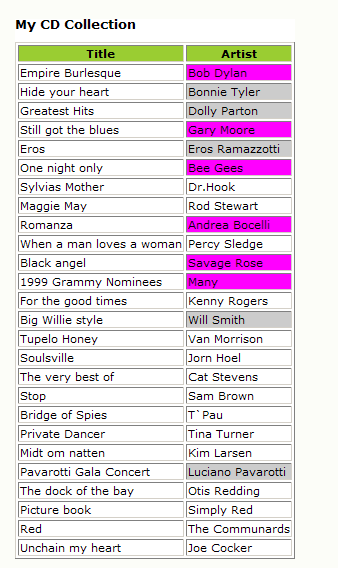
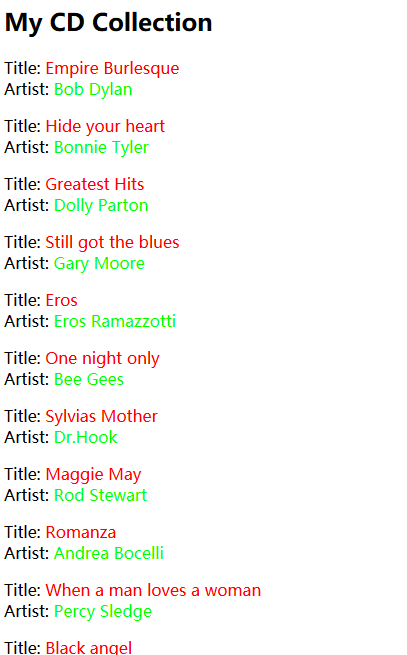
<xsl:apply-templates>:<xsl:apply-templates> 元素可把一个模板应用于当前的元素或者当前元素的子节点。假如我们向 <xsl:apply-templates> 元素添加一个 select 属性,此元素就会仅仅处理与属性值匹配的子元素。我们可以使用 select 属性来规定子节点被处理的顺序。
例子:
<?xml version="1.0" encoding="ISO-8859-1"?>

<xsl:stylesheet version="1.0"

xmlns:xsl="http://www.w3.org/1999/XSL/Transform">

<xsl:template match="/">

<html>

<body>

<h2>My CD Collection</h2>

<xsl:apply-templates/>

</body>

</html>

</xsl:template>

<xsl:template match="cd">

<p>

<xsl:apply-templates select="title"/>

<xsl:apply-templates select="artist"/>

</p>

</xsl:template>

<xsl:template match="title">

Title: <span style="color:#ff0000">

<xsl:value-of select="."/></span>

<br />

</xsl:template>

<xsl:template match="artist">

Artist: <span style="color:#00ff00">

<xsl:value-of select="."/></span>

<br />

</xsl:template>

</xsl:stylesheet>
结果:
另外还有像<xsl:text>,<xsl:number>等,更多元素,可以查看:XSLT 元素参考手册
关于<xsl:apply-templates>的更多内容,可以查看:【原创】浅谈对<xsl:apply-templates/>的理解
在java服务器转换xml为html:java编写xsl转换器(xslt)把xml文件转换为html文件
xslt基础学习的更多相关文章
- salesforce 零基础学习(五十二)Trigger使用篇(二)
第十七篇的Trigger用法为通过Handler方式实现Trigger的封装,此种好处是一个Handler对应一个sObject,使本该在Trigger中写的代码分到Handler中,代码更加清晰. ...
- 如何从零基础学习VR
转载请声明转载地址:http://www.cnblogs.com/Rodolfo/,违者必究. 近期很多搞技术的朋友问我,如何步入VR的圈子?如何从零基础系统性的学习VR技术? 本人将于2017年1月 ...
- IOS基础学习-2: UIButton
IOS基础学习-2: UIButton UIButton是一个标准的UIControl控件,UIKit提供了一组控件:UISwitch开关.UIButton按钮.UISegmentedContro ...
- HTML5零基础学习Web前端需要知道哪些?
HTML零基础学习Web前端网页制作,首先是要掌握一些常用标签的使用和他们的各个属性,常用的标签我总结了一下有以下这些: html:页面的根元素. head:页面的头部标签,是所有头部元素的容器. b ...
- python入门到精通[三]:基础学习(2)
摘要:Python基础学习:列表.元组.字典.函数.序列化.正则.模块. 上一节学习了字符串.流程控制.文件及目录操作,这节介绍下列表.元组.字典.函数.序列化.正则.模块. 1.列表 python中 ...
- python入门到精通[二]:基础学习(1)
摘要:Python基础学习: 注释.字符串操作.用户交互.流程控制.导入模块.文件操作.目录操作. 上一节讲了分别在windows下和linux下的环境配置,这节以linux为例学习基本语法.代码部分 ...
- CSS零基础学习笔记.
酸菜记 之 CSS的零基础. 这篇是我自己从零基础学习CSS的笔记加理解总结归纳的,如有不对的地方,请留言指教, 学前了解: CSS中字母是不分大小写的; CSS文件可以使用在各种程序文件中(如:PH ...
- Yaf零基础学习总结5-Yaf类的自动加载
Yaf零基础学习总结5-Yaf类的自动加载 框架的一个重要功能就是类的自动加载了,在第一个demo的时候我们就约定自己的项目的目录结构,框架就基于这个目录结构来自动加载需要的类文件. Yaf在自启动的 ...
- Yaf零基础学习总结4-Yaf的配置文件
在上一节的hello yaf当中我们已经接触过了yaf的配置文件了, Yaf和用户共用一个配置空间, 也就是在Yaf_Application初始化时刻给出的配置文件中的配置. 作为区别, Yaf的配置 ...
随机推荐
- 优化Django ORM中的性能问题(含prefetch_related 和 select_related)
Django是个好工具,使用的很广泛. 在应用比较小的时候,会觉得它很快,但是随着应用复杂和壮大,就显得没那么高效了.当你了解所用的Web框架一些内部机制之后,才能写成比较高效的代码. 怎么查问题 W ...
- MFC信号量使用指南
DEMO程序:TestSemaphore_DEMO.rar 源代码:TestSemaphore_SRC.rar ---关键代码如下--- void CTestSemaphoreDlg::OnBnCli ...
- iText使用经历
最近用iText搞了下PDF,虽然一路趟坑而过,毕竟是搞出来了,所以iText还是不错的开源PDF生成软件的.先看搞出来的PDF长啥样: 然后看一路趟过来的坑: 1.表格怎么生成,具体是行怎么生成?列 ...
- netty初步
netty是java的高性能socket框架,linux下基epoll,这里不对他多牛逼作分析,网上资料很多,这里针对一般socket的业务作个例子 几个基本概念: channel类似于socket句 ...
- 终于完成了 源码 编译lnmp环境
经过了大概一个星期的努力,终于按照海生的编译流程将lnmp环境源码安装出来了 nginx 和php 主要参考 http://hessian.cn/p/1273.html mysql 主要参考 http ...
- JAVA课程设计——多源教学数据管理系统
团队简介 团队名称: 419圣斗士 团队成员 姓名 成员介绍 任务分配 周炳辉(组长) 来自网络的一个大佬,穿女装很合适 poi与servlet 徐宏伟 网络中一个具有强大隐藏实力的大哥 css,部分 ...
- 手动安装Android Support Library(23.0.1)
在搭建React-Native开发环境的时候,使用Android Sdk Manager无法找到Android Support Library这一项. 所以google了一下,找到了解决办法. 访问A ...
- Dubbo配置优化
来自于:https://blog.csdn.net/youaremoon/article/details/51884644 感谢博主,收藏一下 dubbo作为一个服务治理框架,功能相对比较完善,性能也 ...
- Date类型之继承方法
ECMAScript中的Date类型是在早期Java中的java.util.Date类型基础上构建的.为此,Date类型使用自UTC(国际协调时间)1970年1月1日午夜零时开始经过的毫秒数来保存日期 ...
- ubuntu solute two different terminals cmd
sudo update-alternatives --config x-terminal-emulator select 1. gnome-xterminal