
DelaunayTriangulation_VoronoiDiagram_using_OpenCV的实现
前言
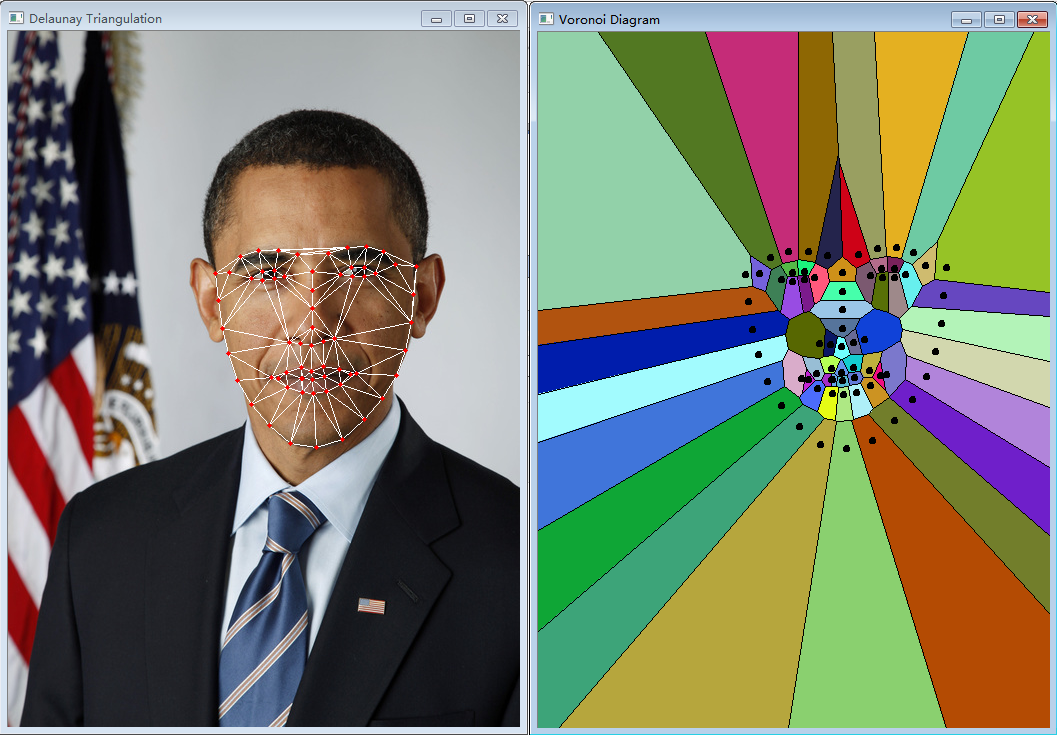
最近project中有关于delaunay的实现问题,查找资料,看到learnopencv这个网站,有很多peoject的实现,本文主要是实现Delaunay Triangulation and Voronoi Diagram using OpenCV这个project,基于Python实现的。
环境
系统环境:win7_64
python版本:python3.5.2
实现过程
1.下载代码和依赖的资源;
github上列出了learnopencv用到的全部代码,非常不错!推荐~
2.基于python的代码;
#!/usr/bin/python

#RE:http://www.learnopencv.com/delaunay-triangulation-and-voronoi-diagram-using-opencv-c-python/

import cv2

import numpy as np

import random

# Check if a point is inside a rectangle

def rect_contains(rect, point) :

    if point[0] < rect[0] :

        return False

    elif point[1] < rect[1] :

        return False

    elif point[0] > rect[2] :

        return False

    elif point[1] > rect[3] :

        return False

    return True

# Draw a point

def draw_point(img, p, color ) :

    #cv2.circle( img, p, 2, color, cv2.cv.CV_FILLED, cv2.CV_AA, 0 )

    cv2.circle( img, p, 2, color, cv2.FILLED, 0 )

# Draw delaunay triangles

def draw_delaunay(img, subdiv, delaunay_color ) :

    triangleList = subdiv.getTriangleList();

    size = img.shape

    r = (0, 0, size[1], size[0])

    for t in triangleList :

        pt1 = (t[0], t[1])

        pt2 = (t[2], t[3])

        pt3 = (t[4], t[5])

        if rect_contains(r, pt1) and rect_contains(r, pt2) and rect_contains(r, pt3) :

            cv2.line(img, pt1, pt2, delaunay_color, 1, 0)

            cv2.line(img, pt2, pt3, delaunay_color, 1, 0)

            cv2.line(img, pt3, pt1, delaunay_color, 1, 0)

# Draw voronoi diagram

def draw_voronoi(img, subdiv) :

    ( facets, centers) = subdiv.getVoronoiFacetList([])

    for i in range(0,len(facets)) :

        ifacet_arr = []

        for f in facets[i] :

            ifacet_arr.append(f)

        ifacet = np.array(ifacet_arr, np.int)

        color = (random.randint(0, 255), random.randint(0, 255), random.randint(0, 255))

        cv2.fillConvexPoly(img, ifacet, color, 0);

        ifacets = np.array([ifacet])

        cv2.polylines(img, ifacets, True, (0, 0, 0), 1, 0)

        cv2.circle(img, (centers[i][0], centers[i][1]), 3, (0, 0, 0), cv2.FILLED, 0)

if __name__ == '__main__':

    # Define window names

    win_delaunay = "Delaunay Triangulation"

    win_voronoi = "Voronoi Diagram"

    # Turn on animation while drawing triangles

    animate = True

    # Define colors for drawing.

    delaunay_color = (255,255,255)

    points_color = (0, 0, 255)

    # Read in the image.

    img = cv2.imread("obama.jpg");

    # Keep a copy around

    img_orig = img.copy();

    # Rectangle to be used with Subdiv2D

    size = img.shape

    rect = (0, 0, size[1], size[0])

    # Create an instance of Subdiv2D

    subdiv = cv2.Subdiv2D(rect);

    # Create an array of points.

    points = [];

    # Read in the points from a text file

    with open("obama.txt") as file :

        for line in file :

            x, y = line.split()

            points.append((int(x), int(y)))

    # Insert points into subdiv

    for p in points :

        subdiv.insert(p)

        # Show animation

        if animate :

            img_copy = img_orig.copy()

            # Draw delaunay triangles

            draw_delaunay( img_copy, subdiv, (255, 255, 255) );

            cv2.imshow(win_delaunay, img_copy)

            cv2.waitKey(100)

    # Draw delaunay triangles

    draw_delaunay( img, subdiv, (255, 255, 255) );

    # Draw points

    for p in points :

        draw_point(img, p, (0,0,255))

    # Allocate space for Voronoi Diagram

    img_voronoi = np.zeros(img.shape, dtype = img.dtype)

    # Draw Voronoi diagram

    draw_voronoi(img_voronoi,subdiv)

    # Show results

    cv2.imshow(win_delaunay,img)

    cv2.imshow(win_voronoi,img_voronoi)

    cv2.waitKey(0)
注意:官网上的代码由于版本的不同不能正常运行,需要调试通过;
3.代码调试;
调试代码的过程中遇到较多的问题,针对出现的问题一一进行解决;
3.1)ImportError: No module named 'cv2'

原因:没有安装cv2第三方库;
解决方法:
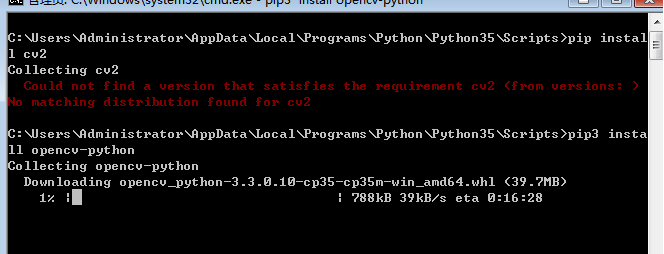
在Python的安装目录下打开.\Scripts路径,再次目录下打开cmd,使用以下命令安装cv2
pip3 install opencv-python
尝试过的方法
第一次安装使用的命令是
pip install cv2
但是没有正确安装;
后来找到另一个方法,刚看的时候觉得很不错,不过仔细看发现主要是针对python2.7版本的,之后就放弃了;
3.2)忘记加载资源文件;

原因:程序代码中需要用到图片和txt文件,将其加载到合适的路径下即可;
3.3)版本有关;

解决方法:直接将cv2.CV_AA remove即可;
3.4)版本问题;
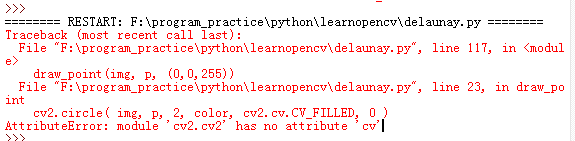
解决方法:将cv2.cv.CV_FILLED替换为cv2.CV_FILLED即可;
3.5)版本问题;
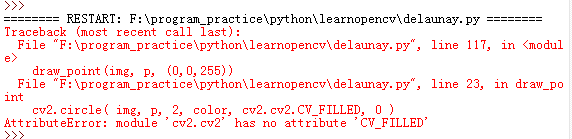
解决方法:直接将cv2.CV_FILLED替换为cv2.FILLED即可;
3.6)不同版本的语法问题;
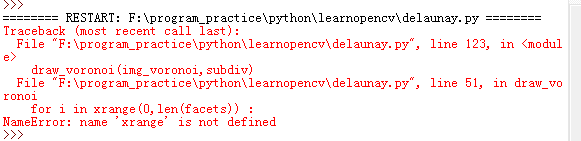
解决方法:将xrange替换为range即可;
之前也遇到过这个问题,现在想想应该是不同版本的Python的语法不同造成的;
4.运行结果;
参考
完
DelaunayTriangulation_VoronoiDiagram_using_OpenCV的实现的更多相关文章
随机推荐
- PL/SQL Developer-官网下载地址
官网下载地址:https://www.allroundautomations.com/registered/plsqldev.html
- git问题解决(摘录)
https://blog.csdn.net/dxk539687357/article/details/54629274
- 雷林鹏分享:C# 异常处理
C# 异常处理 异常是在程序执行期间出现的问题.C# 中的异常是对程序运行时出现的特殊情况的一种响应,比如尝试除以零. 异常提供了一种把程序控制权从某个部分转移到另一个部分的方式.C# 异常处理时建立 ...
- synchronized同步代码块锁释放
今天发现自己写的线上程序出现数据库不能同步的问题,查看日志已经停止记录,随后使用jstack查看线程的运行状况,发现有个同步线程锁住了. 以下是jstack -l 637 问题线程的内容. &quo ...
- 『Json』常用方法记录
json模块可以把字典结构改写为string然后保存,并可以反向读取字典 pickle模块则可以持久化任意数据结构 但是即使同样是字典数据结构,两个包也是有差别的, json字典value不支持其他对 ...
- UI线程和工作者线程
本文转载于:http://blog.csdn.net/libaineu2004/article/details/40398405 1.线程分为UI线程和工作者线程,UI线程有窗口,窗口自建了消息队列, ...
- UVA-12569 Planning mobile robot on Tree (EASY Version) (BFS+状态压缩)
题目大意:一张无向连通图,有一个机器人,若干个石头,每次移动只能移向相连的节点,并且一个节点上只能有一样且一个东西(机器人或石头),找出一种使机器人从指定位置到另一个指定位置的最小步数方案,输出移动步 ...
- OC 对象和函数
#import <Foundation/Foundation.h> @interface Car : NSObject {// 成员变量 @public int wheels; int s ...
- laravel通过Eloquent ORM实现CURD
//Eloquent ORM public function orm1() { //all(); 返回所有数据: /*$students=Student::all(); dd($students);* ...
- POJ 3013最短路变形....
DES:计算输的最小费用.如果不能构成树.输出-1.每条边的费用=所有的子节点权值*这条边的权值.计算第二组样例可以知道树的费用是所有的节点的权值*到根节点的最短路径的长度. 用dij的邻接矩阵形式直 ...