
Android笔记-跳转到相册选择图片
跳转到相册选择图片
即设置一个点击事件,点击之后即可跳转到相册进行图片的选择
具体的实现步骤:
界面很简单的啦,这里就直接将源代码放出来啦:
<?xml version="1.0" encoding="utf-8"?>

<LinearLayout xmlns:android="http://schemas.android.com/apk/res/android"

    xmlns:app="http://schemas.android.com/apk/res-auto"

    xmlns:tools="http://schemas.android.com/tools"

    android:layout_width="match_parent"

    android:layout_height="match_parent"

    tools:context=".tiaoPhoto"

    android:orientation="vertical">

    <LinearLayout

        android:orientation="horizontal"

        android:layout_width="match_parent"

        android:layout_height="wrap_content">

        <TextView

            android:layout_width="300px"

            android:layout_height="wrap_content"

            android:text="对方号码:">

        </TextView>

        <EditText

            android:id="@+id/et_hao"

            android:layout_width="780px"

            android:layout_height="wrap_content"

            android:text="10086">

        </EditText>

    </LinearLayout>

    <LinearLayout

        android:orientation="horizontal"

        android:layout_width="match_parent"

        android:layout_height="wrap_content">

        <TextView

            android:layout_width="300px"

            android:layout_height="wrap_content"

            android:text="彩信标题:">

        </TextView>

        <EditText

            android:id="@+id/et_top"

            android:layout_width="780px"

            android:layout_height="wrap_content"

            android:text="下面是打招呼内容">

        </EditText>

    </LinearLayout>

    <LinearLayout

        android:orientation="horizontal"

        android:layout_width="match_parent"

        android:layout_height="wrap_content">

        <TextView

            android:layout_width="300px"

            android:layout_height="wrap_content"

            android:text="彩信内容:">

        </TextView>

        <EditText

            android:id="@+id/et_body"

            android:layout_width="780px"

            android:layout_height="wrap_content"

            android:text="hello">

        </EditText>

    </LinearLayout>

    <LinearLayout

        android:orientation="horizontal"

        android:layout_width="match_parent"

        android:layout_height="wrap_content">

        <TextView

            android:layout_width="300px"

            android:layout_height="wrap_content"

            android:text="图片附件:">

        </TextView>

        <ImageView

            android:id="@+id/iv_photo"

            android:layout_width="780px"

            android:layout_height="400px">

        </ImageView>

    </LinearLayout>

    <Button

        android:id="@+id/btn_send"

        android:layout_width="match_parent"

        android:layout_height="wrap_content"

        android:text="发送彩信">

    </Button>

</LinearLayout>
然后就是后台代码了,如下所示:
package com.example.myapplication;

import androidx.activity.result.ActivityResult;

import androidx.activity.result.ActivityResultCallback;

import androidx.activity.result.ActivityResultLauncher;

import androidx.activity.result.contract.ActivityResultContracts;

import androidx.appcompat.app.AppCompatActivity;

import android.content.Intent;

import android.net.Uri;

import android.os.Bundle;

import android.util.Log;

import android.view.View;

import android.widget.ImageView;

public class tiaoPhoto extends AppCompatActivity implements View.OnClickListener {

    private ImageView iv_photo;

    private ActivityResultLauncher<Intent> resultLauncher;

    @Override

    protected void onCreate(Bundle savedInstanceState) {

        super.onCreate(savedInstanceState);

        setContentView(R.layout.activity_tiao_photo);

        iv_photo=findViewById(R.id.iv_photo);

        iv_photo.setOnClickListener(this);//设置点击事件

        //跳转到系统相册,选择图片,并返回

        resultLauncher=registerForActivityResult(new ActivityResultContracts.StartActivityForResult(), new ActivityResultCallback<ActivityResult>() {

            @Override

            public void onActivityResult(ActivityResult result) {

                if(result.getResultCode()==RESULT_OK){

                    Intent intent=result.getData();

                    //获得选中文件的路径对象

                    Uri pUri=intent.getData();

                    if(pUri!=null){

                        iv_photo.setImageURI(pUri);

                        Log.d("ning","pUri"+pUri.toString());

                    }

                }

            }

        });

    }

    @Override

    public void onClick(View view) {

        switch(view.getId()){

            case R.id.iv_photo:

                //跳转到系统相册,选择图片,并返回

                Intent intent=new Intent(Intent.ACTION_GET_CONTENT);

                //确定需要的图片类型

                intent.setType("image/*");

                resultLauncher.launch(intent);//返回之后,跳转到上面的那个方法里面

                break;

        }

    }

}
结果展示
页面呈现:
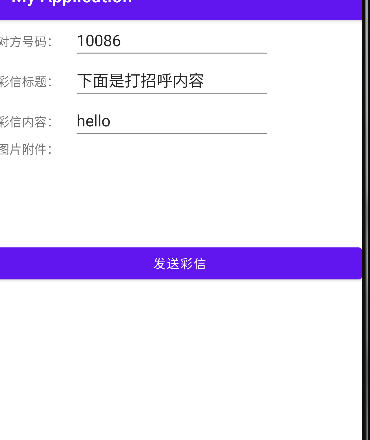
点击事件的呈现:

Android笔记-跳转到相册选择图片的更多相关文章
- 浅谈Android中拍照、从相册选择图片并截图相关知识点
前言 我们在Android开发中经常会需要使用相机或者从相册中选取图片的情况,今天就把这里面相关的知识点总结下,方便以后开发的时候使用. 1.相机拍照并可自定义截图功能 我们先来看如何使用Intent ...
- [Android实例教程] 教你如何拍照+相册选择图片+剪裁图片完整实现
[Android实例教程] 教你如何拍照+相册选择图片+剪裁图片完整实现 今天做Android项目的时候要用到图片选择,要实现拍照获取图片和从相册获取图片,并且要求在获取完之后可以裁剪,试了很多方法之 ...
- HTML5 Plus 拍照或者相册选择图片上传
HBuilder+HTML5 Plus+MUI实现拍照或者相册选择图片上传,利用HTML5 Plus的Camera.Gallery.IO.Storage和Uploader来实现手机APP拍照或者从相册 ...
- IOS研究院之打开照相机与本地相册选择图片(六)
原创文章如需转载请注明:转载自雨松MOMO程序研究院本文链接地址:IOS研究院之打开照相机与本地相册选择图片(六) Hello 大家好 IOS的文章好久都木有更新了,今天更新一篇哈. 这篇文章主要学习 ...
- 微信小程序:从本地相册选择图片或使用相机拍照。
wx.chooseImage(OBJECT) 从本地相册选择图片或使用相机拍照. OBJECT参数说明: 示例代码: wx.chooseImage({ count: 1, // 默认9 sizeTyp ...
- Ionic3学习笔记(十二)拍照上传图片以及从相册选择图片上传
本文为原创文章,转载请标明出处 目录 安装插件 导入 app.module.ts 创建 provider 更多 效果图 1. 安装插件 终端运行: ionic cordova plugin add c ...
- 【ARK UI】HarmonyOS 从相册选择图片并显示到Image组件上
参考资料 [Harmony OS][ARK UI]ETS 上下文基本操作 [Harmony OS][ARK UI]ets使用startAbility或startAbilityForResult方式 ...
- android开发——从相冊中选择图片不裁剪
转载请注明出处:http://blog.csdn.net/zhoubin1992/article/details/46864777 问题: 在郭神的第一行代码中,第8章的从相冊中选择图片这块,从相冊选 ...
- ng-cordova 手机拍照或从相册选择图片
1.需求描述 实现一个调用摄像头拍照,或者直接打开本地图库选择照片,然后替换App中图片的功能 2.准备 1) 安装ng-cordova 进入到ionic工程目录,使用bower工具安装, bower ...
- IOS研究院之打开照相机与本地相册选择图片
如下图所示 在本地相册中选择一张图片后,我们将他拷贝至沙盒当中,在客户端中将它的缩略图放在按钮旁边,这个结构其实和新浪微薄中选择图片后的效果一样.最终点击发送将按钮将图片2进制图片上传服务器. 下面我 ...
随机推荐
- 苹果电脑快捷键使用 Mac快捷键大全详细介绍
相信有很多刚开始使用苹果电脑操作系统的用户,都并不了解整个MAC操作系统,就连一般快捷键的使用都不清楚,这让人很感觉很苦恼.分享一下Mac快捷键大全的详细介绍,记住这些常用的快捷键,是你熟悉苹果电脑的 ...
- K8S kubectl命令
一.kubectl命令 1. 格式:kubectl [command] [type] [name] [flag] command:资源执行的操作,如create.get.delete: type:指定 ...
- 关于npm和yarn的坑
遇到下载出错的情况,这两个两个双管齐下
- layui弹出层layer点击关闭还会显示在html中
我的弹出层是这样定义的: 它的属性为display:none <div id="divlayer" style="display:none"> &l ...
- Http方式发送Soap报文调用WebService
WebService的实现方式之一就是基于HTTP发送SOAP报文进行调用. 可能由于各种原因,我们不能使用CXF.AXIS等框架调用,此时的解决方案之一就是直接基于HTTP发送SOAP报文,然后将响 ...
- eclipse 提示错误The method of type must override a superclass method 的解决办法
java1.5中继承接口是不需要@Override的,而在1.6以上版本中是需要添加@Override注解的,如果项目的编译器是1.5版本的就可能报错The method *** of type mu ...
- ie8 不支持 trim方法
那就自己写一个trim() String.prototype.trim = function() { return this.replace(/(^\s*)|(\s* ...
- 前端vue框架上手记录
---恢复内容开始--- Vue CLI 是一个基于 Vue.js 进行快速开发的完整系统,提供: 通过 @vue/cli 搭建交互式的项目脚手架. 通过 @vue/cli + @vue/cli-se ...
- linux 学习shell
1. bash的父进程,子进程 [root@A~]# my_var=123[root@A~]# echo $my_var123[root@A~]# bash[root@A~]# [root@A~]# ...
- mysql之数据库操作-第一篇
1.数据库的创建 mysql> create database if not exists myTestDB; Query OK, 1 row affected (0.00 sec) 2.查看可 ...