
Security Context
概述
Security Context(安全上下文)用来限制容器对宿主节点的可访问范围,以避免容器非法操作宿主节点的系统级别的内容,使得节点的系统或者节点上其他容器组受到影响。
Security Context可以按照如下几种方式设定:
- 访问权限控制:是否可以访问某个对象(例如文件)是基于 userID(UID)和 groupID(GID)的
- Security Enhanced Linux (SELinux):为对象分配Security标签
- 以 privileged(特权)模式运行
- Linux Capabilities:为容器组(或容器)分配一部分特权,而不是 root 用户的所有特权
- AppArmor:自 Kubernetes v1.4 以来,一直处于 beta 状态
- Seccomp:过滤容器中进程的系统调用(system call)
- AllowPrivilegeEscalation(允许特权扩大):此项配置是一个布尔值,定义了一个进程是否可以比其父进程获得更多的特权,直接效果是,容器的进程上是否被设置 no_new_privs标记。当出现如下情况时,AllowPrivilegeEscalation 的值始终为 true:
- 容器以 privileged 模式运行
- 容器拥有 CAP_SYS_ADMIN 的 Linux Capability
为Pod设置Security Context
在 Pod 的定义中增加 securityContext 字段,即可为 Pod 指定 Security 相关的设定。 securityContext 字段是一个 PodSecurityContext 对象。通过该字段指定的内容将对该 Pod 中所有的容器生效
Pod示例
apiVersion: v1

kind: Pod

metadata:

  name: security-context-demo

spec:

  securityContext:

    runAsUser: 1000

    runAsGroup: 3000

    fsGroup: 2000

  volumes:

  - name: sec-ctx-vol

    emptyDir: {}

  containers:

  - name: sec-ctx-demo

    image: busybox

    command: [ "sh", "-c", "sleep 1h" ]

    volumeMounts:

    - name: sec-ctx-vol

      mountPath: /data/demo

    securityContext:

      allowPrivilegeEscalation: false
- spec.securityContext.runAsUser 字段指定了该 Pod 中所有容器的进程都以UserID 1000 的身份运行,spec.securityContext.runAsGroup 字段指定了该 Pod 中所有容器的进程都以GroupID 3000 的身份运行
- 如果该字段被省略,容器进程的GroupID为 root(0)
- 容器中创建的文件,其所有者为 userID 1000,groupID 3000
- spec.securityContext.fsGroup 字段指定了该 Pod 的 fsGroup 为 2000
- 数据卷 (本例中,对应挂载点 /data/demo 的数据卷为 sec-ctx-demo) 的所有者以及在该数据卷下创建的任何文件,其 GroupID 为 2000
为容器设置Security Context
容器的定义中包含 securityContext 字段,该字段接受 SecurityContext对象。通过指定该字段,可以为容器设定安全相关的配置,当该字段的配置与 Pod 级别的 securityContext 配置相冲突时,容器级别的配置将覆盖 Pod 级别的配置。容器级别的 securityContext 不影响 Pod 中的数据卷。
下面的示例中的 Pod 包含一个 Container,且 Pod 和 Container 都有定义 securityContext 字段:
apiVersion: v1

kind: Pod

metadata:

  name: security-context-demo-2

spec:

  securityContext:

    runAsUser: 1000

  containers:

  - name: sec-ctx-demo-2

    image: busybox

    command: [ "sh", "-c", "sleep 1h" ]

    securityContext:

      runAsUser: 2000

      allowPrivilegeEscalation: false
请注意,容器的进程以 userID 2000 的身份运行。该取值由 spec.containers[*].securityContext.runAsUser 容器组中的字段定义。Pod 中定义的 spec.securityContext.runAsUser 取值 1000 被覆盖。
为容器设置Linux Capabilities
使用 Linux Capabilities 可以为容器内的进程授予某些特定的权限(而不是 root 用户的所有权限)。在容器定义的 securityContext 中添加 capabilities 字段,可以向容器添加或删除 Linux Capability。
先运行一个不包含 capabilities 字段的容器,观察容器内进程的 linux capabilities 位图的情况;然后在运行一个包含 capabilities 字段的容器,比较其 linux capabilities 位图与前者的不同。
无capabilities字段时
先确认在没有 capabilities 字段时,容器的行为是怎样的。下面的例子中包含一个容器,我们没有为其添加或删除任何 Linux capability。
apiVersion: v1

kind: Pod

metadata:

  name: security-context-demo-3

spec:

  containers:

  - name: sec-ctx-demo-3

    image: busybox

    command: [ "sh", "-c", "sleep 1h" ]
在容器的命令行界面中查看 process 1 的状态
# cat /proc/1/status

CapPrm: 00000000a80425fb

CapEff: 00000000a80425fb
有capabilities字段时
运行同样的一个容器,不同的是,这次为其设置了 capabilities 字段。下面是 yaml 配置文件,该配置中为进程添加了两个 Linux Capability: CAP_NET_ADMIN 和 CAP_SYS_TIME:
apiVersion: v1

kind: Pod

metadata:

  name: security-context-demo-4

spec:

  containers:

  - name: sec-ctx-demo-4

    image: busybox

    command: [ "sh", "-c", "sleep 1h" ]

    securityContext:

      capabilities:

        add: ["NET_ADMIN", "SYS_TIME"]
在容器的命令行界面中查看 process 1 的状态
# cat /proc/1/status

CapPrm: 00000000aa0435fb

CapEff: 00000000aa0435fb
比较两次运行,进程的 Linux Capabilities 位图的差异:
第一次运行:00000000a80425fb

第二次运行:00000000aa0435fb
第一次运行时,位图的 12 位和 25 为是 0。第二次运行时,12 位和 25 位是 1.查看 Linux Capabilities 的常量定义文件 capability.h 可知:12 位代表 CAP_NET_ADMIN,25 位代表 CAP_SYS_TIME。
LinuxCapability常量
Linux Capabilities 常量格式为 CAP_XXX。然而,在容器定义中添加或删除 Linux Capabilities 时,必须去除常量的前缀 CAP_。例如:向容器中添加 CAP_SYS_TIME 时,只需要填写 SYS_TIME。
为容器设置SELinux标签
Pod 或容器定义的 securityContext 中 seLinuxOptions 字段是一个 SELinuxOptions 对象,该字段可用于为容器指定 SELinux 标签。
securityContext:

  seLinuxOptions:

    level: "s0:c123,c456"
为容器指定 SELinux 标签时,宿主节点的 SELinux 模块必须加载。
Kuboard中Pod的Security Context
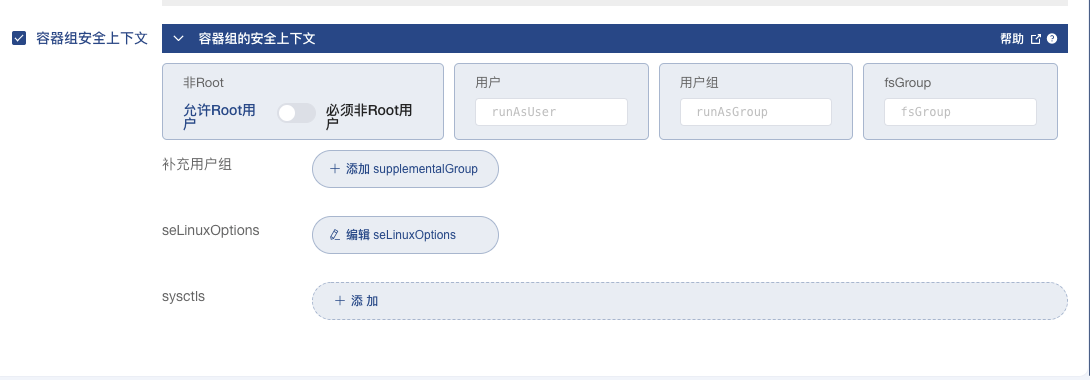
通过 Kuboard,可以直接设定 Deployment、StatefulSet、DaemonSet 等中 Pod 模板的 securityContext 的内容。在 Kuboard 工作负载编辑器界面中切换到 高级设置 标签页,并勾选 容器组安全上下文 ,可查看到 Pod 的 Security Context 设置界面,如下图所示:
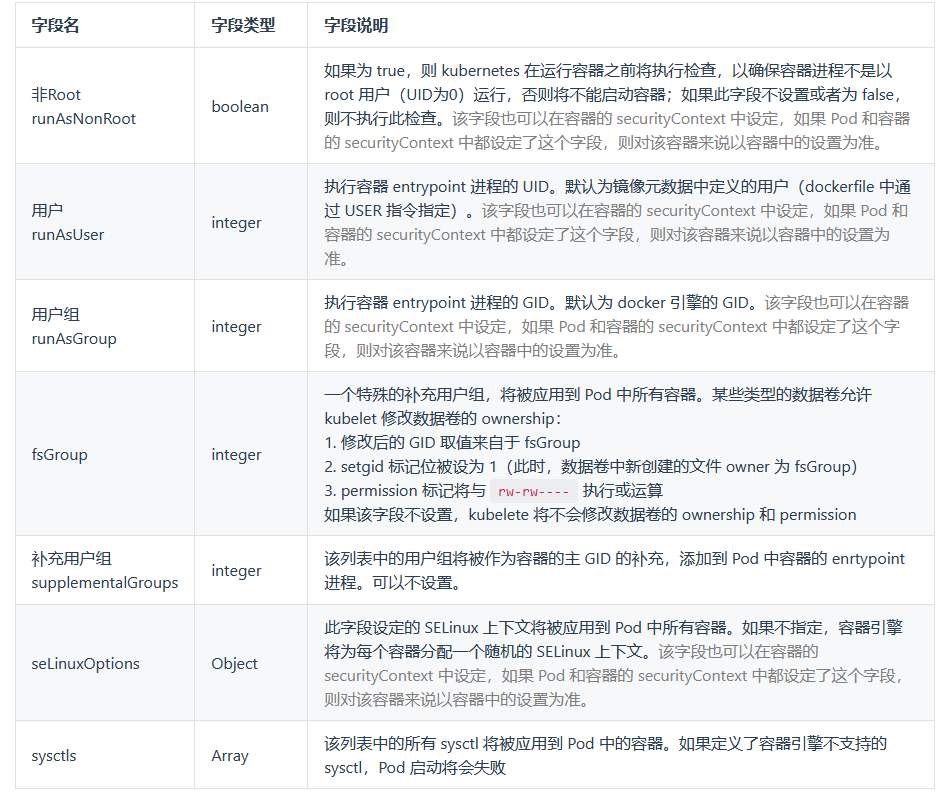
各个字段的含义逐个解释如下:
Kuboard中容器的Security Context
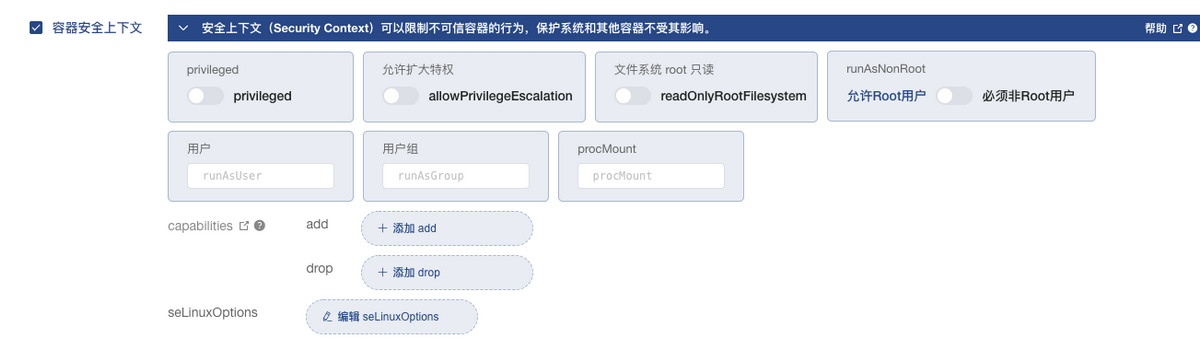
在 Kuboard 工作负载编辑器界面中切换到 容器信息 标签页,并勾选 容器安全上下文 ,可查看到容器的 Security Context 设置界面,如下图所示:
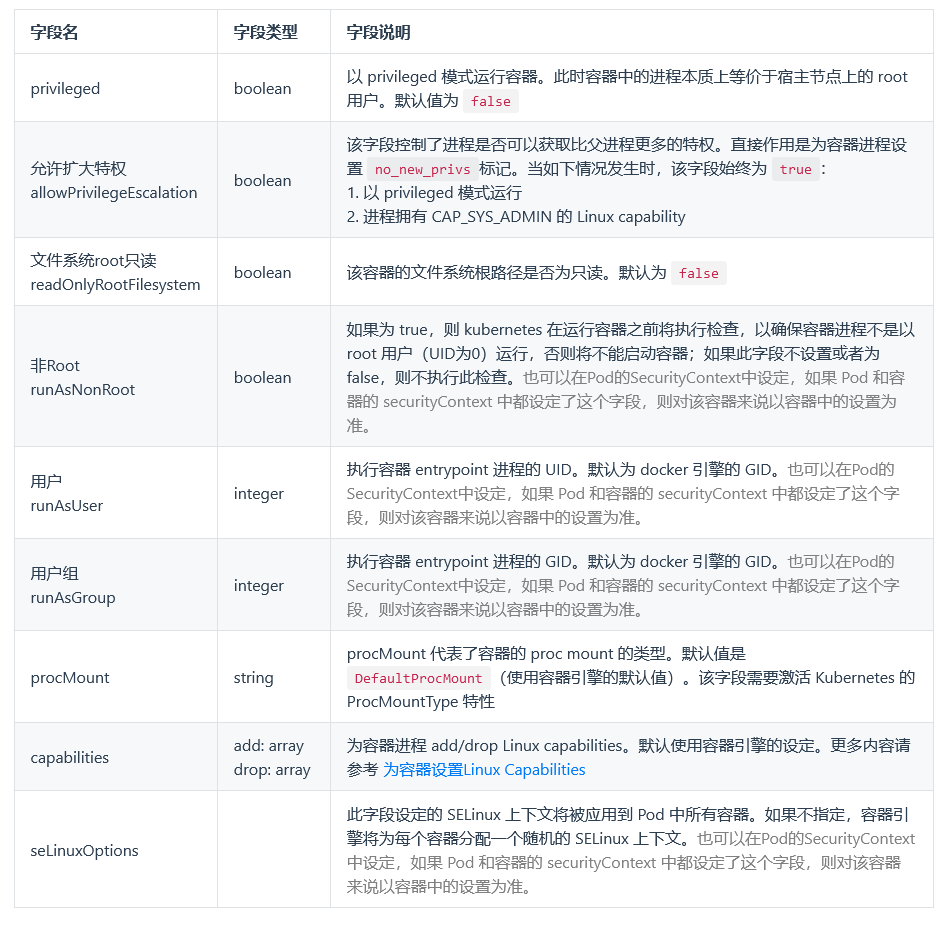
各个字段的含义逐个解释如下:
Security Context的更多相关文章
- The server principal "sa" is not able to access the database "xxxx" under the current security context
在SQL Server服务器上一个作业执行时,遇到下面错误信息: Message: Executed as user: dbo. The server principal "sa" ...
- SQL Agent Job 报“Access to the remote server is denied because the current security context is not trusted”
SQL Server 2005(Microsoft SQL Server 2005 - 9.00.5000.00)下的一个作业执行一个存储过程,存储过程中动态SQL语句使用链接服务器(Linked S ...
- Page Security
参见开发文档 Overview This document describes how to build applications that grant selected access to indi ...
- openstack context
之前一直不知道context模块中存储的是什么东西,这回看一下代码: 其中最主要的类是:RequestContext: class RequestContext(object): "&q ...
- Unable to get valid context for root
登陆时报以下错误Unable to get valid context for rootLast login: Wed Jul 24 02:06:01 2013 from 10.64.41.3 单机模 ...
- Spring源码解析之:Spring Security启动细节和工作模式--转载
原文地址:http://blog.csdn.net/bluishglc/article/details/12709557 Spring-Security的启动加载细节 Spring-Securit ...
- 【Spring】关于Boot应用中集成Spring Security你必须了解的那些事
Spring Security Spring Security是Spring社区的一个顶级项目,也是Spring Boot官方推荐使用的Security框架.除了常规的Authentication和A ...
- WebLogic: The Definitive Guide examined WebLogic's security mechanisms--reference
reference from: http://www.onjava.com/pub/a/onjava/excerpt/weblogic_chap17/index1.html?page=1 ...... ...
- 网络负载均衡环境下wsHttpBinding+Message Security+Windows Authentication的常见异常
提高Windows Communication Foundation (WCF) 应用程序负载能力的方法之一就是通过把它们部署到负载均衡的服务器场中. 其中可以使用标准的负载均衡技术, Windows ...
随机推荐
- javaWeb,web服务器
一. 1.ASP 国内最早最流行的语言就是ASP:微软研发 在HTML中嵌套了VB脚本,ASP+COM(网页元素) 在ASP开发中,基本一个业务就有几千行代码,页面机器混乱 维护成本高 <h1& ...
- 2.Android高仿网易云音乐-引导界面和广告界面实现
效果图 效果图依次为图片广告,视频广告,引导界面. 系列文章目录导航 目录 1.实现分析 广告界面就是显示图片和视频,所以可以放一个图片控件,视频控件,然后跳过按钮,提示按钮,WiFi预加载提示都是放 ...
- ExceptionLess的安装、配置、使用
前言 Exceptionless 是一个开源的实时的日志收集框架,它可以应用在基于 ASP.NET,ASP.NET Core,Web API,Web Forms,WPF,Console,ASP.NET ...
- GitLab:Your account has been blocked.
使用git pull 出现"GitLab:Your account has been blocked."错误 背景 多人使用服务器同一用户,在~/.ssh 目录下的公私钥是之前一个 ...
- javascript的原型链那些事
如果你对javascript的原型链还有任何疑问,请看这篇文章 进入主题 前言 原型链的规则不百分百适用于所有情况 显式原型:prototype,是一个对象{} 隐式原型:__proto__,是一个对 ...
- iframe 标签
iframe是一个内联框架,可以在当前HTML页面中嵌入另一个文档,一般情况下使用iframe直接在页面嵌套iframe标签再指定src就可以了. iframe 的常用属性: name : 规定 &l ...
- YII模块化处理
config.php $config = [ 'modules' => [ 'comment' => [ 'class' => 'frontend\modules\comment\C ...
- Less混合结合:nth-child()选择器的高级玩法
1.先看效果图 上图中比较麻烦的是每块的底色处理,下面看怎么处理 2.:nth-child(n) 选择器 匹配属于其父元素的第 N 个子元素,不论元素的类型. n 可以是数字.关键词或公式. 数字:最 ...
- AOP实现切入
6.AOP实现切入 AOP为Aspect Oriented Programming的缩写,意为:面向切面编程 通过预编译方式和运行期间动态代理实现程序功能的统一维护的一种技术 AOP是OOP的延续,也 ...
- 蔚来杯2022牛客暑期多校训练营7 CFGJ
比赛链接 C 题解 方法一 知识点:思维. 先统计没有出现的数,每个都可以随便放,所以作为补位用的. 将原数组左移一位作为预定的答案数组,然后开始检查.如果和原数组一样,则用补位数字填充,如果不一样就 ...